User Manual for BrickHouse Security Spark Nano International GPS Tracker Click to enlarge the picture
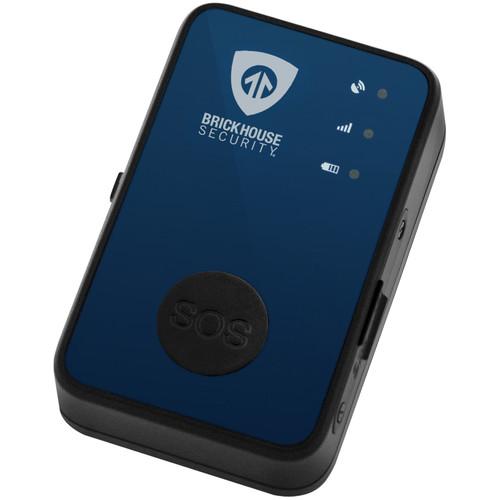 Contents of the user manual for the BrickHouse Security Spark Nano International GPS
- Product category: GPS Tracking BrickHouse Security
- Brand: BrickHouse Security
- Description and content of package
- Technical information and basic settings
- Frequently asked questions – FAQ
- Troubleshooting (does not switch on, does not respond, error message, what do I do if...)
- Authorized service for BrickHouse Security GPS Tracking
|
User manual for the BrickHouse Security Spark Nano International GPS contain basic instructions
that need to be followed during installation and operation.
Before starting your appliance, the user manual should be read through carefully.
Follow all the safety instructions and warnings, and be guided by the given recommendations.
User manual is an integral part of any BrickHouse Security product,
and if it is sold or transferred, they should be handed over jointly with the product.
Following the instructions for use is an essential prerequisite for protecting
health and property during use, as well as recognition of liability on the part of the manufacturer
for possible defects should you make a warranty claim. Download an official BrickHouse Security user manual in which you will find instructions on how to install, use, maintain and service your product.
And do not forget – unsuitable use of a BrickHouse Security product will considerably shorten its lifespan!
|
Product description The compact Spark Nano International GPS Tracker from BrickHouse Security delivers real-time location viewing from your computer or smartphone without the need to download apps. It operates using a cellular GSM/GPRS network, enabling it to function almost anywhere in the world with no additional roaming fees. Brickhouse Security's online tracking platform enables you to view detailed reports of all the GPS tracker's travel history. Additionally, this device is able to alert you via text or email for events such as speeding or if the tracker has left a designated geofence.
The GPS tracker has a rechargeable Li-ion polymer battery that can last up to three weeks when the tracker is in motion for an hour per day. The tracker is housed in an IPX5-rated weather-resistant case. A SIM card and wall charger are included with the GPS tracker.
This device requires a monthly service plan to operate. Please visit the manufacturer's website for pricing. - Suitable for international travelers, and for tracking vehicles, assets, children, teens, and the elderly
- Compact design allows for easy transport
- Motion-activated tracking enables the rechargeable battery to last up to three weeks with one hour of daily use
- Real-time location viewing through a computer or a smartphone
- No roaming fees, free activation, and no contract
- IPX5-rated weather-resistant housing
- Includes SIM card and wall charger
- Supported Countries
- Albania, Anguilla, Antigua and Barbuda, Argentina, Armenia, Aruba, Austria (limited coverage), Azerbaijan, Bangladesh, Barbados, Belgium, Belize, Benin, Bermuda (limited coverage), Bolivia, Brazil, British Virgin Islands, Brunei (limited coverage), Bulgaria, Burkina Faso, Canada, Cape Verde, Cayman Islands, Chad, Chile, China, Columbia, Republic of the Congo, Democratic Republic of the Congo, Croatia (limited coverage), Cyprus, Czech Republic, Denmark, Dominica, Dominican Republic, Easter Island, Ecuador, Egypt, El Salvador, Estonia, Faroe Islands, Fiji, Finland, France, Gabon, Georgia, Ghana, Germany, Gibraltar, Greece, Greenland, Guadeloupe, Grenada, Guatemala, Guernsey, Guinea, Guyana, Haiti, Honduras, Hong Kong (limited coverage), Hungary, Iceland, India, Indonesia, Islamic Republic of Iran, Ireland, Isle of Man, Israel, Italy, Jamaica, Kazakhstan, Kenya, Kuwait, Kyrgyzstan, Lao PDR, Latvia, Libya, Liechtenstein, Lithuania, Luxembourg, Macedonia, Malaysia (limited coverage), Mali, Malta, Mexico, Monaco, Morocco, Mozambique, Myanmar, Namibia, Nepal, Netherlands, Netherlands Antilles, New Zealand (limited coverage), Nicaragua, Nigeria, Norway, Oman, Pakistan, Panama, Papua New Guinea, Paraguay, Peru, Philippines, Poland, Portugal, Puerto Rico, Qatar, Romania, Russian Federation, Rwanda, R
|
Upload User Manual
Have you got an user manual for the BrickHouse Security Spark Nano International GPS Tracker in electronic form? Please send it to us and help us expand our library of instruction manuals.
Thank you, too, on behalf of other users.
To upload the product manual, we first need to check and make sure you are not a robot. After that, your "Submit Link" or "Upload File" will appear.
Technical parametersBrickHouse Security Spark Nano Specs | Cellular Network Supported | GSM/GPRS | | GSM/GPRS Module | GSM Phase 2/2+ Compliant | | Bands | Quad-Band: 850/900/1800/1900 MHz | | GPS Accuracy | Within 10' / 3.05 m | | GPS Sensitivity | 50 Channels | | GPS Module | u-blox 6 All-in-One GPS Receiver | | Cold Start GPS Acquisition Time | 29 Seconds | | Hot Start GPS Acquisition Time | 1 Second | | Connector | 1 x Mini-USB | | Battery | 1300 mAh, 3.7 V Li-Ion Polymer Backup Battery | | IP Rating | IPX5 | | Operating Temperature | -40 to 185°F / -40 to 85°C | | Dimensions (H x W x D) | 2.66 x 1.57 x 0.83" / 67.5 x 40 x 21 mm | | Weight | 2.03 oz / 60 g | | | | Package Weight | 0.52 lb | | Box Dimensions (LxWxH) | 4.4 x 3.9 x 2.4" |
Rating70% users recommend this product to others. And what about you?

This product has already been rated by 18 owners. Add your rating and experience with the product.
Discussion
 Ask our technicians if you have a problem with your settings,
or if anything is unclear in the user manual you have downloaded.
You can make use of our moderated discussion.
The discussion is public and helps other users of our website who may be encountering similar problems.
Ask our technicians if you have a problem with your settings,
or if anything is unclear in the user manual you have downloaded.
You can make use of our moderated discussion.
The discussion is public and helps other users of our website who may be encountering similar problems.
The discussion is empty - enter the first post
Post a new topic / query / comment:
|
|


