|
User Manual for Buffalo TeraStation 4TB TS5210DN 2-Bay NAS Server Click to enlarge the picture
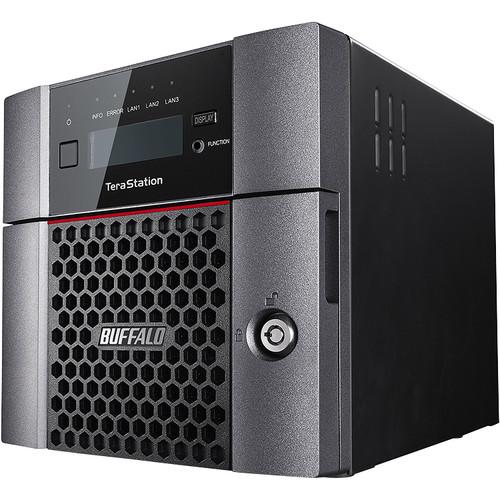 Contents of the user manual for the Buffalo TeraStation 4TB TS5210DN 2-Bay NAS
- Product category: Network Attached Storage Drives Buffalo
- Brand: Buffalo
- Description and content of package
- Technical information and basic settings
- Frequently asked questions – FAQ
- Troubleshooting (does not switch on, does not respond, error message, what do I do if...)
- Authorized service for Buffalo Network Attached Storage Drives
 |
User manual for the Buffalo TeraStation 4TB TS5210DN 2-Bay NAS contain basic instructions
that need to be followed during installation and operation.
Before starting your appliance, the user manual should be read through carefully.
Follow all the safety instructions and warnings, and be guided by the given recommendations.
User manual is an integral part of any Buffalo product,
and if it is sold or transferred, they should be handed over jointly with the product.
Following the instructions for use is an essential prerequisite for protecting
health and property during use, as well as recognition of liability on the part of the manufacturer
for possible defects should you make a warranty claim. Download an official Buffalo user manual in which you will find instructions on how to install, use, maintain and service your product.
And do not forget – unsuitable use of a Buffalo product will considerably shorten its lifespan!
|
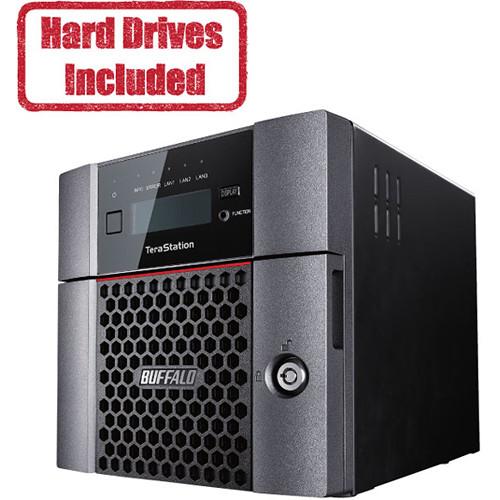
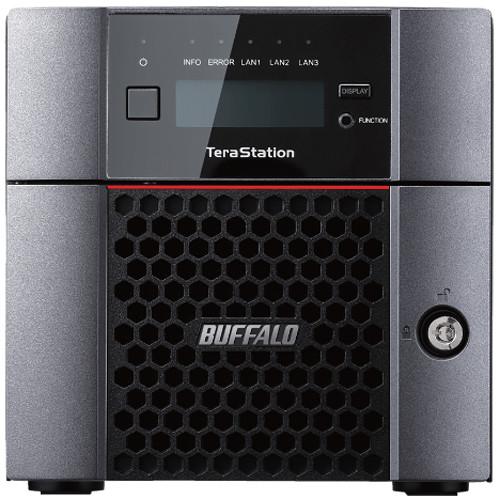
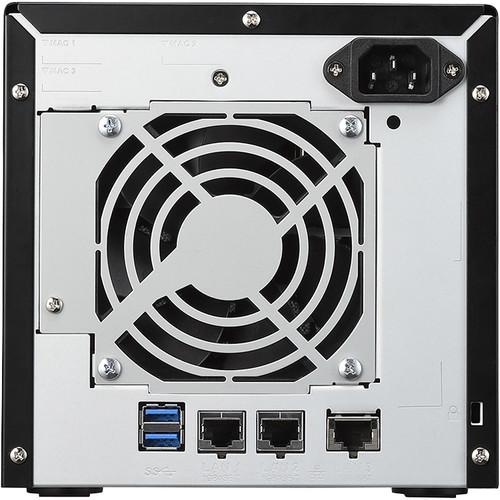
Product description Designed as business-class scalable storage solution for those who need to add virtualized storage to their network, the TeraStation 4TB TS5210DN 2-Bay NAS Server from Buffalo connects to your router or switch to provide a storage pool of 4TB for connected systems. The TeraStation TS5210DN comes equipped with two drive bays, each of which is populated with a 2TB SATA III 3.5" NAS hard drive, and you can configure the drives in a RAID 0 or 1 array to increase the delivery of data or help preserve data in the event one drive fails. If you want the drives to operate independently, the NAS also supports JBOD. To quickly provide data, there is one 10GbE and two Gigabit Ethernet ports. Other notable features include a 1.7 GHz Alpine AL314 Quad-Core processor, 4GB of DDR3 ECC memory to manage your files, videos, photos, and other digital content, AES 256-bit encryption for security, and VMware certification for iSCSI and NFS. Moreover, the Buffalo TeraStation TS5210DN has two USB 3.0 Type-A ports for accessing external drives. Included is an Ethernet cable, an AC power cable, and a front panel key. General Features - Entry Point to 10GbE Networking
- Without making a large investment in hardware or needing additional IT support to set up and run a new platform, SMB customers can benefit from the speed of 10GbE networking. Buffalo designed the TeraStation 5210DN to include one native 10GbE port, enabling enterprise-level speeds for SMBs.
- 10GbE - Not Just for Enterprise Environments
- All businesses are impacted by growing data requirements. 10GbE effectively positions businesses to meet the challenge by eliminating traditional 1GbE data transfer bottlenecks. Other 10GbE networking advantages to consider include the consolidation of network hardware devices and the reduction of physical space needed by legacy equipment, the increase in energy efficiency and lower utility costs, and increased scalability due to more headroom for larger applications and more bandwidth per user.
- Automated Data Backup
- Many businesses and industries, such as accounting, architecture, and other organizations that have offices in different locations, can set automated backup schedules for their data to back up at offsite locations. This is useful for sharing and securing data from one location to another.
- Advanced NTFS Permissions (Windows ACL)
- File permissions can now be controlled at the subfolder file level from Windows Explorer, making it possible to create new shares with unique permissions at a moment's notice from active directory. Permissions can be assigned to all levels of the shared directory structure, they can be managed from a domain account, and existing permission structures can be copied and pasted.
- Duplex Firmware
- Duplex Firmware is an advanced recovery feature that makes the TeraStation more secure from data corruption and data loss. Duplex Firmware creates more stabilized network storage performance and results in less system downtime without having to wait for an engineer to recover data.
Quickly restore the OS with the assistance of the Duplex Firmware feature without compromising data. Now with Duplex Firmware, if you experience minor OS system issues, the TeraStation will then either begin the recovery process itself or allow for a recovery without affecting user data. - Active Directory User Limits
- The TeraStation now supports up to 10,000 individual users.
- RAID Mode Manager
- Improvements to the RAID Mode Manager allow partially populated systems to receive two or more additional hard drives simultaneously.
- Rsync Integration
- TeraStation devices can now backup and replicate data to other non-Buffalo Rsync enabled devices. They can be added to existing Rsync environments, providing greater integration opportunities.
- Rapid RAID Mode Change
- Rapid RAID Mode Change allows for improved RAID rebuild times. In the event of a drive failure, this feature allows recovery as quickly as possible.
- Protect Your Data
- Data security is essential. The TeraStation offers both electronic and physical security options. Additional data security features include a front panel lock to help prevent theft, AES 256-bit drive encryption that includes drive recognition technology that helps ensure drives cannot be accessed from systems other than your TeraStation, encrypted data replication, and a Kensington Security Slot, allowing your TeraStation to be physically tethered to a fixed location.
- Integrated 3rd Party Cloud Backup
- The TeraStation makes 3rd party cloud backup simple with integrated support for cloud providers including Amazon S3, Dropbox, or Dropbox Business. This provides a way to back up your critical data to an offsite backup tool. Offsite backup adds an extra layer of protection against data loss due to environmental disasters or equipment problems at your primary location.
- Data Replication = Private Cloud
- Many businesses/industries such as hospitals and legal firms have legal requirements preventing them from backing up data to public cloud services. Additionally, businesses may want to create a private cloud for greater security or simply because the solution provides a finite cost instead of recurring monthly public cloud backup fees.
The TeraStation includes data replication capabilities allowing users to create a private cloud backup scenario when connected to another TeraStation. Businesses can enable bi-directional replication so data from each TeraStation is stored offsite. More advanced scenarios could include replicating data in a round-robin type fashion or having a single TeraStation replicate key data to multiple branch office TeraStations simultaneously. Alternatively, each branch office TeraStation could replicate back to a single TeraStation at the businesses primary facility. - iSCSI Backup
- The TeraStation can serve as an iSCSI target for businesses needing additional network storage. When used as an iSCSI target for virtualized systems, the TeraStation allows businesses to achieve an affordable cost per terabyte of network storage with strong throughput speeds via native 10GbE connectivity. Businesses will achieve increased return-on-investment on existing server infrastructure by migrating older data to the TeraStation, creating valuable space on the server for more important tasks.
- IEEE802.3bz - Flexibility for Present and Future Needs
- Small businesses are positioned to maximize current network infrastructure while preparing them for later transition to 10GbE. The primary advantage of the 802.3bz standard is the flexibility to support 2.5, 5 and 10GBASE-T networks through the same switch. Most small businesses have existing network infrastructure that will not support 10GbE requirements. BS-MP20 allows these businesses to achieve faster through put at 2.5 and 5GbE with basic Cat 5e cabling. By using the intermediate speeds supported in BS-MP20, businesses can take advantage of increased bandwidth over existing 1GbE infrastructure while planning future network improvements.
- Virus Protection
- Add virus protection to your TeraStation with the optional Trend Micro Anti-Virus. Once licensed and installed, Buffalo's Trend Micro virus protection for TeraStation will monitor whether files stored or updated are infected with viruses. If an infected file is detected, it will be automatically quarantined in a dedicated folder to prevent virus infection and allow you to share documents.
- Burn-In Tested Hard Drives
- Buffalo uses burn-in tested hard drives that are held to higher standards than traditional hard drives.
- Spare Drive Quality Control
- Buffalo puts their replacement drives through a zero-write process before they are offered on the market.
- Remote Monitoring
- Monitoring the health of your Buffalo NAS devices in your local or remote offices will help you identify potential issues before they develop into problems leading to downtime. The TeraStation plays well with network monitoring products in the market such as Kaseya, PRTG, SolarWinds Orion NPM, and Zabbix to provide the monitoring you need.
In the Box Buffalo TeraStation 4TB TS5210DN 2-Bay NAS Server (2 x 2TB) Ethernet Cable AC Power Cable Front Panel Key Limited 3-Year Warranty More from Manufacturer xfbfwzutdtezxe Table of Contents
|
Upload User Manual
Have you got an user manual for the Buffalo TeraStation 4TB TS5210DN 2-Bay NAS Server in electronic form? Please send it to us and help us expand our library of instruction manuals.
Thank you, too, on behalf of other users.
To upload the product manual, we first need to check and make sure you are not a robot. After that, your "Submit Link" or "Upload File" will appear.
Technical parametersBuffalo 5210DN Specs | | | CPU | 1.7 GHz Alpine AL314 Quad-Core | | Total Installed Memory | 4 GB ECC DDR3 | | | | Total Raw Capacity | 4 TB | | Included Drives | 2 x 2 TB 3.5" HDD | | | | Connections | 2 x USB Type-A (USB 3.1 Gen 1 (5 Gb/s))
1 x RJ45 (10GbE)
2 x RJ45 (Gigabit Ethernet) | | Compatible Drive Interface | SATA III | | Form Factor | Desktop | | RAID Modes | RAID 0, 1, JBOD | | | | Supported Protocols | AFP
CIFS/SMB
FTP
NFS
SFTP
SNMP | | Ethernet Standards | IEEE 802.3, IEEE 802.3ab, IEEE 802.3an, IEEE 802.3bz, IEEE 802.3u | | | | AC Input Power | 100 to 240 VAC, 50 / 60 Hz | | Power Consumption | 85 W (Maximum)
32 W (Idle) | | | | Operating Temperature | 32 to 104°F / 0 to 40°C | | Operating Humidity | 10 to 85% | | | | Dimensions | 9.1 x 6.7 x 6.7" / 23.0 x 17.0 x 17.0 cm | | Weight | 10.6 lb / 4.8 kg | | | | Package Weight | 13.5 lb | | Box Dimensions (LxWxH) | 14.4 x 13.2 x 12.5" |
Rating90% users recommend this product to others. And what about you?

This product has already been rated by 83 owners. Add your rating and experience with the product.
Discussion
 Ask our technicians if you have a problem with your settings,
or if anything is unclear in the user manual you have downloaded.
You can make use of our moderated discussion.
The discussion is public and helps other users of our website who may be encountering similar problems.
Ask our technicians if you have a problem with your settings,
or if anything is unclear in the user manual you have downloaded.
You can make use of our moderated discussion.
The discussion is public and helps other users of our website who may be encountering similar problems.
The discussion is empty - enter the first post
Post a new topic / query / comment:
|
|
|
| Request for user manual |
You can’t find the operation manual you are looking for? Let us know and we will try to add the missing manual:
I’m looking for a manual / Request for manual
Current requests for instruction manuals:
Call Of Duty World War Two For Xbox...
controller stratus XL...
stratus XL...
smart whatch serie S11 42mm...
Allen & Heath SQ-6 manual...
|
| Discussion |
Latest contributions to the discussion:
AEW R 4100
Name: MAURICIO ANGARITA
Audio-Technica AEW-R4100 UHF Diversity Receiver for
AEW R 4100 has the mute function blocked and does not allow audio to pass. I tried several times to turn off the mute from the transmitter but it does nothing, the mute stays on. Solution?
Thank you...
Instructions for assembling the 2015 Forecast Image Master Consoles GC3-A
Name: mike elam
Forecast Consoles GC3-A ImageMaster Editing Console
Looking for instructions for assembling this console. ...
EMPTY TONER ERROR MESSAGE AFTER REPLACING TONER
Name: LINDA BAD YELLOW EYES
Brother TN223BK Standard-Yield Toner
I HAD TO CHANGE OUT ALL THREE TONERS DUE TO LEAKS IN THE YELLOW AND CYAN. AFTER I REPLACED THEM, THE MACHINE KEEPS GIVING ME AN EMPTY TONER ERROR MESSAGE. HELP!!...
PS480D 20/24 pin Switching 480W Power Supply
Name: swkargo
Logisys 480W Power Supply
This item states in can run -5vdc .It is NOT listed on the board or I beleive is r4 is missing the resitior. Any body have thid issue. Shawn
...
Help needed
Name: Ann Carter
SanDisk 1TB Extreme Portable USB 3.1
When I click the link to download the user manual for my Sandisk Extreme external hard drive, it gives me the manual for the LG Cricket. Can you please change the link so I can download the Sandisk manual and begin using this drive? Thank you....
|
|


