|
User Manual for Canon DP-V2420 24" UHD 4K Reference Display Click to enlarge the picture
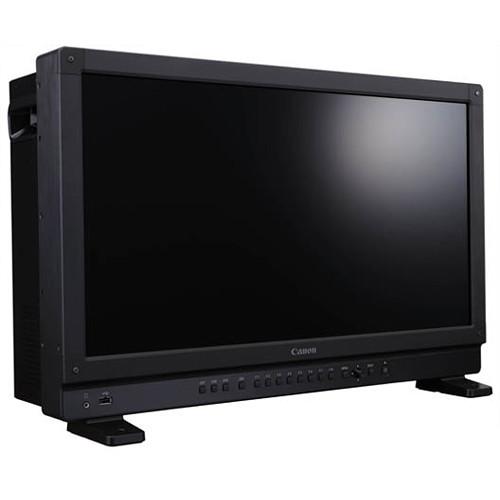 Contents of the user manual for the Canon DP-V2420 24" UHD 4K Reference
- Product category: Production Monitors Canon
- Brand: Canon
- Description and content of package
- Technical information and basic settings
- Frequently asked questions – FAQ
- Troubleshooting (does not switch on, does not respond, error message, what do I do if...)
- Authorized service for Canon Production Monitors
 |
User manual for the Canon DP-V2420 24" UHD 4K Reference contain basic instructions
that need to be followed during installation and operation.
Before starting your appliance, the user manual should be read through carefully.
Follow all the safety instructions and warnings, and be guided by the given recommendations.
User manual is an integral part of any Canon product,
and if it is sold or transferred, they should be handed over jointly with the product.
Following the instructions for use is an essential prerequisite for protecting
health and property during use, as well as recognition of liability on the part of the manufacturer
for possible defects should you make a warranty claim. Download an official Canon user manual in which you will find instructions on how to install, use, maintain and service your product.
And do not forget – unsuitable use of a Canon product will considerably shorten its lifespan!
|
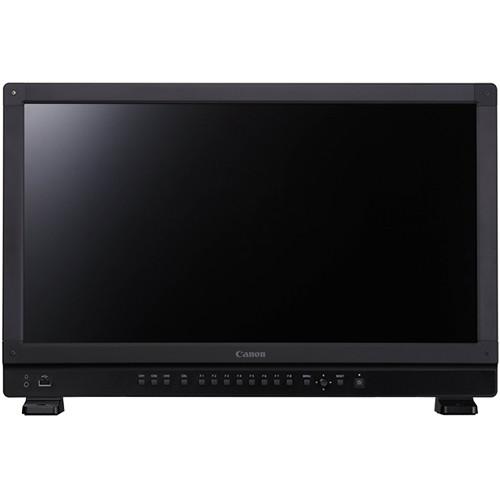
Product description The DP-V2420 24" UHD 4K Reference Display from Canon is a Dolby Vision mastering monitor that supports SMPTE ST 2084's gamma curve and qualifies HLG (Hybrid Log-Gamma) broadcast HDR standards. The innovative Canon-designed RGB LED backlight, with its 10-bit IPS panel, insures a wide viewing angle, while the anti-glare coating helps improve on set visibility. It also features a specially developed image-processing engine to help produce uniform brightness.
As post processes move onto or near the set, the DP-V2420 works with a variety of workflows. It supports the ability to internally debayer the Canon Cinema EOS 4K RAW signal output from the Cinema EOS C500 and Cinema EOS C300 Mark II cameras for direct display while looping the signal to an external recorder. This provides a flexible companion to your other Canon equipment and allows you to build a simple but sophisticated on set Canon workflow. The DP-V2420 also allows you to verify the looks of the ARRI ALEXA SXT cameras, supporting a linkup to ARRI's image quality settings and other features such as metadata and area markers. The aluminum frame design offers rigidity and strength. The anti-tip stand, function buttons on front of the unit, and built-in easy setup transport handles ensure portability and multi-purpose use. - Compatible with HDR Industry Standards
- The DP-V2420 4K Reference Display is a full-specification HDR reference display compatible with HDR industry standards, helping to meet demanding HDR workflows. The display facilitates a high luminance performance, meeting the requirements of HDR standards, SMPTE ST 2084, and HLG. It fully covers this range by actual luminance to help ensure that gradation and color can be accurately confirmed.
- Two HDR Monitoring Modes Provided for Specific Applications
- Peak luminance priority mode: Video can be monitored at the maximum (peak) luminance supported on the DP-V2420 main unit. HDR image quality can be confirmed at high luminance on the DP-V2420 as an HDR reference display in post-production editing rooms.
Sustained luminance mode: Any video content luminance being input is monitored without altering the luminance of the display main unit. This allows high-luminance HDR video images to be monitored without varying the image quality at the individual luminance of displayed content. - Abundant Selection of Functions for Supporting HDR Production
- It supports HDR/SDR 2 split screen display, HDR compatible waveform monitor display, HDR range variable adjustment function, and HDR meta-information display.
- Supports Cinema & Broadcast HDR Workflows
- The DP-V2420 4K Reference Display is an essential tool if you're working in HDR. In a cinema-style workflow, its size and capabilities make it versatile enough to use on set on a DIT cart, as a client display, or as a close range grading or QC display in post. For sophisticated broadcast workflows, it is a great addition to your control room or broadcast truck.
- Integration with Canon Cinema EOS & ARRI Camera Systems
- The Camera Link-Up feature of the display allows seamless linking to the EOS C500/C300 Mark II digital cinema cameras, and the ARRI ALEXA SXT camera system, allowing for increased flexibility on set for camera assistants and DITs.
- Simple but Powerful Canon Cinema EOS Workflow
- The RAW data, which is output through the 3G-SDI cables from the Cinema EOS C500/C500PL or Cinema EOS C300 Mark II, can be debayered and displayed in the DP-V2420. The fact that the 4K RAW format image debayering is done in the display unit itself means that there is no need for any external debayering equipment. This enables a 4K production environment to be constructed with minimal wiring connections, making for a more compact camera/display combination and increasing mobility during shooting.
- On-Set LUT & CDL Functions
- The DP-V2420 can connect to various color grading systems. It also allows you to set multiple LUTs for each picture mode. As a result, users can select up to eight LUTs in one picture mode for improved convenience. In addition, presets from CDL1 to CDL15 and a CDL details setting screen have been added. Users can also change the name settings for CDL1 to CDL15.
- Color Reproduction Supporting 4K Cinema & UHD 4K Broadcast Standards
- It supports broadcast and cinema standards of ITU-R BT.2020 and ACES2065-1 and achieves high-accuracy uniformity. The display's 10-bit panel that expresses the shades of each RGB color in 1024 steps, and the high-accuracy display processor, enable more accurate gradation displays.
- Image Enhancement Functions
- An array of image functions such as boost contrast, backlight scanning, and shape trace gives users the ability to control and modify the display's features and customize the overall look.
- ACES 1.0 Support
- The DP-V2420 4K Reference Display supports the latest ACES2065-1 standard. It can also be used with any source input that complies with ACESproxy.
- Shoot Assistance Features
- It comes with features such as two-sample interleave, 2/4 split-screen display, zooming, peaking, fan shutdown, waveform monitor, vectorscope, false color, capture, frame hold, area markers, and background color.
- Maintaining Consistency in Color Image Quality
- In order to maintain consistent high image quality, the DP-V2420 4K Reference Display utilizes built-in autocorrect functions that consistently monitor color, brightness, and other parameters that keep the display at a high level of uniformity at all times. These functions include automatic color and luminance correction system and calibration without a PC.
- OSD Menus Tailored
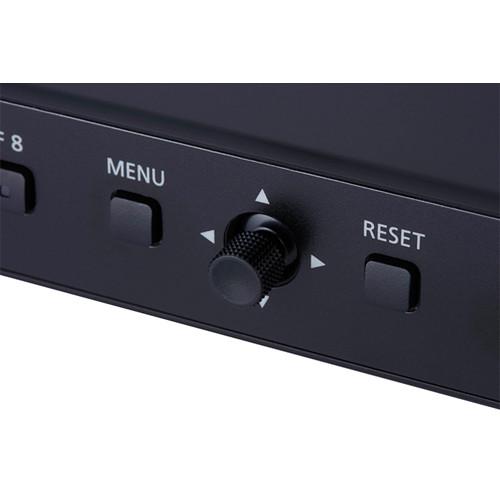
- While carrying over the proven operability of the DP-V2410, Canon has reduced the size of the OSD menu displays to a size that is optimally suited for the operation range. The users can change the OSD positions according to the resolution of the images displayed (two modes are available: 4096 x 2160 and 3840 x 2160). It comes with assignable function buttons and an easy-to-use control area.
- Ergonomic Design
- The display design concept provides minimal noise and is designed not to interfere with video production work. You can choose from two types of stands for positioning, and screw holes are provided for securing the stand in place, allowing it to be installed in a variety of locations. The display features a multilayer split exhaust structure to radiate heat. The duct shape and suction ports (mounting area) have been optimally designed to control airflow, and heat radiation helps ensure both high luminance and reliability.
- Signal Input Formats
- There is a broad choice in signal inputs to the DP-V2420 including two variants of 4K and the ability to upscale either 2K or HD, all at multiple frame rates.
UPC: 013803285284 In the Box Canon DP-V2420 24" UHD 4K Reference Display AC Power Cord Limited 1-Year Warranty Table of Contents
|
Upload User Manual
Have you got an user manual for the Canon DP-V2420 24" UHD 4K Reference Display in electronic form? Please send it to us and help us expand our library of instruction manuals.
Thank you, too, on behalf of other users.
To upload the product manual, we first need to check and make sure you are not a robot. After that, your "Submit Link" or "Upload File" will appear.
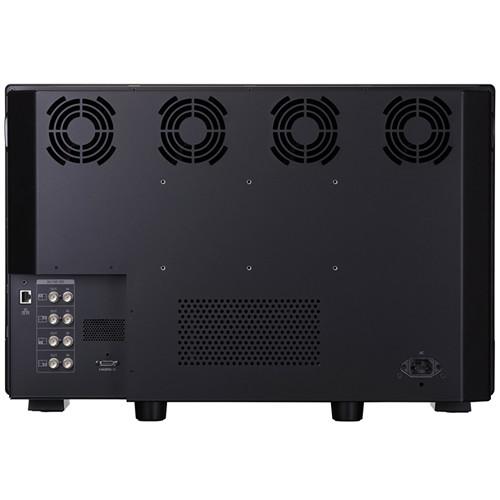
Technical parametersCanon DP-V2420 Specs | | | Type | IPS LCD panel | | Screen Size | 24" (61.1 cm) | | Aspect Ratio | 17:9 | | Resolution | 8.8 MP (4096 x 2160) | | Active Display Area | 21.3 x 11.2" (54.1 x 28.4 cm), approximately | | Pixel Pitch | 132 μm / 193 ppi | | Driver | 1024 gradations, 10 bits for each RGB color | | | | Brightness | 100 cd/m2 | | Viewing Angle | 89° Up/Down/Left/Right (contrast ratio 10:1 or higher) | | Surface Treatment | Anti-glare coating | | | | Interface | 4 x 3G/HD-SDI (1 system); BNC (75 Ohms) | | HDMI | 1 x HDMI Type A (4K60p support)
Copy Protection: HDCP 2.2 | | | | Output | 4 x 3G/HD-SDI (pass-thru 1 system) | | Headphone | 1 3.5 mm stereo mini jack
Supported Impedance: 32 to 64 Ohms | | USB | 1 x USB type A
USB Specification Revision 2.0 compliant LS (Low Speed)/FS (Full Speed)/HS (High Speed) mode compatible
Enhanced Host Controller Interface Specification for USB Revision 1.0 compliant | | LAN | 1 x RJ45 terminal
IEEE802.3 10BASE-TX / IEEE802.3u 100BASE-TX compliant | | | | Backlight Type | RGB LED, direct down type | | Power | Rated Voltage: 100 to 240 VAC
Rated Frequency: 50/60 Hz | | Power Consumption | Approximately 510 W at maximum load (including change in brightness through aging) | | Operational Temperature | Temperature and Humidity:
32 to 104°F (0 to 40°C)
20 to 85 % RH, no condensation
Recommended: 59 to 86°F (15 to 30°C) | | Storage Temperature | Temperature and Humidity:
-4 to 104°F (-20 to 40°C)
20 to 85 % RH, no condensation
105 to 140°F (41 to 60°C)
20 to 30 % RH, no condensation | | Pressure Level | 700 to 1060 hPa | | Mounting Hole Pitch | 7.9 x 3.9" (20.1 x 9.9 cm) VESA standard | | Dimensions | With Stand: 23.4 x 15.7 x 9.3" (59.4 x 39.9 x 23.6 cm), approximately
Without Stand: 23.4 x 14.9 x 7.7" (59.4 x 37.8 x 19.6 cm), approximately | | Weight | 41.8 lb (19 kg) approximately |
Rating70% users recommend this product to others. And what about you?

This product has already been rated by 38 owners. Add your rating and experience with the product.
Discussion
 Ask our technicians if you have a problem with your settings,
or if anything is unclear in the user manual you have downloaded.
You can make use of our moderated discussion.
The discussion is public and helps other users of our website who may be encountering similar problems.
Ask our technicians if you have a problem with your settings,
or if anything is unclear in the user manual you have downloaded.
You can make use of our moderated discussion.
The discussion is public and helps other users of our website who may be encountering similar problems.
The discussion is empty - enter the first post
Post a new topic / query / comment:
|
|
|
| Request for user manual |
You can’t find the operation manual you are looking for? Let us know and we will try to add the missing manual:
I’m looking for a manual / Request for manual
Current requests for instruction manuals:
Call Of Duty World War Two For Xbox...
controller stratus XL...
stratus XL...
smart whatch serie S11 42mm...
Allen & Heath SQ-6 manual...
|
| Discussion |
Latest contributions to the discussion:
AEW R 4100
Name: MAURICIO ANGARITA
Audio-Technica AEW-R4100 UHF Diversity Receiver for
AEW R 4100 has the mute function blocked and does not allow audio to pass. I tried several times to turn off the mute from the transmitter but it does nothing, the mute stays on. Solution?
Thank you...
Instructions for assembling the 2015 Forecast Image Master Consoles GC3-A
Name: mike elam
Forecast Consoles GC3-A ImageMaster Editing Console
Looking for instructions for assembling this console. ...
EMPTY TONER ERROR MESSAGE AFTER REPLACING TONER
Name: LINDA BAD YELLOW EYES
Brother TN223BK Standard-Yield Toner
I HAD TO CHANGE OUT ALL THREE TONERS DUE TO LEAKS IN THE YELLOW AND CYAN. AFTER I REPLACED THEM, THE MACHINE KEEPS GIVING ME AN EMPTY TONER ERROR MESSAGE. HELP!!...
PS480D 20/24 pin Switching 480W Power Supply
Name: swkargo
Logisys 480W Power Supply
This item states in can run -5vdc .It is NOT listed on the board or I beleive is r4 is missing the resitior. Any body have thid issue. Shawn
...
Help needed
Name: Ann Carter
SanDisk 1TB Extreme Portable USB 3.1
When I click the link to download the user manual for my Sandisk Extreme external hard drive, it gives me the manual for the LG Cricket. Can you please change the link so I can download the Sandisk manual and begin using this drive? Thank you....
|
|


