|
User Manual for Canon DP-V2421 4K Reference Display Click to enlarge the picture
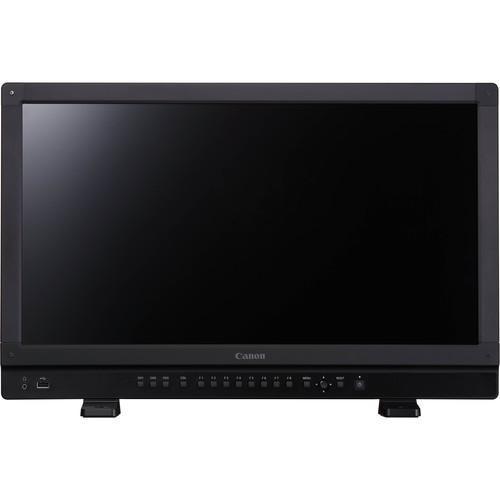 Contents of the user manual for the Canon DP-V2421 4K Reference Display
- Product category: Production Monitors Canon
- Brand: Canon
- Description and content of package
- Technical information and basic settings
- Frequently asked questions – FAQ
- Troubleshooting (does not switch on, does not respond, error message, what do I do if...)
- Authorized service for Canon Production Monitors
|
User manual for the Canon DP-V2421 4K Reference Display contain basic instructions
that need to be followed during installation and operation.
Before starting your appliance, the user manual should be read through carefully.
Follow all the safety instructions and warnings, and be guided by the given recommendations.
User manual is an integral part of any Canon product,
and if it is sold or transferred, they should be handed over jointly with the product.
Following the instructions for use is an essential prerequisite for protecting
health and property during use, as well as recognition of liability on the part of the manufacturer
for possible defects should you make a warranty claim. Download an official Canon user manual in which you will find instructions on how to install, use, maintain and service your product.
And do not forget – unsuitable use of a Canon product will considerably shorten its lifespan!
|
Product description The DP-V2421 4K Reference Display is Canon's flagship 24" reference display, offering versatile, high-luminance HDR functions. Designed for both on-set capture and post-production, this 4K display supports both SMPTE ST 2084 and the HLG (hybrid log-gamma) HDR standards. Its 12G-SDI ports streamline 4K60p video input, reducing the number of cables per signal from four to one.When shooting with the Canon EOS C700/500/300 Mk II, the DP-V2421 can simplify your workflow by internally debayering the 4K raw signal and outputting it via a single 12-SDI cable. It supports both DCI and UHD 4K video at 10 bits, and supports cinema and broadcast frame rates. The DP-V2421 has a backlit IPS panel offering wide off-axis viewing, uniform brightness, and consistency with the rest of the Canon display line.Canon Log/Log2/Log3 and ARRI Log C are all supported by the DP-V2421, with Log C preset in the display's main menu. The DP-V2421 can link to the metadata of select Canon Cinema EOS and ARRI cameras, offering "look" verification and the flexibility of choosing your camera settings through the larger display instead of the viewfinder.A metal chassis helps the DP-V2421 4K display withstand the rigors of daily production. Ergonomic design features include an anti-tip stand, easily accessible function buttons on the front panel, and integrated carrying handles. Note: The camera setup function is available when the SDI raw format has been selected in compatible EOS cameras, or when the 3G/HD-SDI format is selected in an ARRI ALEXA SXT. - Industry-Standard HDR Compatibility
- The DP-V2421 4K Reference Display is compatible with HDR industry standards, fully covering both SMPTE ST 2084 and HLG ranges for accurate assessments of gradations and colors. In addition to this dual-gamma curve support, the DP-V2421 features improved black level luminance and shadow area gradations.
- Dual HDR Monitoring Modes
- Two HDR monitoring modes are offered to suit specific production needs:
- Peak Luminance Priority mode: The maximum display luminance is controlled to match the brightness of the displayed contact.
- Sustained Luminance mode: The display luminance remains constant and does not fluctuate according to the input, making this mode useful for sports and performance shoots where the luminance varies within a fixed camera angle.
- Multiple HDR Support Functions
- The DP-V2421 4K Reference Display includes HDR tools like split screen display of HDR and SDR signals, range compression display, clipped display, camera information display, and an HDR-compatible waveform monitor.
- Internal 4K Raw Debayering / 4K Output via 12G-SDI and HDMI
- Compatible with Canon EOS C700/500/300 Mk II cameras, the DP-V2421's internal debayering feature enables you to display the 4K raw signal using a single 12G-SDI cable. The DP-V2421 can also display 4K60p content from any 4K camera with a single HDMI cable if that camera supports a 4K60p output connection.
- Cine-Style and Broadcast HDR Workflow Support
- The DP-V2421's display capabilities and its size suit it for use both on a DIT cart for cine-style projects, and in a broadcast truck or editing suite for a director/client display or color grading.
- Canon Cinema EOS and ARRI Camera Integration
- The DP-V2421 display can link to the metadata output by a Canon C700/500/300 Mk II or ARRI ALEXA SXT camera, enabling you to check your image look and choose your camera settings via a larger display than that provided by the camera. Canon Log/Log2/Log3 and ARRI Log C can all be preset in the display, simplifying your LUT management.
- Simplified Canon Cinema EOS Workflow
- Internal 4K raw image debayering and signal output via a single 12G/HD-SDI cable enables the DP-V2421 to offer a 4K workflow with minimal cabling, and without the need for an external debayering unit. Internal debayering is offered for Canon EOS C700/500/300 Mk II cameras.
- On Set LUT and CDL Functions
- Like its predecessor, the Canon DP-V2410, the DP-V2421 display can connect via LAN to select color grading systems like Pomfort LiveGrade. When used with a Canon EOS C700/500/300 Mk II camera, you can employ LUTs and CDLs while your 4K raw signal is being debayered.
- Accurate 4K Cinema and UHD 4K Color Reproduction
- The DP-V2421 display supports multiple cinema and broadcast standards like ITU-R BT.709, EBU, SMPTE-C, DCI-P3, ITU-R BT.2020, and ACESproxy. An RGB LED backlight and IPS LCD panel provide high-quality color reproduction suited for on-set or post-production display.
- Image Enhancement Functions
- A full-array RGB backlight features tri-level adjustments for crisp video playback, and Canon Shape Tracing enables the DP-V2421 to minimize artifacts on scaled images.
- Shot Assistance Features
- Image display features include two-sample interleaving, 2/4 split-screen display, three-mode zooming with 4x/8x ratio and position selection, peaking to aid focusing, false color, waveform, and vectorscope functions. Additional monitor functions include fan shutdown mode, image freeze capture, image frame hold, aspect ratio and safety markers, and selectable gray/white/black band areas.
- Consistent Image Quality Maintenance
- The DP-V2421's auto-correct system monitors color, brightness, and additional parameters, ensuring a high degree of uniformity over time. If needed, accurate corrections may be made to the display without a PC by using a separately available CA-210/CA-310 external sensor from Konica Minolta.
- OSD Menus, Assignable Buttons, and LAN/USB Ports
- OSD menus have been reduced in size from those on the DP-V2410, and can be repositioned for DCI 4K and UHD 4K use. The DP-V2421 4K Reference Display also features assignable function buttons, an easy-to-use illuminated control area, and LAN and USB ports for connecting to a color-grading system.
In the Box Canon DP-V2421 4K Reference Display AC Power Cord Limited 1-Year Warranty Table of Contents
|
Upload User Manual
Have you got an user manual for the Canon DP-V2421 4K Reference Display in electronic form? Please send it to us and help us expand our library of instruction manuals.
Thank you, too, on behalf of other users.
To upload the product manual, we first need to check and make sure you are not a robot. After that, your "Submit Link" or "Upload File" will appear.
Technical parametersCanon DP-V2421 Specs | | | Panel Type | IPS LCD | | Screen Size (Diagonal) | 24" / 61 cm | | Aspect Ratio | 17:9 | | Resolution | 4096 x 2160, 8.8 MP | | Active Display Area | Approximately 21.3 x 11.2" / 540.7 x 285.1 mm | | Pixel Pitch | 132 μm / 193 ppi | | Bit Depth | 10-bit | | | | Brightness | 100 cd/m² | | Viewing angle (L/R/T/B) | 89° (contrast ratio 10:1 or higher) | | Surface Treatment | Anti-glare coating | | | | Input | 12G/3G/HD-SDI: 4 x BNC (75 Ohms)
HDMI: 1 x HDMI type A (4K 60p support)
Copy Protection: HDCP 2.2 | | Output | 12G/3G/HD-SDI: 4 x BNC (1 pass-through 1 system)
Headphone: 1 x 3.5 mm stereo mini jack, 34-64 Ohms | | Control | USB: 1 x USB 2.0 Type-A
Mode Compatibility: LS (Low-Speed) / FS (Full-Speed) / HS (High-Speed)
USB Revision 1.0 compliant
LAN: 1 x RJ45 (10/100BASE-TX compliant) | | | | Backlight Type | RGB LED, direct down type | | Power Requirements | 100 to 240 VAC, 50/60 Hz | | Power Consumption (Approximate) | Maximum Load: 510 W (including change in brightness through aging)
At Factory Shipment: 180 W | | | | Temperature and Humidity | Operation: 32 to 104°F / 0 to 40°C (20 to 85 % RH, non-condensing)
Recommended: 59 to 86°F / 15 to 30°C
Storage: -4 to 104°F / -20 to 40°C (20 to 85 % RH, non-condensing)
Transporting: 106 to 140°F / 41 to 60°C (20 to 30 % RH, non-condensing) | | Pressure Level | 700 to 1060 hPa | | | | Mounting Hole Pitch | VESA Standard: 7.9 x 3.9" / 200 x 100 mm | | Dimensions (WxHxD) | With Stand: 23.4 x 15.7 x 9.3" / 59.4 x 39.9 x 23.5 cm
Display Unit Only: 23.4 x 14.9 x 7.7" / 59.4 x 37.8 x 19.5 cm | | Weight (Approximate) | 41.9 lb / 19 kg |
Rating80% users recommend this product to others. And what about you?

This product has already been rated by 17 owners. Add your rating and experience with the product.
Discussion
 Ask our technicians if you have a problem with your settings,
or if anything is unclear in the user manual you have downloaded.
You can make use of our moderated discussion.
The discussion is public and helps other users of our website who may be encountering similar problems.
Ask our technicians if you have a problem with your settings,
or if anything is unclear in the user manual you have downloaded.
You can make use of our moderated discussion.
The discussion is public and helps other users of our website who may be encountering similar problems.
The discussion is empty - enter the first post
Post a new topic / query / comment:
|
|
|
| Request for user manual |
You can’t find the operation manual you are looking for? Let us know and we will try to add the missing manual:
I’m looking for a manual / Request for manual
Current requests for instruction manuals:
Call Of Duty World War Two For Xbox...
controller stratus XL...
stratus XL...
smart whatch serie S11 42mm...
Allen & Heath SQ-6 manual...
|
| Discussion |
Latest contributions to the discussion:
AEW R 4100
Name: MAURICIO ANGARITA
Audio-Technica AEW-R4100 UHF Diversity Receiver for
AEW R 4100 has the mute function blocked and does not allow audio to pass. I tried several times to turn off the mute from the transmitter but it does nothing, the mute stays on. Solution?
Thank you...
Instructions for assembling the 2015 Forecast Image Master Consoles GC3-A
Name: mike elam
Forecast Consoles GC3-A ImageMaster Editing Console
Looking for instructions for assembling this console. ...
EMPTY TONER ERROR MESSAGE AFTER REPLACING TONER
Name: LINDA BAD YELLOW EYES
Brother TN223BK Standard-Yield Toner
I HAD TO CHANGE OUT ALL THREE TONERS DUE TO LEAKS IN THE YELLOW AND CYAN. AFTER I REPLACED THEM, THE MACHINE KEEPS GIVING ME AN EMPTY TONER ERROR MESSAGE. HELP!!...
PS480D 20/24 pin Switching 480W Power Supply
Name: swkargo
Logisys 480W Power Supply
This item states in can run -5vdc .It is NOT listed on the board or I beleive is r4 is missing the resitior. Any body have thid issue. Shawn
...
Help needed
Name: Ann Carter
SanDisk 1TB Extreme Portable USB 3.1
When I click the link to download the user manual for my Sandisk Extreme external hard drive, it gives me the manual for the LG Cricket. Can you please change the link so I can download the Sandisk manual and begin using this drive? Thank you....
|
|


