User Manual for Canon EOS 5D Mark IV DSLR Camera with Filmmaker's HDR Kit
Click to enlarge the picture Contents of the user manual for the Canon EOS 5D Mark IV DSLR
Product category: DSLR Cameras Canon
Brand: Canon
Description and content of package
Technical information and basic settings
Frequently asked questions – FAQ
Troubleshooting (does not switch on, does not respond, error message, what do I do if...)
Authorized service for Canon DSLR Cameras
User manual for the Canon EOS 5D Mark IV DSLR contain basic instructions
that need to be followed during installation and operation.
Before starting your appliance, the user manual should be read through carefully.
Follow all the safety instructions and warnings, and be guided by the given recommendations.
User manual is an integral part of any Canon product,
and if it is sold or transferred, they should be handed over jointly with the product.
Following the instructions for use is an essential prerequisite for protecting
health and property during use, as well as recognition of liability on the part of the manufacturer
for possible defects should you make a warranty claim. Download an official Canon user manual in which you will find instructions on how to install, use, maintain and service your product.
And do not forget – unsuitable use of a Canon product will considerably shorten its lifespan!
Product description
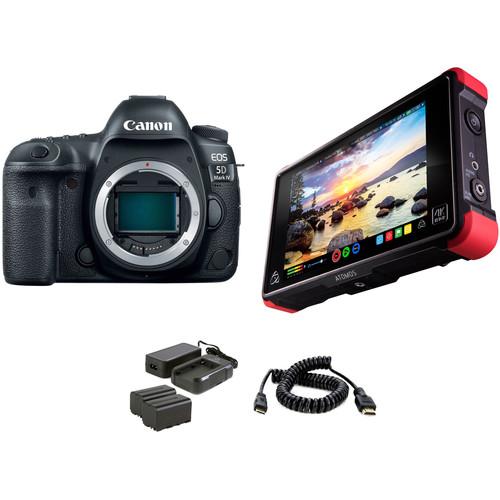
Make sure you are capturing vivid, sharp video with this Filmmaker's HDR Kit from , which bundles the full-frame Canon EOS 5D Mark IV DSLR Camera with an Atomos Ninja Flame 7" recorder/monitor for accurate viewing during shooting, an Atomos Power Kit for powering long shoots, and a coiled HDMI cable.
Canon EOS 5D Mark IV DSLR Camera (Body Only)
First Look: Canon EOS 5D Mark IV
Official Canon EOS 5D Mark IV Introduction
Introducing the Canon EOS 5D Mark IV
EOS 5D Mark IV Canon Log Upgrade Details
Introducing the Still Features of the Canon EOS 5D Mark IV
Canon EOS 5D Mark IV: New AWB Options
Continuing on in their legacy of powerful workhorse cameras, Canon has released the 5D Mark IV DSLR which is an outstanding still photography option and an able 4K-capable video machine. This multimedia maven offers a newly developed 30.4MP full-frame CMOS sensor paired with the DIGIC 6+ image processor in order to balance fine detail and resolution with low-light performance and sensitivity. It is able to work within a native range of ISO 100-32000, which can then be expanded to an impressive ISO 50-102400, for sharp, low-noise images in a variety of conditions. Along with these improvements to image quality, users will enjoy a performance boost across the board with an enhanced AF system, built-in Wi-Fi, NFC, and GPS, and much more.
In order to deliver detailed images quickly and effectively the 5D Mark IV leverages the power of the DIGIC 6+ image processor, which can handle up to 7 frames per second during continuous shooting. It also uses a 150,000-pixel RGB+IR metering sensor to evaluate the scene and subjects for accurate exposures under a variety of different lighting conditions. An improved 61-point High Density Reticular AF furthers the camera's speed by tracking and locking onto subjects quickly and accurately for tack sharp photos. A new AF area select button is now available as well for near immediate access to this setting.
Video benefits from the addition of Dual Pixel CMOS AF and Movie Servo AF to smoothly rack focus during a shot. Shooters can even make use of the 3.2" 1.62m-dot touchscreen LCD to simply tap to adjust the focus point. Furthermore, now that the camera has DCI 4K (4096 x 2160) video recording at up to 30 fps, users can snag 8.8MP stills from the video for an even faster capture option. Tied into the Dual Pixel sensor architecture is a brand new feature for Canon: Dual Pixel RAW, which allows for fine tuning of certain image parameters, including bokeh shift and focus micro adjustment, after the image is taken.
The body has been further refined for comfort and ease of access, as well as durability and weather resistance. The Canon N3 remote port has been relocated to the front of the camera body and they have added both GPS and Wi-Fi with NFC to make this model a connected camera.
30.4MP Full-Frame CMOS Sensor and DIGIC 6+ Image Processor
In line with previous members of the main 5D series, the Mark IV attempts to balance high resolution with low-light performance with a newly developed 30.4MP full-frame CMOS sensor. This provides a beneficial increase in overall resolution without compromising on sensitivity. Additionally, thanks to the DIGIC 6+ image processor it is paired with, it offers impressive performance within a native range of ISO 100-32000, which can be expanded to ISO 50-102400.
Versatility is key with the 5D, as it needs to be able to tackle landscapes and weddings with equal ease. By using a 150,000-pixel RGB+IR metering sensor shooters will be able to more comfortably rely on the camera to capture difficult scenes. This sensor also has face detection as well as flicker detection which can ensure proper exposure in less-than-ideal lighting situations. Along with this, the camera offers an improved continuous shooting rate of 7 fps, making it a great option for events and action.
High Density Reticular AF and Dual Pixel CMOS AF Systems
Ensuring your subject is tack sharp, the 5D Mark IV incorporates an enhanced High Density Reticular AF system, which offers 61 phase-detect points, with all points sensitive to f/8 and 41 of which are cross-type. The center point can function down to -3 EV for working in extremely dim lighting. Compared to previous versions, this sensor has expanded vertical coverage of 24% on the peripherals and 8% in the center in order to better track and locate subjects in the frame.
In addition to advanced tracking and focusing while using the optical finder for stills, Live View and video can now use Dual Pixel CMOS AF on the actual imaging sensor. This offers about 80% coverage of phase-detection autofocus for faster and more accurate focusing in these modes. It is ideal for video as users will enjoy smoother rack focusing without the downsides normally encountered with contrast-based systems. Also, this works well with the touchscreen functions, allowing shooters to just tap to adjust focus.
DCI 4K Video Recording
Designed for both professional stills shooting and video recording, the 5D Mark IV supports DCI 4K (4096 x 2160) resolution recording at up to 30 fps at 500 Mbps, along with Full HD 1080p shooting at 60 fps and HD 720p at 120 fps for slow motion playback. When recording in-camera, 4K video has 4:2:2 sampling and 8-bit color depth, while Full HD 1080p footage has 4:2:0 sampling. Uncompressed Full HD 1080p video can also be saved via HDMI to an optional external recorder with 4:2:2 color sampling. 4K video is recorded using a central 4096 x 2160 area of the sensor at a 1.74x crop in order to record video with an ideal 1:1 pixel sampling ratio, while Full HD recording makes use of the entire full frame.
Audio can be recorded using the on-board stereo microphone or an optional external mic can also be used via the 3.5mm mic jack. Real time audio monitoring is possible, too, via the 3.5mm headphone jack. The 4K video recording also avails the ability to take 8.8MP still frame grabs during playback on the rear touchscreen and save them as single images.
Dual Pixel RAW
First implemented here on the 5D Mark IV, Dual Pixel RAW allows photographers to record all the information the sensor's unique pixel architecture can deliver, providing a way for fine adjustments to be made after the image is taken. These adjustments include focus fine tuning that can help you ever-so-slightly adjust the focus point to bring out extra details, shift bokeh around for improved composition, and reduce the impact of ghosting on your photos. This requires the use of Canon's Digital Photo Professional 4.5 software.
Body Design
A large 3.2" 1.62m-dot Clear View II LCD monitor is available and features an anti-reflective design for bright, vivid image playback and live view shooting, and its touchscreen interface can be used for intuitive touch-to-focus control and adjusting settings in the menus.
A dedicated AF mode selection button located beneath the rear joystick offers another avenue for accessing settings, allowing for fast, intuitive access to commonly changed options.
Dual CompactFlash and SD memory card slots allow you to extend your file saving capabilities by permitting overflow recording or in-camera file type separation while shooting.
An Intelligent Viewfinder II uses a pentaprism design and offers a bright means for viewing. When using the viewfinder, AF points are highlighted in red for greater visibility in low-light conditions, and the finder can also be configured to display a range of other shooting aids, such as an electronic level, grid, flicker detection, white balance, metering mode, AF information, and other settings.
A Mirror Vibration Control System helps to minimize mechanical vibrations in order to better ensure sharpness during long exposures or fast continuous shooting bursts.
A robust magnesium alloy body design is both dust- and weather-sealed to permit working in harsh environments.
Other Camera Features
A built-in GPS module allows you to geotag imagery in-camera as well as auto time sync with the Universal Time Code via satellites. This module is compatible with American GPS, Russian GLONASS, and Japanese quasi-zenith Michibiki satellites for a wide coverage of support.
Digital Lens Optimizer technology compensates for a range of optical defects from various lenses, including chromatic aberration, distortion, peripheral brightness, and diffraction, and the camera can store lens data in order to avoid having to re-register lenses prior to each use. The camera can handle this process in real time, delivering JPEGs with the corrections already applied.
A built-in intervalometer permits the creation of time-lapse imagery and supports recording 1-99 consecutive frames in pre-selected intervals from 1 second to 99 hours 59 minutes and 59 seconds. Users can also choose to set the camera to unlimited frames.
Built-in Wi-Fi and NFC connectivity enable wireless sharing, control, and image transfer with a compatible smart device as well as the CS100 Connect Station.
UPC: 013803281347
Atomos Ninja Flame 7" 4K HDMI Recording Monitor
First Look: Canon EOS 5D Mark IV
Official Canon EOS 5D Mark IV Introduction
Introducing the Canon EOS 5D Mark IV
EOS 5D Mark IV Canon Log Upgrade Details
Introducing the Still Features of the Canon EOS 5D Mark IV
Canon EOS 5D Mark IV: New AWB Options
The Atomos Ninja Flame is a 7", 1920 x 1200 on-camera recording monitor combining 4K recording with a 10-bit FRC panel that supports native display of HDR (log) footage, as well as high-brightness viewing of Rec. 709 footage. It utilizes an HDMI input to support clean output signals at resolutions up to UHD 4K, recording it to 2.5" SSDs using 10-bit, 4:2:2 Apple ProRes and Avid DNxHR codecs.
The 10-bit panel and AtomHDR display technology support a brightness range of over 10 stops, allowing you to more accurately monitor your log gamma footage without having to view flat, washed-out looking images, or use a LUT to compress the dynamic range and color space. The monitor offers built-in pre-sets to accurately translate popular log formats from Sony, Canon, Panasonic, ARRI, RED, and JVC cameras. The settings only affect viewing, with recorded video remaining unaltered.
In addition to HDR monitoring, the monitor also offers a High Bright mode for traditional Rec. 709 monitoring. This mode takes advantage of the full 1500 cd/m² brightness to allow for more confident monitoring in bright outdoor environments, even without a sun hood. In HDR mode, use of a separately available sun hood is required, as displaying a wider brightness range reduces the overall brightness of the monitor.
Built to withstand the rigors of production, the Ninja Flame features built-in protective armor with silicone-covered corners and chamfered edges. Compared to the original Ninja, the Flame now features dual Sony L-Series battery plates that support battery hot-swapping, enabling longer run times. For audio recording, the monitor features a 3.5mm microphone input, with on-screen audio level display. Additionally, the monitor features a variety of on-screen exposure analysis, framing, and focus assist tools. Included with the basic kit are a Master Caddy II 2.5" drive enclosure and an AC adapter power supply. A travel case for storing the monitor is also included to protect it during storage and transport.
Monitor
1920 x 1200 resolution
10-bit FRC monitoring processing
1500 cd/m² brightness
4K HDMI input/output
AtomHDR technology displays 10 stops of dynamic range to natively display HDR (log) footage
Presets for viewing log gamma curves from Sony, Canon, Panasonic, ARRI, RED, and JVC cameras
10-bit 4:2:2 ProRes and DNxHR recording to SSD/HDD media
Pre-roll record (HD 8 seconds, 4K 2 seconds)
Custom time-lapse mode
10 metadata fields
Additional Features
3.5mm microphone input
Audio level meters and mic level adjustment
Dual Sony L-Series type battery slots support hot-swappable for continuous power
Built-in armor with silicone-covered corners
UPC: 814164020671
Atomos Power Kit for Shogun/Ninja Inferno & Flame
First Look: Canon EOS 5D Mark IV
Official Canon EOS 5D Mark IV Introduction
Introducing the Canon EOS 5D Mark IV
EOS 5D Mark IV Canon Log Upgrade Details
Introducing the Still Features of the Canon EOS 5D Mark IV
Canon EOS 5D Mark IV: New AWB Options
The Atomos Power Kit includes two NP-F750 5200mAh batteries, a charger, and a power adapter for the Shogun/Ninja Inferno and Flame. UPC: 814164020756
Atomos Full to Mini HDMI Coiled Cable (19.7 to 25.6")
First Look: Canon EOS 5D Mark IV
Official Canon EOS 5D Mark IV Introduction
Introducing the Canon EOS 5D Mark IV
EOS 5D Mark IV Canon Log Upgrade Details
Introducing the Still Features of the Canon EOS 5D Mark IV
Canon EOS 5D Mark IV: New AWB Options
The 19.7 to 25.6" Full to Mini HDMI Coiled Cable from Atomos is coiled to prevent clutter, but it can extend up to 25.6". UPC: 853815005681
In the Box
EOS 5D Mark IV DSLR Camera (Body Only) cvedwvrszdxa
LP-E6N Lithium-Ion Battery Pack (7.2V, 1865mAh)
LC-E6 Charger for LP-E6 Battery Pack
Eyecup Eg
RF-3 Body Cap for Canon EOS Cameras
IFC-150U II USB 3.1 Gen 1 Interface Cable for DSLRs
Cable Protector
Wide Neck Strap
Software CD-ROM
Limited 1-Year Warranty
Atomos - Ninja Flame 7" 4K HDMI Recording Monitor
Atomos - Power Kit for Shogun/Ninja Inferno & Flame
Atomos - Full to Mini HDMI Coiled Cable (19.7 to 25.6")
More from Manufacturer Table of Contents
Upload User Manual
Have you got an user manual for the Canon EOS 5D Mark IV DSLR Camera with Filmmaker's HDR Kit in electronic form? Please send it to us and help us expand our library of instruction manuals.
Thank you, too, on behalf of other users.
To upload the product manual, we first need to check and make sure you are not a robot. After that, your "Submit Link" or "Upload File" will appear.
Technical parameters
Canon EOS 5D Mark IV DSLR Camera (Body Only)
Lens Mount
Canon EF
Camera Format
Full-Frame (1x Crop Factor)
Pixels
Actual: 31.7 Megapixel Effective: 30.4 Megapixel
Maximum Resolution
6720 x 4480
Aspect Ratio
1:1, 3:2, 4:3, 16:9
Sensor Type
CMOS
Sensor Size
36 x 24 mm
Image File Format
JPEG, RAW
Bit Depth
14-Bit
Image Stabilization
None
ISO Sensitivity
Auto, 100 to 32000 (Extended: 50 to 102400)
Shutter Speed
Electronic Front Curtain Shutter 1/8000 to 30 Seconds Bulb Mode
Up to 7 fps at 30 MP for up to 21 Exposures (Raw Format) Up to 7 fps at 30 MP for Unlimited Exposures
Interval Recording
Yes
Self Timer
2/10-Second Delay
Mirror Lock-Up
Yes
Recording Modes
M-JPEG 4:2:2 8-Bit DCI 4K (4096 x 2160) at 23.976p/24p/29.97p [500 Mb/s] MOV Full HD (1920 x 1080) at 59.94p [180 Mb/s] Full HD (1920 x 1080) at 23.976p/24p/29.97p [90 Mb/s] Full HD (1920 x 1080) at 59.94p [60 Mb/s] Full HD (1920 x 1080) at 23.976p/24p/29.97p [30 Mb/s] HD (1280 x 720) at 120p [160 Mb/s] MP4 Full HD (1920 x 1080) at 59.94p [60 Mb/s] Full HD (1920 x 1080) at 23.976p/24p/29.97p [30 Mb/s] Full HD (1920 x 1080) at 29.97p [12 Mb/s]
External Recording Modes
Full HD (1920 x 1080) at 59.94p Full HD (1920 x 1080) at 23.976p/24.00p/29.97p Full HD (1920 x 1080) at 29.97p HD (1280 x 720) at 120p
Recording Limit
Up to 29 Minutes, 59 Seconds for DCI 4K (4096 x 2160)
1.4 lb / 0.65 kg 2.4 lb / 1.09 kg, Including Battery, Recording Media
Box Dimensions (LxWxH)
11.6 x 7.05 x 4.0"
Atomos Power Kit for Shogun/Ninja Inferno & Flame
Box Dimensions (LxWxH)
7.2 x 4.35 x 3.8"
Atomos Full to Mini HDMI Coiled Cable (19.7 to 25.6")
Connector 1
HDMI Type-A Male
Connector 2
HDMI Type-C Male
Cable Length
19.7 to 25.6" / 50 to 65 cm
Box Dimensions (LxWxH)
5.6 x 3.0 x 0.4"
Rating
100% users recommend this product to others. And what about you?
This product has already been rated by 44 owners. Add your rating and experience with the product.
Discussion
Ask our technicians if you have a problem with your settings,
or if anything is unclear in the user manual you have downloaded.
You can make use of our moderated discussion.
The discussion is public and helps other users of our website who may be encountering similar problems.
Call Of Duty World War Two For Xbox...controller stratus XL...stratus XL...smart whatch serie S11 42mm...Allen & Heath SQ-6 manual...
Discussion
Latest contributions to the discussion:
AEW R 4100 Name: MAURICIO ANGARITA Audio-Technica AEW-R4100 UHF Diversity Receiver for AEW R 4100 has the mute function blocked and does not allow audio to pass. I tried several times to turn off the mute from the transmitter but it does nothing, the mute stays on. Solution?
Thank you...Instructions for assembling the 2015 Forecast Image Master Consoles GC3-A Name: mike elam Forecast Consoles GC3-A ImageMaster Editing Console Looking for instructions for assembling this console. ...EMPTY TONER ERROR MESSAGE AFTER REPLACING TONER Name: LINDA BAD YELLOW EYES Brother TN223BK Standard-Yield Toner I HAD TO CHANGE OUT ALL THREE TONERS DUE TO LEAKS IN THE YELLOW AND CYAN. AFTER I REPLACED THEM, THE MACHINE KEEPS GIVING ME AN EMPTY TONER ERROR MESSAGE. HELP!!...PS480D 20/24 pin Switching 480W Power Supply Name: swkargo Logisys 480W Power Supply This item states in can run -5vdc .It is NOT listed on the board or I beleive is r4 is missing the resitior. Any body have thid issue. Shawn
...Help needed Name: Ann Carter SanDisk 1TB Extreme Portable USB 3.1 When I click the link to download the user manual for my Sandisk Extreme external hard drive, it gives me the manual for the LG Cricket. Can you please change the link so I can download the Sandisk manual and begin using this drive? Thank you....
PDF User Manuals
We regularly supplement and update our library. Latest instruction manuals added for download:
Peter Morgan: "Thanks for this website! With help from your instructions I’ve got my dishwasher working again."
Nick Jackson: "Your site’s been a massive help because the user manual didn’t come with the product. Thanks a lot."
Leslie Scott: "I finally found the user's guide with you that I couldn’t find anywhere else! Totally happy!"
Take a look through our user manuals in our on-line library, with instruction manuals and service handbooks downloadable in PDF format. Our instructions database is constantly updated and supplemented with new products. Looking for instruction manuals? Ask us!
SEARCH-MANUAL.com Sitemap.xml




 Ask our technicians if you have a problem with your settings,
or if anything is unclear in the user manual you have downloaded.
You can make use of our moderated discussion.
The discussion is public and helps other users of our website who may be encountering similar problems.
Ask our technicians if you have a problem with your settings,
or if anything is unclear in the user manual you have downloaded.
You can make use of our moderated discussion.
The discussion is public and helps other users of our website who may be encountering similar problems.