|
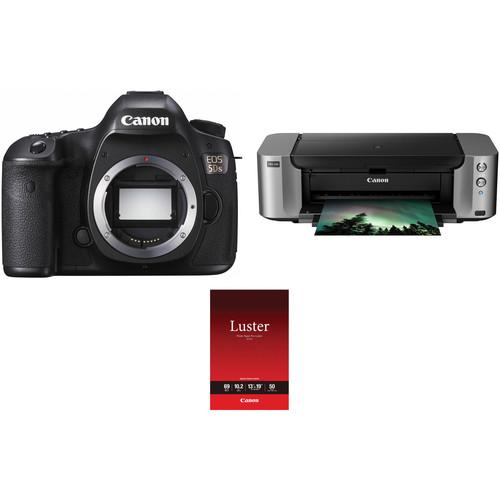
User Manual for Canon EOS 5DS DSLR Camera Body with Inkjet Printer Kit Click to enlarge the picture
 Contents of the user manual for the Canon EOS 5DS DSLR Camera Body
- Product category: DSLR Cameras Canon
- Brand: Canon
- Description and content of package
- Technical information and basic settings
- Frequently asked questions – FAQ
- Troubleshooting (does not switch on, does not respond, error message, what do I do if...)
- Authorized service for Canon DSLR Cameras
|
User manual for the Canon EOS 5DS DSLR Camera Body contain basic instructions
that need to be followed during installation and operation.
Before starting your appliance, the user manual should be read through carefully.
Follow all the safety instructions and warnings, and be guided by the given recommendations.
User manual is an integral part of any Canon product,
and if it is sold or transferred, they should be handed over jointly with the product.
Following the instructions for use is an essential prerequisite for protecting
health and property during use, as well as recognition of liability on the part of the manufacturer
for possible defects should you make a warranty claim. Download an official Canon user manual in which you will find instructions on how to install, use, maintain and service your product.
And do not forget – unsuitable use of a Canon product will considerably shorten its lifespan!
|
Product description The Megapixel War's Latest Contenders: the Sony a7R II and Canon 5DS R Read More zbqzatyrfurwvsywy Comprising everything needed to shoot and print high-resolution photographs, the Canon EOS 5DS DSLR Camera Body with Inkjet Printer Kit from bundles the advanced DSLR camera with the PIXMA PRO-100 wireless inkjet printer. - Canon EOS 5DS DSLR Camera (Body Only)
- Canon 5DS and 5DSR: Hands-On Review
- Introducing the Canon EOS 5DS and EOS 5DS R
The EOS 5DS DSLR Camera from Canon is the long-awaited follow-up to the vaunted 5D Mark III and brings with it new technology and a number of significant upgrades, placing it in very lofty territory for a DSLR. Featuring a full-frame 50.6MP CMOS sensor, the camera captures ultra-high resolution images suitable for large-scale printing and extensive, creative cropping. The Dual DIGIC 6 Image Processors provide the wherewithal to handle this abundance of information, enabling fast performance speeds and top-of-the-line image quality. The 5DS also features advanced video capability including HD 1080p capture at 30 fps and a Time Lapse movie function which takes still photos at set intervals and combines them into a full HD movie.
The EOS Scene Detection System with the 150,000-pixel RGB+IR metering sensor provides precise exposure and color metering and the 61-point High Density Reticular AF sensor with 41 cross-type points enables accurate AF placement and Canon's EOS iTR (Intelligent Tracking and Resolution) enhances AF performance by using information from the metering sensor. Crop shooting at 1.3x and 1.6x allows for flexibility in the size of image files created and the selection of lenses. Also, a built-in intervalometer and bulb timer expand your creative options. An advanced mirror control mechanism and new selectable shutter release lag times control camera vibration for reduced blur and quiet operation. Anti-flicker functionality compensates for flickering light sources, providing consistent exposure metering during continuous shooting. Despite its large file sizes, the 5DS can still offer up to a 5 fps continuous shooting rate.
For stable eye-level composition the 5DS features the Intelligent Viewfinder II with 100% coverage. In addition to its clear view, a superimposed, transparent LCD is incorporated which displays setting information and offers a customizable view of focus points and grid lines. The 3.2" ClearView II LCD monitor provides playback and live view composition with 1.04m-dot resolution and a 170º viewing angle. High-transparency materials and multi-coating resist reflections for bright viewing, especially important when shooting video.
The 5DS is a durable and multi-faceted camera for advanced use, yet its dimensions match that of the 5D Mark III. A magnesium-alloy build provides resistance to impact and the elements and inputs include a PC terminal, 3-pin input, an external microphone jack as well as HDMI out and USB 3.0 compatibility. The base plate and tripod socket have also been reinforced to reduce vibrations and ensure a secure attachment to support systems. Dual media slots for Compact Flash and SD format memory cards are supported. A customizable Quick Control System allows you to easily switch between frequently used settings and functions. - New 50.6 Megapixel Full-frame CMOS Sensor
- Newly designed 50.6MP full-frame CMOS helps deliver ultra-high resolution images for large-scale printing and extensive, creative cropping, while Dual DIGIC 6 Image Processors enable top-of-the-line image quality and processing speed.
- Fine Detail Mode in Picture Style
- Taking advantage of its sensor's high-resolution capturing power, the EOS 5DS camera has a new Picture Style called Fine Detail mode. Fine Detail emphasizes fine edges and patterns or textures by setting the camera's Sharpness sub-settings, fineness and threshold to their minimum and by lowering contrast settings as well. Prioritizing minute details in the image allows for better gradations, more detailed textures and fine edges for smoother, more polished photographs.
- EOS Scene Detection System with RGB+IR Metering Sensor
- The EOS 5DS camera has the iSA Intelligent Scene Analysis system that employs an independent RGB+IR light sensor with approximately 150,000-pixel resolution. This sensor enables Canon's Intelligent Tracking and Recognition system (iTR AF) that detects and tracks subjects, automatically switching the AF point to optimize tracking. With new tracking algorithms tailored to recognize faces and colors, this system serves as the foundation to the camera's AF system.
- 61-Point High Density Reticular AF
- For fast, precise AF with sophisticated tracking performance, the EOS 5DS camera has an advanced, 61-point High Density Reticular AF system with up to 41 cross-type AF points. The AF system is sensitive to changes in composition, making adjustments quickly to help ensure consistent, sharp AF. A new RGB+IR AF sensor (with approximately 150,000 pixels) monitors subject motion, and Canon's iTR Intelligent Tracking and Recognition system synchronizes the active AF point with the subject's motion, helping to ensure that AF precision is maintained. With focus modes dedicated to the particulars of the shooting environment, the EOS 5DS realizes a level of focus accuracy befitting its 50.6MP sensor.
- Advanced Mirror Control Mechanism and Shutter Release Time Lag
- The camera shake that occurs from the impact of an SLR's mirror can leave blurred details in the recorded image. This effect is magnified when working with a high-resolution sensor like the one found in the EOS 5DS camera. To counter the effects of conventional, spring-driven SLR mirrors, the EOS 5DS features a newly developed Mirror Vibration Control system. The camera's mirror is not controlled by springs but instead is driven by a small motor and cams. This system suppresses the impact typical of the camera's mirror, significantly reducing impact and its effects on the image. A new Time Release Lag setting, easily accessed on the menu system, offers added protection against camera shake by setting the shutter release time intentionally longer so the camera does not begin the exposure until after the impact of the camera's mirror has diffused.
- Anti-Flicker Feature
- With Canon's anti-flicker function, the camera is able to deliver accurate results under cycling lighting situations. Under flickering light, such as fluorescent lighting, a fast shutter speed may result in an irregular exposure. The anti-flicker function detects the frequency and phase of the flicker and captures images near the point of peak brightness when the subject is most likely well illuminated.
- 1.3x and 1.6x Crop Shooting
- For still photography, the EOS 5DS features the flexibility of a cropping feature that extends the shooting effect 1.3x and 1.6x. With 50.6MP capture, cropped shots are possible with resolution to spare. Images recorded at 1.3x (APS-H) are approximately 30.5MP (6768 x 4512) Large/Fine JPEG, while images recorded at 1.6x (APS-C) are approximately 19.6MP (5424 x 3616) Large/Fine JPEG. Particularly useful in extending the range of telephoto lenses, the crop function also improves the subject tracking capability with almost the entire frame covered with AF points. Image cropping can be displayed in the viewfinder either masked or overlaid with an outline showing the cropped area, and in Live View shooting the image is cropped by the effect chosen. Aspect ratios can also be defined, with the EOS 5DS shooting in 1:1, 4:3, and 16:9 ratios, in addition to the default 3:2.
- Full HD 30p Movie Capability
- The Canon 5DS supports full HD 1080/30p movie capability and Time Lapse Movie function, which takes still photographs at set intervals and combines them into a full HD movie file, is provided. In addition HD and VGA resolution, numerous frame rates and ALL-I and IPB compressions are supported. Still images can be captured during video recording. A jack for an external microphone is provided.
- Built-In Intervalometer and Bulb Timer
- The EOS 5DS offers time-lapse fixed-point shooting and long exposures without the need for a remote control. The interval timer takes from 1 to 99 shots at pre-selected intervals (from 1 second to 99 hours 59 minutes 59 seconds, or unlimited), ideal for shooting flowers as they bloom or clouds drifting through the sky. Captured exposures can even be collected and saved as an HD movie. Its built-in bulb timer keeps the shutter open for a designated amount of time, perfect for night photography, to capture the flow of traffic on a street corner, or any other situation where long exposure photography is warranted.
- 3.2" ClearView II LCD Monitor
- The 3.2" ClearView II LCD monitor has 1,040,000 dots, anti-reflective construction and features Canon's ClearView technology for a bright, sharp display in any number of shooting situations. It's ideal for reviewing settings and images, as well as for shooting in Live View mode. In Live View, grid lines can be displayed in 9 sections, 24 sections, or 9 sections with diagonals, as can the electronic level. For image review, the camera has a dedicated Magnify/Reduce button for zooming in or out (up to 16x) simply by pressing the button and turning the Main Dial. Images can be protected or erased quickly, individually or in batches, and slideshows can be created with some or all images and can be sequenced by date, folders, movies, stills or rating. A clear and simple feature guide found in the camera's menu provides detailed reference information whenever needed.
- Intelligent Viewfinder II
- The Intelligent Viewfinder II makes it easy to both shoot, change and confirm camera settings and shooting modes all without looking away from the viewfinder. Displaying approximately 100% of the composition, the viewfinder can show settings like shooting mode, exposure level, white balance, drive mode, AF operation, metering mode, recording format, an electronic level and more. All of this information can be displayed by or superimposed easily over the image for review while shooting, and multiple views are customizable through the camera's simple user interface.
- Customizable Quick Control Screen
- In addition to a conventional Quick Control screen, the EOS 5DS camera features a Quick Control button that enables the photographer to easily access the settings critical for the task at hand. The user can specify features to display, as well as their location and size on the screen.
- Continuous Shooting
- High-speed continuous shooting up to 5.0 fps allows you to capture fast-moving action at full resolution.
- USB 3.0 and Other Connectors
- The 5DS provides support for USB 3.0 connections as well as mini HDMI out, 3-pin input, and a PC terminal. The USB 3.0 digital terminal offers fast transfer to PCs and printers, plus connectivity to Canon's WFT-E7 (Version 2) for wireless transfer and Wi-Fi compatibility.
UPC: 013803256949 - Canon PIXMA PRO-100 Wireless Professional Inkjet Photo Printer
- Canon 5DS and 5DSR: Hands-On Review
- Introducing the Canon EOS 5DS and EOS 5DS R
The Canon PIXMA PRO-100 Wireless Professional Inkjet Photo Printer features a 4800 x 2400 dpi resolution and Canon's FINE technology with an ink drop as small as 3.0 pl. The printer's 8-cartridge ink system provides a wide color range and includes 3 black inks for high-quality black-and-white photos. The Pro-100 can output borderless prints up to 13 x 19" and is compatible with a wide range of media, including glossy, luster, and matte photo paper as well as Museum Etching and other fine art papers. Additionally, you can print directly on CDs, DVDs, and Blu-ray discs and create your own customizable discs and jackets. The included Print Studio Pro plug in software provides an easy way to achieve optimal results when printing directly from Adobe Photoshop CS and Elements, as well as from Adobe Photoshop Lightroom. The PIXMA Pro-100 features multiple connectivity options so you can easily print from your different devices. In addition to a standard USB connection, you can connect to the printer over a wired or wireless Ethernet network. Additionally, you can use the front-facing USB port to print directly from a compatible digital camera with PictBridge compatibility. The PictBridge cable is not included Print Speeds - Print an 8.0x10" image in approximately 51 seconds and an 11x14" image in approximately 1 minute 30 seconds
- Canon FINE Technology
- Canon Full-photolithography Inkjet Nozzle Engineering (FINE) features a patented print head that enables printing with microscopic droplets and high resolution up to 4800 x 2400 dpi
- True Monochrome Prints
- The 3 monochrome inks which are part of the 8-ink ChromaLife 100+ system consist of Black, Gray, and Light Gray. These inks deliver enhanced, deep black density to raise your level of professional print quality when creating the dramatic expression of grayscale photography
- Optimum Analysis & Mixture Of Color
- The Optimum Image Generating (OIG) System utilizes two major technologies that were first introduced in the PIXMA PRO-1. The first is a sophisticated mixing balance of inks determined from numerous ink combinations and advanced analysis. During this analysis, the OIG System carefully calculates the best results for each print mode and paper type used while looking at various image factors including color reproduction, tonal gradations, black density, low graininess, glossiness, anti-bronzing and anti-metamerism. These critical ink balancing principles are derived from Canon's expertise in imaging technology, as well as the familiar colors of life that people see and remember on a daily basis. The second is the balancing of color reproduction, tonal gradations, and uniform glossiness. The genius and power of the OIG System is truly showcased when your image is printed, exhibited, and is seen exactly as you envisioned it
- Pro Printing
- The powerful Print Studio Pro plug-in software provides professional photographers effective printing solutions and can directly hand-over image data. Print Studio Pro is compatible with Digital Photo Professional (ver. 2.1 or later), Adobe Photoshop CS, Photoshop Elements, and Photoshop Lightroom
- Built-In CD & DVD Printing
- Conveniently print onto your printable CD, DVD or Blu-ray discs and jackets
- Print Your Vision Up To 13x19"
- Print professional quality photos on various media up to 13x19"
- Versatile Paper Handling
- The 2-way paper feeding provides a rear tray for most supported media types and a dedicated manual feed in the back of the printer for easy loading of thicker papers
- Built-In Wi-Fi
- The built-in Wi-Fi gives you the freedom to place the printer where it's convenient and allows multiple users to seamlessly print from several computers
- Built-in Ethernet Connectivity
- The built-in Ethernet port allows multiple users to seamlessly print from several networked computers in any environment
- Computer-Free Printing
- PictBridge lets you print photos directly from your compatible digital camera, DV camcorder, or camera phone
- Hi-Speed USB
- Plug the cable into your PC for fast data transfer
- AirPrint
- Print photos, email, Web pages and documents from a MacBook, iPhone, iPad, or iPod Touch directly to your printer without installing a driver
UPC: 013803149050 - Canon Photo Paper Pro Luster (13 x 19", 50 Sheets)
- Canon 5DS and 5DSR: Hands-On Review
- Introducing the Canon EOS 5DS and EOS 5DS R
With a soft luster finish, this Photo Paper Pro Luster from Canon, available here as a 50-pack of 13 x 19" sheets, will provide a slightly textured surface that resists both glare and fingerprints while offering great color saturation and contrast. The paper also benefits from a moderate basis weight of 255 gsm and a thickness of 10.2 mil, as well as a brightness of 92%. UPC: 013803146868 In the Box - EOS 5DS DSLR Camera (Body Only) zbqzatyrfurwvsywy
- LP-E6N Lithium-Ion Battery Pack (7.2V, 1865mAh)
- LC-E6 Charger for LP-E6 Battery Pack
- IFC-150U II USB 3.1 Gen 1 Interface Cable for DSLRs
- Eyecup Eg
- RF-3 Body Cap for Canon EOS Cameras
- Wide Strap EW-EOS5DSR
- Cable Protector
- EOS DIGITAL Solution Disk
- Limited 1-Year Warranty
- PIXMA PRO-100 Wireless Professional Inkjet Photo Printer
Includes Free - Photo Paper Pro Luster (13 x 19", 50 Sheets)
Canon 5Ds & 5Ds R Webcast: Live from B&H BH Online Videos 06/22/2015 Designed for Detail: The Canon EOS 5DS & 5DS R DSLRs Shawn C. Steiner 06/15/2015 More from Manufacturer Table of Contents
|
Upload User Manual
Have you got an user manual for the Canon EOS 5DS DSLR Camera Body with Inkjet Printer Kit in electronic form? Please send it to us and help us expand our library of instruction manuals.
Thank you, too, on behalf of other users.
To upload the product manual, we first need to check and make sure you are not a robot. After that, your "Submit Link" or "Upload File" will appear.
Technical parameters - Canon EOS 5DS DSLR Camera (Body Only)
| | | Lens Mount | Canon EF | | Camera Format | Full-Frame (1x Crop Factor) | | Pixels | Actual: 53 Megapixel
Effective: 50.6 Megapixel | | Maximum Resolution | 8688 x 5792 | | Aspect Ratio | 1:1, 3:2, 4:3, 16:9 | | Sensor Type | CMOS | | Sensor Size | 36 x 24 mm | | Image File Format | JPEG, RAW | | Bit Depth | 14-Bit | | Image Stabilization | None | | | | ISO Sensitivity | Auto, 100 to 6400 (Extended: 50 to 12800) | | Shutter Speed | Mechanical Shutter
1/8000 to 30 Seconds | | Metering Method | Center-Weighted Average, Evaluative, Partial, Spot | | Exposure Modes | Aperture Priority, Manual, Shutter Priority | | Exposure Compensation | -5 to +5 EV (1/3, 1/2 EV Steps) | | Metering Range | 0 to 20 EV | | White Balance | Auto, Cloudy, Color Temperature, Custom, Daylight, Flash, Fluorescent (White), Shade, Sunset, Tungsten, Twilight | | Interval Recording | Yes | | Self Timer | 2/10-Second Delay | | Mirror Lock-Up | Yes | | | | Recording Modes | MOV/H.264
Full HD (1920 x 1080) at 23.976p/25p/29.97p
HD (1280 x 720) at 50p/59.94p
SD (640 x 480) at 25p/29.97p | | Recording Limit | Up to 29 Minutes, 59 Seconds for Full HD (1920 x 1080)
Up to 29 Minutes, 59 Seconds for HD (1280 x 720)
Up to 29 Minutes, 59 Seconds for SD (640 x 480) | | Video Encoding | NTSC/PAL | | ISO Sensitivity | Auto: 100 to 6400 (Extended: 12800) | | Audio Recording | Built-In Microphone
External Microphone Input | | Audio File Format | Linear PCM (Stereo) | | | | Focus Type | Auto and Manual Focus | | Focus Mode | Automatic (A), Full-Time Servo (F), Manual Focus (M), Single-Servo AF (S) | | Autofocus Points | Phase Detection: 61 (41 Cross-Type) | | Autofocus Sensitivity | -2 to +18 EV | | | | Viewfinder Type | Optical (Pentaprism) | | Viewfinder Eye Point | 21 mm | | Viewfinder Coverage | 100% | | Viewfinder Magnification | Approx. 0.71x | | Diopter Adjustment | -3 to +1 m | | Monitor Size | 3.2" | | Monitor Resolution | 1,040,000 Dot | | Monitor Type | LCD | | | | Built-in Flash | None | | Flash Modes | TTL Auto, Wireless | | Maximum Sync Speed | 1/200 Second | | Flash Compensation | -3 to +3 EV (1/3 EV Steps) | | Dedicated Flash System | eTTL | | External Flash Connection | Hot Shoe, PC Terminal | | | | Memory Card Slot | 1 x SD/SDHC/SDXC
1 x CompactFlash | | Connectivity | Canon N3, HDMI C (Mini), USB 3.0 | | Wireless | None | | GPS | None | | | | Operating Temperature | 32 to 104°F / 0 to 40°C | | Operating Humidity | 0 to 85% | | | | Battery | 1 x LP-E6N Rechargeable Lithium-Ion | | Dimensions (W x H x D) | 6.0 x 4.6 x 3.0" / 15.2 x 11.7 x 7.6 cm | | Weight | 29.81 oz / 845 g (Body Only) | | | | Box Dimensions (LxWxH) | 9.8 x 7.4 x 5.9" | - Canon PIXMA PRO-100 Wireless Professional Inkjet Photo Printer
| | | Printing Technology | Inkjet | | Maximum Resolution | Up to 4800 x 2400 dpi (black/color) | | Print Speed | 8.0x10.0" Image ~ 51 seconds (A4 paper, with border)
11.0x14.0" Image: ~ 1 minute 30 seconds (A3 paper, with border) | | Ink Cartridge Configuration | 8 individual ink cartridges | | Compatible Ink Cartridges | CLI-42 Black
CLI-42 Cyan
CLI-42 Magenta
CLI-42 Yellow
CLI-42 Photo Cyan
CLI-42 Photo Magenta
CLI-42 Gray
CLI-42 Light Gray | | Number of Nozzles | 768 per color 6144 total | | Ink Droplet Size | 3.0 pl | | | | Maximum Printable Area | 13.0 x 19.0" (33.02 x 48.26 cm) | | Paper Sizes | Letter, Legal, 4.0 x 6.0" (10.16 x 15.24 cm), 5.0 x 7.0" (12.7 x 17.78 cm), 8.0 x 10.0" (20.32 x 25.4 cm), 11.0 x 17.0" (27.94 x 43.18 cm), 13.0 x 19.0" (33.02 x 48.26 cm) | | Paper Types | Plain: Plain Paper, Canon High Resolution Paper
Super High Gloss: Photo Paper Pro Platinum
Glossy: Photo Paper Plus Glossy II, Photo Paper Glossy
Semi-Gloss: Photo Paper Plus Semi-Gloss, Photo Paper Pro Luster
Matte: Matte Photo Paper
Fine Art Paper: Fine Art "Museum Etching"; Other Fine Art Papers
CD/DVD: Printable CD/DVD/Blu-ray Disc | | Paper Capacity | Auto Sheet Feeder: 150 sheets plain, 20 sheets photo (4.0 x 6.0"); 10 sheets Letter/8.0 x 10.0", 1 sheet A3+
Manual Feeder: 1 Sheet Photo Paper (all sizes) | | Paper-Feed Method | Auto sheet feeder, manual feeder | | | | Interface | Hi-Speed USB
Ethernet
Wireless LAN (802.11 b/g/n)
PictBridge (Cable not included) | | Direct Print Capable | PictBridge | | Network Capable | Ethernet, Wi-Fi | | Wireless Standards | 802.11b/g/n | | OS Compatibility | Windows 10, 8, 7/7 SP1, Vista SP1/SP2, XP SP3 (32-bit)
Mac OS X 10.7.5-10.11 | | Windows System Requirements | Windows 7/Windows 7 SP1: 1 GHz or faster 32-bit (x86) or 64-bit (x64) processor, IE6 or later, 1.0 GB (x86) or 2.0 GB (x64) RAM, 3.0 GB disk space, CD-ROM drive, SVGA 800 x 600 display
Vista SP1/SP2: 1 GHz processor, 512 MB RAM, 3.0 GB disk space, CD-ROM drive, SVGA 800 x 600 display
Windows XP SP3: 300 MHz 32-bit processor, 128 MB RAM, 3.0 GB disk space, CD-ROM drive, SVGA 800 x 600 display | | Mac OS System Requirements | OS X 10.7: Intel Core 2 Duo, Core i3, Core i5, Core i7, or Xeon processor, 2 GB RAM, Safari 3 or later, 1.5 GB disk space, CD-ROM drive, XGA 1024 x 768 display
OS X 10.6: Intel processor, 1 GB RAM, Safari 3 or later, 1.5 GB disk space, CD-ROM drive, XGA 1024 x 768 display
OS X 10.5.8: Intel processor, 512 MB RAM, Safari 3 or later, 1.5 GB disk space, CD-ROM drive, XGA 1024 x 768 display | | | | Power Requirements | 100 to 240 VAC, 50/60 Hz | | Power Consumption | Printing: 19 W
Standby: 2.3 W
Off: 0.3 W | | Temperature / Humidity | Operating Temperature: 41 to 95°F (5 to 35°C)
Storage Temperature: 32 to 104°F (0 to 40°C)
Operating Humidity: 10 to 90%
Storage Humidity: 5 to 95% | | Acoustics | 38.5 dB(A) | | Installation Clearance | Front: 17.0" (43.18 cm)
Back: 10.0" (25.4 cm) | | Dimensions (WxHxD) | 27.2 x 8.5 x 15.2" (69.09 x 21.59 x 38.61 cm) | | Weight | 43.2 lb (19.60 kg) | | | | Box Dimensions (LxWxH) | 31.25 x 20.75 x 13.0" | - Canon Photo Paper Pro Luster (13 x 19", 50 Sheets)
| Coating | Resin | | Basis Weight | 255 gsm | | Thickness | 10.2 mil / 0.26 mm | | Brightness | 92% | | Single/Double-Sided | Single | | Surface Finish | Luster | | Quantity | 50 Sheets | | Sheet Size (W x L) | 13 x 19" / 33.02 x 48.26 cm | | | | Box Dimensions (LxWxH) | 20.5 x 13.3 x 1.1" |
Rating94% users recommend this product to others. And what about you?

This product has already been rated by 89 owners. Add your rating and experience with the product.
Discussion
 Ask our technicians if you have a problem with your settings,
or if anything is unclear in the user manual you have downloaded.
You can make use of our moderated discussion.
The discussion is public and helps other users of our website who may be encountering similar problems.
Ask our technicians if you have a problem with your settings,
or if anything is unclear in the user manual you have downloaded.
You can make use of our moderated discussion.
The discussion is public and helps other users of our website who may be encountering similar problems.
The discussion is empty - enter the first post
Post a new topic / query / comment:
|
|
|
| Request for user manual |
You can’t find the operation manual you are looking for? Let us know and we will try to add the missing manual:
I’m looking for a manual / Request for manual
Current requests for instruction manuals:
Call Of Duty World War Two For Xbox...
controller stratus XL...
stratus XL...
smart whatch serie S11 42mm...
Allen & Heath SQ-6 manual...
|
| Discussion |
Latest contributions to the discussion:
AEW R 4100
Name: MAURICIO ANGARITA
Audio-Technica AEW-R4100 UHF Diversity Receiver for
AEW R 4100 has the mute function blocked and does not allow audio to pass. I tried several times to turn off the mute from the transmitter but it does nothing, the mute stays on. Solution?
Thank you...
Instructions for assembling the 2015 Forecast Image Master Consoles GC3-A
Name: mike elam
Forecast Consoles GC3-A ImageMaster Editing Console
Looking for instructions for assembling this console. ...
EMPTY TONER ERROR MESSAGE AFTER REPLACING TONER
Name: LINDA BAD YELLOW EYES
Brother TN223BK Standard-Yield Toner
I HAD TO CHANGE OUT ALL THREE TONERS DUE TO LEAKS IN THE YELLOW AND CYAN. AFTER I REPLACED THEM, THE MACHINE KEEPS GIVING ME AN EMPTY TONER ERROR MESSAGE. HELP!!...
PS480D 20/24 pin Switching 480W Power Supply
Name: swkargo
Logisys 480W Power Supply
This item states in can run -5vdc .It is NOT listed on the board or I beleive is r4 is missing the resitior. Any body have thid issue. Shawn
...
Help needed
Name: Ann Carter
SanDisk 1TB Extreme Portable USB 3.1
When I click the link to download the user manual for my Sandisk Extreme external hard drive, it gives me the manual for the LG Cricket. Can you please change the link so I can download the Sandisk manual and begin using this drive? Thank you....
|
|


