|
User Manual for Canon EOS 6D Mark II Camera Body with PRO-1000 Inkjet Printer Kit Click to enlarge the picture
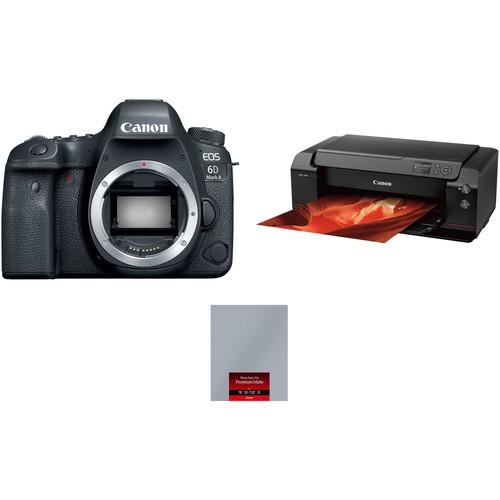 Contents of the user manual for the Canon EOS 6D Mark II Camera
- Product category: DSLR Cameras Canon
- Brand: Canon
- Description and content of package
- Technical information and basic settings
- Frequently asked questions – FAQ
- Troubleshooting (does not switch on, does not respond, error message, what do I do if...)
- Authorized service for Canon DSLR Cameras
|
User manual for the Canon EOS 6D Mark II Camera contain basic instructions
that need to be followed during installation and operation.
Before starting your appliance, the user manual should be read through carefully.
Follow all the safety instructions and warnings, and be guided by the given recommendations.
User manual is an integral part of any Canon product,
and if it is sold or transferred, they should be handed over jointly with the product.
Following the instructions for use is an essential prerequisite for protecting
health and property during use, as well as recognition of liability on the part of the manufacturer
for possible defects should you make a warranty claim. Download an official Canon user manual in which you will find instructions on how to install, use, maintain and service your product.
And do not forget – unsuitable use of a Canon product will considerably shorten its lifespan!
|
Product description Get the key items you need to shoot and print high-quality photos with this Canon EOS 6D Mark II Camera Body with PRO-1000 Inkjet Printer Kit put together by . Bundled together in this kit is the body only version of the 6D Mark II DSLR and the imagePROGRAF PRO-1000 17" printer. - Canon EOS 6D Mark II DSLR Camera (Body Only)
- First Look: Canon EOS 6D Mark II
- Official Canon EOS 6D Mark II Digital Camera Introduction
- Introducing the EOS 6D Mark II Digital Camera
- The EOS 6D Mark II Viewfinder and Live View AF Systems
Step up into the full-frame game with the EOS 6D Mark II DSLR Camera from Canon. Making high-performance full-frame imaging more accessible, the 6D Mark II makes numerous advancements over its predecessor to improve upon every aspect of image capture and creation. The main update comes in the form of a 26.2MP CMOS sensor and the use of the DIGIC 7 Image Processor to deliver sharper, more vivid imagery in a variety of shooting situations. This setup offers an improved native sensitivity range of ISO 100-40000, which can then be expanded to ISO 50-102400, as well as speedy shooting rates of up to 6.5 fps.
Ensuring your images are tack sharp is a 45-point all-cross type AF system, which is able to track subjects with accuracy. This marks a significant improvement over its predecessor and will result in faster acquisition of your subject. Along with a revamped AF system, the sensor features Dual Pixel CMOS AF technology to provide a boost to focusing in live view and video shooting, which itself has been bumped up to Full HD at 60p. This setup works well with the 3" 1.04m-dot vari-angle touchscreen LCD, which permits use at various angles and with intuitive controls.
For hybrid stills/video shooters, you will enjoy the enhanced video quality as well as the ability to plug in an external mic via a 3.5mm input. Users will also have the ability to create 4K time-lapse movies as well as HDR video with dedicated settings and modes. Additionally, the body design has received an upgrade with improved ergonomics and durability, including dust and water resistance. Users will have access to many connectivity options as well, such as Wi-Fi, NFC, and Bluetooth, for connecting to a smart device, and built-in GPS for geotagging your photos. - 26.2MP Full-Frame CMOS Sensor and DIGIC 7 Image Processor
- Offering boosts to both resolution and low-light performance, the 6D Mark II uses a newly developed 26.2MP full-frame CMOS sensor that works in tandem with a DIGIC 7 Image Processor to create sharp, vivid imagery and video. This contributes to high performance in low light with native sensitivity range of ISO 100-40000, which can then be expanded to ISO 50-102400, if desired.
Assisting with the capture of properly exposed images is a 7560-pixel RGB+IR metering sensor that helps minimize the impact of flickering lights in your images and ensures accurate reading of the entire scene. - 45-Point All-Cross Type AF and Dual Pixel CMOS AF Systems
- Ensuring your subject is tack sharp, the 6D Mark II incorporates an all-cross type AF system, which offers 45 phase-detect points, for advanced tracking and focusing while using the optical finder for stills. This AF system can operate in lighting conditions as low as -3 EV and will work with various lenses with maximum aperture of f/8 and smaller, though with a maximum of 27 points. Five different AF area selection modes are available as well, for optimizing performance to your subject matter.
When using Live View and recording video, you can now use Dual Pixel CMOS AF on the actual imaging sensor. This offers wide coverage of phase-detection autofocus for faster and more accurate focusing in these modes. It is ideal for video as users will enjoy smoother rack focusing without the downsides normally encountered with contrast-based systems. Also, this works well with the touchscreen functions, allowing shooters to just tap to adjust focus. - Full HD Video Recording
- For multimedia creation, the 6D Mark II comes equipped with powerful Full HD video recording options. The 6D Mark II offers improved speed with a maximum frame rate of 60p when capturing Full HD video. It also offers Digital IS with 5-axis image stabilization to minimize the appearance of camera shake for sharper handheld shooting. This benefits recording while walking or moving, and can also be used in conjunction with lenses featuring optical IS for more effective overall stabilization. Audio is high quality as well, with the ability to use either the built-in microphone or an external microphone via a 3.5mm input.
- Body Design
-
- A large 3.0" 1.04m-dot vari-angle LCD monitor is available for bright, vivid image playback and live view shooting, and its touchscreen interface features an anti-smudge design and can be used for intuitive touch-to-focus control and adjusting settings in the menus.
- A single SD card slot is available for saving photos and video.
- Optical viewfinder offers approximately 98% coverage of the frame and has a magnification of 0.71x.
- The durable body design is dust- and weather-sealed to permit working in harsh environments.
- Other Camera Features
-
- A built-in GPS module allows you to geotag imagery in-camera as well as auto time sync with the Universal Time Code via satellites. This module is compatible with American GPS, Russian GLONASS, and Japanese quasi-zenith Michibiki satellites for a wide coverage of support.
- A built-in intervalometer permits the creation of UHD 4K time-lapse imagery and supports recording consecutive frames in pre-selected intervals.
- Bluetooth permits linking a smartphone or tablet for quick image sharing between devices as well as remote control capabilities.
- Built-in Wi-Fi and NFC connectivity enable wireless sharing, control, and image transfer with a compatible smart device as well as the CS100 Connect Station.
UPC: 013803286557 - Canon imagePROGRAF PRO-1000 17" Professional Photographic Inkjet Printer
- First Look: Canon EOS 6D Mark II
- Official Canon EOS 6D Mark II Digital Camera Introduction
- Introducing the EOS 6D Mark II Digital Camera
- The EOS 6D Mark II Viewfinder and Live View AF Systems
Marked with the distinctive red line normally found on Canon's professional lenses, the imagePROGRAF PRO-1000 17" Professional Photographic Inkjet Printer is designed to offer users large-format print sizes with exceptional image quality. This printer leverages the outstanding FINE (Full-Photolithography Inkjet Nozzle Engineering) technology with a 50% larger print head than previous offerings and the 11-color LUCIA PRO pigment-based ink set and Chroma Optimizer to create prints with fine detail and a wide, accurate color gamut. The PRO-1000 also offers the largest print size in the imagePROGRAF line, up to 17" wide, and can print borderless at up to 17 x 22" as well as work with thick 27.6 mil fine art media.
Equipped with the L-COA PRO Image Processing Engine, the PRO-1000 can quickly and accurately determine printing paths and patterns in order to work as quickly and efficiently as possible. This enables bordered 17 x 22" photos to be created in just 4 minutes 10 seconds while a two-way vacuum feeder keeps media flat and quickly, accurately feeds the media. Also, to expand on the capabilities of the LUCIA PRO ink set, it offers four monochrome inks that reduce bronzing, increase black density, and expand dynamic range in the shadows for excellent grayscale prints. Additionally, the Chroma Optimizer cartridge improves color consistency on coated papers and reduces the difference in ink droplet height to ensure a smooth ink layer and less metamerism.
A 3.0" color LCD is available on the front of the unit for easily viewing settings and making adjustments. Also, connectivity is a highlight of this model with USB 2.0, Ethernet, and Wi-Fi options available. Wireless printing furthers the printer's overall capabilities by adding compatibility with Canon's PRINT App and PIXMA Cloud Link. The mobile app is available for iOS and Android devices and allows users to quickly transfer images and files for print as well as monitor the printer's settings. PIXMA Cloud Link provides access to Google Cloud Print for printing documents directly from cloud-based servers. - FINE (Full-Photolithography Inkjet Nozzle Engineering) printing technology works with 1,536 nozzles for each color to produce impressively detailed prints on a variety of fine-art papers with deep blacks, and accurate quality colors
- Two-way vacuum feeder keeps media flat and even while accurately and quickly moving media through the printer
- Prints a color bordered 17 x 22" photo in 4 minutes 10 seconds or a color bordered 13 x 19" photo in 2 minutes 30 seconds
- The Chroma Optimizer improves color consistency on coated papers and reduces the difference in ink droplet height to ensure a smooth ink layer, reducing metamerism
- Four monochrome inks work to create images with deep blacks for dramatic grayscale prints as well as reduce the effect of bronzing for photographs with a wide dynamic range, most notably in the dark or shadow areas of the image
- Minimum droplet size of 4pl for finely detailed imagery
- Pigment-based LUCIA PRO ink tanks hold 80ml
- Built-in Wi-Fi connectivity enables use with the Canon PRINT app for wirelessly sending files from a mobile device as well as remote monitoring of ink levels and printer status
- Wireless PictBridge, Apple AirPrint, and Canon PIXMA Cloud Link for accessing cameras, mobile devices, and cloud files directly
- 1GB of standard memory for handling large files with ease
- Support for fine art media up to 27.6 mil using the manual feed slot
- Rated EPEAT Silver, ENERGY STAR qualified, and RoHS Directive Certified to guarantee efficient power consumption
- Print Studio Pro v2.0 is plug-in for Adobe Photoshop and Lightroom with 16-bit processing will help you easily send high quality large-format files to the printer for making vivid, detailed photographic prints
- Media Configuration Tool enables customization of the media settings in both the driver and printer and can make adjustments such as print head height and vacuum strength
- Accounting Manager will help users track use and cost of consumables such as ink and media in order to determine print costs, and it can manage a number of users in a multi-unit environment
- Device Management Console can manage multiple PRO-1000 printer and monitor activity such as error messages and printer information
UPC: 013803257601 - Canon PM-101 Photo Paper Pro Premium Matte (17 x 22", 20 Sheets)
- First Look: Canon EOS 6D Mark II
- Official Canon EOS 6D Mark II Digital Camera Introduction
- Introducing the EOS 6D Mark II Digital Camera
- The EOS 6D Mark II Viewfinder and Live View AF Systems
With a smooth matte surface finish that will ensure images look great in a wide range of lighting conditions, Canon's PM-101 Photo Paper Pro Premium Matte, available here in a 20-pack of 17 x 22" sheets, is a great option for fine art printing. It offers a basis weight of 210 gsm that is highly manageable and a thickness of 12.2 mil for supporting the image when hung, as well as a brightness of 92% for a natural white base. UPC: 013803258912 In the Box - EOS 6D Mark II DSLR Camera (Body Only) dyycebftvdesvxyezvcbdcbdurzdubzv
- LP-E6N Lithium-Ion Battery Pack (7.2V, 1865mAh)
- LC-E6 Charger for LP-E6 Battery Pack
- Eyecup Eb
- RF-3 Body Cap for Canon EOS Cameras
- EW-EOS6DMKII Wide Neck Strap
- Limited 1-Year Warranty
- imagePROGRAF PRO-1000 17" Professional Photographic Inkjet Printer
Includes Free - PM-101 Photo Paper Pro Premium Matte (17 x 22", 20 Sheets)
Table of Contents
|
Upload User Manual
Have you got an user manual for the Canon EOS 6D Mark II Camera Body with PRO-1000 Inkjet Printer Kit in electronic form? Please send it to us and help us expand our library of instruction manuals.
Thank you, too, on behalf of other users.
To upload the product manual, we first need to check and make sure you are not a robot. After that, your "Submit Link" or "Upload File" will appear.
Technical parameters - Canon EOS 6D Mark II DSLR Camera (Body Only)
| | | Lens Mount | Canon EF | | Camera Format | Full-Frame (1x Crop Factor) | | Pixels | Actual: 27.1 Megapixel
Effective: 26.2 Megapixel | | Maximum Resolution | 6240 x 4160 | | Aspect Ratio | 1:1, 3:2, 4:3, 16:9 | | Sensor Type | CMOS | | Sensor Size | 35.9 x 24 mm | | Image File Format | JPEG, RAW | | Bit Depth | 14-Bit | | Image Stabilization | Digital, 5-Axis (Video Only) | | | | ISO Sensitivity | Auto, 100 to 40000 (Extended: 50 to 102400) | | Shutter Speed | Mechanical Shutter
1/4000 to 30 Seconds
Bulb Mode | | Metering Method | Center-Weighted Average, Evaluative, Partial, Spot | | Exposure Modes | Aperture Priority, Auto, Manual, Shutter Priority | | Exposure Compensation | -5 to +5 EV (1/3, 1/2 EV Steps) | | Metering Range | 1 to 20 EV | | White Balance | Auto, Cloudy, Color Temperature, Custom, Daylight, Flash, Fluorescent (White), Shade, Tungsten | | Continuous Shooting | Up to 6.5 fps at 26.2 MP
Up to 3 fps at 26.2 MP | | Interval Recording | Yes | | Self Timer | 2/10-Second Delay | | Mirror Lock-Up | Yes | | | | Recording Modes | MP4/H.264
Full HD (1920 x 1080) at 23.976p/25p/29.97p/50p/59.94p
HD (1280 x 720) at 23.976p/25p/29.97p/50p/59.94p | | External Recording Modes | Full HD (1920 x 1080) at 23.976p/29.97p/59.94p
HD (1280 x 720) at 29.97p/50p/59.94p | | Recording Limit | Up to 29 Minutes, 59 Seconds for Full HD (1920 x 1080) | | Video Encoding | NTSC/PAL | | ISO Sensitivity | Auto: 100 to 25600 | | Audio Recording | Built-In Microphone (Stereo)
External Microphone Input | | Audio File Format | AAC | | | | Focus Type | Auto and Manual Focus | | Focus Mode | Automatic (A), Continuous-Servo AF (C), Manual Focus (M), Single-Servo AF (S) | | Autofocus Points | Phase Detection: 45 (45 Cross-Type) | | Autofocus Sensitivity | -3 to +18 EV | | | | Viewfinder Type | Optical | | Viewfinder Eye Point | 21 mm | | Viewfinder Coverage | 98% | | Viewfinder Magnification | Approx. 0.71x | | Diopter Adjustment | -3 to +1 m | | Monitor Size | 3" | | Monitor Resolution | 1,040,000 Dot | | Monitor Type | Articulating Touchscreen LCD | | | | Built-in Flash | None | | Maximum Sync Speed | 1/180 Second | | Flash Compensation | -3 to +3 EV (1/3, 1/2 EV Steps) | | Dedicated Flash System | eTTL | | External Flash Connection | Hot Shoe | | | | Memory Card Slot | 1 x SD/SDHC/SDXC | | Connectivity | 3.5mm Microphone, Canon N3, HDMI C (Mini), Mini-USB, USB 2.0 | | Wireless | Wi-Fi | | GPS | Yes | | | | Operating Temperature | 32 to 104°F / 0 to 40°C | | Operating Humidity | 0 to 85% | | | | Battery | 1 x LP-E6N Rechargeable Lithium-Ion, 7.2 VDC, 1865 mAh | | Dimensions (W x H x D) | 5.7 x 4.4 x 2.9" / 144.0 x 110.5 x 74.8 mm | | Weight | 1.51 lb / 685 g (Body Only) | | | | Box Dimensions (LxWxH) | 9.8 x 7.2 x 5.9" | - Canon imagePROGRAF PRO-1000 17" Professional Photographic Inkjet Printer
| | | Printing Technology | FINE: Full-Photolithography Inkjet Nozzle Engineering | | Maximum Resolution | 2400 x 1200 dpi | | Print Speed | Bordered 17 x 22" / 43.2 x 55.9 cm Photo (Color): 4 min 10 sec
Bordered 13 x 19" / 33 x 48.3 cm Photo (Color): 2 min 30 sec | | Minimum Ink Droplet Size | 4 pl | | Print Color | Matte black, photo black, cyan, magenta, yellow, photo cyan, photo magenta, gray, photo gray, red, blue, chroma optimizer | | Ink Type | Pigment-based LUCIA PRO Ink Technology | | Ink Cartridge Configuration | 12 individual cartridges | | Compatible Ink Cartridges | PFI-1000 MBK LUCIA PRO Matte Black Ink Tank (80 ml)
PFI-1000 PBK LUCIA PRO Photo Black Ink Tank (80 ml)
PFI-1000 C LUCIA PRO Cyan Ink Tank (80 ml)
PFI-1000 M LUCIA PRO Magenta Ink Tank (80 ml)
PFI-1000 Y LUCIA PRO Yellow Ink Tank (80 ml)
PFI-1000 PC LUCIA PRO Photo Cyan Ink Tank (80 ml)
PFI-1000 PM LUCIA PRO Photo Magenta Ink Tank (80 ml)
PFI-1000 GY LUCIA PRO Gray Ink Tank (80 ml)
PFI-1000 PGY LUCIA PRO Photo Gray Ink Tank (80 ml)
PFI-1000 R LUCIA PRO Red Ink Tank (80 ml)
PFI-1000 B LUCIA PRO Blue Ink Tank (80 ml)
PFI-1000 CO LUCIA PRO Chroma Optimizer Ink Tank (80 ml) | | Number of Nozzles | 1,536 nozzles x 12 inks
Total: 18,432 nozzles | | Nozzle Pitch | 600 dpi x 2 | | Print Features | Apple AirPrint, borderless printing, Canon PRINT app, Grayscale Photo Printing, photo printing, Wireless PictBridge, wireless printing, Pro Gallery Print, PIXMA Cloud Link, 12 individual ink tanks, Advanced Pattern Print, Index Print, Fine Art Paper Support, L-COA PRO Image Processing Engine, Non-Firing and Compensation Function, Real Time Control of Ink Ejection, Air Feeding System, Color Density Sensor, Calibration Link, Contrast Reproduction | | | | Paper Handling | Rear tray
Manual feed slot | | Paper Sizes | Maximum Paper Width: 17" / 43.2 cm
Maximum Paper Length: 23.4" / 59.4 cm
Minimum Paper Length, Rear Tray: 5" / 12.7 cm
Minimum Paper Length, Manual Feed Slot: 10" / 25.4 cm | | Borderless Photo Sizes | 17 x 22" / 43.2 x 55.9 cm
14 x 17" / 35.6 x 43.2 cm
13 x 19" / 33 x 48.3 cm
11 x 14" / 27.9 x 35.6 cm
10 x 12" / 25.4 x 30.5 cm
8.5 x 11" / 21.6 x 27.9 cm
8 x 10" / 20.3 x 25.4 cm
5 x 7" / 12.7 x 17.8 cm
4 x 6" / 10.2 x 15.2 cm | | Media Thickness | Rear Tray: Up to 11.8 mil / 0.3 mm
Manual Feed Slot: 3.9-27.6 mil / 0.1-0.7 mm | | Print Archival Life | Gas Fastness: 60 years
Light Fastness: 45-60 years
Longevity in Photo Album: 200 years | | | | Interfaces | USB 2.0
Ethernet (10/100Base-T/TX)
Wi-Fi (IEEE 802.11b/g/n) | | Wireless Printing Features | Canon PRINT app
Apple AirPrint
Wireless PictBridge
Wireless Printing | | OS Compatibility | Windows 10, 8.1, 8, 7 SP1, 7, Vista SP2, Vista SP1, Server 2012 R2, Server 2012, Server 2008 R2, Server 2008
Mac OS X 10.7.5-10.10.x
iOS, Android | | Memory | 1 GB (standard) | | Printer Language | Swift Graphic Raster Job Control Language
IVEC | | | | Control Panel | 3" / 7.6 cm color LCD
Buttons | | Power Requirements | 100-240 VAC | | Power Consumption | Maximum: 37 W
Standby: 2.5 W
Power Off: 0.4 W | | Certifications | Rated EPEAT Silver
ENERGY STAR certified
RoHS Directive Certification | | Acoustic Noise | 41 dB(A) | | Operating Conditions | Recommended Temperature: 59 to 86°F / 15 to 30°C
Recommended Humidity: 10 to 80%, non-condensing | | Storage Conditions | Temperature: 32 to 104°F / 0 to 40°C
Humidity: 5 to 95%, non-condensing | | Dimensions | 28.5 x 17 x 11.2" / 72.4 x 43.2 x 28.4 cm | | Weight | 70.5 lb / 32 kg | | | | Box Dimensions (LxWxH) | 39.0 x 21.75 x 16.5" | - Canon PM-101 Photo Paper Pro Premium Matte (17 x 22", 20 Sheets)
| Basis Weight | 210 gsm | | Thickness | 12 mil / 0.3 mm | | Brightness | 92% | | Single/Double-Sided | Single | | Surface Finish | Matte | | Quantity | 20 Sheets | | Sheet Size (W x L) | 17 x 22" / 43.2 x 55.9 cm | | | | Box Dimensions (LxWxH) | 22.5 x 18.2 x 1.0" |
Rating88% users recommend this product to others. And what about you?

This product has already been rated by 16 owners. Add your rating and experience with the product.
Discussion
 Ask our technicians if you have a problem with your settings,
or if anything is unclear in the user manual you have downloaded.
You can make use of our moderated discussion.
The discussion is public and helps other users of our website who may be encountering similar problems.
Ask our technicians if you have a problem with your settings,
or if anything is unclear in the user manual you have downloaded.
You can make use of our moderated discussion.
The discussion is public and helps other users of our website who may be encountering similar problems.
The discussion is empty - enter the first post
Post a new topic / query / comment:
|
|
|
| Request for user manual |
You can’t find the operation manual you are looking for? Let us know and we will try to add the missing manual:
I’m looking for a manual / Request for manual
Current requests for instruction manuals:
Call Of Duty World War Two For Xbox...
controller stratus XL...
stratus XL...
smart whatch serie S11 42mm...
Allen & Heath SQ-6 manual...
|
| Discussion |
Latest contributions to the discussion:
AEW R 4100
Name: MAURICIO ANGARITA
Audio-Technica AEW-R4100 UHF Diversity Receiver for
AEW R 4100 has the mute function blocked and does not allow audio to pass. I tried several times to turn off the mute from the transmitter but it does nothing, the mute stays on. Solution?
Thank you...
Instructions for assembling the 2015 Forecast Image Master Consoles GC3-A
Name: mike elam
Forecast Consoles GC3-A ImageMaster Editing Console
Looking for instructions for assembling this console. ...
EMPTY TONER ERROR MESSAGE AFTER REPLACING TONER
Name: LINDA BAD YELLOW EYES
Brother TN223BK Standard-Yield Toner
I HAD TO CHANGE OUT ALL THREE TONERS DUE TO LEAKS IN THE YELLOW AND CYAN. AFTER I REPLACED THEM, THE MACHINE KEEPS GIVING ME AN EMPTY TONER ERROR MESSAGE. HELP!!...
PS480D 20/24 pin Switching 480W Power Supply
Name: swkargo
Logisys 480W Power Supply
This item states in can run -5vdc .It is NOT listed on the board or I beleive is r4 is missing the resitior. Any body have thid issue. Shawn
...
Help needed
Name: Ann Carter
SanDisk 1TB Extreme Portable USB 3.1
When I click the link to download the user manual for my Sandisk Extreme external hard drive, it gives me the manual for the LG Cricket. Can you please change the link so I can download the Sandisk manual and begin using this drive? Thank you....
|
|


