User Manual for Canon EOS 77D DSLR Camera Body with Inkjet Printer Kit Click to enlarge the picture
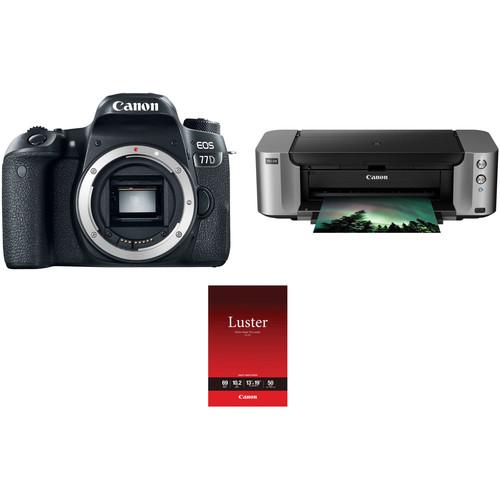 Contents of the user manual for the Canon EOS 77D DSLR Camera Body
- Product category: DSLR Cameras Canon
- Brand: Canon
- Description and content of package
- Technical information and basic settings
- Frequently asked questions – FAQ
- Troubleshooting (does not switch on, does not respond, error message, what do I do if...)
- Authorized service for Canon DSLR Cameras
|
User manual for the Canon EOS 77D DSLR Camera Body contain basic instructions
that need to be followed during installation and operation.
Before starting your appliance, the user manual should be read through carefully.
Follow all the safety instructions and warnings, and be guided by the given recommendations.
User manual is an integral part of any Canon product,
and if it is sold or transferred, they should be handed over jointly with the product.
Following the instructions for use is an essential prerequisite for protecting
health and property during use, as well as recognition of liability on the part of the manufacturer
for possible defects should you make a warranty claim. Download an official Canon user manual in which you will find instructions on how to install, use, maintain and service your product.
And do not forget – unsuitable use of a Canon product will considerably shorten its lifespan!
|
Product description Comprising everything needed to shoot and print high-resolution photographs, the Canon EOS 77D DSLR Camera with Inkjet Printer Kit from bundles the advanced DSLR with a PIXMA PRO-100 wireless inkjet printer. - Canon EOS 77D DSLR Camera (Body Only)
- First Look: Canon EOS 77D
- Introducing the EOS 77D Digital Camera
- Canon EOS 77D: HD Video
- Canon EOS 77D: Built In Wi-Fi
|
Upload User Manual
Have you got an user manual for the Canon EOS 77D DSLR Camera Body with Inkjet Printer Kit in electronic form? Please send it to us and help us expand our library of instruction manuals.
Thank you, too, on behalf of other users.
To upload the product manual, we first need to check and make sure you are not a robot. After that, your "Submit Link" or "Upload File" will appear.
Technical parameters - Canon EOS 77D DSLR Camera (Body Only)
| | | Lens Mount | Canon EF-S | | Camera Format | APS-C (1.6x Crop Factor) | | Pixels | Actual: 25.8 Megapixel
Effective: 24.2 Megapixel | | Maximum Resolution | 6000 x 4000 | | Aspect Ratio | 1:1, 3:2, 4:3, 16:9 | | Sensor Type | CMOS | | Sensor Size | 22.3 x 14.9 mm | | Image File Format | JPEG, RAW | | Bit Depth | 14-Bit | | Image Stabilization | Digital, 5-Axis (Video Only) | | | | ISO Sensitivity | Auto, 100 to 25600 (Extended: 100 to 51200) | | Shutter Speed | 1/4000 to 30 Seconds
Bulb Mode | | Metering Method | Center-Weighted Average, Evaluative, Partial, Spot | | Exposure Modes | Aperture Priority, Manual, Program, Shutter Priority | | Exposure Compensation | -5 to +5 EV (1/3, 1/2 EV Steps) | | Metering Range | 1 to 20 EV | | White Balance | Auto, Cloudy, Custom, Daylight, Flash, Fluorescent (White), Shade, Tungsten | | Continuous Shooting | Up to 6 fps at 24.2 MP for up to 190 Exposures (JPEG Format)
Up to 6 fps at 24.2 MP for up to 21 Exposures (Raw Format)
Up to 3 fps at 24.2 MP for up to 190 Exposures (JPEG Format)
Up to 3 fps at 24.2 MP for up to 21 Exposures (Raw Format) | | Interval Recording | Yes | | Self Timer | 2/10-Second Delay | | | | Recording Modes | MP4/H.264
Full HD (1920 x 1080) at 59.94p [60 Mb/s]
Full HD (1920 x 1080) at 23.976p/29.97p [30 Mb/s]
Full HD (1920 x 1080) at 29.97p [12 Mb/s]
HD (1280 x 720) at 59.94p [26 Mb/s]
HD (1280 x 720) at 29.97p [4 Mb/s]
SD (640 x 480) at 29.97p [9 Mb/s]
SD (640 x 480) at 29.97p [3 Mb/s]
MOV/iFrame
Full HD (1920 x 1080) at 29.97p [90 Mb/s] | | External Recording Modes | Full HD (1920 x 1080) at 23.976p/29.97p/59.94p
HD (1280 x 720) at 29.97p/59.94p
SD (640 x 480) at 29.97p | | Recording Limit | Up to 29 Minutes, 59 Seconds for Full HD (1920 x 1080) | | Video Encoding | NTSC/PAL | | ISO Sensitivity | Auto/Manual: 100 to 12800 (Extended: 25600) | | Audio Recording | Built-In Microphone (Stereo)
External Microphone Input | | Audio File Format | AAC | | | | Focus Type | Auto and Manual Focus | | Focus Mode | Continuous-Servo AF (C), Manual Focus (M), Single-Servo AF (S) | | Autofocus Points | Phase Detection: 45 (45 Cross-Type) | | Autofocus Sensitivity | -3 to +18 EV | | | | Viewfinder Type | Optical (Pentamirror) | | Viewfinder Eye Point | 19 mm | | Viewfinder Coverage | 95% | | Viewfinder Magnification | Approx. 0.82x | | Diopter Adjustment | -3 to +1 m | | Monitor Size | 3" | | Monitor Resolution | 1,040,000 Dot | | Monitor Type | Articulating Touchscreen LCD | | | | Built-in Flash | Yes | | Guide Number | 39.37' / 12 m at ISO 100 | | Maximum Sync Speed | 1/200 Second | | Flash Compensation | -2 to +2 EV (1/3, 1/2 EV Steps) | | Dedicated Flash System | eTTL | | External Flash Connection | Hot Shoe | | | | Memory Card Slot | 1 x SD/SDHC/SDXC | | Connectivity | 3.5mm Microphone, HDMI C (Mini), Mini-USB, USB 2.0 | | Wireless | Wi-Fi
Bluetooth | | GPS | None | | | | Operating Temperature | 32 to 104°F / 0 to 40°C | | Operating Humidity | 0 to 85% | | | | Battery | 1 x LP-E17 Rechargeable Lithium-Ion, 7.2 VDC, 1040 mAh | | Dimensions (W x H x D) | 5.2 x 3.9 x 3.0" / 131.0 x 99.9 x 76.2 mm | | Weight | 1.19 lb / 540 g | | | | Box Dimensions (LxWxH) | 8.8 x 6.6 x 5.9" | - Canon PIXMA PRO-100 Wireless Professional Inkjet Photo Printer
| | | Printing Technology | Inkjet | | Maximum Resolution | Up to 4800 x 2400 dpi (black/color) | | Print Speed | 8.0x10.0" Image ~ 51 seconds (A4 paper, with border)
11.0x14.0" Image: ~ 1 minute 30 seconds (A3 paper, with border) | | Ink Cartridge Configuration | 8 individual ink cartridges | | Compatible Ink Cartridges | CLI-42 Black
CLI-42 Cyan
CLI-42 Magenta
CLI-42 Yellow
CLI-42 Photo Cyan
CLI-42 Photo Magenta
CLI-42 Gray
CLI-42 Light Gray | | Number of Nozzles | 768 per color 6144 total | | Ink Droplet Size | 3.0 pl | | | | Maximum Printable Area | 13.0 x 19.0" (33.02 x 48.26 cm) | | Paper Sizes | Letter, Legal, 4.0 x 6.0" (10.16 x 15.24 cm), 5.0 x 7.0" (12.7 x 17.78 cm), 8.0 x 10.0" (20.32 x 25.4 cm), 11.0 x 17.0" (27.94 x 43.18 cm), 13.0 x 19.0" (33.02 x 48.26 cm) | | Paper Types | Plain: Plain Paper, Canon High Resolution Paper
Super High Gloss: Photo Paper Pro Platinum
Glossy: Photo Paper Plus Glossy II, Photo Paper Glossy
Semi-Gloss: Photo Paper Plus Semi-Gloss, Photo Paper Pro Luster
Matte: Matte Photo Paper
Fine Art Paper: Fine Art "Museum Etching"; Other Fine Art Papers
CD/DVD: Printable CD/DVD/Blu-ray Disc | | Paper Capacity | Auto Sheet Feeder: 150 sheets plain, 20 sheets photo (4.0 x 6.0"); 10 sheets Letter/8.0 x 10.0", 1 sheet A3+
Manual Feeder: 1 Sheet Photo Paper (all sizes) | | Paper-Feed Method | Auto sheet feeder, manual feeder | | | | Interface | Hi-Speed USB
Ethernet
Wireless LAN (802.11 b/g/n)
PictBridge (Cable not included) | | Direct Print Capable | PictBridge | | Network Capable | Ethernet, Wi-Fi | | Wireless Standards | 802.11b/g/n | | OS Compatibility | Windows 10, 8, 7/7 SP1, Vista SP1/SP2, XP SP3 (32-bit)
Mac OS X 10.7.5-10.11 | | Windows System Requirements | Windows 7/Windows 7 SP1: 1 GHz or faster 32-bit (x86) or 64-bit (x64) processor, IE6 or later, 1.0 GB (x86) or 2.0 GB (x64) RAM, 3.0 GB disk space, CD-ROM drive, SVGA 800 x 600 display
Vista SP1/SP2: 1 GHz processor, 512 MB RAM, 3.0 GB disk space, CD-ROM drive, SVGA 800 x 600 display
Windows XP SP3: 300 MHz 32-bit processor, 128 MB RAM, 3.0 GB disk space, CD-ROM drive, SVGA 800 x 600 display | | Mac OS System Requirements | OS X 10.7: Intel Core 2 Duo, Core i3, Core i5, Core i7, or Xeon processor, 2 GB RAM, Safari 3 or later, 1.5 GB disk space, CD-ROM drive, XGA 1024 x 768 display
OS X 10.6: Intel processor, 1 GB RAM, Safari 3 or later, 1.5 GB disk space, CD-ROM drive, XGA 1024 x 768 display
OS X 10.5.8: Intel processor, 512 MB RAM, Safari 3 or later, 1.5 GB disk space, CD-ROM drive, XGA 1024 x 768 display | | | | Power Requirements | 100 to 240 VAC, 50/60 Hz | | Power Consumption | Printing: 19 W
Standby: 2.3 W
Off: 0.3 W | | Temperature / Humidity | Operating Temperature: 41 to 95°F (5 to 35°C)
Storage Temperature: 32 to 104°F (0 to 40°C)
Operating Humidity: 10 to 90%
Storage Humidity: 5 to 95% | | Acoustics | 38.5 dB(A) | | Installation Clearance | Front: 17.0" (43.18 cm)
Back: 10.0" (25.4 cm) | | Dimensions (WxHxD) | 27.2 x 8.5 x 15.2" (69.09 x 21.59 x 38.61 cm) | | Weight | 43.2 lb (19.60 kg) | | | | Box Dimensions (LxWxH) | 31.25 x 20.75 x 13.0" | - Canon Photo Paper Pro Luster (13 x 19", 50 Sheets)
| Coating | Resin | | Basis Weight | 255 gsm | | Thickness | 10.2 mil / 0.26 mm | | Brightness | 92% | | Single/Double-Sided | Single | | Surface Finish | Luster | | Quantity | 50 Sheets | | Sheet Size (W x L) | 13 x 19" / 33.02 x 48.26 cm | | | | Box Dimensions (LxWxH) | 20.5 x 13.3 x 1.1" |
Rating50% users recommend this product to others. And what about you?

This product has already been rated by 40 owners. Add your rating and experience with the product.
Discussion
 Ask our technicians if you have a problem with your settings,
or if anything is unclear in the user manual you have downloaded.
You can make use of our moderated discussion.
The discussion is public and helps other users of our website who may be encountering similar problems.
Ask our technicians if you have a problem with your settings,
or if anything is unclear in the user manual you have downloaded.
You can make use of our moderated discussion.
The discussion is public and helps other users of our website who may be encountering similar problems.
The discussion is empty - enter the first post
Post a new topic / query / comment:
|
|


