|
User Manual for Canon EOS R Mirrorless Digital Camera with Ninja V Kit Click to enlarge the picture
 Contents of the user manual for the Canon EOS R Mirrorless Digital Camera
- Product category: Mirrorless System Cameras Canon
- Brand: Canon
- Description and content of package
- Technical information and basic settings
- Frequently asked questions – FAQ
- Troubleshooting (does not switch on, does not respond, error message, what do I do if...)
- Authorized service for Canon Mirrorless System Cameras
|
User manual for the Canon EOS R Mirrorless Digital Camera contain basic instructions
that need to be followed during installation and operation.
Before starting your appliance, the user manual should be read through carefully.
Follow all the safety instructions and warnings, and be guided by the given recommendations.
User manual is an integral part of any Canon product,
and if it is sold or transferred, they should be handed over jointly with the product.
Following the instructions for use is an essential prerequisite for protecting
health and property during use, as well as recognition of liability on the part of the manufacturer
for possible defects should you make a warranty claim. Download an official Canon user manual in which you will find instructions on how to install, use, maintain and service your product.
And do not forget – unsuitable use of a Canon product will considerably shorten its lifespan!
|
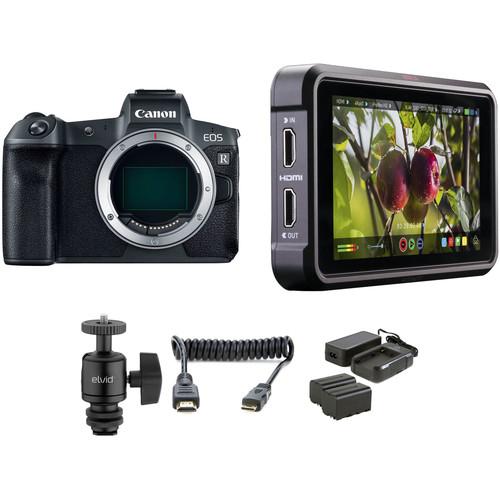
Product description In the Field: Canon EOS R Full-Frame Mirrorless System Read More sacdqaqyfdvctztdtqebfzfdyd Configured for the aspiring filmmaker, the Canon EOS R Mirrorless Digital Camera with Ninja V Kit from bundles the multimedia mirrorless body with an Atomos Ninja V 5" 4K HDMI Recording Monitor, a power kit for the external monitor, a mount for attaching the monitor to the camera, and an HDMI cable. - Canon EOS R Mirrorless Digital Camera (Body Only)
- Dollar Store Challenge with the Canon EOS R
- Canon EOS R Goes Bowling at Depth of Field After Party
- Discover the New Canon EOS R System with Rudy Winston
- Canon EOS R System Operability
- EOS R Quick Tips: Electronic ViewfinderThe Basics
- Canon EOS R Sample Video - Lake Natron
The first step in Canon's mirrorless evolution, the EOS R pairs a redeveloped lens mount and updated full-frame image sensor for a unique and sophisticated multimedia camera system. Revolving around the new RF lens mount, the EOS R is poised to be the means from which to make the most of a new series of lenses and optical technologies.
Focusing on the camera itself, the EOS R features a high-resolution 30.3MP full-frame CMOS sensor along with a DIGIC 8 image processor. The combination of these technologies offers a wide sensitivity range up to a native ISO 40000, fast continuous shooting to 8 fps, and UHD 4K30 video recording. In addition to imaging, the sensor also facilitates an advanced Dual Pixel CMOS AF system, which uses 5655 selectable points for quickly and accurately acquiring focus. This focusing system is also sensitive down to EV -6 for working in impressively dark conditions. The AF system is also perfectly matched to the UHD 4K video recording capabilities, which are also rounded out by Movie Digital IS to minimize camera shake, built-in Canon Log gamma for a greater dynamic range, and 4K 10-bit 4:2:2 output over HDMI for even greater color control.
Beyond the performance attributes, this camera has been designed from the ground up and features a high-resolution 3.69m-dot OLED electronic viewfinder for clear and bright eye-level viewing. Conversely, a rear 3.15" 2.1m-dot LCD touchscreen is also featured, and has a swivel design to suit working from high and low angles. Also catering to the tactile cravings is a Multi-Function bar, which is customizable for intuitively adjusting shooting settings. And as a camera built to withstand the toughest environments, the magnesium alloy body is dust and moisture-sealed. - Canon RF Lens Mount
- Beginning with a new lens mount, the EOS R is the first camera to support Canon's line of RF-mount lenses. This mount is characterized by its wide 54mm diameter and short 20mm flange-back distance, which promotes the ability to design lenses that are both faster and smaller than their SLR equivalents. The mount also incorporates a 12-pin electronic contact system for more sophisticated autofocus and image stabilization capabilities. This mount design also lends full compatibility to existing EF and EF-S-mount lenses via an optional EF-EOS R Mount Adapter.
- 30.3MP Full-Frame CMOS Sensor and DIGIC 8 Image Processor
- A large 30.3MP full-frame CMOS sensor is featured and serves as an ideal balance between high-resolution output, low-light performance, and high-speed capabilities. When paired with the DIGIC 8 image processor, the EOS R affords a native sensitivity range of ISO 100-40000, which can be expanded to ISO 50-102400 for working in a variety of lighting conditions. Quick continuous shooting to 8 fps is also supported for photographing moving subjects.
- Dual Pixel CMOS AF
- Dual Pixel CMOS AF offers smooth and fast focusing performance in a similar manner to how a camcorder acquires focus. This system integrates two separate photodiodes within each pixel to provide a broad and dense network of 5655 phase-detection gathering elements across a majority of the image sensor to reduce focus hunting for faster, more direct control of focus placement. When working with still imagery, this focusing system works to acquire focus quickly and accurately, making it ideally suited to shooting and tracking moving subjects so that critical focus is attained with each shot. When shooting video, a Movie Servo AF mode offers smooth and natural focusing when changing from different subjects or different distances within the scene, as well as the ability to specify tracking sensitivity, AF speed, and Face Tracking priority. Benefited by the Touch AF system, rack focus is possible simply by touching elements within the scene on the touchscreen in order to change focus in an intuitive manner. Subject tracking in movies is also heightened due to the Dual Pixel CMOS AF system's ability to recognize subjects and maintain focus when working within changing or cluttered scenery. Additionally, the focus system is sensitive down to EV -6 for working in truly low-light conditions with accurate AF capabilities.
- UHD 4K Video Recording and Canon Log Gamma
- Designed for multimedia image-maker, the EOS R supports UHD 4K (3840 x 2160) resolution recording at up to 30 fps at 480 Mb/s, along with Full HD 1080p shooting at 60 fps and HD 720p at 120 fps for slow motion playback. When recording in-camera, 4K video has 4:2:2 sampling and 8-bit color depth, a 4:2:2 10-bit clean output in ITU-R CT.2020 is possible when using an external recorder.
Integrated Canon Log also allows users to capture flat images with an improved dynamic range of 800%, or 12 stops. This function makes it easier to match cameras in post-production as well as provides the most latitude and potential for color grading. For monitoring, a View Assist function is available, which emulates a graded look for more accurate viewing on the camera's LCD.
Audio can be recorded using the on-board stereo microphone or an optional external mic can also be used via the 3.5mm mic jack. - Dual Pixel RAW
- First introduced with the EOS 5D Mark IV, Dual Pixel RAW allows photographers to record all the information the sensor's unique pixel architecture can deliver, providing a way for fine adjustments to be made after the image is taken. These adjustments include focus fine tuning that can help you ever-so-slightly adjust the focus point to bring out extra details, shift bokeh around for improved composition, and reduce the impact of ghosting on your photos. This requires the use of Canon's Digital Photo Professional software.
- Body Design
-
- Integrated 3.69m-dot OLED electronic viewfinder has 0.71x magnification and affords a bright and clear means for eye-level viewing.
- Rear 3.15" 2.1m-dot LCD features a swivel design for easier use when working from high, low, and front-facing angles. It is also a touchscreen for intuitive control over shooting, playback, and menu navigation controls.
- Customizable Multi-Function Bar is located near the viewfinder on the rear of the camera, and can be set to control four functions using right, left, slide, and press movements. It can be used to adjust ISO or white balance, to check focus/display focus info or AF modes, change to movie shooting modes, use flexible-priority AE, or be customized for other functions.
- Top panel incorporates a dot-matrix LCD, which provides quick access to important camera settings.
- One SD memory card slot featured, and supports the UHS-II protocol for faster read and write speeds to better support 4K video recording and fast continuous shooting.
- Magnesium alloy body design is lightweight, durable, and features dust- and water-resistant seals for use in a variety of weather conditions.
- Built-in Wi-Fi and Bluetooth connectivity enable wireless sharing, control, and image transfer with a compatible smart device via the Canon Camera Connect app, which also supports geotagging your files using your mobile device's location data.
- Included LP-E6N rechargeable lithium-ion battery provides approximately 430 shots per charge, and in-camera charging is supported via the PD-E1 USB Power Adapter. This camera is also compatible with the LP-E6 battery, however is not supported for in-camera charging.
- Other Camera Features
-
- Digital Lens Optimizer helps to minimize the appearance of various optical aberrations in-camera, including diffraction, for cleaner image quality.
- Multi shot noise reduction technology records four sequential exposures and then combines them in-camera to produce an image with smoother tones and lower noise to suit long exposure images.
- Images can be saved as Compact Raw (C-RAW / .CR3) files, which offer smaller file sizes for faster post-processing.
- Language Support: English, German, French, Dutch, Danish, Portuguese, Finnish, Italian, Ukraine, Norwegian, Swedish, Spanish, Greek, Russian, Polish, Czech, Hungarian, Vietnamese, Hindi, Romanian, Turkish, Arabic, Thai, Simplified/Traditional Chinese, Korean, Malay, Indonesian, and Japanese.
UPC: 013803306347 - Atomos Ninja V 5" 4K HDMI Recording Monitor
- Dollar Store Challenge with the Canon EOS R
- Canon EOS R Goes Bowling at Depth of Field After Party
- Discover the New Canon EOS R System with Rudy Winston
- Canon EOS R System Operability
- EOS R Quick Tips: Electronic ViewfinderThe Basics
- Canon EOS R Sample Video - Lake Natron
The Atomos Ninja V 5" 4K HDMI Recording Monitor is a 5" on-camera monitor/recorder that records and plays back DCI 4K, UHD 4K, and HD video from purpose-built mini-SSDs. It features a 10-bit FRC IPS screen with a brightness of 1000 cd/m², which makes it suitable for use in both exterior and interior conditions. The AtomHDR display technology allows you to accurately monitor your log gamma footage without having to view flat, washed-out looking images or use a LUT to compress the dynamic range and color space. The monitor supports popular log formats from Sony, Canon, Panasonic, ARRI, RED, and JVC cameras. The settings only affect viewing, with recorded video remaining unaltered.
Built to withstand the rigors of production, the Ninja V features an aluminum chassis and powers from a single L-series battery. Additional features include a variety of onscreen exposure analysis, framing, and focus assist tools, as well as anamorphic de-squeeze. A power supply and SSD Caddy are included with the unit. Designed with an interface that differs somewhat from prior units, the Ninja V's HDR functions are accessed through the MON buttons and its ProRes options are chosen via the arrows on the unit's upper left corner. The Ninja V can record to both AtomX SSDmini or standard 2.5" SSD drives, fitting up to 150 minutes of 4K video on an 1TB drive. Separately available AtomX Ethernet/NDI and SYNC Expansion Modules enable you to output live video over IP or add wireless timecode for multicamera shoots respectively. AtomHDR - With AtomHDR you can monitor up to ten stops of dynamic range of your camera's LOG image. Most conventional monitors can only display six or seven stops, which is fine for standard footage; but a Log image will look overly flat. It is also superior to monitoring with a loaded LUT, which can clip the highlights and mask shadows.
Supported Log Formats -
- ARRI Log C
- Canon CLog / CLog 2
- Fuji F-Log
- JVC JLog
- Sony SLog2 / SLog3
- Panasonic Vlog
- RED LogFilm
HDR Recording -
- ARRI Log CEI160 / LogCEI200 / LogCEI250 / LogCEI320/ LogCEI400 / LogCEI500 / LogCEI640 / LogCEI800 / LogCEI1000 / LogCEI1280 / LogCEI1600
- Canon CLog / CLog2 / Clog3
- Fuji F-Log
- JVC JLog1
- Panasonic Vlog
- PQ10k, HLG
- RED LogFilm / Log3G10 / Log3G12
- Sony SLog / SLog2 / SLog3
HDR Monitoring -
- ARRI ALEXA Wide Gamut
- Canon Cinema / DCI P3 / DCI P3+ / BT2020
- Fuji F-Log
- JVC LS300
- Panasonic V Gamut
- Rec. 2100
- Rec. 709
- RED DragonColor / DragonColor2 / RedColor2 / RedColor3 / RedColor4 / RedWideGamut
- Sony SGamut / SGamut3 / SGamut3.cine / BT2020
- Wide Color Gamut (SGamut / SGamut3 / SGamut3.cine / Canon Cinema / BT2020 / DCI P3 / DCI P3+ / Panasonic V Gamut / ARRI ALEXA Wide Gamut) mapping to Rec. 709 on screen
- Wide Color Gamut (SGamut / SGamut3 / SGamut3.cine / Canon Cinema / BT2020 / DCI P3 / DCI P3+ / Panasonic V Gamut / ARRI ALEXA Wide Gamut) mapping to Rec. 709 / BT2020 / DCI P3 on loop out
4K 60p Capabilities - Record high-resolution 4K footage in DCI or UHD formats up to 60 fps, including 24 and 25 fps for a more film-like aesthetic. All recordings are stored as high-quality Apple ProRes or Avid DNxHR files with 10-bit 4:2:2 chroma subsampling. A variety of bit rates are available to fit your project and storage needs.
SSD Recording - Record to standard 2.5" SSD drives or to compact AtomX SSDmini drives, capturing up to 150 minutes of 4K video on a 1TB drive.
Audio I/O - Input/output audio via HDMI or add external audio via the 3.5mm Line In/Mic In port; output audio using the 3.5mm headphone port for convenient audio monitoring.
5" Daylight Viewable Screen - The Ninja V features a 5" IPS LCD screen that is illuminated by a bright 1000 cd/m² LED backlight, making it possible to view in daylight without requiring a hood. Plus, the screen is also color calibrated from the factory to ensure accurate image representation.
HDR Signal Management - Log and HDR signals can be difficult to monitor with conventional equipment. Though, with the Ninja V's built-in HDR signal management functions, the log signal can be converted to the PQ standard for compatibility with existing consumer and professional HDR equipment.
Anamorphic De-Squeeze - The Ninja V supports Anamorphic de-squeeze, allowing you to comfortably view anamorphic footage with a squeeze of 2x, 1.5x, 1.33, and Panasonic's 8:3.
Edit-Ready Recording - Incoming video signals can be recorded in a wide range of Apple ProRes and Avid DNx codecs which maintain high quality while not requiring the storage space of uncompressed video. Both ProRes and DNx are edit-friendly, requiring no conversion in post-production to ensure smooth playback and compatibility with most common video editing software.
Optional Expansion Modules - The Ninja V features a bidirectional high-speed video port along with power and audio which enables the use of the AtomX Ethernet/NDI and SYNC modules along with future module releases.
UPC: 814164021074 - Elvid Heavy Duty Camera Shoe Mount Adapter with Ball Head for Monitors
- Dollar Store Challenge with the Canon EOS R
- Canon EOS R Goes Bowling at Depth of Field After Party
- Discover the New Canon EOS R System with Rudy Winston
- Canon EOS R System Operability
- EOS R Quick Tips: Electronic ViewfinderThe Basics
- Canon EOS R Sample Video - Lake Natron
Add a monitor to your video recording system with this aluminum Heavy Duty Camera Shoe Mount Adapter with Ball Head from Elvid. This convenient accessory mounts directly to a camera's shoe mount, and allows for the attachment of a full array of video accessories. Specifically meant to attach monitors or small lights to your camcorder or camera while shooting video, this ball head has a single locking knob for fast and safe operation, and is easily removable. Accessories attach via the 1/4"-20 screw thread on top, and the bottom features a removable shoe mount and a 3/8" thread. The shoe mount itself is removable and features its own 3/8"-16 mounting screw, in case you want to use it without the ball head. Note: Due to its compact design, this ball head should not be used to support a camera. - Removeable shoe mount on bottom and 1/4"-20 screw on top allows for multiple applications
- Single locking knob for safe and fast operation
- Head itself allows for 90º vertical articulation
- Fits most standard shoe mounts (except for Sony flash shoe)
UPC: 847628578029 - Atomos Full to Mini HDMI Coiled Cable (11.8 to 17.7")
- Dollar Store Challenge with the Canon EOS R
- Canon EOS R Goes Bowling at Depth of Field After Party
- Discover the New Canon EOS R System with Rudy Winston
- Canon EOS R System Operability
- EOS R Quick Tips: Electronic ViewfinderThe Basics
- Canon EOS R Sample Video - Lake Natron
The 11.8 to 17.7" Full to Mini HDMI Coiled Cable from Atomos is coiled to prevent clutter, but it can extend up to 17.7". UPC: 853815005674 - Atomos Power Kit for Shogun/Ninja Inferno & Flame
- Dollar Store Challenge with the Canon EOS R
- Canon EOS R Goes Bowling at Depth of Field After Party
- Discover the New Canon EOS R System with Rudy Winston
- Canon EOS R System Operability
- EOS R Quick Tips: Electronic ViewfinderThe Basics
- Canon EOS R Sample Video - Lake Natron
The Atomos Power Kit includes two NP-F750 5200mAh batteries, a charger, and a power adapter for the Shogun/Ninja Inferno and Flame. UPC: 814164020756 In the Box - EOS R Mirrorless Digital Camera (Body Only) sacdqaqyfdvctztdtqebfzfdyd
- LP-E6N Lithium-Ion Battery Pack (7.2V, 1865mAh)
- LC-E6 Charger for LP-E6 Battery Pack
- ER-100B Neck Strap
- Cable Protector
- IFC-100U Interface Cable (39.4")
- R-F-5 Camera Cover
- Limited 1-Year Warranty
- Atomos - Ninja V 5" 4K HDMI Recording Monitor
- Elvid - Heavy Duty Camera Shoe Mount Adapter with Ball Head for Monitors sacdqaqyfdvctztdtqebfzfdyd
- Atomos - Full to Mini HDMI Coiled Cable (11.8 to 17.7")
- Atomos - Power Kit for Shogun/Ninja Inferno & Flame
Canon EOS R: Great Start for Full-Frame RF Mirrorless System Shawn C. Steiner 12/13/2018 sacdqaqyfdvctztdtqebfzfdyd Table of Contents
|
Upload User Manual
Have you got an user manual for the Canon EOS R Mirrorless Digital Camera with Ninja V Kit in electronic form? Please send it to us and help us expand our library of instruction manuals.
Thank you, too, on behalf of other users.
To upload the product manual, we first need to check and make sure you are not a robot. After that, your "Submit Link" or "Upload File" will appear.
Technical parameters - Canon EOS R Mirrorless Digital Camera (Body Only)
| | | Lens Mount | Canon RF | | Camera Format | Full-Frame (1x Crop Factor) | | Pixels | Actual: 31.7 Megapixel
Effective: 30.3 Megapixel | | Maximum Resolution | 6720 x 4480 | | Aspect Ratio | 1:1, 3:2, 4:3, 16:9 | | Sensor Type | CMOS | | Sensor Size | 36 x 24 mm | | Image File Format | JPEG, RAW | | Bit Depth | 14-Bit | | Image Stabilization | Digital, 5-Axis (Video Only) | | | | ISO Sensitivity | Auto, 100 to 40000 (Extended: 50 to 102400) | | Shutter Speed | Electronic Front Curtain Shutter
1/8000 to 30 Seconds
Bulb Mode | | Metering Method | Center-Weighted Average, Evaluative, Partial | | Exposure Modes | Aperture Priority, Manual, Shutter Priority | | Exposure Compensation | -3 to +3 EV (1/3, 1/2 EV Steps) | | Metering Range | -3 to 20 EV | | White Balance | Auto, Cloudy, Color Temperature, Custom, Daylight, Flash, Fluorescent (White), Shade, Tungsten | | Continuous Shooting | Up to 8 fps at 30.3 MP for up to 47 Exposures (Raw Format)
Up to 8 fps at 30.3 MP for up to 100 Exposures (JPEG Format)
Up to 3 fps at 30.3 MP for up to 47 Exposures (Raw Format)
Up to 3 fps at 30.3 MP for up to 100 Exposures (JPEG Format)
Up to 2.2 fps at 30.3 MP for up to 47 Exposures (Raw Format)
Up to 2.2 fps at 30.3 MP for up to 100 Exposures (JPEG Format) | | Self Timer | 2/10-Second Delay | | | | Recording Modes | MP4/H.264
UHD 4K (3840 x 2160) at 23.976p/24p/25p/29.97p
Full HD (1920 x 1080) at 23.976p/24p/25p/29.97p/50p/59.94p
HD (1280 x 720) at 25p/29.97p/50p/59.94p/100p/120p | | External Recording Modes | 4:2:2 10-Bit
UHD 4K (3840 x 2160) | | Recording Limit | Up to 29 Minutes, 59 Seconds | | Video Encoding | NTSC/PAL | | Audio Recording | Built-In Microphone (Stereo)
External Microphone Input | | Audio File Format | AAC, Linear PCM (Stereo) | | | | Focus Type | Auto and Manual Focus | | Focus Mode | Continuous-Servo AF (C), Manual Focus (M), Single-Servo AF (S) | | Autofocus Points | Phase Detection: 5655 | | Autofocus Sensitivity | -6 to +18 EV | | | | Viewfinder Type | Electronic | | Viewfinder Size | 0.5" | | Viewfinder Resolution | 3,690,000 Dot | | Viewfinder Eye Point | 23 mm | | Viewfinder Coverage | 100% | | Viewfinder Magnification | Approx. 0.71x | | Diopter Adjustment | -4 to +2 m | | Monitor Size | 3.15" | | Monitor Resolution | 2,100,000 Dot | | Monitor Type | Articulating Touchscreen LCD | | | | Built-in Flash | None | | Flash Modes | Flash On, Slow Sync | | Flash Compensation | -3 to +3 EV (1/3, 1/2 EV Steps) | | Dedicated Flash System | eTTL | | External Flash Connection | Hot Shoe | | | | Memory Card Slot | 1 x SD/SDHC/SDXC | | Connectivity | 3.5mm Microphone, HDMI C (Mini), USB Type-C | | Wireless | Wi-Fi
Bluetooth | | GPS | None | | | | Operating Temperature | 32 to 104°F / 0 to 40°C | | Operating Humidity | 0 to 85% | | | | Battery | 1 x LP-E6N Rechargeable Lithium-Ion, 7.2 VDC, 1865 mAh | | Dimensions (W x H x D) | 5.3 x 3.9 x 3.3" / 135.8 x 98.3 x 84.4 mm | | Weight | 1.45 lb / 660 g (Body with Battery and Memory) | | | | Box Dimensions (LxWxH) | 11.1 x 8.9 x 6.0" | - Atomos Ninja V 5" 4K HDMI Recording Monitor
| | | Panel Type | IPS-Type LCD | | Display Size | 5.0" / 12.7 cm | | Screen Resolution | 1920 x 1080 | | Aspect Ratio | 16:9 | | Touchscreen | Yes | | Maximum Brightness | 1000 cd/m2 | | Bit Depth / Color Support | 8-Bit+FRC (1.07 Billion Colors) | | Pixels Per Inch (ppi) | 427 ppi | | Color Gamut | 100% Rec. 709 | | Real-Time LUT Monitoring | SDR | | | | Video | 1 x HDMI Type A (HDMI 2.0) Output
1 x HDMI Type A (HDMI 2.0) Input | | Embedded Audio | HDMI: 8-Channel | | Audio | 1 x 3.5 mm Mic/Line Input
1 x 3.5 mm Headphone Output | | Built-In Speaker | None | | Power | 1 x Barrel Input | | Other I/O | 1 x LANC (2.5 mm) | | Card Slot | None | | | | Video Format | HDMI (8/10-Bit 4:2:2)
DCI 4K: 60/50/30/25/24
UHD 4K: 60/50/30/25/24
1080p: 120/60/50/30/25/24
1080i: 60/50
720p: 60/50 | | Video Signal Conversion | HDMI to SDI
DCI 4K: 24/25/30/50/60
UHD 4K: 24/25/30/50/60
1080p: 24/25/30/50/60/100/120
1080i: 50/60
720p: 50/60 | | | | Pulldown Conversion | 2:2, 3:2 | | Encoding Formats | 3840 x 2160
ProRes 422, LT, HQ
DNxHR HQ, HQX, SQ, LB | | Recording Media | 1 x 2.5" SSD (SATA III)
1 x AtomX SSDmini (SATA III) | | | | DC Input Power | 6.2 to 16.8 VDC | | Battery Type | 1 x L-Series | | Power Consumption | 10 W (Typical)
19 W (Maximum) | | | | Mounting | 2 x 1/4"-20 Female | | | | Material of Construction | Aluminum, Polycarbonate | | Dimensions (W x H x D) | 5.94 x 3.6 x 1.22" / 151 x 91.5 x 31 mm | | Weight | 11.3 oz / 320 g | | | | Box Dimensions (LxWxH) | 7.7 x 5.7 x 4.3" | - Elvid Heavy Duty Camera Shoe Mount Adapter with Ball Head for Monitors
| Bottom Mount | 1 x 3/8"-16 Female
1 x Accessory Foot | | Top Mount | 1 x 1/4"-20 Male | | Load Capacity | 15 lb / 6.8 kg | | Material | Aluminum | | Weight | 0.3 lb / 136.0 g | | | | Box Dimensions (LxWxH) | 3.95 x 3.8 x 1.55" | - Atomos Full to Mini HDMI Coiled Cable (11.8 to 17.7")
| Connector 1 | HDMI Type-A Male | | Connector 2 | HDMI Type-C Male | | Cable Length | 11.8 to 17.7" / 30 to 45 cm | | | | Box Dimensions (LxWxH) | 6.3 x 5.0 x 0.5" | - Atomos Power Kit for Shogun/Ninja Inferno & Flame
| | | Box Dimensions (LxWxH) | 7.2 x 4.35 x 3.8" |
Rating92% users recommend this product to others. And what about you?

This product has already been rated by 34 owners. Add your rating and experience with the product.
Discussion
 Ask our technicians if you have a problem with your settings,
or if anything is unclear in the user manual you have downloaded.
You can make use of our moderated discussion.
The discussion is public and helps other users of our website who may be encountering similar problems.
Ask our technicians if you have a problem with your settings,
or if anything is unclear in the user manual you have downloaded.
You can make use of our moderated discussion.
The discussion is public and helps other users of our website who may be encountering similar problems.
The discussion is empty - enter the first post
Post a new topic / query / comment:
|
|
|
| Request for user manual |
You can’t find the operation manual you are looking for? Let us know and we will try to add the missing manual:
I’m looking for a manual / Request for manual
Current requests for instruction manuals:
Call Of Duty World War Two For Xbox...
controller stratus XL...
stratus XL...
smart whatch serie S11 42mm...
Allen & Heath SQ-6 manual...
|
| Discussion |
Latest contributions to the discussion:
AEW R 4100
Name: MAURICIO ANGARITA
Audio-Technica AEW-R4100 UHF Diversity Receiver for
AEW R 4100 has the mute function blocked and does not allow audio to pass. I tried several times to turn off the mute from the transmitter but it does nothing, the mute stays on. Solution?
Thank you...
Instructions for assembling the 2015 Forecast Image Master Consoles GC3-A
Name: mike elam
Forecast Consoles GC3-A ImageMaster Editing Console
Looking for instructions for assembling this console. ...
EMPTY TONER ERROR MESSAGE AFTER REPLACING TONER
Name: LINDA BAD YELLOW EYES
Brother TN223BK Standard-Yield Toner
I HAD TO CHANGE OUT ALL THREE TONERS DUE TO LEAKS IN THE YELLOW AND CYAN. AFTER I REPLACED THEM, THE MACHINE KEEPS GIVING ME AN EMPTY TONER ERROR MESSAGE. HELP!!...
PS480D 20/24 pin Switching 480W Power Supply
Name: swkargo
Logisys 480W Power Supply
This item states in can run -5vdc .It is NOT listed on the board or I beleive is r4 is missing the resitior. Any body have thid issue. Shawn
...
Help needed
Name: Ann Carter
SanDisk 1TB Extreme Portable USB 3.1
When I click the link to download the user manual for my Sandisk Extreme external hard drive, it gives me the manual for the LG Cricket. Can you please change the link so I can download the Sandisk manual and begin using this drive? Thank you....
|
|


