|
User Manual for Canon imageFORMULA DR-6010C Production Scanner Click to enlarge the picture
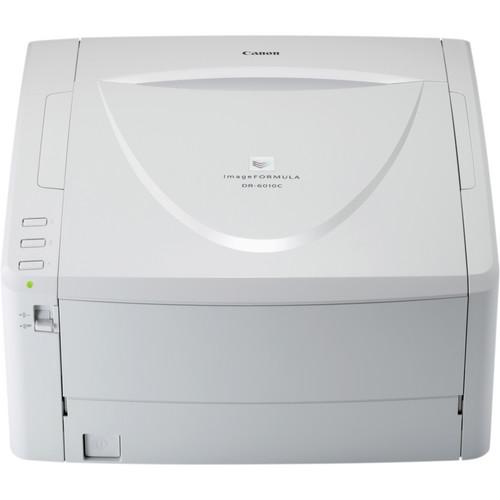 Contents of the user manual for the Canon imageFORMULA DR-6010C Production Scanner
- Product category: Flatbed & Document Scanners Canon
- Brand: Canon
- Description and content of package
- Technical information and basic settings
- Frequently asked questions – FAQ
- Troubleshooting (does not switch on, does not respond, error message, what do I do if...)
- Authorized service for Canon Flatbed & Document Scanners
|
User manual for the Canon imageFORMULA DR-6010C Production Scanner contain basic instructions
that need to be followed during installation and operation.
Before starting your appliance, the user manual should be read through carefully.
Follow all the safety instructions and warnings, and be guided by the given recommendations.
User manual is an integral part of any Canon product,
and if it is sold or transferred, they should be handed over jointly with the product.
Following the instructions for use is an essential prerequisite for protecting
health and property during use, as well as recognition of liability on the part of the manufacturer
for possible defects should you make a warranty claim. Download an official Canon user manual in which you will find instructions on how to install, use, maintain and service your product.
And do not forget – unsuitable use of a Canon product will considerably shorten its lifespan!
|
Product description The imageFORMULA DR-6010C Production Scanner from Canon batch scans both black and white and color pages at a fast 60 pages-per-minute or at 120 ipm when using duplex scanning for a fast and efficient way to digitize your office. The scanner employs a 3-line contact image sensor as well as the ability to compress documents as you scan to optimize both hard drive space and save time. The 600 dpi resolution is high enough to capture full detail in even the most complex documents. Once the document is scanned, it can be sent directly to email, printer or other destinations at the push of a button. The scan-to buttons are programmable so you can assign them to your most frequent destinations. The scanner's rapid scan speed and distortion correction features such as Prevent Bleed-Through, Moire Reduction, and Shading Mechanisms let you process documents in rapid succession without having to check for scan errors. The scanner automatically detects blank pages and skips them so your documents are as compact as possible. Additionally, the scanner detects the page size and adjusts the page size accordingly to minimize wasted space. The scanner's compact size and small footprint makes it easy to keep the scanner in a convenient location without taking up valuable desktop space. Increasing The Capabilities While Decreasing The Size - The imageFORMULA DR-6010C departmental scanner delivers high-speed, reliable document handling and high-quality images in a small package. Flexibility, rich features, and ease of use help maximize return on investment at all levels of the business system
Speed To Suit User Needs - Employees in paper-intensive environments find themselves looking for standards to alleviate the document conversion process. The DR-6010C scanner employs technologies such as an advanced three-line CIS sensor and onboard file compression capabilities, enabling prompt transition of hard-copy documents into electronic files at fast speeds
- Scanning speeds of up to 42 pages per minute in color, grayscale, and black and white
- The DR-6010C scanner saves users time and keep them on pace with laborious business workflows
Flexible Capabilities For Seamless Document Handling - Users with pressing document capture needs not only require fast scanning speeds to lessen their workloads, but they must also reduce preparation time and increase unattended batch scanning time. The DR-6010C scanner exercises a diverse set of features to achieve these goals. With capabilities such as Ultrasonic Double-Feed Detection, straight paper path, and Long Document Mode, the DR-6010C scanner can reliably accommodate a wide variety of documents, including plastic cards, fragile or thick documents, and documents up to 118" in length. The DR-6010C scanner us a flexible solution for users with varied batch scanning needs
Dedicated Features for Detailed Image Capture - Canon realizes that within business workflows, users are not able to sacrifice scanning quantity for quality. The DR-6010C scanner concentrates advanced image processing features into a convenient design for precise yet rapid document capture. Scanning at resolutions up to 600 dpi, this model uses image processing features such as Prevent Bleed-Through and Moiré Reduction as well as sensor Shading Mechanisms to maintain the integrity of scanned documents, without forfeiting scanning speed
User-Friendly Solutions For Capturing And Distributing Documents - Easy integration and user-friendly features are important when deploying scanning solutions into existing corporate workflows. To increase productivity, the DR-6010C scanner yields many user-intuitive features. Scan-To-Job buttons distribute documents directly to e-mail, printer, and other standard destinations, with one-touch access to customizable or preprogrammable scan tasks. The DR-6010C scanner is bundled with Canon CapturePerfect, Nocson EasyConnect (available via D/L), and Kofax VirtualReScan, the most recent document imaging software for capturing and distributing newly created electronic files. This provides the first step in the Enterprise Content Management process
Environment In Mind - The DR-6010C scanner has been designed with Canon's initiative to take an environmental approach to product design and life cycle. For example, the scanner can be synchronized to automatically turn on and off, according to the status of the connected PC, and feature a Standby Mode to conserve power. The scanner also meets the ENERGY STAR guidelines for energy efficiency, and also comply with the RoHS and WEEE directives for reduction of hazardous substances and waste products
Punch Hole Removal Function - Automatically remove black dots from a document with binder holes for a more readable, cleaner-looking image
Extra Wide Scanning Sensor - The extra wide scanning sensor (9.3") is wider than the maximum allowance of the document guide (8.6"). Even if a letter-size document is skewed, the DR-6010C will scan the complete image without cutting the corners of the image
Advanced Text Enhancement II - An added capability to the DR-6010C's scanning modes. This feature will enhance light colored text on light colored backgrounds
Improved OCR Results - Select a color range to remove from the scanned image with Custom Color Dropout for improved OCR results
Scan Color And Black & White Documents Together - It is no longer necessary to separate color and black & white document prior to scanning with the DR-6010C. The Auto Color Detection feature makes this a thing of the past
Driver Interface Design - The DR-6010C employs a Driver Interface Design. For enhanced user friendliness the interface incorporates tabs for each settings dialogue
Rapid Recovery System - Allows you to reposition the document and seamlessly continue scanning should a misfeed occur - only complete image data is sent to the PC
High Speed Scanning - The DR-6010C employs an advanced 3-Line CMOS CIS sensor to achieve ultra-fast color scanning at the same rapid rate as black-and-white - 42 ppm in simplex or 84 ipm in duplex
Advanced Features - Advance features include: auto page size detection, batch separation, deskew, folio layout, MultiStream, Pre-Scan, prevent bleed-through/remove background, punch hole removal, rapid recovery system, skip blank page, and text orientation recognition
UPC: 013803112986 In the Box Canon imageFORMULA DR-6010C Production Scanner Power Cord USB Cable Job Labels Easy Start Guide Reference Guide DR-6010C Setup Disc Adobe Acrobat Setup Disc Registration Card Retard Roller Roller Unit Limited 1-Year Warranty Manual PDF 3.9mbfyueycvvtrafuf Table of Contents
|
Upload User Manual
Have you got an user manual for the Canon imageFORMULA DR-6010C Production Scanner in electronic form? Please send it to us and help us expand our library of instruction manuals.
Thank you, too, on behalf of other users.
To upload the product manual, we first need to check and make sure you are not a robot. After that, your "Submit Link" or "Upload File" will appear.
Technical parametersCanon DR-6010C Specs | Maximum dpi Resolution | 600 dpi | | Duplex Speed | 120 ipm (Color)
120 ipm (Grayscale) | | Simplex Speed | 60 ppm (Color)
60 ppm (Grayscale) | | Maximum Document Width | 8.5" / 21.6 cm | | Maximum Document Length | 14" / 35.6 cm | | Color Depth | 24-Bit (External) | | Grayscale Bit-Depth | 8-Bit (External)
8-Bit (Internal) | | Scan Modes | Monochrome | | Document Feeding | Manual | | Paper Weight | 14 to 32 lb | | Operating System Compatibility | Windows | | Light Source | LED | | Drivers | ISIS | | Duty Cycle | 7500 Scans | | Maximum Sheet Capacity | 100 | | Environmental Compliance | ENERGY STAR | | Maximum Power Consumption | 33 W | | AC Input Power | 120 VAC, 60 Hz | | Dimensions | 7.3 x 12.5 x 10.9" / 18.5 x 31.8 x 27.7 cm | | Weight | 14.3 lb / 6.49 kg | | | | Package Weight | 19.4 lb | | Box Dimensions (LxWxH) | 16.0 x 14.4 x 12.3" |
Rating90% users recommend this product to others. And what about you?

This product has already been rated by 38 owners. Add your rating and experience with the product.
Discussion
 Ask our technicians if you have a problem with your settings,
or if anything is unclear in the user manual you have downloaded.
You can make use of our moderated discussion.
The discussion is public and helps other users of our website who may be encountering similar problems.
Ask our technicians if you have a problem with your settings,
or if anything is unclear in the user manual you have downloaded.
You can make use of our moderated discussion.
The discussion is public and helps other users of our website who may be encountering similar problems.
The discussion is empty - enter the first post
Post a new topic / query / comment:
|
|
|
| Request for user manual |
You can’t find the operation manual you are looking for? Let us know and we will try to add the missing manual:
I’m looking for a manual / Request for manual
Current requests for instruction manuals:
Call Of Duty World War Two For Xbox...
controller stratus XL...
stratus XL...
smart whatch serie S11 42mm...
Allen & Heath SQ-6 manual...
|
| Discussion |
Latest contributions to the discussion:
AEW R 4100
Name: MAURICIO ANGARITA
Audio-Technica AEW-R4100 UHF Diversity Receiver for
AEW R 4100 has the mute function blocked and does not allow audio to pass. I tried several times to turn off the mute from the transmitter but it does nothing, the mute stays on. Solution?
Thank you...
Instructions for assembling the 2015 Forecast Image Master Consoles GC3-A
Name: mike elam
Forecast Consoles GC3-A ImageMaster Editing Console
Looking for instructions for assembling this console. ...
EMPTY TONER ERROR MESSAGE AFTER REPLACING TONER
Name: LINDA BAD YELLOW EYES
Brother TN223BK Standard-Yield Toner
I HAD TO CHANGE OUT ALL THREE TONERS DUE TO LEAKS IN THE YELLOW AND CYAN. AFTER I REPLACED THEM, THE MACHINE KEEPS GIVING ME AN EMPTY TONER ERROR MESSAGE. HELP!!...
PS480D 20/24 pin Switching 480W Power Supply
Name: swkargo
Logisys 480W Power Supply
This item states in can run -5vdc .It is NOT listed on the board or I beleive is r4 is missing the resitior. Any body have thid issue. Shawn
...
Help needed
Name: Ann Carter
SanDisk 1TB Extreme Portable USB 3.1
When I click the link to download the user manual for my Sandisk Extreme external hard drive, it gives me the manual for the LG Cricket. Can you please change the link so I can download the Sandisk manual and begin using this drive? Thank you....
|
|


