|
User Manual for Canon PowerShot G1 X Mark II Digital Camera with Pouch Kit Click to enlarge the picture
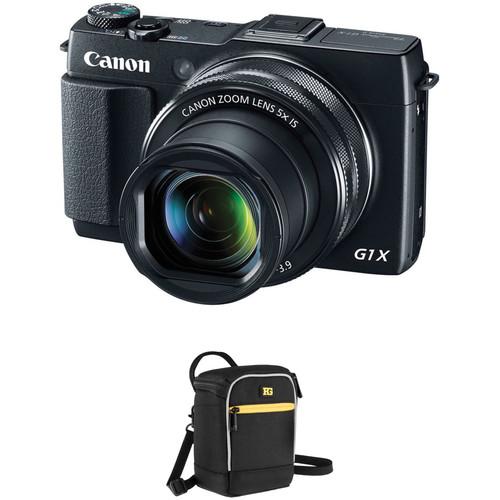 Contents of the user manual for the Canon PowerShot G1 X Mark II
- Product category: Point & Shoot Cameras Canon
- Brand: Canon
- Description and content of package
- Technical information and basic settings
- Frequently asked questions – FAQ
- Troubleshooting (does not switch on, does not respond, error message, what do I do if...)
- Authorized service for Canon Point & Shoot Cameras
|
User manual for the Canon PowerShot G1 X Mark II contain basic instructions
that need to be followed during installation and operation.
Before starting your appliance, the user manual should be read through carefully.
Follow all the safety instructions and warnings, and be guided by the given recommendations.
User manual is an integral part of any Canon product,
and if it is sold or transferred, they should be handed over jointly with the product.
Following the instructions for use is an essential prerequisite for protecting
health and property during use, as well as recognition of liability on the part of the manufacturer
for possible defects should you make a warranty claim. Download an official Canon user manual in which you will find instructions on how to install, use, maintain and service your product.
And do not forget – unsuitable use of a Canon product will considerably shorten its lifespan!
|
Product description Complementing the advanced point-and-shoot, the Canon PowerShot G1 X Mark II Digital Camera with Pouch Kit from pairs the sleek and versatile camera with a protective camera pouch. - Canon PowerShot G1 X Mark II Digital Camera
- Canon PowerShot G1 X Mark II Demo
The Canon PowerShot G1 X Mark II Digital Camera is an advanced compact camera featuring a 12.8MP High-Sensitivity 1.5" CMOS sensor and a DIGIC 6 image processor to produce high-resolution still imagery and Full HD 1080p video with notable low-light quality and sensitivity to ISO 12800. The sensor and processor work together to form the Canon HS SYSTEM, which helps to improve the image quality of dimly-lit shots by reducing noise and enhancing the overall clarity. Additionally, the processor offers a range of speed-related assets throughout the camera, including a maximum full resolution continuous shooting rate of 5.2 fps for up an SDHC/SDXC UHS-I memory card's capacity as well as a High Speed AF system for maintained sharpness in a variety of shooting conditions.
The built-in Canon 5x optical zoom lens provides a 35mm-equivalent focal length range of 24-120mm, covering wide-angle to telephoto length perspectives. A maximum aperture of f/2-3.9 contributes to working in low lighting and, when coupled with the 9-blade diaphragm, helps to isolate subject matter and realize a pleasing out-of-focus quality in shallow depth of field images. Benefitting this lens' coverage is an Optical Image Stabilizer system, which helps to minimize the appearance of camera shake to suit working with longer shutter speeds and greater focal lengths.
The compact camera design integrates a number of design elements that complement an overall intuitive handling scheme, including a 3.0" 1,040k-dot capacitive touchscreen LCD that features a tilting design to benefit working from high and low angles. A redeveloped lens design also increases shooting efficiency through its incorporation of Dual Control Rings, which support a range of customizable settings and mimic the operation of a traditional SLR lens, including full-time manual focusing abilities, for greater familiarity during shooting.
Complementing the imaging and handling traits of the camera is built-in Wi-Fi connectivity, which allows for the instant sharing of photos and videos to linked mobile devices, home computers, or directly to select social networking sites. Connection is further simplified through the implementation of NFC technology to streamline the sharing process. Once linked, mobile devices can also be used to control and release the camera's shutter. - 12.8MP High-Sensitivity CMOS Sensor and DIGIC 6 Image Processor
- The 12.8 megapixel High-Sensitivity 1.5" CMOS sensor and DIGIC 6 image processor work in concert to produce high resolution still imagery and Full HD video recording with notable low-light quality and sensitivity to ISO 12800. The combination of these two technologies creates the Canon HS SYSTEM, which provides effective low-light sensitivity with minimal noise and enhanced clarity to truly benefit impressive image making in dimly-lit situations. The processor also contributes to overall speed throughout the camera, including High Speed AF, Full HD 1080p video recording, and a full-resolution continuous shooting rate of 5.2 fps with no buffer limit.
The redeveloped sensor and processor also combine to enable RAW imaging with 14-bit signal processing, the same used in Canon's EOS DSLRs, to provide high image quality with expanded post-processing capabilities. RAW imagery can be recorded in both 3:2 and 4:3 ratios, and due to the size of the sensor, the angle of view remains the same when transitioning from one format to another. - Canon 5x Optical Zoom Lens
- The built-in Canon 5x optical zoom lens provides a 35mm-equivalent focal length range of 24-120mm, covering wide-angle to telephoto perspectives to suit working in a wide array of situations. The f/2-3.9 maximum aperture benefits working in low-light conditions and also contributes to producing shallow depth of field imagery, which is further complemented by a nine-blade aperture for producing a smooth out-of-focus quality. Additionally, an inner focusing system benefits a fast AF system and minimal lens movement.
The lens' performance is further enhanced through the inclusion of an Optical Image Stabilizer system, which helps to minimize the appearance of camera shake to suit working in difficult lighting conditions. Furthermore, an Intelligent IS system offers unique stabilization solutions depending on specific shooting conditions. The Normal setting corrects for a wide range of movements and is ideal for still photography; the Panning setting detects when panning shots are being made and does not compensate for lateral shake; the Macro (Hybrid) setting specifically corrects for shift-type shake that is common when working with close-up subject matter; the Dynamic mode is highly effective for video work and wide-angle settings and helps to minimize common shake that occurs while walking or moving with the camera; the Powered setting is suited for shooting at the telephoto end of the zoom range when hand shake is most prevalent; the Active Tripod mode is used for recording video atop a tripod where minor amounts of camera shake can occur; and Tripod mode simply turns off the IS since it is no longer needed. - Full HD Video Recording
- Full HD 1080p movie recording is supported at 30 fps in the Internet-friendly MP4 format. A built-in stereo microphone provides clear sound and direct playback to an HDTV is afforded through the incorporation of an HDMI port. Additionally, movies can also be recorded in the Apple iFrame format to help expedite the process of importing and exporting videos on a computer.
- Built-In Wi-Fi Connectivity with NFC
- Built-in Wi-Fi connectivity enables seamless and instant transferring of photos and videos to mobile devices, home computers, and to select social networking sites. Linking Android devices to the camera is aided through the incorporation of NFC (Near Field Communication), which facilitates connection simply by tapping the two devices. A dedicated Mobile Device Connect Button is available too, to further establish a simplified means for linking both iOS and Android devices. Additionally, Automatic Switching via the Image Sync function works to automatically sync images with any discovered and linked PC within a designated network or, alternatively, images are temporarily sent to the CANON iMAGE GATEWAY for later transferring.
When connected, the mobile device can also be used to remotely control and release the camera's shutter, self-timer, flash, and zoom from a distance, as well as display a live view image on the linked device's screen. - Camera Design
- Revolving around a compact overall form factor, the G1 X Mark II incorporates a large 3.0" 1,040k-dot, 3:2 aspect ratio capacitive touchscreen LCD for live view monitoring, image playback, and menu navigation. As a touchscreen, convenient and intuitive features, such as Touch AF, touch-enabled shutter release and focus point selection, and simplified menu navigation, are also available to benefit an overall workflow. Additionally, the screen features a tilting design-180° upward and 45° downward-to better facilitate working from high and low angles. For enhanced eye-level viewing, the optional EVF-DC1 electronic viewfinder can also be employed.
Benefitting the overall control and handling capabilities, Dual Control Rings surround the lens and offer an intuitive means for controlling customizable functions and camera settings. The inner ring is stepped and can be set to control aperture value, shutter speed, and exposure compensation. The outer, non-stepped ring has a different texture for easy recognition and is used for fine-tuned adjustments, including full-time manual focus akin to a traditional SLR lens. When combined with a rear control dial, the camera can be easily configured to give immediate access to the most frequently used camera controls. - Other Camera Features
-
- Photographing and recording movies during nighttime is enhanced through a series of dedicated star shooting modes, including Star Nightscapes, Star Trails, Star Time-Lapse Movies, and Star Portrait, which help to more easily achieve clear, brilliant imagery of the night sky. Star Portrait mode, in particular, records two consecutive images of a subject and one of the night sky and composites all three into a well-rendered portrait with a properly depicted starry sky. Each of these modes can be used with auto or manual settings, and Night Display, Color Adjustment, and Star Emphasis support functions further aid the photographing process.
- A 31-point AF system delivers precise focus in a quick and consistent manner. Individual focus points are easily selectable as well as different AF frame sizes depending on the type of subject being photographed. One-point and Touch AF functions are also supported.
- Benefitting manual focus operation, MF Peaking is available and works to highlight bright edges of contrast for faster, more precise control over critical focus.
- Multiple aspect ratio RAW imagery can be recorded in both 3:2 and 4:3 formats, with further support given for other formats in the RAW+JPEG file saving format. When shooting in 3:2 or 16:9 ratios, a JPEG will be saved in the chosen format with a RAW image being saved in the 3:2 format. When shooting in 4:3, 1:1, or 4:5 aspect ratios, a JPEG will be saved in the chosen format and a RAW image will be saved in the 4:3 aspect ratio.
- A hot shoe is incorporated to permit the use of an off-camera, external flash and is compatible with Canon Speedlite flashes for utilizing the intelligent E-TTL II flash metering system.
- The High Dynamic Range scene mode is ideally suited to working in high contrast environments and records three consecutive exposures-one underexposed, one overexposed, and one at normal-in order to realize one composite image displaying extended shadow and highlight detail with an expanded range of mid-tones.
- Four Sub-modes-Art Bold, Art Vivid, Art Standard, and Art Embossed-allow you to more precisely refine the final output and appearance of imagery in-camera.
Ruggard Lyra 60 Camera Pouch (Black) - Canon PowerShot G1 X Mark II Demo
Store, transport and protect your digital mirrorless or bridge camera from moisture, dirt and dust with the black Lyra 60 Camera Pouch from Ruggard. The pouch features an easy access, zippered, clamshell opening, and an interior SD memory card pocket. Soft, padded, interior nylon helps protect your camera from impact, scratches and abrasion. This protection is complemented by a weather-resistant nylon exterior. Carry the pouch with the top grab handle, handy belt loop with touch-fasten tabs, or with the removable shoulder strap. The bright yellow interior makes it easier to locate stored items in low light. - Durable, weather-resistant nylon exterior for protection from moisture, dirt, and dust
- Thick foam padding to protect against bumps and impact
- Soft nylon interior to prevent lens and screen scratches and abrasions
- Interior media pocket for storing 2 SD memory cards
- Zippered front pocket for added cards, lens cloth, spare battery and other small items
UPC: 847628571358 In the Box - PowerShot G1 X Mark II Digital Camera saftwusvtdzczxqewcfyabtuydy
- NB-12L Lithium-Ion Battery Pack (3.6V, 1910mAh)
- CB-2LG Charger for NB-12L Battery Pack
- Neck Strap NS-DC11
- Limited 1-Year Warranty
- Ruggard - Lyra 60 Camera Pouch (Black)
Table of Contents
|
Upload User Manual
Have you got an user manual for the Canon PowerShot G1 X Mark II Digital Camera with Pouch Kit in electronic form? Please send it to us and help us expand our library of instruction manuals.
Thank you, too, on behalf of other users.
To upload the product manual, we first need to check and make sure you are not a robot. After that, your "Submit Link" or "Upload File" will appear.
Technical parameters - Canon PowerShot G1 X Mark II Digital Camera
| | | Pixels | Actual: 15 Megapixel
Effective: 12.8 Megapixel | | Sensor | 1.5" (18.7 x 12.5 mm) CMOS | | Bit Depth | 14-Bit | | File Formats | Still Images: JPEG, RAW
Movies: MP4,
Audio: AAC LC | | Max Resolution | 4352 x 2904 | | Aspect Ratio | 1:1, 3:2, 4:3, 4:5, 16:9 | | Image Stabilization | Optical | | | | Lens | 14 Elements in 11 Groups
Effective Focal Length: 12.5 to 62.5mm (35 mm Equivalent: 24 to 120mm)
Aperture: f/2 (W) to f/3.9 (T) | | Zoom | Optical: 5x
Digital: 4x | | Focus Range | Wide: 1.97" to Infinity / 5 cm to Infinity
Telephoto: 1.31' to Infinity / 39.93 cm to Infinity
Wide Macro: 1.97" to 1.64' / 5 cm to 49.99 cm
Quick: 4.92' to 65.62' / 1.5 m to 20 m | | | | ISO Sensitivity | Auto, 100 to 12800 | | Shutter | 1 to 1/4000 Second
15 to 1/4000 Second in Shutter Priority Mode
60 to 1/4000 Second in Manual Mode | | Exposure Metering | Center-Weighted, Evaluative, Spot | | Exposure Modes | Modes: Aperture Priority, Auto, C1, C2, Creative Filters, Creative Shot, Custom, Hybrid Auto, Manual, Movie, Program, SCN, Scene Modes, Shutter Priority
Compensation: -3 EV to +3 EV (in 1/3 EV Steps) | | Shooting Modes | Auto
Background Defocus
Face Self-Timer
Fireworks
Fish-Eye Effect
HDR
Handheld Night Scene
Miniature Effect
Monochrome
Natural
Nostalgic
Portrait
Poster Effect
Retro
Smart Shutter
Smile
Snow
Soft Focus
Special
Standard
Star
Star Nightscape
Star Portrait
Star Time-Lapse Movie
Star Trails
Super Vivid
Toy Camera Effect
Underwater
Wink Self-Timer
iFrame Movie | | White Balance | Auto, Cloudy, Custom 1, Custom 2, Daylight, Flash, Fluorescent, Fluorescent H, Multi-Area White Balance, Shade, Tungsten, Underwater | | Continuous Shooting | Up to 5.2 fps at 12.8 MP for up to Exposures
Up to 3.1 fps at 12.8 MP for up to Exposures
Up to 3 fps at 12.8 MP for up to Exposures | | Self-Timer | 2, 10 Sec | | Remote Control | RS60-E3 (Optional) | | | | Flash Modes | Auto
Flash On
Off
Slow Sync | | Built-In Flash | Yes | | Effective Flash Range | Wide:1.64 to 22.31' / 0.50 to 6.80 m
Telephoto:4.59 to 11.48' / 1.40 to 3.50 m | | External Flash Connection | Hot Shoe | | | | Memory Card Type | SD
SDHC
SDXC | | | | Video Recording | Yes, NTSC/PAL | | Resolution | 1920 x 1080p: 30 fps, 15 fps
1280 x 720p: 30 fps, 6 fps, 3 fps, 1.5 fps
640 x 480p: 30 fps, 6 fps, 3 fps, 1.5 fps | | | | Audio Recording | Built-In Mic: With Video (Stereo) | | | | Screen | 3.0" LCD Rear Touchscreen Tilt (1,040,000 Pixels) | | Screen Coverage | 100% | | | | Connectivity | HDMI D (Micro), USB 2.0 | | Wi-Fi | Yes Built In | | | | Operating Temperature | 32 to 104°F / 0 to 40°C | | Operating Humidity | 10 to 90% | | | | Battery | 1 x NB-12L Rechargeable Lithium-Ion Battery Pack, 3.6 VDC, 1910 mAh | | AC Power Adapter | ACK-DC100 (Not Included) | | | | Dimensions (W x H x D) | 4.6 x 2.9 x 2.6" / 116.8 x 73.7 x 66.0 mm | | Weight | 1.22 lb / 553.38 g CIPA standard | | | | Box Dimensions (LxWxH) | 6.5 x 6.0 x 4.0" | - Ruggard Lyra 60 Camera Pouch (Black)
| Carrying/Transport Options | Belt Loop, Handle, Shoulder Strap | | | | Exterior Dimensions | 4.25 x 3.5 x 5.75" / 10.8 x 8.9 x 14.6 cm | | Exterior Material | Nylon | | Type of Closure | Zipper | | | | Interior Dimensions | 4 x 3.25 x 5.5" / 10.16 x 8.26 x 13.97 cm | | Interior Material | Nylon | | Weight | 3.0 oz / 85 g | | | | Box Dimensions (LxWxH) | 2.598 x 2.047 x 0.63" |
Rating100% users recommend this product to others. And what about you?

This product has already been rated by 64 owners. Add your rating and experience with the product.
Discussion
 Ask our technicians if you have a problem with your settings,
or if anything is unclear in the user manual you have downloaded.
You can make use of our moderated discussion.
The discussion is public and helps other users of our website who may be encountering similar problems.
Ask our technicians if you have a problem with your settings,
or if anything is unclear in the user manual you have downloaded.
You can make use of our moderated discussion.
The discussion is public and helps other users of our website who may be encountering similar problems.
The discussion is empty - enter the first post
Post a new topic / query / comment:
|
|
|
| Request for user manual |
You can’t find the operation manual you are looking for? Let us know and we will try to add the missing manual:
I’m looking for a manual / Request for manual
Current requests for instruction manuals:
Call Of Duty World War Two For Xbox...
controller stratus XL...
stratus XL...
smart whatch serie S11 42mm...
Allen & Heath SQ-6 manual...
|
| Discussion |
Latest contributions to the discussion:
AEW R 4100
Name: MAURICIO ANGARITA
Audio-Technica AEW-R4100 UHF Diversity Receiver for
AEW R 4100 has the mute function blocked and does not allow audio to pass. I tried several times to turn off the mute from the transmitter but it does nothing, the mute stays on. Solution?
Thank you...
Instructions for assembling the 2015 Forecast Image Master Consoles GC3-A
Name: mike elam
Forecast Consoles GC3-A ImageMaster Editing Console
Looking for instructions for assembling this console. ...
EMPTY TONER ERROR MESSAGE AFTER REPLACING TONER
Name: LINDA BAD YELLOW EYES
Brother TN223BK Standard-Yield Toner
I HAD TO CHANGE OUT ALL THREE TONERS DUE TO LEAKS IN THE YELLOW AND CYAN. AFTER I REPLACED THEM, THE MACHINE KEEPS GIVING ME AN EMPTY TONER ERROR MESSAGE. HELP!!...
PS480D 20/24 pin Switching 480W Power Supply
Name: swkargo
Logisys 480W Power Supply
This item states in can run -5vdc .It is NOT listed on the board or I beleive is r4 is missing the resitior. Any body have thid issue. Shawn
...
Help needed
Name: Ann Carter
SanDisk 1TB Extreme Portable USB 3.1
When I click the link to download the user manual for my Sandisk Extreme external hard drive, it gives me the manual for the LG Cricket. Can you please change the link so I can download the Sandisk manual and begin using this drive? Thank you....
|
|


