User Manual for Canon PowerShot G5 X Digital Camera with Connect Station CS100 Kit Click to enlarge the picture
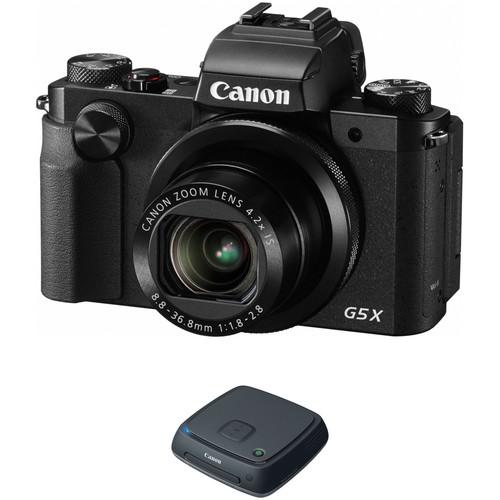 Contents of the user manual for the Canon PowerShot G5 X Digital Camera
- Product category: Point & Shoot Cameras Canon
- Brand: Canon
- Description and content of package
- Technical information and basic settings
- Frequently asked questions – FAQ
- Troubleshooting (does not switch on, does not respond, error message, what do I do if...)
- Authorized service for Canon Point & Shoot Cameras
|
User manual for the Canon PowerShot G5 X Digital Camera contain basic instructions
that need to be followed during installation and operation.
Before starting your appliance, the user manual should be read through carefully.
Follow all the safety instructions and warnings, and be guided by the given recommendations.
User manual is an integral part of any Canon product,
and if it is sold or transferred, they should be handed over jointly with the product.
Following the instructions for use is an essential prerequisite for protecting
health and property during use, as well as recognition of liability on the part of the manufacturer
for possible defects should you make a warranty claim. Download an official Canon user manual in which you will find instructions on how to install, use, maintain and service your product.
And do not forget – unsuitable use of a Canon product will considerably shorten its lifespan!
|
Product description Bundling a versatile compact camera with an intuitive storage device, the Canon PowerShot G5 X Digital Camera with Connect Station CS100 Kit from includes the advanced point-and-shoot along with a wirelessly accessible storage hub.
Characterized by a large image sensor and fast zoom lens, the PowerShot G5 X pairs a 20.2MP 1" High-Sensitivity CMOS sensor and DIGIC 6 image processor to form the Canon HS SYSTEM for enhanced low-light capabilities, fast performance and full HD 1080p/60 video recording. Matching the imaging versatility is the 4.2x optical zoom lens, which provides a 24-100mm equivalent focal length range, and features a bright f/1.8-2.8 maximum aperture for depth of field control and working in difficult lighting conditions. Both a high-resolution 2.36m-dot electronic viewfinder and 3.0" 1.04m-dot multi-angle touchscreen LCD are available for monitoring and image review, and built-in Wi-Fi with NFC allows you to wirelessly share imagery with a smartphone, tablet, or Connect Station CS100. Revolving around the sophisticated sensor and processor combination, the G5 X sports both apt imaging capabilities as well as a wealth of functional assets for shooting control and sharing.
Also included within this kit is the Connect Station CS100, which is a media hub, designed to store, manage, and view up to 1TB of multimedia content. Transferring to this storage device is possible using NFC and Wi-Fi, and a USB 2.0 port as well as SD and CF card slots is also featured for importing content. Playback is supported on HDTVs from the device using an HDMI connection, and the drive's contents can also be viewed using a web browser on a computer or mobile device. - Canon PowerShot G5 X Digital Camera
- Breaking News: Canon Announces New Mirrorless and Two New G Series Cameras
- PowerShot G5 X: "The World in the Camera"
- Great Images Are In Your View with the Canon PowerShot G5 X Digital Camera
- Canon PowerShot G5 X: "The Premium" Movie
- Canon PowerShot G5 X: Auto Level
An advanced compact camera characterized by a large image sensor and fast zoom lens, the PowerShot G5 X from Canon pairs a 20.2MP 1" High-Sensitivity CMOS sensor and DIGIC 6 image processor to form the Canon HS SYSTEM for enhanced low-light capabilities, fast performance and Full HD 1080p/60 video recording. Matching the imaging versatility is the 4.2x optical zoom lens, which provides a 24-100mm equivalent focal length range, and features a bright f/1.8-2.8 maximum aperture for depth of field control and working in difficult lighting conditions. Both a high-resolution 2.36m-dot electronic viewfinder and 3.0" 1.04m-dot multi-angle touchscreen LCD are available for monitoring and image review, and built-in Wi-Fi with NFC allows you to wirelessly share imagery with a smartphone, tablet, or Connect Station CS100. Revolving around the sophisticated sensor and processor combination, the G5 X sports both apt imaging capabilities as well as a wealth of functional assets for shooting control and sharing.
To benefit handling, the G5 X has been fitted with numerous physical controls, including a dedicated exposure compensation dial, front dial, control ring and control dial for quickly customizing various shooting settings. A hot shoe is incorporated into the design for working with an optional external flash, and the camera is also compatible with the optional RS-60E3 for wired remote shooting. - 20.2MP 1" CMOS Sensor and DIGIC 6 Processor
- A large 20.2MP 1" High-Sensitivity CMOS sensor and DIGIC 6 image processor combine to create the Canon HS SYSTEM, which offers enhanced low-light performance with reduced image noise, as well as a top sensitivity of ISO 12800. The sensor and processor also benefit performance speeds throughout the camera, including a top 5.9 fps shooting rate in one-shot AF or 4.4 fps with continuous AF. The physically large sensor and advanced processing techniques also contribute to rich image quality that is well-suited to printing applications.
- 4.2x Optical Zoom Lens
- The versatile 4.2x optical zoom lens covers a wide-angle to short telephoto 24-100mm equivalent focal length range, and features an f/1.8-2.8 maximum aperture along with image stabilization to benefit handheld shooting in difficult lighting conditions. The fast maximum aperture also pairs with a nine-blade diaphragm to produce a smooth out-of-focus quality when working with selective focus techniques.
- Intelligent IS
- Utilizing the unique Intelligent IS image stabilization system, this camera compensates for a variety of types of camera shake by analyzing different movement types and applying specific settings to produce the sharpest imagery and smoothest movies:
- Normal IS: Corrects for a wide variety of camera movement types when shooting stills.
- Panning IS: Intended for use when making tracking shots, this setting ensures that IS will not interfere with desired lateral camera movements.
- Macro (Hybrid) IS: Used for both stills and video recording, this setting corrects for shift-type camera shake that is common when photographing close-up subjects. It also compensates for motion blur associated with recording video while walking.
- Tripod: Image stabilization is deactivated when shooting stills atop a tripod.
- Dynamic IS: This setting is effective when recording video using wider focal lengths and simultaneously walking or moving.
- Powered IS: Ideally suited for shooting video with telephoto focal lengths, this mode compensates for the camera movements that become more apparent with greater zoom magnifications.
- Active Tripod IS: Unlike the stills tripod mode, this video-specific tripod mode compensates for slight amounts of shake that can be caused when recording movies from a tripod.
- Body Design
-
- A 2.36m-dot electronic viewfinder offers high-resolution, wide gamut eye-level monitoring for critical viewing in harsh lighting conditions. The viewfinder provides 100% frame coverage, incorporates a sensor for switching between the finder and rear monitor, has a smooth refresh rate of 120 fps, and has an eye point of 22mm for viewing flexibility.
- For live view monitoring and image playback, a 3.0" 1.04m-dot LCD screen is available and features a multi-angle design for working from high and low angles, and is also a touchscreen for intuitive settings control and menu navigation. The vari-angle design can rotate up to 270° and can also be turned around and closed against the camera body for protection while shooting.
- An exposure compensation dial, as well as a customizable front dial, control ring, and control dial, lend easily accessible, direct control over various shooting settings.
- A hot shoe allows you to pair optional external flashes as well as other shoe-mounted accessories with the camera.
- A remote socket permits use of the optional RS-60E3 Remote Switch for wired remote camera control.
- Full HD Video Recording
- In addition to stills shooting, Full HD 1080p video recording is possible in multiple frame rates, including 60, 30, and 24 fps. Movies are saved in the MP4 format and an HDMI port permits direct, high definition playback and live monitoring on external screens. Audio quality has been enhanced thanks to a wider dynamic range and better signal-to-noise ratio and for greater control during recording, access to manual exposure modes is available. Additionally, focus peaking can be used for faster, more intuitive manual focusing.
- Built-In Wi-Fi with NFC
- Both photos and movies can be wirelessly shared to smartphones or tablets, using the Canon Camera Connect app, for instant online sharing or backed up to the Canon Connect Station CS100 via built-in Wi-Fi with NFC connectivity. Remote shooting from a linked mobile device is also available, allowing you to wirelessly configure exposure modes, aspect ratios, AF frame modes, or drive modes. In addition to the touch-to-connect functionality of NFC, a dedicated mobile device connect button is also integrated into the camera's design for seamless pairing of the camera to a device for browsing and sharing imagery.
- Other Camera Features
-
- Dedicated Star Modes and functions can be used to capture photos and videos of the nighttime sky with enhanced brilliance and clarity. Star Nightscape, Star Trails, and Star Time-Lapse Movies can be recorded, with auto or manual settings, and support functions, such as Night Display, Color Adjustment, and star Emphasis, offer greater control over the final results.
- A built-in pop-up flash can be used to provide additional illumination to a scene when working in challenging lighting conditions.
- The included NB-13L rechargeable lithium-ion battery provides up to 210 shots per charge when working with the LCD screen, 215 shots per charge with the electronic viewfinder, or 320 shots per charge in the ECO Mode.
- An electronic level function helps to ensure plumb verticals and level horizons.
- Photo Effects: My Colors Off, Vivid, Neutral, Sepia, Black & White, Positive Film, Lighter Skin Tone, Darker Skin Tone, Vivid Blue, Vivid Green, Vivid Red, and Custom Color.
- Playback Functions: Story Highlights, Protect, Favorites, Erase, Print, Group Playback, Play Movie, List/Play Digest Movies, Image Search, Slideshow, Rotate, Album Playback, Play Creative Shot Movies, Short Clip Mix, i-Contrast, Resize, Cropping, Red-Eye Correction, My Colors, Face ID Info, Print Settings, Photobook Set-up, Transition Effect, Index Effect, Scroll Display, Group Images, Auto Rotate, Resume, Image Jump with Control Ring/Front Dial, and Set Touch Actions.
UPC: 013803266986 - Canon Connect Station CS100 1TB Storage Device
- Breaking News: Canon Announces New Mirrorless and Two New G Series Cameras
- PowerShot G5 X: "The World in the Camera"
- Great Images Are In Your View with the Canon PowerShot G5 X Digital Camera
- Canon PowerShot G5 X: "The Premium" Movie
- Canon PowerShot G5 X: Auto Level
Enabling wireless backing up of image and video files from Canon cameras and camcorders, the Connect Station CS100 is a media hub designed for storing, managing, and viewing your multimedia content. Featuring a built-in 1TB drive, this storage device is able to back-up approximately 150,000 photos or 70 hours of video from your camera, with the convenience of syncing your device via NFC or over Wi-Fi. Once the content has been loaded into the CS100, you can browse, manage, sort, and view your files using an intuitive menu system. Playback is supported via HDMI. Wireless printing is possible to compatible PIXMA/SELPHY printers, and imagery can be downloaded to PCs or smart devices via a web browser. The CS100 offers both convenience and practicality in how to import, view, and export your imagery. - The built-in 1TB of storage is able to hold approximately 150,000 photos or approximately 70 hours of video.
- NFC and Wi-Fi connectivity allow you to simply tap your NFC-enabled Canon camera to the device in order to automatically transfer photos and movies over Wi-Fi. For cameras without built-in Wi-Fi or NFC, a USB 2.0 port and both CF and SD card slots are also available for importing content.
- For large-scale playback on an HDTV or monitor, an HDMI out port can be used to preview your imagery. The photos' full resolution is maintained during playback as well as the smooth playback from high bitrate video formats. Additionally, the included remote control (CS-RC1) permits simple, wireless control over playback and file navigation.
- Files are automatically sorted by date (month/year) or by the specific shooting device. For further refinement, an easy-to-navigate menu structure allows you to create albums for more personalized sorting.
- Wireless printing is supported from the CS100, which is fully compatible with PictBridge and wireless LAN-enabled PIXMA, SELPHY, or other compatible printers.
- Accessible via a web browser on smartphones, tablets, or PCs, the contents of the CS100 can also be viewed or downloaded to other devices. Furthermore, imagery can be imported from smart devices, and compatible Android devices will automatically connect without the need to manually launch the web browser interface.
- Seamless and wireless file transferring between two Connect Stations is possible, as well as the ability to share directly to social networks via the Canon iMAGE GATEWAY.
- The following file formats are supported by the CS100:
- Photo: JPEG, CR2
- Video: MP4, MOV, AVCHD
- The contents of the CS100 can securely be offloaded to another external hard drive via USB connection for backing up your photo and video library.
UPC: 013803253740 In the Box - PowerShot G5 X Digital Camera eqsqsyqzfsbuvudyrfezcwcvzacq
- NB-13L Lithium-Ion Battery Pack (3.6V, 1250mAh)
- CB-2LH Battery Charger for NB-13L Li-Ion Batteries
- NS-DC12 Neck Strap
- Strap Adapter
- Limited 1-Year Warranty
- Connect Station CS100 1TB Storage Device
User Manual- for Camera PDF 12.7mb More from Manufacturer Table of Contents
|
Upload User Manual
Have you got an user manual for the Canon PowerShot G5 X Digital Camera with Connect Station CS100 Kit in electronic form? Please send it to us and help us expand our library of instruction manuals.
Thank you, too, on behalf of other users.
To upload the product manual, we first need to check and make sure you are not a robot. After that, your "Submit Link" or "Upload File" will appear.
Technical parameters - Canon PowerShot G5 X Digital Camera
| | | Pixels | Actual: 20.9 Megapixel
Effective: 20.2 Megapixel | | Sensor | 1" CMOS | | Bit Depth | 14-Bit | | File Formats | Still Images: JPEG, RAW
Movies: MP4,
Audio: AAC LC | | Max Resolution | 20.2 MP: 5472 x 3648 | | Aspect Ratio | 1:1, 3:2, 4:3, 16:9 | | Image Stabilization | Optical | | | | Lens | Effective Focal Length: 8.8 to 36.8mm (35 mm Equivalent: 24 to 100mm)
Aperture: f/1.8 (W) to f/2.8 (T) | | Zoom | Optical: 4.2x
Digital: 4x | | Focus Range | Wide: 2" to Infinity / 5.08 cm to Infinity
Telephoto: 1.3' to Infinity / 39.62 cm to Infinity
Macro: 2" to 1.6' / 5.08 cm to 48.77 cm | | | | ISO Sensitivity | Auto, 125 to 6400 (Extended Mode:125 to 12800) | | Shutter | 30 to 1/2000 Second , Bulb Mode
1 to 1/2000 Second in Auto Mode
1/8 to 1/2000 Second in Movie Mode | | Exposure Metering | Center-Weighted, Evaluative, Spot | | Exposure Modes | Modes: Aperture Priority, Auto, Creative Filters, Creative Shot, Custom, Hybrid Auto, Manual, Movie, Program, SCN, Shutter Priority
Compensation: -3 EV to +3 EV (in 1/3 EV Steps) | | Shooting Modes | Background Defocus
Fireworks
Fish-Eye Effect
HDR
Handheld Night Scene
Miniature Effect
Monochrome
Movie
Nostalgic
Portrait
Poster Effect
Self-Portrait
Soft Focus
Sports
Star Nightscape
Star Portrait
Star Time-Lapse Movie
Star Trails
Super Vivid
Toy Camera Effect | | White Balance | Auto, Cloudy, Custom 1, Custom 2, Daylight, Flash, Fluorescent, Fluorescent H, Shade, Tungsten | | Continuous Shooting | Up to 5.9 fps at 20.2 MP for up to Exposures
Up to 4.4 fps at 20.2 MP for up to Exposures | | Self-Timer | 2, 10 Sec | | Interval Recording | Yes | | Remote Control | RS-60E3 (Optional) | | | | Flash Modes | Auto
Forced On
Off
Slow Sync | | Built-In Flash | Yes | | Effective Flash Range | Wide:1.6 to 23.0' / 0.5 to 7 m
Telephoto:1.6 to 13.1' / 0.5 to 4 m | | External Flash Connection | Hot Shoe | | | | Memory Card Type | SD
SDHC
SDXC | | | | Video Recording | Yes, NTSC/PAL | | Resolution | 1920 x 1080p: 59.94 fps, 29.97 fps, 23.98 fps, 14.985 fps
1280 x 720p: 29.97 fps, 6 fps, 3 fps, 1.5 fps
640 x 480p: 29.97 fps, 6 fps, 3 fps, 1.5 fps | | | | Video Clip Length | Up to 4 GB or 29 Minutes 59 Seconds | | Audio Recording | Built-In Mic: With Video (Stereo) | | | | Viewfinder Type | Electronic | | Viewfinder Coverage | 100% | | Screen | 3.0" LCD Rear Touchscreen Swivel (1,040,000 Pixels) | | Screen Coverage | 100% | | | | Connectivity | HDMI D (Micro), USB 2.0 Micro-B, USB 2.0 | | Wi-Fi | Yes, Wi-Fi 4 (802.11n) Built In | | | | Operating Temperature | 32 to 104°F / 0 to 40°C | | Operating Humidity | 10 to 90% | | | | Battery | 1 x NB-13L Rechargeable Lithium-Ion Battery Pack, 3.6 VDC, 1250 mAh | | AC Power Adapter | ACK-DC110 (Not Included) | | | | Dimensions (W x H x D) | 4.4 x 3.0 x 1.7" / 112.4 x 76.4 x 44.2 mm | | Weight | 13.3 oz / 377.1 g with battery and memory card | | | | Box Dimensions (LxWxH) | 7.087 x 6.693 x 3.543" | - Canon Connect Station CS100 1TB Storage Device
| | | Storage Capacity | Built-in 1 TB drive (actual capacity is less than 1 TB due to system requirements) | | | | Standard Compliance | IEEE802.11b/g/n | | Transmission Method | DS-SS modulation (IEEE 802.11b)
OFDM modulation (IEEE 802.11g / n) | | Transmission Range | Approx. 49.2' / 15 m | | Transmission Frequency | 2.412 - 2.462 GHz | | Security | WEP, WPA-PSK (TKIP), WPA-PSK (AES), WPA2-PSK (TKIP), WPA2-PSK (AES) | | | | Interface Type | 10BASE-T, 100BASE-TX, 1000BASE-T | | | | USB | Hi-Speed USB (USB 2.0) | | HDMI Out | Type A, CEC-compatible | | Card Slot | 1x CF (Type I or II compatible)
1x SD (SD, SDHC, SDXC; UHS-I is not compatible) | | | | Still Image | JPEG, RAW (CR2 only) | | Video | MP4, MOV, AVCHD | | | | Operating Environment | 32-104°F / 0-40°C
85% or less relative humidity | | Power Consumption | During operation: Approx. 10 W
During standby: Approx. 9.5 W | | Power Adapter | Compact Power Adapter CA-PS00
100-240 V AC
50/60 Hz
5.9' / 1.8 m DC cord | | Dimensions | CS100: 6.1 x 2.0 x 6.1" / 155.6 x 51.1 x 155.6 mm
Remote Controller CS-RC1: 1.6 x 0.6 x 4.9" / 41.3 x 15.1 x 125.5 mm
Compact Power Adapter CA-PS00: 4.4 x 1.1 x 1.8" / 112 x 29 x 45 mm (excluding power cord) | | Weight | CS100: 1.3 lb / 570 g
Remote Controller CS-RC1: 1.5 oz / 48 g
Compact Power Adapter CA-PS00: 6.5 oz / 185 g (excluding power cord) | | | | Box Dimensions (LxWxH) | 10.2 x 8.9 x 3.8" |
Rating70% users recommend this product to others. And what about you?

This product has already been rated by 41 owners. Add your rating and experience with the product.
Discussion
 Ask our technicians if you have a problem with your settings,
or if anything is unclear in the user manual you have downloaded.
You can make use of our moderated discussion.
The discussion is public and helps other users of our website who may be encountering similar problems.
Ask our technicians if you have a problem with your settings,
or if anything is unclear in the user manual you have downloaded.
You can make use of our moderated discussion.
The discussion is public and helps other users of our website who may be encountering similar problems.
The discussion is empty - enter the first post
Post a new topic / query / comment:
|
|


