|
User Manual for Canon PowerShot G7 X Mark II Digital Camera with Free Accessory Kit Click to enlarge the picture
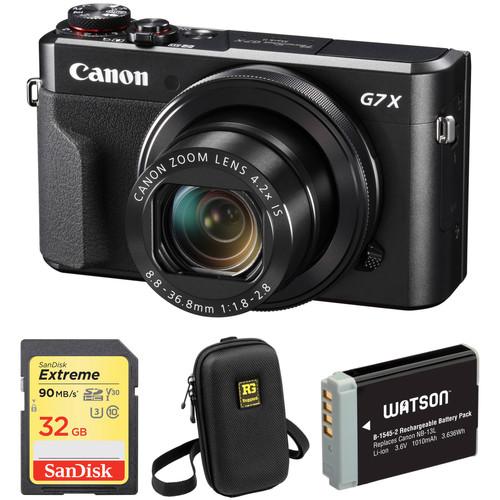 Contents of the user manual for the Canon PowerShot G7 X Mark II
- Product category: Point & Shoot Cameras Canon
- Brand: Canon
- Description and content of package
- Technical information and basic settings
- Frequently asked questions – FAQ
- Troubleshooting (does not switch on, does not respond, error message, what do I do if...)
- Authorized service for Canon Point & Shoot Cameras
|
User manual for the Canon PowerShot G7 X Mark II contain basic instructions
that need to be followed during installation and operation.
Before starting your appliance, the user manual should be read through carefully.
Follow all the safety instructions and warnings, and be guided by the given recommendations.
User manual is an integral part of any Canon product,
and if it is sold or transferred, they should be handed over jointly with the product.
Following the instructions for use is an essential prerequisite for protecting
health and property during use, as well as recognition of liability on the part of the manufacturer
for possible defects should you make a warranty claim. Download an official Canon user manual in which you will find instructions on how to install, use, maintain and service your product.
And do not forget – unsuitable use of a Canon product will considerably shorten its lifespan!
|
Product description Advanced Point-and-Shoot Cameras Read More Comprising the essentials needed to begin shooting, the Canon PowerShot G7 X Mark II Digital Camera with Free Accessory Kit from pairs the advanced compact camera with a memory card and a camera case to protect and store all of the kit contents. - Canon PowerShot G7 X Mark II Digital Camera
- Canon EOS 80D & PowerShot G7X Mk II: First Look
- Canon PowerShot G7 X Mark II: Illuminate Your Passion
- Canon PowerShot G7 X Mark II: "The Premium Movie"
Blending notable imaging qualities with refined handling, the PowerShot G7 X Mark II Digital Camera from Canon is a compact point-and-shoot characterized by its large feature-set. Utilizing a 20.1MP 1" CMOS sensor and DIGIC 7 image processor, this camera offers a maximum ISO 12800 in Program mode, and achieves smooth image quality with reduced noise when working in low-light conditions. Additionally, it is also capable of recording stills at up to 8 fps as well as Full HD 1080p60 video. Complementing the sensor and processor combination is a versatile 4.2x zoom lens, which provides a 24-100mm equivalent focal length range, covering wide-angle to short-telephoto perspectives. A fast f/1.8-f/2.8 maximum aperture maintains consistent performance throughout the zoom range and also benefits working in difficult lighting conditions. The lens design is surrounded by a familiar control ring that offers intuitive control over settings, and a large 3.0" 1.04m-dot tilting touchscreen LCD provides a natural means for composing imagery from a variety of shooting angles. Additionally, the G7 X Mark II also features built-in Wi-Fi with NFC for wireless sharing of imagery to smartphones or tablets, as well as remote camera control from linked mobile devices. - 20.1MP 1" CMOS Sensor and DIGIC 7 Image Processor
- Delivering notable image quality in a variety of situations, a 20.1MP 1" CMOS sensor and DIGIC 7 image processor combine to create the Canon HS SYSTEM, which avails clean, clear imagery with minimal noise and a wide dynamic range, with a top expanded sensitivity to ISO 12800. The sensor and processor also avail the ability to shoot raw or JPEG files at up to 8 fps or record Full HD 1080p60 video in the MP4 format with stereo sound.
In addition to benefitting image quality, the DIGIC 7 processor also enhances focusing speeds and tracking capabilities for maintaining sharp focus on moving subjects, even in low light and low contrast situations. Additionally, the processor also enables Dual Sensing IS that interprets data from imagery in order to intelligently reduce blur caused by camera shake. - 4.2x Optical Zoom Lens and Intelligent IS
- A built-in 4.2x optical zoom lens provides a versatile 24-100mm equivalent focal length range, and features a bright f/1.8-f/2.8 maximum aperture range to benefit working in difficult lighting conditions throughout the zoom range. This fast maximum aperture also teams up with a nine-blade diaphragm to produce a smooth bokeh quality when using selective focus techniques. Additionally, a Super Spectra Coating has been applied to individual lens elements to noticeably reduce lens flare and ghosting when shooting in strong lighting conditions.
An Intelligent IS image stabilization system is also incorporated into the lens design to minimize the appearance of camera shake for a variety of shooting scenarios:
- Normal IS: Corrects for a wide variety of camera movement types when shooting stills.
- Panning IS: Intended for use when making tracking shots, this setting ensures that IS will not interfere with desired lateral camera movements.
- Macro (Hybrid) IS: Used for both stills and video recording, this setting corrects for shift-type camera shake that is common when photographing close-up subjects. It also compensates for motion blur associated with recording video while walking.
- Tripod: Image stabilization is deactivated when shooting stills atop a tripod.
- Dynamic IS: This setting is effective when recording video using wider focal lengths and simultaneously walking or moving.
- Powered IS: Ideally suited for shooting video with telephoto focal lengths, this mode compensates for the camera movements that become more apparent with greater zoom magnifications.
- Active Tripod IS: Unlike the stills tripod mode, this video-specific tripod mode compensates for slight amounts of shake that can be caused when recording movies from a tripod.
- Body Design and Built-In Wi-Fi
-
- A sleek, compact profile incorporates a large 3.0" 1.04m-dot touchscreen LCD that features a 180° upward, 45° downward tilting design to support taking selfies or working from low shooting angles.
- A manual control ring surrounds the lens for intuitive control over select camera and exposure settings. The ring can also be set to have clicked intervals, for tactile recognition of settings changes, or can be de-clicked for smooth, quiet transitions between adjustments.
- Built-in Wi-Fi with NFC allows you to wirelessly share your photos and movies with a linked smartphone or tablet as well as remotely control the camera from the mobile device by using the Camera Connect app.
- Other Camera Features
-
- Picture Style affords in-camera control over the color, contrast, and sharpness of imagery.
- In-camera raw file conversions let you preview and apply adjustments to files without needing to process the files on a computer.
- A Time-Lapse Movie function automatically compiles sequentially-recorded images taken at predetermined intervals and composites them into a seamless movie file for smooth playback.
- A dedicated Panning function can lock onto an intended subject and, using image stabilization, automatically adjust the shutter speed to render a sharp moving subject set against a blurred background.
UPC: 013803269321 - SanDisk 32GB Extreme UHS-I SDHC Memory Card
- Canon EOS 80D & PowerShot G7X Mk II: First Look
- Canon PowerShot G7 X Mark II: Illuminate Your Passion
- Canon PowerShot G7 X Mark II: "The Premium Movie"
Built to meet the demands of photographers and passionate shutterbugs who are using advanced cameras and HD camcorders, the 32GB Extreme UHS-I SDHC Memory Card from SanDisk allows users to take advantage of functions such as fast action shots, continuous burst mode, and multiple frames per second. It features a capacity of 32GB, is compatible with the UHS-I bus, and delivers maximum read speeds of up to 90 MB/s and maximum write speeds of up to 40 MB/s. This Extreme UHS-I SDHC card supports the V30 speed class, which guarantees minimum write speeds of 30 MB/s. If your device does not support the V30 speed class, this card also supports the U3 speed class, which likewise guarantees minimum write speeds of 30 MB/s. If your device only supports the Class 10 standard, minimum write speeds are guaranteed not to drop below 10 MB/s.
Built for extreme conditions, SanDisk's 32GB Extreme UHS-I SDHC Memory Card is water, shock, and x-ray proof, while also being able to withstand temperatures from -13 to 185°F, allowing for use in environments such as snow and deserts. A built-in write protect switch further helps to safeguard your content, while advanced Error Correction Code engine offers improved data integrity and card reliability during read and write operations. Downloadable RescuePRO data recovery software helps you restore accidentally deleted images. The card also has a writable label on its surface and the included jewel case makes for easy storage and organization. This card is backed by a limited lifetime warranty. General Features - Faster Performance and Downloads
- With write speeds up to 40 MB/s, this card unleashes the full shooting potential of your advanced camera or DSLR. Take advantage of advanced functions such as fast action shots, continuous burst mode, and multiple frames per second. Photos are written to your card almost instantly so you'll get your best shot, and you'll save time moving it all from your camera to your computer.
- Capacity for High-Resolution Photos and Videos
- With a capacity of 32GB to capture it all, this SanDisk Extreme UHS-I Card offers enough room for thousands of high-resolution photos. The card can accommodate high-volume image formats, such as RAW and JPEG, and also provides plenty of room for Full HD videos.
- 4K and Full HD Video Recording
- With Class 10, UHS Speed Class 3 (U3), and V30 video ratings, you'll be ready to capture 4K Ultra HD, cinema quality 3D, and Full HD video (1080p), which require more performance than ordinary cards can handle. This memory card's accelerated minimum sustained write speeds help ensure that video data isn't lost during recording, by reducing dropouts and stuttering.
- Error Correction for Enhanced Relability
- Thanks to its Advanced Error Correction Code engine, this SanDisk Extreme UHS-I SDHC card helps reduce the chance for errors during data storage and retrieval. It prevents potential data corruption, providing high data integrity.
- Fast Transfer Speeds Reduce Upload Times
- SanDisk Extreme UHS-I SDHC cards boast a read speed of up to 90 MB/s, so you can transfer photos and videos to your computer quickly. You'll spend less time uploading photos and more time editing, storing, and sharing.
- Durable Design
- Designed and tested to withstand the tough conditions, this card has a capacity of 32GB and is waterproof, shockproof, and X-ray proof. It can operate in temperatures ranging from -13 to 185°F, so you can work in almost any climate.
- RescuePRO Software
- SanDisk RescuePRO and RescuePRO Deluxe software are file and data recovery products for recovering deleted files from all types of digital media.
UPC: 619659147037 - Ruggard HFV-260 Protective Camera Case
- Canon EOS 80D & PowerShot G7X Mk II: First Look
- Canon PowerShot G7 X Mark II: Illuminate Your Passion
- Canon PowerShot G7 X Mark II: "The Premium Movie"
The HFV-260 Protective Camera Case from Ruggard is a semi-hard shell case that can hold your digital point-and-shoot camera or smartphone. The tough outer shell protects the contents from bumps, abrasions, and incidental contact while the inside, with its softer lining, will be gentle on the screen and finish of your camera.Access is via the pouch's dual zippers that open the clamshell casing for easy retrieval of your gear. Carrying the pouch is made easy by its removable neck strap or handy belt loop that will leave you handsfree for other pursuits. The pouch is topped off with a front sewn-in Ruggard logo and three-year warranty. - Semi-hard, clamshell design for maximum exterior protection
- Soft lining for screen and camera protection
- Interior pullout memory card/battery pocket
- Convenient belt loop and removable neck strap
UPC: 847628536630 - Watson NB-13L V2 Lithium-Ion Battery Pack (3.6V, 1010mAh)
- Canon EOS 80D & PowerShot G7X Mk II: First Look
- Canon PowerShot G7 X Mark II: Illuminate Your Passion
- Canon PowerShot G7 X Mark II: "The Premium Movie"
With the Watson NB-13L V2 Lithium-Ion Battery Pack, you can power any camera that runs on the Canon NB-13L. This replacement battery improves on the previous version by adding compatibility with the Powershot G9 X Mark II. It features a 1010mAh capacity, 3.6V of output power, and a 3.636Wh energy consumption rate. Small and lightweight, lithium-ion batteries can be charged or discharged at any time without developing memory effect. - Compatible Cameras
-
Canon PowerShot:- G5 X
- G7 X
- G7 X Mark II
- G9 X
- G9 X Mark II
- SX720
- SX730
UPC: 847628002838 In the Box - PowerShot G7 X Mark II Digital Camera evbrvwxyywxwtxyd
- NB-13L Lithium-Ion Battery Pack (3.6V, 1250mAh)
- CB-2LH Battery Charger for NB-13L Li-Ion Batteries
- WS-DC12 Wrist Strap
- Limited 1-Year Warranty
- SanDisk - 32GB Extreme UHS-I SDHC Memory Card evbrvwxyywxwtxyd
- Ruggard - HFV-260 Protective Camera Case
- Watson - NB-13L V2 Lithium-Ion Battery Pack (3.6V, 1010mAh)
Guides & Manuals More from Manufacturer Table of Contents
|
Upload User Manual
Have you got an user manual for the Canon PowerShot G7 X Mark II Digital Camera with Free Accessory Kit in electronic form? Please send it to us and help us expand our library of instruction manuals.
Thank you, too, on behalf of other users.
To upload the product manual, we first need to check and make sure you are not a robot. After that, your "Submit Link" or "Upload File" will appear.
Download User ManualThe user manual for the Canon PowerShot G7 X Mark II Digital Camera with Free Accessory Kit can be downloaded in PDF format at the link stated below.
Technical parameters - Canon PowerShot G7 X Mark II Digital Camera
| | | Pixels | Actual: 20.9 Megapixel
Effective: 20.1 Megapixel | | Sensor | 1" CMOS | | Bit Depth | 14-Bit | | File Formats | Still Images: JPEG, RAW
Movies: MP4
Audio: AAC LC | | Max Resolution | 5472 x 3648 | | Aspect Ratio | 1:1, 3:2, 4:3, 16:9 | | Image Stabilization | Optical | | | | Lens | Effective Focal Length: 8.8 to 36.8mm (35 mm Equivalent: 24 to 100mm)
Aperture: f/1.8 (W) to f/2.8 (T) | | Zoom | Optical: 4.2x
Digital: 4x | | Focus Range | Wide: 1.97" to Infinity / 5 cm to Infinity
Telephoto: 1.31' to Infinity / 40 cm to Infinity
Macro: 1.97" to 1.64' / 5 cm to 50 cm
Quick: 4.92' to 65.62' / 1.5 m to 20 m | | | | ISO Sensitivity | 125 to 12800 | | Shutter | 15 to 1/2000 Second , Bulb Mode
1 to 1/2000 Second in Auto Mode | | Exposure Metering | Center-Weighted, Evaluative, Spot | | Exposure Modes | Modes: AE Lock, Aperture Priority, Custom, Manual, Program Shift, Safety Shift, Shutter Priority
Compensation: -3 EV to +3 EV (in 1/3 EV Steps) | | Shooting Modes | Auto
Background Defocus
Fireworks
Fish-Eye Effect
HDR
Handheld Night Scene
Hybrid Auto
Miniature Effect
Movie
Panning
Portrait
Self-Portrait
Soft Focus
Star Nightscape
Star Portrait
Star Time-Lapse Movie
Star Trails
Time-Lapse Movie
Toy Camera Effect
Underwater
Watercolor | | White Balance | Auto, Cloudy, Custom, Daylight, Flash, Fluorescent, Fluorescent H, Kelvin, Shade, Tungsten, Underwater | | Continuous Shooting | Up to 8 fps at 20.1 MP for up to 30 Exposures (JPEG Format)
Up to 5.4 fps at 20.1 MP for up to 46 Exposures (JPEG Format)
Up to 4 fps at 20.1 MP | | Self-Timer | 2, 10 Sec | | Interval Recording | Yes | | | | Flash Modes | Auto
Flash On
Off
Slow Sync | | Built-In Flash | Yes | | Effective Flash Range | Wide:1.6 to 23.0' / 0.5 to 7 m
Telephoto:1.3 to 13.1' / 0.4 to 4 m | | | | Memory Card Type | SD
SDHC
SDXC | | | | Video Recording | Yes, NTSC | | Resolution | 1920 x 1080p: 59.94 fps, 29.97 fps, 23.98 fps
1280 x 720p: 29.97 fps
640 x 480p: 29.97 fps | | | | Video Clip Length | Up to 29 Minutes 59 Seconds | | Audio Recording | Built-In Mic: With Video (Stereo) | | | | Screen | 3.0" LCD Rear Touchscreen Tilt (1,040,000 Pixels) | | Screen Coverage | 100% | | | | Connectivity | AV Output, HDMI D (Micro), USB 2.0 Micro-B, USB 2.0 | | Wi-Fi | Yes, Wi-Fi 4 (802.11n) Built In | | | | Operating Temperature | 32 to 104°F / 0 to 40°C | | Operating Humidity | 10 to 90% | | | | Battery | 1 x NB-13L Rechargeable Lithium-Ion Battery Pack, 3.6 VDC, 1250 mAh | | | | Dimensions (W x H x D) | 4.2 x 2.4 x 1.7" / 105.5 x 60.9 x 42.0 mm | | Weight | 11.29 oz / 320 g with battery and memory card | | | | Box Dimensions (LxWxH) | 6.2 x 5.9 x 3.2" | - SanDisk 32GB Extreme UHS-I SDHC Memory Card
| Card Type | SDHC | | Storage Capacity | 32 GB | | Bus Type | UHS-I | | Speed Class | 10 | | UHS Speed Class | U3 | | Video Speed Class | V30 | | Bus Interface Speed | UHS Class I | | Data Transfer | Read Speed: 90 MB/s Maximum (Burst)
Write Speed: 40 MB/s Maximum (Burst)
Write Speed: 30 MB/s Minimum | | Durability | Shockproof, Temperature Extremes, Waterproof, X-Ray Proof | | Operating Temperature | -13 to 185°F/ -25 to 85°C | | Storage Temperature | -40 to 185°F/ -40 to 85°C | | Error Correction | Yes | | Built-in Write-Protect Switch | Yes | | | | Box Dimensions (LxWxH) | 4.5 x 4.0 x 0.1" | - Ruggard HFV-260 Protective Camera Case
| Carrying/Transport Options | Belt Loop, Neck Strap | | | | Exterior Dimensions | 6 x 3.8 x 2" / 15.2 x 9.6 x 5.1 cm | | Exterior Material | EVA | | Type of Closure | Zipper | | | | Interior Dimensions | 5.3 x 2.9 x 1.6" / 13.5 x 7.3 x 4 cm | | Weight | 2.9 oz / 82.0 g | | | | Box Dimensions (LxWxH) | 5.5 x 3.9 x 0.8" | - Watson NB-13L V2 Lithium-Ion Battery Pack (3.6V, 1010mAh)
| | | Capacity (Wh) | 3.636 Wh | | Amp-Hours | 1010 mAh | | Chemistry | Lithium-Ion | | Output Voltage | 3.6 VDC | | | | Box Dimensions (LxWxH) | 5.5 x 3.1 x 0.6" |
Rating90% users recommend this product to others. And what about you?

This product has already been rated by 84 owners. Add your rating and experience with the product.
Discussion
 Ask our technicians if you have a problem with your settings,
or if anything is unclear in the user manual you have downloaded.
You can make use of our moderated discussion.
The discussion is public and helps other users of our website who may be encountering similar problems.
Ask our technicians if you have a problem with your settings,
or if anything is unclear in the user manual you have downloaded.
You can make use of our moderated discussion.
The discussion is public and helps other users of our website who may be encountering similar problems.
The discussion is empty - enter the first post
Post a new topic / query / comment:
|
|
|
| Request for user manual |
You can’t find the operation manual you are looking for? Let us know and we will try to add the missing manual:
I’m looking for a manual / Request for manual
Current requests for instruction manuals:
Call Of Duty World War Two For Xbox...
controller stratus XL...
stratus XL...
smart whatch serie S11 42mm...
Allen & Heath SQ-6 manual...
|
| Discussion |
Latest contributions to the discussion:
AEW R 4100
Name: MAURICIO ANGARITA
Audio-Technica AEW-R4100 UHF Diversity Receiver for
AEW R 4100 has the mute function blocked and does not allow audio to pass. I tried several times to turn off the mute from the transmitter but it does nothing, the mute stays on. Solution?
Thank you...
Instructions for assembling the 2015 Forecast Image Master Consoles GC3-A
Name: mike elam
Forecast Consoles GC3-A ImageMaster Editing Console
Looking for instructions for assembling this console. ...
EMPTY TONER ERROR MESSAGE AFTER REPLACING TONER
Name: LINDA BAD YELLOW EYES
Brother TN223BK Standard-Yield Toner
I HAD TO CHANGE OUT ALL THREE TONERS DUE TO LEAKS IN THE YELLOW AND CYAN. AFTER I REPLACED THEM, THE MACHINE KEEPS GIVING ME AN EMPTY TONER ERROR MESSAGE. HELP!!...
PS480D 20/24 pin Switching 480W Power Supply
Name: swkargo
Logisys 480W Power Supply
This item states in can run -5vdc .It is NOT listed on the board or I beleive is r4 is missing the resitior. Any body have thid issue. Shawn
...
Help needed
Name: Ann Carter
SanDisk 1TB Extreme Portable USB 3.1
When I click the link to download the user manual for my Sandisk Extreme external hard drive, it gives me the manual for the LG Cricket. Can you please change the link so I can download the Sandisk manual and begin using this drive? Thank you....
|
|



