|
User Manual for Canon PowerShot SX130 IS Digital Camera - Refurbished Click to enlarge the picture
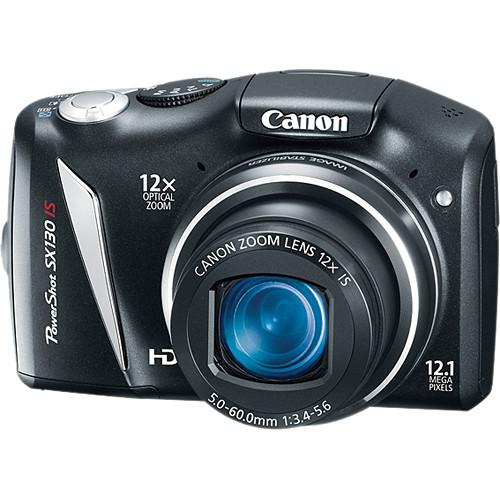 Contents of the user manual for the Canon PowerShot SX130 IS Digital Camera
- Product category: Uncategorized Canon
- Brand: Canon
- Description and content of package
- Technical information and basic settings
- Frequently asked questions – FAQ
- Troubleshooting (does not switch on, does not respond, error message, what do I do if...)
- Authorized service for Canon Uncategorized
|
User manual for the Canon PowerShot SX130 IS Digital Camera contain basic instructions
that need to be followed during installation and operation.
Before starting your appliance, the user manual should be read through carefully.
Follow all the safety instructions and warnings, and be guided by the given recommendations.
User manual is an integral part of any Canon product,
and if it is sold or transferred, they should be handed over jointly with the product.
Following the instructions for use is an essential prerequisite for protecting
health and property during use, as well as recognition of liability on the part of the manufacturer
for possible defects should you make a warranty claim. Download an official Canon user manual in which you will find instructions on how to install, use, maintain and service your product.
And do not forget – unsuitable use of a Canon product will considerably shorten its lifespan!
|
Product description Are you ready to rumble? Creatively, that is? Canon's PowerShot SX130 IS Digital Camera (Black) is more than up to the challenge: it's got a 12.1MP sensor, a 12x zoom lens (28-336mm equivalent in 35mm, which goes from very wide-angle to super telephoto in a snap), and a vivid 3" display. That's just the basics--there's also dazzling 720p HD video with stereo sound, fun special effects like Fisheye and Miniatures, and Advanced Smart AUTO that gives you the absolute best exposure for 28 different shooting situations like Portrait, Landscape, Kids & Pets, Low Light, Beach, Foliage, Snow, etc. There's manual control over exposure and focus when you want it, image stabilization that controls camera shake when the shutter speed is low, color variations like Super Vivid for magnificently saturated colors or Color Swap (pick a color in your photo and replace it with a different color that you specify), sensitivity up to 1600 ISO, exposure compensation +/- 2 f-stops in 1/3 stop increments, and 6 different exposure control methods. Whew! But there's a lot more. And it's all accomplished with 2 AA batteries, available just about everywhere in the world. Isn't that sweet? - Greater shooting capabilities in 720p HD video - the SX130 IS can shoot HD video with stereo sound while using the optical zoom, offering better versatility and image quality so you can fully capture those fun, memorable moments.
- A high-powered 12x Wide-Angle Optical Zoom with Optical Image Stabilizer reduces camera shake so you achieve brilliant images whether you are up close or far away.
- Great new scene modes like Miniature Effect for Movie offers a creative option to capture your videos and Fisheye Effect offers a cool artistic option to capture your images.
- Smart Flash Exposure where the camera determines the correct flash based on the shooting situation.
- Advanced Smart AUTO analyzes faces, brightness, colors, distance and movement, then selects an appropriate setting based on 28 predefined shooting situations.
- Powerful DIGIC 4 Image Processor, with 12.1 Megapixels, makes this camera a perfect device for any shooter!
- Large 3.0-inch wide LCD enables easy viewing.
- This AA battery-powered camera enables you to easily power up.
Shooting Modes - Smart AUTO--the camera automatically selects the best shooting settings for optimal quality based on subjects and environmental factors to provide point-and-shoot simplicity.
- P (Program)--access advanced exposure compensation features while shooting mostly automatically.
- Tv (Shutter-priority)--you select the shutter speed to stop or blur action, and the camera finds the appropriate aperture. With slow exposure times, Canon's noise reduction system activates to ensure low image noise.
- Av (Aperture-priority)--you define the aperture to either isolate your subject or have clarity throughout the entire picture, and the camera will choose the corresponding shutter speed.
- M (Manual)--the ultimate in creative control, you set both aperture and shutter speed manually.
- Easy--keep the image quality as high as possible for fail-proof images.
- Portrait--the camera sets a large aperture, focusing the subject and artistically blurring the background to make your subject "pop."
- Landscape--for front to back sharpness, the camera sets a small aperture.
- Kids & Pets--reduced focusing time for even faster shutter response, so you won't miss those special shots.
- Smart Shutter--the camera automatically takes the photo when people smile, wink, or get into frame.
- Low Light--for high quality image capture in an amazing range of dimly-lit situations.
- Super Vivid--Super Vivid intensifies existing hues, saturating the scene with bright colors.
- Poster Effect--poster Effect combines several similar shades into one color, turning subtle gradations into eye-catching, scene-popping contrasts.
- Color Accent--choose to retain a single color in your image while other colors turn monochrome.
- Color Swap--select a color and replace it with a color you specify for special effects.
- Fisheye Effect--add a classic photo distortion without a fisheye lens.
- Miniature Effect--give images a miniature look with an effect that emphasizes perspective by blurring the top and bottom of the image.
- Beach--get clear shots of people at a sunny beach without darkened faces.
- Foliage--capture brilliant shots of autumn foliage, greenery and blossoms.
- Snow--shoot clear snow scenes without darkened subjects or an unnatural bluish tint.
- Fireworks--grab brilliant images of skyrocketing fireworks
In the Box Canon PowerShot SX130 IS Digital Camera (Black) 2 x AA-Size Alkaline Battery Wrist Strap WS-800 AV Cable IFC-400PCU USB 2.0 Type A to Mini USB Type B Cable (4') Digital Camera Solution CD-ROM 90-Day Refurbished Warranty Table of Contents
|
Upload User Manual
Have you got an user manual for the Canon PowerShot SX130 IS Digital Camera - Refurbished in electronic form? Please send it to us and help us expand our library of instruction manuals.
Thank you, too, on behalf of other users.
To upload the product manual, we first need to check and make sure you are not a robot. After that, your "Submit Link" or "Upload File" will appear.
Technical parametersCanon 4345B023AA Specs | | | Pixels | Actual: 12.4 Megapixel
Effective: 12.1 Megapixel | | Sensor | 1/2.3" | | File Formats | Still Images: JPEG
Movies: MOV
Audio: Linear PCM | | Max Resolution | 4000 x 3000 | | Aspect Ratio | 4:3, 16:9 | | Image Stabilization | Optical | | | | Lens | Effective Focal Length: 5 to 60mm (35 mm Equivalent: 28 to 336mm)
Aperture: f/3.4 (W) to f/5.6 (T) | | Zoom | Optical: 12x
Digital: 4x | | Focus Range | Wide: 0.4" to Infinity / 1.02 cm to Infinity
Telephoto: 3.3' to Infinity / 100.58 cm to Infinity
Macro: 0.4" to 1.6' / 1.02 cm to 48.77 cm | | | | ISO Sensitivity | Auto, 80 to 1600 | | Shutter | 1 to 1/2500 Seconds
15 to 1/2500 Seconds in Manual Mode | | Exposure Metering | Center-Weighted, Evaluative, Spot | | Exposure Modes | Modes: AE Lock, Aperture Priority, Manual, Program, Safety Shift, Shutter Priority
Compensation: -2 EV to +2 EV (in 1/3 EV Steps) | | White Balance | Auto, Daylight, Cloudy, Tungsten, Fluorescent, Manual, Fluorescent H | | Continuous Shooting | Up to 1 fps for up to Exposures | | Self-Timer | 2 Sec Also has Custom and Face Self-timer | | Interval Recording | None | | Remote Control | None | | | | Flash Modes | Auto
Auto/Red-Eye Reduction
Exposure Compensation
FE Lock
Flash On
Off
Slow Sync | | Effective Flash Range | Wide:1.6 to 9.8' / 0.5 to 3.0 m
3.3 to 6.6' / 1.0 to 2.0 m | | External Flash Connection | None | | | | Built-In Memory | None | | Memory Card Type | SD
SDHC
SDXC
MMC
MMCplus
HC MMCplus | | Still Images per GB | JPEG: 300at Max Resolution to 875 at Min Resolution | | | | Video Recording | Yes, NTSC/PAL | | | | Video Clip Length | Limited by Memory Card Capacity | | Audio Recording | With Video (Stereo) | | | | Viewfinder Type | None | | Screen | 3" LCD (230,000 Pixels) | | | | Battery | 2 x AA Batteries | | AC Power Adapter | ACK-800 (Not Included) | | | | Dimensions (W x H x D) | 4.5 x 2.9 x 1.8" / 114.3 x 73.7 x 45.7 mm | | Weight | 9.17 oz / 259.97 g (Camera only) | | | | Package Weight | 1.4 lb | | Box Dimensions (LxWxH) | 10.0 x 6.5 x 3.05" |
Rating88% users recommend this product to others. And what about you?

This product has already been rated by 92 owners. Add your rating and experience with the product.
Discussion
 Ask our technicians if you have a problem with your settings,
or if anything is unclear in the user manual you have downloaded.
You can make use of our moderated discussion.
The discussion is public and helps other users of our website who may be encountering similar problems.
Ask our technicians if you have a problem with your settings,
or if anything is unclear in the user manual you have downloaded.
You can make use of our moderated discussion.
The discussion is public and helps other users of our website who may be encountering similar problems.
The discussion is empty - enter the first post
Post a new topic / query / comment:
|
|
|
| Request for user manual |
You can’t find the operation manual you are looking for? Let us know and we will try to add the missing manual:
I’m looking for a manual / Request for manual
Current requests for instruction manuals:
Call Of Duty World War Two For Xbox...
controller stratus XL...
stratus XL...
smart whatch serie S11 42mm...
Allen & Heath SQ-6 manual...
|
| Discussion |
Latest contributions to the discussion:
AEW R 4100
Name: MAURICIO ANGARITA
Audio-Technica AEW-R4100 UHF Diversity Receiver for
AEW R 4100 has the mute function blocked and does not allow audio to pass. I tried several times to turn off the mute from the transmitter but it does nothing, the mute stays on. Solution?
Thank you...
Instructions for assembling the 2015 Forecast Image Master Consoles GC3-A
Name: mike elam
Forecast Consoles GC3-A ImageMaster Editing Console
Looking for instructions for assembling this console. ...
EMPTY TONER ERROR MESSAGE AFTER REPLACING TONER
Name: LINDA BAD YELLOW EYES
Brother TN223BK Standard-Yield Toner
I HAD TO CHANGE OUT ALL THREE TONERS DUE TO LEAKS IN THE YELLOW AND CYAN. AFTER I REPLACED THEM, THE MACHINE KEEPS GIVING ME AN EMPTY TONER ERROR MESSAGE. HELP!!...
PS480D 20/24 pin Switching 480W Power Supply
Name: swkargo
Logisys 480W Power Supply
This item states in can run -5vdc .It is NOT listed on the board or I beleive is r4 is missing the resitior. Any body have thid issue. Shawn
...
Help needed
Name: Ann Carter
SanDisk 1TB Extreme Portable USB 3.1
When I click the link to download the user manual for my Sandisk Extreme external hard drive, it gives me the manual for the LG Cricket. Can you please change the link so I can download the Sandisk manual and begin using this drive? Thank you....
|
|


