|
User Manual for Canon PowerShot SX70 HS Digital Camera with Accessories Kit Click to enlarge the picture
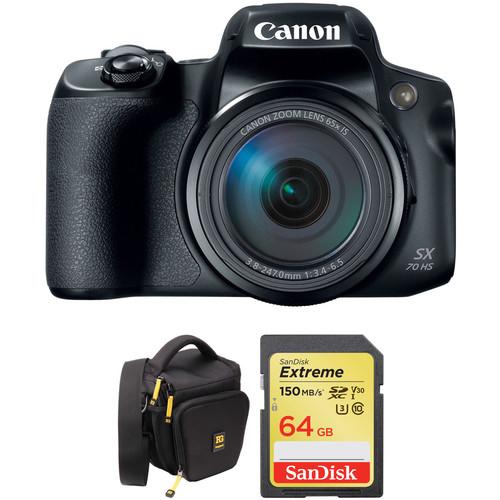 Contents of the user manual for the Canon PowerShot SX70 HS Digital Camera
- Product category: Point & Shoot Cameras Canon
- Brand: Canon
- Description and content of package
- Technical information and basic settings
- Frequently asked questions – FAQ
- Troubleshooting (does not switch on, does not respond, error message, what do I do if...)
- Authorized service for Canon Point & Shoot Cameras
|
User manual for the Canon PowerShot SX70 HS Digital Camera contain basic instructions
that need to be followed during installation and operation.
Before starting your appliance, the user manual should be read through carefully.
Follow all the safety instructions and warnings, and be guided by the given recommendations.
User manual is an integral part of any Canon product,
and if it is sold or transferred, they should be handed over jointly with the product.
Following the instructions for use is an essential prerequisite for protecting
health and property during use, as well as recognition of liability on the part of the manufacturer
for possible defects should you make a warranty claim. Download an official Canon user manual in which you will find instructions on how to install, use, maintain and service your product.
And do not forget – unsuitable use of a Canon product will considerably shorten its lifespan!
|
Product description Comprising the essentials needed to begin shooting, the Canon PowerShot SX70 HS Digital Camera with Accessories Kit from bundles the long-zoom point-and-shoot with a memory card and a protective camera bag. - Canon PowerShot SX70 HS Digital Camera
- Introducing the Canon PowerShot SX70 HS Camera
Characterized by its impressive reach, the PowerShot SX70 HS from Canon is a flexible point-and-shoot offering high-resolution imaging and a wide-ranging 65x zoom lens. The 20.3MP CMOS sensor pairs with the DIGIC 8 image processor to afford stills shooting at up to 10 fps for working with moving subjects, and also enables recording UHD 4K video content as well as producing 4K time-lapse movies. For working in a variety of shooting situations, the 65x optical zoom covers a wide-angle to super-telephoto focal length range, and is complemented by five stop-effective image stabilization to minimize the appearance of camera shake for sharper handheld shooting. Benefitting the imaging capabilities, this camera also incorporates a 2.36m-dot OLED electronic viewfinder for clear eye-level shooting and built-in Wi-Fi and Bluetooth permit seamless wireless control and sharing capabilities. - 20.3MP CMOS Sensor and DIGIC 8 Image Processor
- A 20.3MP CMOS sensor pairs with the DIGIC 8 image processor to realize notable image quality and speed to permit stills shooting at up to 10 fps, UHD 4K video recording, and in-camera 4K time-lapse movie creation. Together, the sensor and processor also produce clean image quality and enhanced sensitivity with minimal noise for working in difficult lighting conditions.
- 65x Zoom Lens and Image Stabilization
- An expansive 65x optical zoom lens offers a wide-angle to super telephoto 21-1365mm equivalent focal length range to suit working with a wide variety of subjects. This extensive reach is complemented by a versatile image stabilization system that minimizes the appearance of camera shake by up to five stops.
- Body Design and Wireless Connectivity
-
- A 2.36m-dot OLED electronic viewfinder is available as a clear and bright means for eye-level monitoring.
- Built-in Wi-Fi allows you to wirelessly share your photos and movies with a linked smartphone or tablet as well as remotely control the camera from the mobile device by using the Camera Connect app.
- Mobile devices can also connect to the camera using Bluetooth for remotely adjusting settings and gaining a live view image from your smartphone or tablet. Bluetooth connectivity also allows you to use your smartphone's location data to geotag your photos, and the date can also be stamped on your imagery for easy reference.
- Other Camera Features
-
- Zoom Framing Assist automatically zooms in or out to keep a subject within the frame and in focus when using longer focal lengths.
UPC: 013803312188 - Ruggard Hunter 35 DSLR Holster Bag
- Introducing the Canon PowerShot SX70 HS Camera
The Hunter 35 DSLR Holster Bag from Ruggard is slightly larger than the Hunter 25 and holds a DSLR (up to semi-pro size) with lens attached, face down, in shooting position. When you're ready to shoot, simply remove your camera, get the shot and replace your camera in the bag. The zippered top of the bag opens away from your body for fast access to your gear. This also serves as a security feature since no one but you will be able to see inside the bag. The bag has a water-repellent exterior and smooth polyester lining that helps prevent scratches to the finish of your camera/lens combo. Inside, there are two removable touch fastened strips that can be configured to support your gear. For storage, there is a front zippered organizer panel, mesh side pocket and two side loops that accept optional pouches. On the inside of the quick-release flap, there are two touch fastened memory card pockets. The bag is carried by its removable shoulder strap, top carry handle or belt loop that will leave you hands free. The zippers have yellow pull tabs that make the bag easy to use while you're wearing gloves. - Carry-on Form Factor
- FAA and airline carry-on specifications are subject to change without notice. Please check with your airline before designating this case as a carry-on item. Most airlines require carry-on items to have an external linear measurement that is equal to or less than 45.0" (114.3 cm). The external dimensions of this case add up to 20.9" (53.1 cm)
UPC: 847628559004 - SanDisk 64GB Extreme UHS-I SDXC Memory Card
- Introducing the Canon PowerShot SX70 HS Camera
Designed for SD devices that can capture Full HD, 3D, and 4K video, as well as raw and burst photography, the 64GB Extreme UHS-I SDXC Memory Card from SanDisk has a capacity of 64GB, is compatible with the UHS-I bus, and features a speed class rating of V30, which guarantees minimum write speeds of 30 MB/s. If your device does not support the V30 standard, this card also supports the U3 standard, which likewise guarantees minimum write speeds of 30 MB/s. Read speeds are supported up to 150 MB/s and write speeds max out at 60 MB/s. A built-in write-protect switch helps to safeguard against the accidental erasure of card data.
While this card has been designed for cameras that are UHS-I / V30 / U3 compatible, it may be used in devices that do not support UHS-I / V30 / U3. However, bear in mind that this card will then default to your device's speed class and bus rating, such as UHS-I and U1, which supports minimum write speeds of 10 MB/s, or Class 10, which also supports minimum write speeds of 10 MB/s. UPC: 619659170684 In the Box - PowerShot SX70 HS Digital Camera fryzqcydbtbqfeec
- LP-E12 Lithium-Ion Battery Pack (7.2V, 875mAh)
- Battery Charger LC-E12 for Battery Pack LP-E12
- NS-DC11 Neck Strap
- Lens Cap
- Limited 1-Year Warranty
- Ruggard - Hunter 35 DSLR Holster Bag fryzqcydbtbqfeec
- SanDisk - 64GB Extreme UHS-I SDXC Memory Card
Table of Contents
|
Upload User Manual
Have you got an user manual for the Canon PowerShot SX70 HS Digital Camera with Accessories Kit in electronic form? Please send it to us and help us expand our library of instruction manuals.
Thank you, too, on behalf of other users.
To upload the product manual, we first need to check and make sure you are not a robot. After that, your "Submit Link" or "Upload File" will appear.
Technical parameters - Canon PowerShot SX70 HS Digital Camera
| | | Pixels | Actual: 21.1 Megapixel
Effective: 20.3 Megapixel | | Sensor | 1/2.3" CMOS | | File Formats | Still Images: JPEG, RAW
Movies: AVC/H.264, MP4
Audio: AAC | | Max Resolution | 5184 x 3888 | | Aspect Ratio | 1:1, 3:2, 4:3, 16:9 | | Image Stabilization | Optical | | | | Lens | Effective Focal Length: 3.8 to 247mm (35 mm Equivalent: 21 to 1365mm)
Aperture: f/3.4 (W) to f/6.5 (T) | | Zoom | Optical: 65x
Digital: 4x
Intelligent Zoom: 130x | | Focus Range | Wide: 1.97" to Infinity / 5 cm to Infinity
Telephoto: 5.91' to / 1.8 m to
Macro: 0" to 1.64' / 0 cm to 50 cm | | | | ISO Sensitivity | Auto, 100 to 3200 | | Shutter | 15 to 1/2000 Second | | Exposure Metering | Center-Weighted, Evaluative, Spot | | Exposure Modes | Modes: Aperture Priority, Auto, Manual, Program, Shutter Priority | | Shooting Modes | Monochrome
Natural
Sepia
Standard
Vivid Color | | White Balance | Auto, Cloudy, Custom, Daylight, Flash, Fluorescent (White), Shade, Tungsten, White Balance Adjustment | | Continuous Shooting | Up to 10 fps at 20.3 MP
Up to 5.7 fps at 20.3 MP
Up to 3 fps at 20.3 MP | | Self-Timer | 2, 10 Sec | | | | Flash Modes | Auto
Flash On
Off
Slow Sync | | Built-In Flash | Yes | | Effective Flash Range | Wide:1.64 to 16.40' / 0.5 to 5 m
Telephoto:6.56 to 8.20' / 2 to 2.5 m | | | | Memory Card Type | SD
SDHC
SDXC | | | | Video Recording | Yes, NTSC | | Resolution | 3840 x 2160p: 29.97 fps
1920 x 1080p: 119.9 fps, 59.94 fps, 29.97 fps
1280 x 720p: 59.94 fps | | | | Video Clip Length | Up to 29 Minute 59 Second | | Audio Recording | Built-In Mic: With Video (Stereo) | | | | Viewfinder Type | Electronic | | Screen | 3.0" LCD Rear Screen Swivel (920,000 Pixels) | | Screen Coverage | 100% | | | | Connectivity | HDMI D (Micro), USB 2.0 Micro-B | | Wi-Fi | Yes | | | | Battery | 1 x LP-E12 Rechargeable Lithium-Ion Battery Pack, 875 VDC, 7.2 mAh | | | | Dimensions (W x H x D) | 5.0 x 3.6 x 4.6" / 127.0 x 90.9 x 116.6 mm | | Weight | 1.34 lb / 608 g with battery and memory card | | | | Box Dimensions (LxWxH) | 7.5 x 5.7 x 5.4" | - Ruggard Hunter 35 DSLR Holster Bag
| Carrying/Transport Options | Belt Loop, Handle, Shoulder Strap | | | | Exterior Dimensions | 7.3 x 5.3 x 8.25" / 18.5 x 13.5 x 21 cm | | Exterior Material | Nylon | | Type of Closure | Quick Release, Zipper | | | | Interior Dimensions | 6.5 x 4.5 x 7" / 16.5 x 11.4 x 17.8 cm | | Interior Material | Polyester | | Weight | 10.3 oz / 292.0 g | | | | Box Dimensions (LxWxH) | 10.0 x 7.0 x 5.5" | - SanDisk 64GB Extreme UHS-I SDXC Memory Card
| Card Type | SDXC | | Storage Capacity | 64 GB | | Bus Type | UHS-I | | Speed Class | 10 | | UHS Speed Class | U3 | | Video Speed Class | V30 | | Data Transfer | Read Speed: 150 MB/s Maximum (Burst)
Write Speed: 60 MB/s Maximum (Burst)
Write Speed: 30 MB/s Minimum | | Built-in Write-Protect Switch | Yes | | Wireless Capability | None | | | | Box Dimensions (LxWxH) | 9.0 x 6.8 x 4.5" |
Rating70% users recommend this product to others. And what about you?

This product has already been rated by 28 owners. Add your rating and experience with the product.
Discussion
 Ask our technicians if you have a problem with your settings,
or if anything is unclear in the user manual you have downloaded.
You can make use of our moderated discussion.
The discussion is public and helps other users of our website who may be encountering similar problems.
Ask our technicians if you have a problem with your settings,
or if anything is unclear in the user manual you have downloaded.
You can make use of our moderated discussion.
The discussion is public and helps other users of our website who may be encountering similar problems.
Post new comment to Canon PowerShot SX70 HS Digital Camera with Accessories Kit
| Subject: Guidance | | Date: 20.11.2022 11:41:23 | Name: Lance Molle | I cannot figure out how to choose my own shutter speeds and
aperture settings. | | Post reply |
| Subject: manual | | Date: 18.12.2020 00:06:34 | Name: Jack Cover | | Is there a hard copy for the Cannon Powershot SX70? | | Post reply |
Post a new topic / query / comment:
|
|
|
| Request for user manual |
You can’t find the operation manual you are looking for? Let us know and we will try to add the missing manual:
I’m looking for a manual / Request for manual
Current requests for instruction manuals:
Call Of Duty World War Two For Xbox...
controller stratus XL...
stratus XL...
smart whatch serie S11 42mm...
Allen & Heath SQ-6 manual...
|
| Discussion |
Latest contributions to the discussion:
AEW R 4100
Name: MAURICIO ANGARITA
Audio-Technica AEW-R4100 UHF Diversity Receiver for
AEW R 4100 has the mute function blocked and does not allow audio to pass. I tried several times to turn off the mute from the transmitter but it does nothing, the mute stays on. Solution?
Thank you...
Instructions for assembling the 2015 Forecast Image Master Consoles GC3-A
Name: mike elam
Forecast Consoles GC3-A ImageMaster Editing Console
Looking for instructions for assembling this console. ...
EMPTY TONER ERROR MESSAGE AFTER REPLACING TONER
Name: LINDA BAD YELLOW EYES
Brother TN223BK Standard-Yield Toner
I HAD TO CHANGE OUT ALL THREE TONERS DUE TO LEAKS IN THE YELLOW AND CYAN. AFTER I REPLACED THEM, THE MACHINE KEEPS GIVING ME AN EMPTY TONER ERROR MESSAGE. HELP!!...
PS480D 20/24 pin Switching 480W Power Supply
Name: swkargo
Logisys 480W Power Supply
This item states in can run -5vdc .It is NOT listed on the board or I beleive is r4 is missing the resitior. Any body have thid issue. Shawn
...
Help needed
Name: Ann Carter
SanDisk 1TB Extreme Portable USB 3.1
When I click the link to download the user manual for my Sandisk Extreme external hard drive, it gives me the manual for the LG Cricket. Can you please change the link so I can download the Sandisk manual and begin using this drive? Thank you....
|
|


