|
User Manual for Canon Speedlite 600EX-RT Essential Accessory Kit Click to enlarge the picture
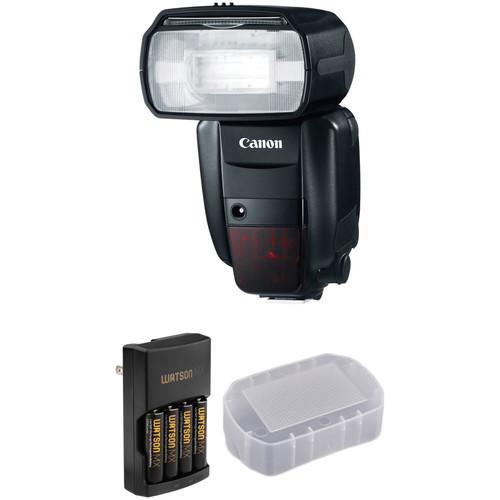 Contents of the user manual for the Canon Speedlite 600EX-RT Essential Accessory Kit
- Product category: On Camera Flashes Canon
- Brand: Canon
- Description and content of package
- Technical information and basic settings
- Frequently asked questions – FAQ
- Troubleshooting (does not switch on, does not respond, error message, what do I do if...)
- Authorized service for Canon On Camera Flashes
|
User manual for the Canon Speedlite 600EX-RT Essential Accessory Kit contain basic instructions
that need to be followed during installation and operation.
Before starting your appliance, the user manual should be read through carefully.
Follow all the safety instructions and warnings, and be guided by the given recommendations.
User manual is an integral part of any Canon product,
and if it is sold or transferred, they should be handed over jointly with the product.
Following the instructions for use is an essential prerequisite for protecting
health and property during use, as well as recognition of liability on the part of the manufacturer
for possible defects should you make a warranty claim. Download an official Canon user manual in which you will find instructions on how to install, use, maintain and service your product.
And do not forget – unsuitable use of a Canon product will considerably shorten its lifespan!
|
Product description A Guide to On-Camera Flash Read More The Canon Speedlite 600EX-RT Essential Accessory Kit from B&H combines the high-performance Speedlite 600EX-RT flash unit with a bounce dome diffuser for softer, more flattering light emission, and a rapid charger with 4 NiMH rechargeable AA batteries to keep you always at the ready to get the most from your Speedlite.The Speedlite 600EX-RT features a wireless multiple flash system using radio wave communication that provides precise control over as many as five groups or fifteen individual flashes at a distance of up to 98.4'. Communicating on 2.4 GHz frequency, it will not be interrupted by physical barriers. It is also very powerful, with a guide number of 197' (60 m) at ISO 100 and a zoom flash head that covers a 20-200mm range. It provides full swivel movement of 180° in both directions. Compatible with the AF frame of all EOS cameras, the Speedlite 600EX-RT even works perfectly with the 61-Point High Density Reticular AF found in the EOS-1D X and the EOS 5D Mark III. It supports all current versions of TTL, including evaluative E-TTL II.A dot matrix LCD panel and backlit button provide easy visibility, and flash functions can be controlled via the camera's menu. A metal hot-shoe and a dust and water-resistant body allow it to be used in adverse conditions, and the included color filter holder and two orange color filters multiply your creative options. - Canon Speedlite 600EX-RT Complete with built-in radio transmission wireless functionality, the Speedlite 600EX-RT sits at the top of Canon's on-camera E-TTL / E-TTL II compatible flash lineup with a powerful guide number of 197' at ISO 100 and 200mm. This two-way 2.4 GHz radio system provides added reliability and a range up to 98.4' among up to 5 groups with a total of 15 individual Speedlites. This system also does not need direct line-of-site like traditional optical-based transmission and will work through obstacles.
For added coverage and functionality, the flash's zoom head can reach from 20-200mm, with the option for wide 14mm coverage when the built-in diffusion panel is used. Also, the unit can tilt from -7 to +90° and rotate 180° either left or right for complete bounce capabilities. On the back of the 600EX-RT is a backlit dot-matrix LCD panel that displays the status and allows users to easily access and change settings. Additionally, the flash is durable with a redesigned contact construction and improved dust and water resistant sealing.
Other capabilities of the 600EX-RT include a stroboscopic mode as well as high-speed, first and second curtain sync settings for more control over your image's final look. The flash is powered by 4 AA batteries which provide a recycle time of 0.1-5.5 seconds, though it does have a port for an optional external power pack. It comes with a color filter holder with case, a light orange filter, a dark orange filter, a mini stand, and a Speedlite case. - AF assist beam works with up to 61-point High Density Reticular AF system
- There are 18 custom functions and 7 personal functions for maximum customization
- Optical transmission is available in addition to radio transmission
- Quick Flash settings speeds up recycle time and flash duration
- Manual power settings from 1/1 to 1/128 power in 1/3-stop increments
- Flash color temperature information is automatically transmitted to the camera
- Automatic power off function
- Flash exposure compensation from -3 to +3 EV in 1/2 or 1/3 EV steps
- PC sync port and remote release terminal for off-camera triggering
- Flash duration of 1.8 ms or less, or 2.3 ms or less in Quick Flash mode
- Stroboscopic setting from 1-500 Hz, or 1-199 Hz during optical transmission wireless shooting
- Wireless flash ratio control from 1:8 to 1:1 to 8:1 in ½-stop increments
- Compatible with ST-E3 Speedlite Transmitter
- Approximately 100-700 flashes with AA alkaline batteries
- Built-in retractable bounce card
UPC: 013803136692 - Watson MX 4-Hour Rapid Charger and 4 MX AA NiMH Batteries Power up your photo equipment, flashlights, gaming devices, and other electronics via the Watson MX 4-Hour Rapid Charger with 4 MX AA NiMH Batteries. The 1.2V, 2550mAh nickel-metal hydride cells are pre-charged, rechargeable up to 500 times, and capable of retaining 85% of their capacity after 1 year in storage. The Rapid unit will charge 4 of them in about 310 minutes, or 2 in about 160 minutes. It's also compatible with optional AA NiCd batteries, or AAA NiMH or NiCd cells.
The charger's integrated micro-controller ensures that each battery is charged to its full capacity, and an automatic cut-off feature prevents overcharging. Should the controller and automatic cut-off functions both fail, the safety guard timer will kick in to ensure that power is still shut off after 6 hours. Additionally, the charger features protection against short circuits and reverse polarity. Two charging channels are individually monitored, and two LED indicators display battery status. In order to enable use all over the world, the charger runs on 100-240 VAC power. As a bonus, its compact outlet prongs can fold inwards, making the unit more compact for storage and travel. UPC: 847628599529 - Vello Bounce Dome Diffuser for Canon Speedlite 600EX-RT The Bounce Dome Diffuser for Canon Speedlite 600EX-RT from Vello will diffuse the light output of the Canon Speedlite 600EX-RT or Yongnuo Speedlite YN600EX-RT and YN600EX-RT II flash, producing softer shadows and a more natural glow rather than the harsher light effect when using a direct flash. The diffuser provides even coverage across the entire frame.The lightweight, compact Bounce Dome simply slides onto and off the Canon Speedlite 600EX-RT or Yongnuo Speedlite YN600EX-RT and YN600EX-RT II with customized fitting, and without the need for touch fastener tabs.
- Soft, even, diffused light from your shoe-mount flash
- Ultra-wide angle of coverage
- Attaches instantly without touch tabs
- Fits the Canon Speedlite 600EX-RT or Yongnuo Speedlite YN600EX-RT and YN600EX-RT II
UPC: 847628564282 In the Box - Speedlite 600EX-RT ucaytcudqwbrbrw
- SCH-E1 Color Filter Holder for 600EX-RT
- SCF-E1 Color Filter Set for 600EX-RT
- Color Filter Holder Case
- Mini Stand
- Speedlite Case
- Limited 1-Year Warranty
- Watson - MX 4-Hour Rapid Charger and 4 MX AA NiMH Batteries
- Vello - Bounce Dome Diffuser for Canon Speedlite 600EX-RT
More from Manufacturer Table of Contents
|
Upload User Manual
Have you got an user manual for the Canon Speedlite 600EX-RT Essential Accessory Kit in electronic form? Please send it to us and help us expand our library of instruction manuals.
Thank you, too, on behalf of other users.
To upload the product manual, we first need to check and make sure you are not a robot. After that, your "Submit Link" or "Upload File" will appear.
Technical parameters - Canon Speedlite 600EX-RT
| Mount | Shoe | | Guide No. | 197' / 60.05 m ISO 100 at 200 mm Position | | Exposure Control | E-TTL / E-TTL II, Manual | | Angle of Coverage | 94° - 12°
Wide-Angle Adapter: 114° | | Vari-Power | 1/1 to 1/128 | | Bounce Head | -7 to +90° | | Swivel Head | 360° | | Coverage | 14 - 200 mm (Full Frame) | | Distance Range | 1.64 to 98.43' (0.5 to 30 m) at f/1.4 | | Zoom Head | Full Frame: 20 - 200 mm | | Off-Camera Terminal | PC, Proprietary | | Recycle Time | Approximately 0.1 to 5.5 Seconds | | Flash Duration | 0.0018 to 0.0023 sec @ Full Power | | Flash-Ready Indicator | Yes | | Compensation | -3 EV to +3 EV (in 1/2 and 1/3 EV steps) | | Wireless Operation | Method: RF
Distance: Up to 98.43' / 30 m
Method: Optical Pulse
Distance: Up to 49.21' / 15 m | | Wireless Communication Channels | 4 Channels | | Wireless Groups | 5 Groups | | Power Source | 4 x AA Alkaline, Lithium, Rechargeable NiMH Batteries | | Dimensions (W x H x D) | 3.1 x 5.6 x 4.9" / 80.0 x 143.0 x 125.0 mm | | Weight | 14.99 oz / 425 g without batteries | | | | Box Dimensions (LxWxH) | 8.5 x 6.2 x 5.1" | - Watson MX 4-Hour Rapid Charger and 4 MX AA NiMH Batteries
| | | Configuration | 2 or 4 x AA or AAA NiMH or NiCd batteries | | Input Voltage | 100-240 VAC, 50/60 Hz | | Output Voltage | 2.8 VDC, 500 mAh | | Charging Time | 4 x AAA 950 mAh: About 190 minutes
2 x AAA 950 mAh: About 95 minutes
4 x AA 2550 mAh: About 310 minutes
2 x AA 2550 mAh: About 160 minutes | | Operating Temperature | 32 to 113°F / 0 to 45°C | | Dimensions | 2.7 x 1.3 x 4.3" / 6.9 x 3.3 x 10.9 cm | | Weight | 2.8 oz / 79.4 g | | | | Quantity | 4 x | | Size | AA | | Chemistry | NiMH (nickel-metal hydride) | | Capacity | 2550 mAh | | Output Voltage | 1.2 V | | Durability | Rechargeable up to 500 times | | Temperature Range | Down to -4°F / -20°C | | | | Box Dimensions (LxWxH) | 7.8 x 4.1 x 0.4" | - Vello Bounce Dome Diffuser for Canon Speedlite 600EX-RT
| Modifier Type | Bounce Diffuser | | Attachment Method | Slip-On | | | | Box Dimensions (LxWxH) | 5.9 x 3.2 x 2.1" |
Rating94% users recommend this product to others. And what about you?

This product has already been rated by 47 owners. Add your rating and experience with the product.
Discussion
 Ask our technicians if you have a problem with your settings,
or if anything is unclear in the user manual you have downloaded.
You can make use of our moderated discussion.
The discussion is public and helps other users of our website who may be encountering similar problems.
Ask our technicians if you have a problem with your settings,
or if anything is unclear in the user manual you have downloaded.
You can make use of our moderated discussion.
The discussion is public and helps other users of our website who may be encountering similar problems.
The discussion is empty - enter the first post
Post a new topic / query / comment:
|
|
|
| Request for user manual |
You can’t find the operation manual you are looking for? Let us know and we will try to add the missing manual:
I’m looking for a manual / Request for manual
Current requests for instruction manuals:
Call Of Duty World War Two For Xbox...
controller stratus XL...
stratus XL...
smart whatch serie S11 42mm...
Allen & Heath SQ-6 manual...
|
| Discussion |
Latest contributions to the discussion:
AEW R 4100
Name: MAURICIO ANGARITA
Audio-Technica AEW-R4100 UHF Diversity Receiver for
AEW R 4100 has the mute function blocked and does not allow audio to pass. I tried several times to turn off the mute from the transmitter but it does nothing, the mute stays on. Solution?
Thank you...
Instructions for assembling the 2015 Forecast Image Master Consoles GC3-A
Name: mike elam
Forecast Consoles GC3-A ImageMaster Editing Console
Looking for instructions for assembling this console. ...
EMPTY TONER ERROR MESSAGE AFTER REPLACING TONER
Name: LINDA BAD YELLOW EYES
Brother TN223BK Standard-Yield Toner
I HAD TO CHANGE OUT ALL THREE TONERS DUE TO LEAKS IN THE YELLOW AND CYAN. AFTER I REPLACED THEM, THE MACHINE KEEPS GIVING ME AN EMPTY TONER ERROR MESSAGE. HELP!!...
PS480D 20/24 pin Switching 480W Power Supply
Name: swkargo
Logisys 480W Power Supply
This item states in can run -5vdc .It is NOT listed on the board or I beleive is r4 is missing the resitior. Any body have thid issue. Shawn
...
Help needed
Name: Ann Carter
SanDisk 1TB Extreme Portable USB 3.1
When I click the link to download the user manual for my Sandisk Extreme external hard drive, it gives me the manual for the LG Cricket. Can you please change the link so I can download the Sandisk manual and begin using this drive? Thank you....
|
|


