User Manual for Casio WK-6600 - Workstation Keyboard with Sequencer and Mixer Click to enlarge the picture
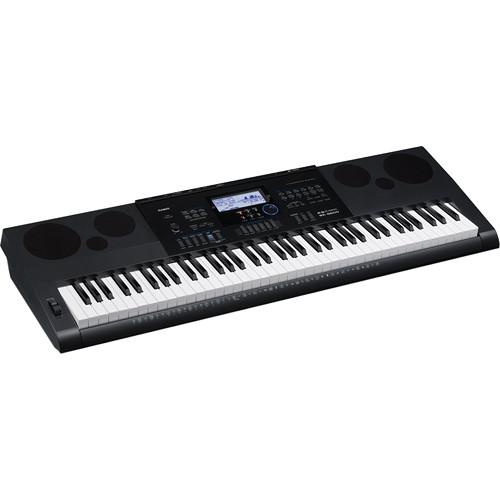 Contents of the user manual for the Casio WK-6600 - Workstation Keyboard with
- Product category: Portable Keyboards Casio
- Brand: Casio
- Description and content of package
- Technical information and basic settings
- Frequently asked questions – FAQ
- Troubleshooting (does not switch on, does not respond, error message, what do I do if...)
- Authorized service for Casio Portable Keyboards
 |
User manual for the Casio WK-6600 - Workstation Keyboard with contain basic instructions
that need to be followed during installation and operation.
Before starting your appliance, the user manual should be read through carefully.
Follow all the safety instructions and warnings, and be guided by the given recommendations.
User manual is an integral part of any Casio product,
and if it is sold or transferred, they should be handed over jointly with the product.
Following the instructions for use is an essential prerequisite for protecting
health and property during use, as well as recognition of liability on the part of the manufacturer
for possible defects should you make a warranty claim. Download an official Casio user manual in which you will find instructions on how to install, use, maintain and service your product.
And do not forget – unsuitable use of a Casio product will considerably shorten its lifespan!
|
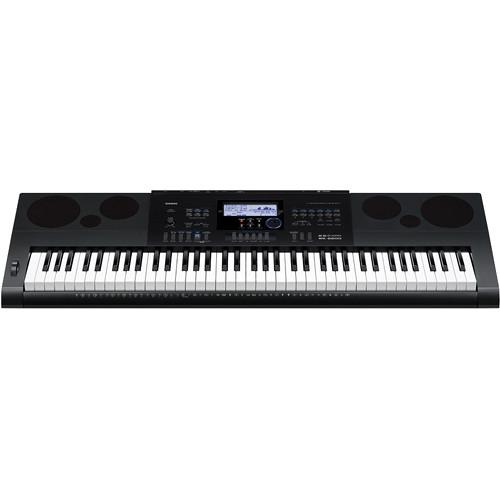
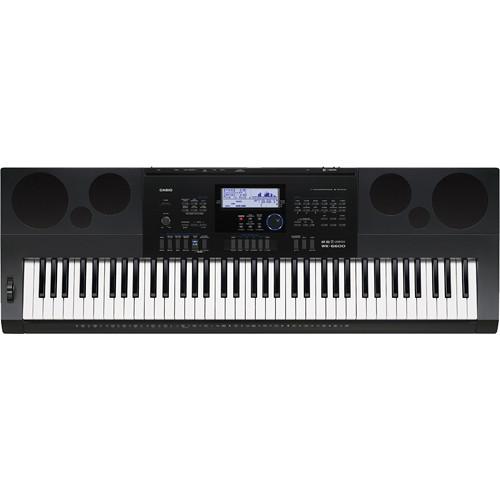
Product description The WK-6600 from Casio is a 76-key, touch-sensitive workstation keyboard that provides seven-hundred tones organized by category, and features a seventeen-track sequencer, a thirty-two-channel mixer, DSP effects, and USB MIDI connectivity. Each of the voices can be edited with control over filters, envelopes and more and audio can be recorded to SDHC cards with everything played back via built-in amplifier and speakers.
A total of 210 preset rhythms are available with full accompaniment built in. A rhythm editor allows for combining instrument parts from multiple rhythms, turn individual instrument parts on or off, and adjust volume, pan, reverb, and other parameters to create original rhythms. The sequencer allows for editing performances and turning out professional sounding tracks. The resulting song file can be saved to an SDHC card or saved as an audio recording. - 76 piano-type key workstation keyboard
- Seventeen-track sequencer supports recording of up to five songs and a total of approximately 12,000 notes
- Sequencer editing tools include event insert, event delete, event copy, quantize, a locator feature for selecting the range of notes to be edited, and more
- Music presets provide one-touch access to auto accompaniment, tone, reverb, and other settings that are configured in accordance with representative chord progressions
- The 305 music presets provide an easy way to configure the keyboard for a wide variety of different musical styles
- Completed recordings can be converted to SMF (Standard MIDI File) format and stored to an SD memory card
- Thirty-two-channel mixer with button operation for individual simultaneous adjustment of volume, pan, reverb send, and other parameters
- Sound input from an external source via the microphone input can also be adjusted in the mixer
- 210 preset rhythms with full accompaniment built in - combine instrument parts from multiple built-in rhythms, turn individual instrument parts on or off, and adjust volume, pan, reverb, and other parameters to create original rhythms
- Extensive set of DSP effects including reverb (10 types), chorus (5 types), and DSP (100 types using 46 effect types including delay, phaser, flanger, wah, rotary, and more)
- Equalizer incorporates five selectable frequency characteristics, including "Bright" for a lively sound emphasizing the treble range and "Powerful" with emphasis on the volume
- Easily create splits, layers or both simultaneously
- Store the current setup, including tone, rhythm, and other settings for instant recall on stage with thirty-two registration slots available
- Tone Editor allows for adjusting attack time, release time, cut off, vibrato, reverb, chorus, DSP, and other parameters
- 150 different arpeggiato types, including playing arpeggios from a fingered chord, guitar phrases, and more
- 6W + 6W high-output, bass reflex 2-way, 4-speaker system delivers rich sound - the speakers can be used as monitoring speakers during performances and music creation sessions
- Display shows the currently selected tone name and rhythm name, along with other information
- Class compliant USB connectivity allows the keyboard to be used with Mac or Windows computers without the need to download drivers
UPC: 079767314132 In the Box Casio WK-6600 - Workstation Keyboard with Sequencer and Mixer External Power Supply Music Stand One (1) Year Limited Warranty Table of Contents
|
Upload User Manual
Have you got an user manual for the Casio WK-6600 - Workstation Keyboard with Sequencer and Mixer in electronic form? Please send it to us and help us expand our library of instruction manuals.
Thank you, too, on behalf of other users.
To upload the product manual, we first need to check and make sure you are not a robot. After that, your "Submit Link" or "Upload File" will appear.
Technical parametersCasio WK-6600 Specs | | | Keyboard | 76 Keys, Weighted Action | | Touch Response | 2 Levels of Sensitivity, Plus Fixed | | Expression Controls | 1 x Pitch Bend | | | | Number of Sound Presets | 700 | | Number of Song Presets | 305 x Factory
50 x User | | Effects | Auto-Pan, Chorus, Compressor, Delay, EQ, Filter, Phaser, Reverb, Ring Modulator, Rotary, Tremolo | | Maximum Polyphony | 48 Notes | | Performance Functions | Arpeggiator, Sequencer, Split/Layer, Temperament Adjustment, Transpose, Tuning Adjustment | | | | Number of Style Presets | 210 x Factory
10 x User | | Types | One Touch, Single-Finger, Multi-Finger, Auto Chord, Auto Harmonize | | Practice Features | Metronome | | | | Supported MIDI Standards | GM | | MIDI Note Memory and Resolution | 12,000 Notes | | | | I/O | 1 x 1/4" TS Microphone Input
1 x 1/8" / 3.5 mm TRS Aux Input
2 x 1/4" TS Line Output
1 x 1/4" TRS Headphone Output | | Pedal Support | 1 x 1/4" TS Sustain | | Data Port | 1 x USB Type-B
1 x Memory Card Slot (SD) | | OS Compatibility | Windows XP
Windows Vista
Windows 7
macOS 10.5
macOS 10.6
macOS 10.7 | | | | Amplifiers | 2 x 6 W | | Round Speakers | 2 x 4.7" / 119 mm
2 x 1.2" / 30 mm | | | | AC Input Power | 120 VAC, 60 Hz | | AC/DC Power Adapter | 12 VDC (Included) | | Battery Type | 6 x D | | | | Display | LCD (Backlit) | | Dimensions | 45.7 x 15.2 x 5.8" / 1161.0 x 386.0 x 147.0 mm | | Weight | 15.9 lb / 7.2 kg | | | | Package Weight | 24.84 lb | | Box Dimensions (LxWxH) | 49.0 x 18.5 x 7.25" |
Rating100% users recommend this product to others. And what about you?

This product has already been rated by 58 owners. Add your rating and experience with the product.
Discussion
 Ask our technicians if you have a problem with your settings,
or if anything is unclear in the user manual you have downloaded.
You can make use of our moderated discussion.
The discussion is public and helps other users of our website who may be encountering similar problems.
Ask our technicians if you have a problem with your settings,
or if anything is unclear in the user manual you have downloaded.
You can make use of our moderated discussion.
The discussion is public and helps other users of our website who may be encountering similar problems.
Post new comment to Casio WK-6600 - Workstation Keyboard with Sequencer and Mixer
| Subject: question | | Date: 12.01.2021 17:20:55 | Name: Micheal Parshall | | how do I lower rhythm volume on my WK6600 ? It drowns out my lead parts. Thanks..... Michael | | Post reply |
Post a new topic / query / comment:
|
|


