User Manual for CeeNee Orchid HD Digital Signage Media Player Click to enlarge the picture
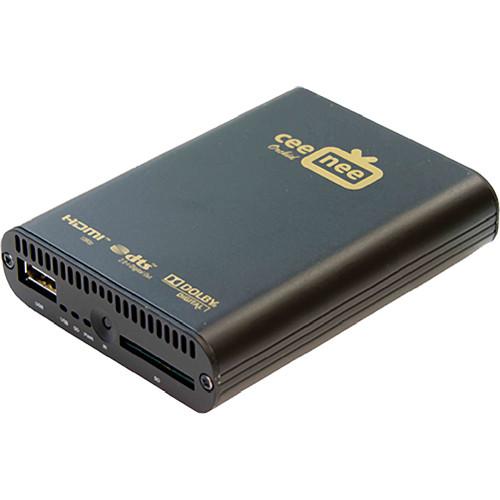 Contents of the user manual for the CeeNee Orchid HD Digital Signage Media
- Product category: Digital Signage Players CeeNee
- Brand: CeeNee
- Description and content of package
- Technical information and basic settings
- Frequently asked questions – FAQ
- Troubleshooting (does not switch on, does not respond, error message, what do I do if...)
- Authorized service for CeeNee Digital Signage Players
 |
User manual for the CeeNee Orchid HD Digital Signage Media contain basic instructions
that need to be followed during installation and operation.
Before starting your appliance, the user manual should be read through carefully.
Follow all the safety instructions and warnings, and be guided by the given recommendations.
User manual is an integral part of any CeeNee product,
and if it is sold or transferred, they should be handed over jointly with the product.
Following the instructions for use is an essential prerequisite for protecting
health and property during use, as well as recognition of liability on the part of the manufacturer
for possible defects should you make a warranty claim. Download an official CeeNee user manual in which you will find instructions on how to install, use, maintain and service your product.
And do not forget – unsuitable use of a CeeNee product will considerably shorten its lifespan!
|
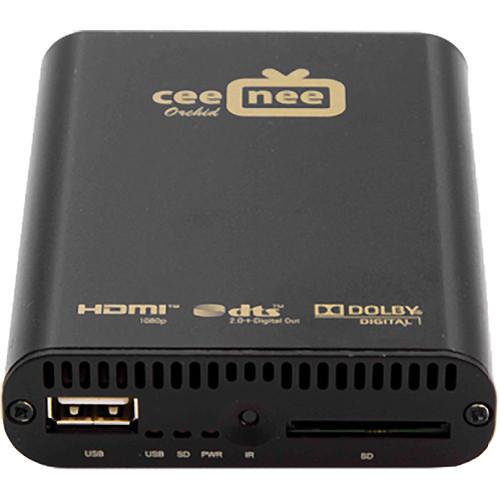
Product description The CeeNee Orchid HD Digital Signage Media Player provides an effective way to playback and schedule digital signage contents on both digital and analog connections. When connecting the Orchid to a network, contents can be remotely pushed to the Orchid by using a computer, laptop or even a smartphone. When a more elaborate setup is required, a number of units can be installed to pull contents from a local or an external FTP server based on a preset schedule.
The Orchid Media Player provides an intuitive directory and file structure that can easily be created and maintained by any text-based editor. Therefore, this allows users to concentrate more on the content creation process. And for a precise synchronization with an external NTP server, a built-in real time clock is dedicated for this special purpose.
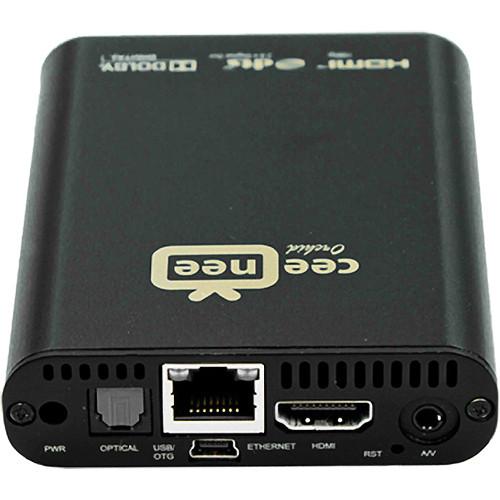
All popular audio and video file formats are supported with the output resolutions up to 1080p Full HD. The HDMI and composite connectors with separate analog and digital audio outputs provide the flexibility when connecting to various display devices. Besides, two USB 2.0 ports provide extra connections to the USB flash drive or to an external hard drive.
With Wi-Fi capability, the Orchid Media Player can be placed at an isolate remote location where RJ45 cable running is not feasible. This player comes with free 2-year hosting service. In the Box CeeNee Orchid HD Digital Signage Media Player AC Adapter 6' HDMI Gold Cable Remote Control with 2 x "AAA" Batteries 802.11n Wi-Fi USB Dongle 4 GB SDHC Card Class 4 Free 2-Year Hosting Service Table of Contents
|
Upload User Manual
Have you got an user manual for the CeeNee Orchid HD Digital Signage Media Player in electronic form? Please send it to us and help us expand our library of instruction manuals.
Thank you, too, on behalf of other users.
To upload the product manual, we first need to check and make sure you are not a robot. After that, your "Submit Link" or "Upload File" will appear.
Technical parametersCeeNee Orchid Specs | Container | Video: MPEG1/2/4 Elementary (M1V, M2V, M4V)
MPEG1/2 PS (M2P, MPG, DAT, VOB) | | Video Decoder | XVID SD/HD, MPEG-1, MPEG-2 MP@HL, MPEG-4.2 ASP@L5, 720p, 1-point GMC, MPEG-4.10 (H.264), BP@L3, MP@L4.0, HP@L4.0, HP@L4.1, WMV9, MP@HL, SMPTE 421M (VC-1), AP@L3 | | Hardware | Sigma SMP8671, 700 MHz CPU, 512 MBs DDR2 DRAM, 256 MBs NAND Flash | | Audio | DTS Passthrough, Dolby True HD, Dolby Digital Out, Stereo | | Audio Containers | AAC, M4A, MPEG audio (MP1, MP2, MP3, MPA), WAV, FLAC, OGG | | Audio Decoder | Dolby - Dolby Digital - Dolby Digital Plus - Dolby TrueHD, MPEG, AAC, HE-AAC, DRA, FLAC | | Photo | Containers: JPEG, BMP, PNG, GIF | | Audio/Video Output | HDMI v1.3a with CEC, 12-bit deep color, 12-bit xvYCC processing, Composite Video, Optical connector, Stereo Analog Audio | | Power | 100 to 240 VAC, 50 to 60 Hz, maximum 2.4 A typical: 6 W (no additional device installed/attached)
Maximum: 10 W | | Other Formats | ISO, IFO navigation, Rich Object Based Interactive Graphics, AVCHD navigation, DVD | | Network | Ethernet 10/100/1000 Port, Wi-Fi, 3G, 4G | | File Sharing | Samba | | Other Interfaces | 2 x USB 2.0 (01 USB host, 01 USB OTG)
1 x SDHC Reader
Infra-Red Remote Control port | | Dimensions | 10 x 8 x 6" (254 x 203 x 152 mm) | | Weight | 3.0 lb (1.3 kg) | | | | Package Weight | 1.35 lb | | Box Dimensions (LxWxH) | 8.7 x 6.4 x 3.3" |
Rating60% users recommend this product to others. And what about you?

This product has already been rated by 99 owners. Add your rating and experience with the product.
Discussion
 Ask our technicians if you have a problem with your settings,
or if anything is unclear in the user manual you have downloaded.
You can make use of our moderated discussion.
The discussion is public and helps other users of our website who may be encountering similar problems.
Ask our technicians if you have a problem with your settings,
or if anything is unclear in the user manual you have downloaded.
You can make use of our moderated discussion.
The discussion is public and helps other users of our website who may be encountering similar problems.
The discussion is empty - enter the first post
Post a new topic / query / comment:
|
|


