User Manual for ChyTV 7A00345 HD Bulletin Board Graphics System Click to enlarge the picture
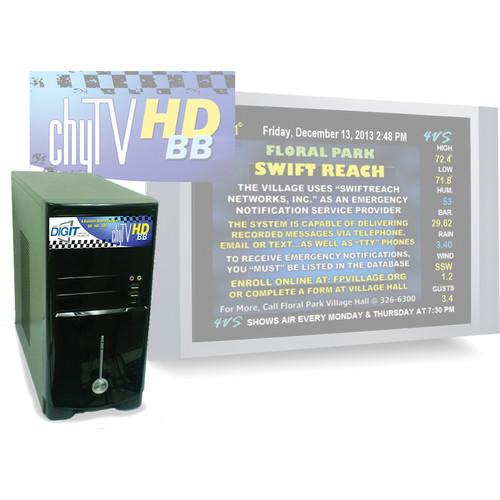 Contents of the user manual for the ChyTV 7A00345 HD Bulletin Board Graphics
- Product category: Character Generators & Graphic Solutions ChyTV
- Brand: ChyTV
- Description and content of package
- Technical information and basic settings
- Frequently asked questions – FAQ
- Troubleshooting (does not switch on, does not respond, error message, what do I do if...)
- Authorized service for ChyTV Character Generators & Graphic Solutions
|
User manual for the ChyTV 7A00345 HD Bulletin Board Graphics contain basic instructions
that need to be followed during installation and operation.
Before starting your appliance, the user manual should be read through carefully.
Follow all the safety instructions and warnings, and be guided by the given recommendations.
User manual is an integral part of any ChyTV product,
and if it is sold or transferred, they should be handed over jointly with the product.
Following the instructions for use is an essential prerequisite for protecting
health and property during use, as well as recognition of liability on the part of the manufacturer
for possible defects should you make a warranty claim. Download an official ChyTV user manual in which you will find instructions on how to install, use, maintain and service your product.
And do not forget – unsuitable use of a ChyTV product will considerably shorten its lifespan!
|
Product description The tower chassis 7A00345 HD Bulletin Board Graphics System from ChyTV is a high definition bulletin board graphics system with HD analog/HD-SDI video overlay, and HD clip playout. The HD Bulletin Board supports SD formats in and out, HD component, and HD-SDI in and out with graphic overlay on top of live video. Additionally, full screen graphics can be displayed with dynamic text, logos, and animations. A versatile playlist scheduler allows for dynamic programming. The supplied ChyTV Tools user interface allows for direct control of a single or multiple ChyTV HD Bulletin Board systems.
This system features an internal MPEG clip player and has the ability to manipulate the video clip either within a window surrounded by graphics and text, or by superimposing the message over the video background. Professional crawl overlays are broadcast quality, smooth, and easy to modify. Multiple crawls can display simultaneously and can include graphics and logos. This HD Bulletin Board system supports a variety of video input and output standards, including HD-SDI, HDMI, analog component, S-Video, composite video, channels of AES/EBU audio, and four channels of balanced analog audio in and out. You also get a down-converted SD output.
Standard format animations can be imported from various file types such as MPEG clips, GIF, AVI, TGA sequences, etc. All graphic pages can then be scheduled from a simple, intuitive scheduling interface for either automatic looping or date/time playout. This self-contained device is virtually virus-proof, requires no external computer connection, and ensures reliability & ease of use. The system can be used in local cable channels, communities, municipalities, PEG, and other budget-conscious television and video distribution networks. Applications include local community, town meeting, and public service announcements, local weather updates, community advertising, agendas and minutes, and emergency alerts. - Live full-screen HD input with text and graphic overlay
- Layered page elements include live video, clips, text, graphics, and backgrounds
- SDI video overlay and HD clip playout
- Full-screen HD clips as animated backgrounds overlaid with dynamic text and graphics
- Dynamic real-time 3D text and graphics
- Squeeze and position clip player windows, including dynamic transitions
- Dynamic broadcast quality effects such as text pushes, fades, and crawls
- Animated text, graphics, and logos using GIF, TGA, MPEG, and more
- Multiple text and graphic zones may be independently sized and positioned
- Page scheduling, including looping durations or specific day, date, and time control
- External data interfaces for real-time data updates such as news, sports, stock, and weather
- Interfaces with multiple peripheral devices including RFIDs, touchscreen, contact closure switches, serial control, and more
In the Box ChyTV 7A00345 HD Bulletin Board Graphics System (Tower Chassis) Limited 1-Year Warranty Table of Contents
|
Upload User Manual
Have you got an user manual for the ChyTV 7A00345 HD Bulletin Board Graphics System in electronic form? Please send it to us and help us expand our library of instruction manuals.
Thank you, too, on behalf of other users.
To upload the product manual, we first need to check and make sure you are not a robot. After that, your "Submit Link" or "Upload File" will appear.
Technical parametersChyTV 7A00345 Specs | Video Inputs | Digital: HDMI, HD/SD-SDI
Analog: HD/SD composite, component via breakout cable | | Video Outputs | Digital: HDMI, HD/SD-SDI
Analog: HD/SD composite, component via breakout cable Outputs not available simultaneously | | Resolution | 525 / 625 / 720p / 1080i | | Software | ChyTV Author:
WYSIWYG content authoring and management tool. Supports the following formats:
Fonts: Any TrueType and OpenType
Images: PNG, JPG, GIF, TIFF, TGA, BMP
Video: MPG2, MPG4, MOV, AVI, QuickTime
ChyTV Tools:
User interface for control and content management
ChyTV Elements:
Page creation and template add-in for PowerPoint (included)
ChyTV Dynamo:
Animation and Image conversion tool for ChyTV flipbooks and logos (optional)
Supports TIFF, TGA, JPG, and PNG image sequences | | Interfaces | USB 2.0
USB 3.0
Ethernet 10/100/1000 BaseT (RJ-45) | | Audio Input | 1 x HDMI
1 x Line | | Audio Output | 1 x HDMI
1 x Line | | Power Supply | ATX 12 VDC
585 W | | Dimensions | 15.3 x 6.9 x 14.0" (38.7 x 17.5 x 35.6 cm) | | Weight | 15.5 lb (7 kg) | | | | Package Weight | 15.0 lb | | Box Dimensions (LxWxH) | 26.0 x 22.25 x 10.0" |
Rating80% users recommend this product to others. And what about you?

This product has already been rated by 32 owners. Add your rating and experience with the product.
Discussion
 Ask our technicians if you have a problem with your settings,
or if anything is unclear in the user manual you have downloaded.
You can make use of our moderated discussion.
The discussion is public and helps other users of our website who may be encountering similar problems.
Ask our technicians if you have a problem with your settings,
or if anything is unclear in the user manual you have downloaded.
You can make use of our moderated discussion.
The discussion is public and helps other users of our website who may be encountering similar problems.
The discussion is empty - enter the first post
Post a new topic / query / comment:
|
|


