|
User Manual for Cisco 48-Port 220 Series Smart Plus Switch Click to enlarge the picture
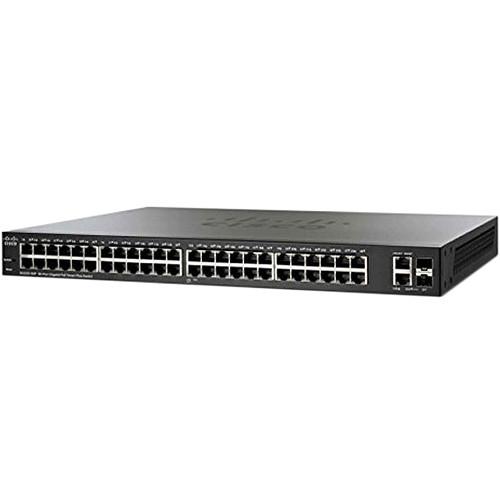 Contents of the user manual for the Cisco 48-Port 220 Series Smart Plus
- Product category: Network Switches, Bridges & Hubs Cisco
- Brand: Cisco
- Description and content of package
- Technical information and basic settings
- Frequently asked questions – FAQ
- Troubleshooting (does not switch on, does not respond, error message, what do I do if...)
- Authorized service for Cisco Network Switches, Bridges & Hubs
|
User manual for the Cisco 48-Port 220 Series Smart Plus contain basic instructions
that need to be followed during installation and operation.
Before starting your appliance, the user manual should be read through carefully.
Follow all the safety instructions and warnings, and be guided by the given recommendations.
User manual is an integral part of any Cisco product,
and if it is sold or transferred, they should be handed over jointly with the product.
Following the instructions for use is an essential prerequisite for protecting
health and property during use, as well as recognition of liability on the part of the manufacturer
for possible defects should you make a warranty claim. Download an official Cisco user manual in which you will find instructions on how to install, use, maintain and service your product.
And do not forget – unsuitable use of a Cisco product will considerably shorten its lifespan!
|
Product description With the 48-Port 220 Series Smart Plus Switch from Cisco small to medium sized businesses benefit from a switch capable of handling a large number of users. Along with the large user capacity supported by this switch, users benefit from enhanced security capabilities, streamlined management, and improved energy efficiency.
Once installed this Cisco Smart Switch supports up to 8,192 MAC addresses along with support for the 802.3ad Link Aggregation Control Protocol capable of configuring 8 groups with 8 ports per group and 16 candidates per port. VLAN features include support for up to 256 simultaneous VLANs as well as 802.1Q VLAN tagging and support for guest VLANs to help organize connected clients into specified groups.
Once the network has been configured, network administrators can implement a variety of security protocols to ensure connections and information remain secure. Features including port security, 802.1x authentication, and MAC address filtering allow administrators to restrict user access and lock ports to ensure only specified users have access to network resources. Additional security features including DoS prevention, Secure Shell Protocol, and Secure Sockets Layer help to mitigate the threats posed to the network and manage traffic.
With this 48-Port Cisco Switch network administrators also benefit from improved management capabilities. With a web based user interface it is possible to configure, monitor, and maintain various aspect of the network right from your web browser. Cisco has also included support for Cisco Small Business FindIT Network Tool for added management capabilities. It is even possible to upgrade the switch firmware using a web browser and Trivial File Transfer Protocol while dual image support keeps the network up and running while the firmware upgrade takes place. Business Applications - Secured Desktop Connectivity
- This Cisco 220 Series Switch can quickly and reliably connect employees working in small offices with each other and with all of the servers, printers, and other devices they use. With device authentication and access control, you can maintain the integrity of key business information while keeping you employees connected and productive.
- Flexible Wireless Connectivity
- With PoE+ support, and comprehensive security and quality of service (QoS) capabilities, this Cisco 220 Series Switch provide a solid foundation to add business-grade wireless to the network. You can easily move up to a cutting-edge 802.11ac wireless access point to increase workforce productivity without worrying about power and throughput.
- Unified Communications
- This Cisco 220 Series Switch provide QoS features to automatically prioritize delay-sensitive traffic to help you easily deploy an IP-based communication solution on a converged network. PoE+ support can enable IP cameras and videophones to be easily added to your current network. Cisco offers a complete portfolio of IP telephony and other unified communications products designed for small businesses. Cisco 220 Series Switches have been rigorously tested to help ensure easy integration and full compatibility with these and other vendor products.
Smart Switch - Enhanced Security and Intelligence
- ACLs and flow-based QoS give you more control over network performance, maintain the integrity of key business information, and can enable higher network efficiency.
- Simple and Flexible Management
- The Cisco 220 Series Switch is easy to deploy and use, not only for small, self-installed deployment by non-IT professionals, but also for mid-scale deployment by IT engineers. These switches provide more management options like Cisco CLI, Simple Network Management Protocol (SNMP), Cisco Prime LAN Management System (LMS) integration, besides the intuitive, web-based interface and Cisco FindIT utility.
- High Performance and Reliability
- This Cisco 220 Series Switch has been tested to deliver the high availability and performance that users have come to expect from Cisco switches. The switches speed up file transfer times, keep vital business applications available, and help your employees respond more quickly to customers and each other. With enhanced QoS capabilities, the Cisco 220 Series also gives you the flexibility to manage and prioritize high-bandwidth traffic so you can easily integrate all the business communications and connectivity needs on a single converged infrastructure.
- Optimal Energy Efficiency
- The Cisco 220 Series Switch is designed with Energy Efficient Ethernet (IEEE 802.3az) and Energy Detect support on all models, as well as fanless designs on selected models. These designs help you save operational expenses and reduce your environmental footprint.
- Enhanced Network Security
- - Extensive ACLs can restrict sensitive portions of the network from unauthorized users and guard against network attacks.
- Support for network security applications such as IEEE 802.1X and port security can tightly limit access to specific segments of your network.
- Guest virtual LANs (VLANs) let you provide Internet connectivity to non-employee users while isolating critical business services from guest traffic.
- Security mechanisms such as broadcast/multicast/unknown unicast storm control and Bridge Protocol Data Unit (BPDU) guard can protect the network from invalid configurations or malicious intent.
- Denial-of-service (DOS) attack prevention helps to increase uptime in the event of a network attack.
- Embedded security can protect management data traveling to and from the switch and encrypt network communications.
- Protect management sessions using RADIUS, TACACS+, and support local database authentication as well as secure management communication over SSL, SSH, and SNMPv3. - Easy Configuration and Management
- - Cisco Discovery Protocol (CDP) and Link Layer Discovery Protocol (LLDP-MED). Automatically detect all the devices connected to your network. Then automatically configure the switch itself with the appropriate settings and instruct the end devices on the appropriate voice VLAN or QoS parameters to use.
- Cisco FindIT Network Discovery Utility. This feature works through a simple toolbar on the user's web browser to discover Cisco devices on the network and display basic information, such as serial numbers and IP addresses. This aids in quicker configuration and deployment of Cisco Small Business products. - Advanced Network Management Capabilities
- - CLI. This switch can be managed using CLI. This can enable scripted or automated deployment for network professionals.
- Remote management. Using SNMP, you can set up and manage all switches and other Cisco devices in your network remotely.
- Dual image support. With the ability to maintain two images in permanent storage instead of only a single image that is traditionally supported on smart switches, you can perform software upgrades without taking the network offline or worrying about an outage because of a bad image file. This reduces switch downtime when the firmware is being upgraded or downgraded.
- Dual-configuration files support. Configure the device, validating that it is done correctly and then save this configuration to become effective after reboot. Additionally, a mirror configuration file provides automatic backup of the latest stable configuration file.
- IPv6 support. Cisco 220 Series Switches provide native support for IPv6, as well as the previous IPv4 standard. As a result, you can migrate to the next generation of networking applications and operating systems without an equipment upgrade. - Additional Gigabit Uplink Ports
- This Cisco 220 Series Switch provides more ports per switch than other switches typically in the market, giving you more flexibility to connect and empower your business. This model features two Gigabit Ethernet combo ports in addition to the 48 copper ports, instead of traditional devices that offer two shared uplink ports with 46 ports. The mini-Gigabit Interface Converter (mini-GBIC) expansion slots in the combo ports give you the option to add fiber optic uplink connectivity to the switch. With the ability to increase the connectivity range of the switches, you have more flexibility to design your network around your unique business environment, and to easily connect switches on different floors or across the business.
- IP Telephony Support
- This Cisco 220 Series Switch includes embedded QoS intelligence to prioritize delay-sensitive services such as voice and video. They can simplify unified communications deployments, and help ensure consistent network performance for all services. For example, automated voice VLAN capabilities let you plug any IP phone (including third-party phones) into your IP telephony network and receive an immediate dial tone. The switch automatically configures the device with the right VLAN and QoS parameters to prioritize voice traffic.
- Peace of Mind and Investment Protection
- This Cisco 220 Series Switch offers the reliable performance, investment protection, and peace of mind you expect from a Cisco switch. They have undergone rigorous testing to help ensure easy integration and compatibility with other Cisco networking and communications products, including the complete Cisco Small Business portfolio.
UPC: 882658624889 In the Box Cisco 48-Port 220 Series Smart Plus Switch (SG220-50-K9-NA) Power Cord Mounting Kit Console Cable CD-ROM with User Documentation Limited Lifetime Warranty Table of Contents
|
Upload User Manual
Have you got an user manual for the Cisco 48-Port 220 Series Smart Plus Switch in electronic form? Please send it to us and help us expand our library of instruction manuals.
Thank you, too, on behalf of other users.
To upload the product manual, we first need to check and make sure you are not a robot. After that, your "Submit Link" or "Upload File" will appear.
Technical parametersCisco SG220-50-K9-NA Specs | | | Ports | 48 x 10/100/1000 Mb/s Gigabit Ethernet (RJ45)
2 x 10/100/1000 Mb/s Gigabit Combo (Ethernet/SFP) | | | | Supported Protocols | Head-of-Line (HOL) Blocking
IGMP Snooping
IPv6
Link Aggregation | | Queuing | Strict Priority, Weighted Round Robin (WRR) | | Jumbo Frames Support | 9,216 Bytes | | MAC Address Table Size | 8K | | Multicast Groups | 256 | | VLAN Groups | 256 | | | | Security Features | DoS Attack Prevention
RADIUS Authentication
Storm Control | | | | RFC | RFC 4443
RFC 4291
RFC 4291
RFC 2460
RFC 4861
RFC 4862
RFC 1981
RFC 4007
RFC 3484 | | Supported IEEE Standards | 802.1d, 802.1q/p, 802.1w, 802.1x, 802.3, 802.3ab, 802.3ad, 802.3af, 802.3at, 802.3u, 802.3x, 802.3z | | | | Forwarding Rate | 74.4 Mpps | | Switching Bandwidth | 100 Gb/s | | Priority Queues | 8 | | Packet Buffer | 12 Mb | | | | Flash Memory | 32 MB | | Memory | 128 MB | | | | Power Draw | 36.6 W (Active) | | AC Input Power | 100 to 240 VAC, 50 / 60 Hz | | | | Operating Temperature | 32 to 122°F / 0 to 50°C | | Operating Humidity | 10 to 90% | | Storage Temperature | 14 to 158°F / -10 to 70°C | | Storage Humidity | 10 to 90% | | Noise Level | 40.3 dB | | | | Cooling System | Fan | | Mean Time Between Failures (MTBF) | 194,036 Hours | | Indicator Lights | Link/Activity, Speed, System | | Dimensions | 17.3 x 7.9 x 1.7" / 44 x 20 x 4.4 cm | | Weight | 7 lb / 3 kg | | | | Package Weight | 10.0 lb | | Box Dimensions (LxWxH) | 21.0 x 12.5 x 4.0" |
Rating70% users recommend this product to others. And what about you?

This product has already been rated by 01 owners. Add your rating and experience with the product.
Discussion
 Ask our technicians if you have a problem with your settings,
or if anything is unclear in the user manual you have downloaded.
You can make use of our moderated discussion.
The discussion is public and helps other users of our website who may be encountering similar problems.
Ask our technicians if you have a problem with your settings,
or if anything is unclear in the user manual you have downloaded.
You can make use of our moderated discussion.
The discussion is public and helps other users of our website who may be encountering similar problems.
The discussion is empty - enter the first post
Post a new topic / query / comment:
|
|
|
| Request for user manual |
You can’t find the operation manual you are looking for? Let us know and we will try to add the missing manual:
I’m looking for a manual / Request for manual
Current requests for instruction manuals:
Call Of Duty World War Two For Xbox...
controller stratus XL...
stratus XL...
smart whatch serie S11 42mm...
Allen & Heath SQ-6 manual...
|
| Discussion |
Latest contributions to the discussion:
AEW R 4100
Name: MAURICIO ANGARITA
Audio-Technica AEW-R4100 UHF Diversity Receiver for
AEW R 4100 has the mute function blocked and does not allow audio to pass. I tried several times to turn off the mute from the transmitter but it does nothing, the mute stays on. Solution?
Thank you...
Instructions for assembling the 2015 Forecast Image Master Consoles GC3-A
Name: mike elam
Forecast Consoles GC3-A ImageMaster Editing Console
Looking for instructions for assembling this console. ...
EMPTY TONER ERROR MESSAGE AFTER REPLACING TONER
Name: LINDA BAD YELLOW EYES
Brother TN223BK Standard-Yield Toner
I HAD TO CHANGE OUT ALL THREE TONERS DUE TO LEAKS IN THE YELLOW AND CYAN. AFTER I REPLACED THEM, THE MACHINE KEEPS GIVING ME AN EMPTY TONER ERROR MESSAGE. HELP!!...
PS480D 20/24 pin Switching 480W Power Supply
Name: swkargo
Logisys 480W Power Supply
This item states in can run -5vdc .It is NOT listed on the board or I beleive is r4 is missing the resitior. Any body have thid issue. Shawn
...
Help needed
Name: Ann Carter
SanDisk 1TB Extreme Portable USB 3.1
When I click the link to download the user manual for my Sandisk Extreme external hard drive, it gives me the manual for the LG Cricket. Can you please change the link so I can download the Sandisk manual and begin using this drive? Thank you....
|
|


