|
User Manual for Cisco SG250-26 250 Series 26-Port Managed Gigabit Ethernet Switch Click to enlarge the picture
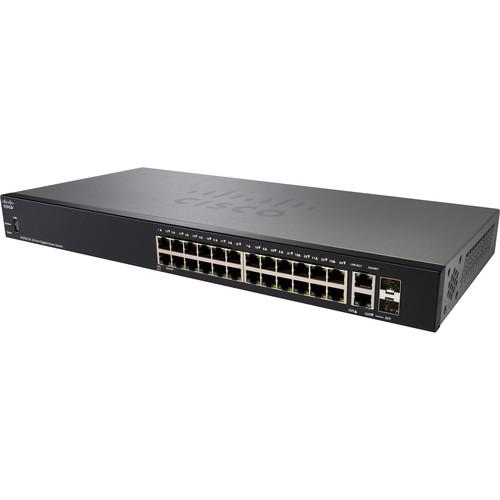 Contents of the user manual for the Cisco SG250-26 250 Series 26-Port Managed
- Product category: Network Switches, Bridges & Hubs Cisco
- Brand: Cisco
- Description and content of package
- Technical information and basic settings
- Frequently asked questions – FAQ
- Troubleshooting (does not switch on, does not respond, error message, what do I do if...)
- Authorized service for Cisco Network Switches, Bridges & Hubs
|
User manual for the Cisco SG250-26 250 Series 26-Port Managed contain basic instructions
that need to be followed during installation and operation.
Before starting your appliance, the user manual should be read through carefully.
Follow all the safety instructions and warnings, and be guided by the given recommendations.
User manual is an integral part of any Cisco product,
and if it is sold or transferred, they should be handed over jointly with the product.
Following the instructions for use is an essential prerequisite for protecting
health and property during use, as well as recognition of liability on the part of the manufacturer
for possible defects should you make a warranty claim. Download an official Cisco user manual in which you will find instructions on how to install, use, maintain and service your product.
And do not forget – unsuitable use of a Cisco product will considerably shorten its lifespan!
|
Product description The Cisco SG250-26 250 Series Managed Switch is armed with 26 Gigabit Ethernet ports that connect multiple systems with one another and with printers, IP telephony devices, wireless access points, and other equipment. Cisco provides useful software-based tools to help in configuration and speed of deployment, and this managed switch allows detailed control over how data travels and who has access to the network. For performance, the SG250-26 switch has a 38.69 Mpps transfer rate and a 52 Gb/s switching capacity.
The SG250-26 switch is equipped with two combo uplink ports that can utilize multimode and single-mode fiber connections, granting the switch a longer distance to another switch when compared to an Ethernet-based connection. Other notable features included with switch are Layer 3 static routing for transmitting data between nodes without degrading networking performance along with IPv6 for supporting future applications without needing to upgrade networking equipment. - Easy Configuration and Management
-
- Smart Network Application (SNA) is a network-level monitoring and management tool embedded in the Cisco 100 to 500 Series switches. It can discover network topology, display link status, monitor events, apply configurations, and upgrade software images across multiple switches in the network.
- The FindIT Network Manager and Probe are designed to manage Cisco 100 to 500 Series switches, routers, and wireless access points. They let you proactively manage the network instead of just reacting to events.
- The FindIT Network Discovery Utility works through a simple toolbar on the user's web browser to discover Cisco devices on the network and display basic device information, inventory, and new firmware updates to aid in the configuration and speed the deployment of Cisco Small Business products.
- Simple or advanced-mode graphic user interfaces reduce the time required to deploy, troubleshoot, and manage the network. Configuration wizards simplify the most common configuration tasks and provide a helpful tool for anyone to set up and manage the network.
- Cisco Smartports technology provides more advanced capabilities and hands-on control by automatically configuring ports with specific levels of security, QoS, and availability according to the type of connected device, based on Cisco best practices and pretested configurations. The Auto Smartports feature automatically applies the intelligence delivered through the Smartports roles to the port based on the device types discovered over Cisco Discovery Protocol or LLDP-MED. This capability facilitates zero-touch deployments.
- The USB port on the front panel of the switch enables easy image and configuration transfer for faster deployment or upgrades.
- Performance
- Cisco 220 Series switches speed up file transfer times, keep vital business applications available, and help your employees respond more quickly to customers and each other.
- Layer 3 Static Routing
- Layer 3 routing allows you to segment your network into separate workgroups and communicate across VLANs without degrading application performance. As a result, you can manage internal routing with your switches and dedicate your router to external traffic and security, helping your network run more efficiently.
- Network Security
- Cisco 250 Series switches provide the security and network management features you need to maintain a high level of security for your business, keep unauthorized users off the network, and protect your business data. The switches include integrated network security to reduce the risk of a security breach, with IEEE 802.1X port security to control access to your network, Denial-of-Service (DoS) attack prevention to increase network uptime during an attack, and extensive Access Control Lists (ACLs) to protect sensitive portions of the network from unauthorized users and guard against network attacks.
- IPv6 Support
- Cisco 250 Series switches provide native support for IPv6 alongside traditional IPv4. With USGv6 and IPv6 Gold Logo certifications, the 250 Series will enable you to take full advantage of IPv6-enabled operating systems and applications in the future, without having to upgrade your network equipment.
- IP Telephony Support
- Included QoS features prioritize delay-sensitive services such as voice and video, simplify unified communications deployments, and help ensure consistent network performance for all services.
- Networkwide Automatic Voice Deployment
- Using a combination of Cisco Discovery Protocol, LLDP-MED, Auto Smartports, and Voice Services Discovery Protocol, customers can deploy an end-to-end voice network dynamically. The switches in the network automatically converge into a single voice VLAN and set of QoS parameters and then propagate them out to the phones on the ports where they are discovered. For example, automated voice VLAN capabilities let you plug any IP phone (including third-party phones) into your IP telephony network and receive an immediate dial tone. The switch automatically configures the device with the right VLAN and QoS parameters to prioritize voice traffic.
- Energy-Efficient Solution
- Cisco 250 Series switches are designed to be energy efficient and ecofriendly without compromising performance. They help conserve energy by optimizing power use, which helps protect the environment and lowers your energy costs. Power-saving features include:
- Support for the Energy Efficient Ethernet (IEEE 802.3az) standard, which reduces energy consumption by monitoring the amount of traffic on an active link and putting the link into a sleep state during quiet periods.
- Automatic power shutoff on ports when a link is down.
- Embedded intelligence to adjust power based on cable length.
- Fanless design in most models, which reduces power consumption, increases reliability, and provides quieter operation.
- Ability to turn off LEDs to conserve power.
UPC: 882658767357 In the Box Cisco SG250-26 250 Series 26-Port Managed Gigabit Ethernet Switch Power Cord Mounting Kit Limited Lifetime Warranty Table of Contents
|
Upload User Manual
Have you got an user manual for the Cisco SG250-26 250 Series 26-Port Managed Gigabit Ethernet Switch in electronic form? Please send it to us and help us expand our library of instruction manuals.
Thank you, too, on behalf of other users.
To upload the product manual, we first need to check and make sure you are not a robot. After that, your "Submit Link" or "Upload File" will appear.
Technical parametersCisco SG250-26-K9-NA Specs | | | Ports | 24 x 10/100/1000 Mb/s Gigabit Ethernet (RJ45)
2 x 10/100/1000 Mb/s Gigabit Combo (Ethernet/SFP) (Uplink) | | | | Layer Services Supported | Layer 2 Support, Layer 3 Support | | Supported Protocols | Head-of-Line (HOL) Blocking
IGMP Snooping
IPv4
IPv6
Link Aggregation
Port Mirroring | | Queuing | Strict Priority, Weighted Round Robin (WRR) | | Jumbo Frames Support | 9000 Bytes | | MAC Address Table Size | 8K | | VLAN Groups | 256 | | | | Security Features | RADIUS Authentication
Storm Control | | IP Interfaces | 16 | | Static Routes | 32 | | SNMP Support | 1, 2c, 3 | | | | RFC | RFC 768
RFC 783
RFC 791
RFC 792
RFC 793
RFC 813
RFC 879
RFC 896
RFC 826
RFC 854
RFC 855
RFC 856
RFC 858
RFC 894
RFC 919
RFC 920
RFC 922
RFC 950
RFC 951
RFC 1042
RFC 1071
RFC 1123
RFC 1141
RFC 1155
RFC 1157
RFC 1213
RFC 1215
RFC 1286
RFC 1350
RFC 1442
RFC 1451
RFC 1493
RFC 1533
RFC 1541
RFC 1542
RFC 1573
RFC 1624
RFC 1643
RFC 1700
RFC 1757
RFC 1867
RFC 1907
RFC 2011
RFC 2012
RFC 2013
RFC 2030
RFC 2131
RFC 2132
RFC 2233
RFC 2576
RFC 2616
RFC 2618
RFC 2665
RFC 2666
RFC 2674
RFC 2737
RFC 2819
RFC 2863
RFC 3164
RFC 3411
RFC 3412
RFC 3413
RFC 3414
RFC 3415
RFC 3416
RFC 4330
RFC 4443
RFC 4291
RFC 2460
RFC 4861
RFC 4862
RFC 1981
RFC 4007
RFC 3484
RFC 5214
RFC 4293
RFC 3595 | | Supported IEEE Standards | 802.1d, 802.1q/p, 802.1s, 802.1w, 802.1x, 802.3, 802.3ab, 802.3ad, 802.3u, 802.3x, 802.3z | | | | Forwarding Rate | 38.69 Mpps | | Switching Bandwidth | 52 Gb/s | | Packet Buffer | 12 Mb | | | | Flash Memory | 256 MB | | Processor | 800 MHz ARM | | | | Power Draw | 18.1 W | | AC Input Power | 100 to 240 VAC, 50 / 60 Hz | | Power Supply Type | Internal | | | | Operating Temperature | 32 to 122°F / 0 to 50°C | | Operating Humidity | 10 to 90% | | Storage Temperature | -4 to 158°F / -20 to 70°C | | Storage Humidity | 10 to 90% | | Certifications | CE, CSA, FCC, UL, as per Manufacturer | | | | Mean Time Between Failures (MTBF) | 343,592 Hours | | Indicator Lights | Link/Activity, Speed, System | | Dimensions | 17.3 x 7.95 x 1.45" / 439.42 x 201.93 x 36.83 mm | | Weight | 6 lb / 2.7 kg | | | | Package Weight | 8.3 lb | | Box Dimensions (LxWxH) | 21.0 x 12.5 x 4.0" |
Rating70% users recommend this product to others. And what about you?

This product has already been rated by 91 owners. Add your rating and experience with the product.
Discussion
 Ask our technicians if you have a problem with your settings,
or if anything is unclear in the user manual you have downloaded.
You can make use of our moderated discussion.
The discussion is public and helps other users of our website who may be encountering similar problems.
Ask our technicians if you have a problem with your settings,
or if anything is unclear in the user manual you have downloaded.
You can make use of our moderated discussion.
The discussion is public and helps other users of our website who may be encountering similar problems.
The discussion is empty - enter the first post
Post a new topic / query / comment:
|
|
|
| Request for user manual |
You can’t find the operation manual you are looking for? Let us know and we will try to add the missing manual:
I’m looking for a manual / Request for manual
Current requests for instruction manuals:
Call Of Duty World War Two For Xbox...
controller stratus XL...
stratus XL...
smart whatch serie S11 42mm...
Allen & Heath SQ-6 manual...
|
| Discussion |
Latest contributions to the discussion:
AEW R 4100
Name: MAURICIO ANGARITA
Audio-Technica AEW-R4100 UHF Diversity Receiver for
AEW R 4100 has the mute function blocked and does not allow audio to pass. I tried several times to turn off the mute from the transmitter but it does nothing, the mute stays on. Solution?
Thank you...
Instructions for assembling the 2015 Forecast Image Master Consoles GC3-A
Name: mike elam
Forecast Consoles GC3-A ImageMaster Editing Console
Looking for instructions for assembling this console. ...
EMPTY TONER ERROR MESSAGE AFTER REPLACING TONER
Name: LINDA BAD YELLOW EYES
Brother TN223BK Standard-Yield Toner
I HAD TO CHANGE OUT ALL THREE TONERS DUE TO LEAKS IN THE YELLOW AND CYAN. AFTER I REPLACED THEM, THE MACHINE KEEPS GIVING ME AN EMPTY TONER ERROR MESSAGE. HELP!!...
PS480D 20/24 pin Switching 480W Power Supply
Name: swkargo
Logisys 480W Power Supply
This item states in can run -5vdc .It is NOT listed on the board or I beleive is r4 is missing the resitior. Any body have thid issue. Shawn
...
Help needed
Name: Ann Carter
SanDisk 1TB Extreme Portable USB 3.1
When I click the link to download the user manual for my Sandisk Extreme external hard drive, it gives me the manual for the LG Cricket. Can you please change the link so I can download the Sandisk manual and begin using this drive? Thank you....
|
|


