|
User Manual for Cisco SG300-20 20-Port 10 100 1000 Gigabit Managed Switch Click to enlarge the picture
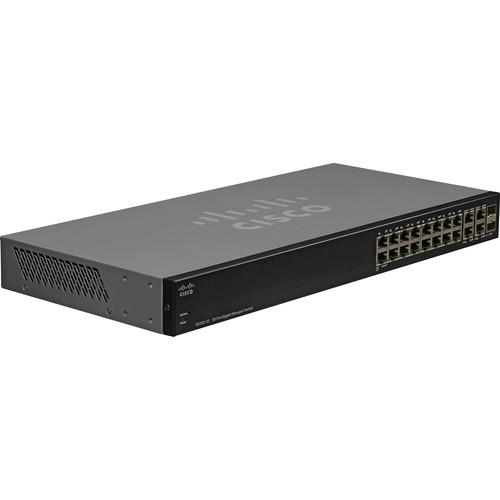 Contents of the user manual for the Cisco SG300-20 20-Port 10 100 1000
- Product category: Network Switches, Bridges & Hubs Cisco
- Brand: Cisco
- Description and content of package
- Technical information and basic settings
- Frequently asked questions – FAQ
- Troubleshooting (does not switch on, does not respond, error message, what do I do if...)
- Authorized service for Cisco Network Switches, Bridges & Hubs
 |
User manual for the Cisco SG300-20 20-Port 10 100 1000 contain basic instructions
that need to be followed during installation and operation.
Before starting your appliance, the user manual should be read through carefully.
Follow all the safety instructions and warnings, and be guided by the given recommendations.
User manual is an integral part of any Cisco product,
and if it is sold or transferred, they should be handed over jointly with the product.
Following the instructions for use is an essential prerequisite for protecting
health and property during use, as well as recognition of liability on the part of the manufacturer
for possible defects should you make a warranty claim. Download an official Cisco user manual in which you will find instructions on how to install, use, maintain and service your product.
And do not forget – unsuitable use of a Cisco product will considerably shorten its lifespan!
|
Product description The Cisco SG300-20 20-Port 10/100/1000 Gigabit Managed Switch provides a reliable foundation for your business network. It delivers the features you need to improve the availability of your critical business applications, protect sensitive data and optimize network bandwidth to deliver information and applications more effectively. Setting up and the usage of the Cisco SG300-20 is a breeze and it provides the ideal combination of affordability and capabilities for small businesses and helps you create a more efficient, better-connected workforce.
The Cisco SG300-20 has the advanced security management capabilities and network features you need to support business-class data, voice, security and wireless technologies. At the same time, it is simple to deploy and configure, allowing you to take advantage of the managed network service your business requires. - Secure Desktop Connectivity
- The Cisco SG300-20 switch can simply and securely connect employees working in small offices with each other and with all of the servers, printers and other devices they use. High performance and reliable connectivity helps speed file transfers and data processing, improves network uptime and keeps your employees connected and productive.
- Secure Wireless Connectivity
- The Cisco SG300-20 switch allows employees to work productively from conference rooms and common areas, collaborate in any office and access business applications from wherever they are. Gigabit Ethernet connectivity helps ensure that your employees have the bandwidth and performance they need to make the most of mobile productivity. And with embedded security, your employees can work with confidence, knowing that only authorized users can access applications and network devices.
- Unified Communications
- As a managed network solution, the Cisco SG300-20 switch provides the performance and advanced traffic-handling intelligence you need to deliver all communications and data over a single network. The Cisco SG300-20 is rigorously tested to help ensure easy integration and full compatibility with Cisco and other products, providing a complete small business solution.
- Highly Secure Guest Connectivity
- The Cisco SG300-20 switch lets you extend highly secure network connectivity to guests in a variety of settings, such as a hotel, an office waiting room or any other area open to nonemployee users. Using powerful but easy-to-configure security and traffic segmentation capabilities, you can isolate your vital business traffic from guest services and keep guests' network sessions private from each other.
- High Performance and Reliability
- The Cisco SG300-20 Switch is rigorously tested to deliver the high availability and performance you expect from a Cisco switch. The solution speeds up file transfer times and improves slow, sluggish networks, while keeping your vital business applications available and preventing costly downtime. As a managed switching solution, the Cisco SG300-20 also gives you the flexibility to manage and prioritize high-bandwidth traffic such as voice. That means you can empower your employees with state-of-the-art communication and productivity solutions, without draining the performance of your other business applications.
- Fast, Easy Setup and Configuration
- The Cisco SG300-20 switch is designed to be easy to use and managed by small businesses and the partners who serve them. The included device manager software provides an intuitive, web-based interface to simplify setup, security and quality of service (QoS) traffic prioritization, allowing even users without IT expertise to configure the switch in minutes. It also provides a Cisco FindIT Network Discovery Utility. This utility works through a simple toolbar on the user's web browser to discover Cisco devices in the network and display basic information, such as serial numbers and IP addresses, to aid in the configuration and deployment of Cisco Small Business products. The Cisco SG300-20 switch uses Cisco Discovery Protocol as well as Link Layer Discovery Protocol (LLDP-MED) to automatically detect all the devices connected to your network and then automatically configures them for the appropriate connectivity and instructs the devices to use appropriate voice VLAN or QoS parameters. For more advanced capabilities and hands-on control, the switch supports Smartport roles which configure the ports with specific levels of Security, QoS and availability according to the type of connected device, based on Cisco best practices and pretested configurations. The Auto Smartports feature applies the intelligence delivered through the Smartport roles and applies it automatically to the port based on the devices discovered over CDP or LLDP-MED. This facilitates zero touch deployments. Although the Cisco SG300-20 is designed to be deployed without using a command-line interface, Cisco Textview is available for those who prefer to use text-based configuration. Together, these features reduce the time your staff must devote to network deployment, management and troubleshooting.
- Strong Security
- The Cisco SG300-20 switch provides a high level of security and gives you fine-grained control to safeguard your network from unauthorized users. It's advanced security features include:
• Embedded security to protect management data traveling to and from the switch and encrypt network communications.
• Extensive access control lists to restrict sensitive portions of the network from unauthorized users and guard against network attacks.
• Guest virtual LANs to let you provide Internet connectivity to nonemployee users while isolating critical business services from guest traffic.
• Support for advanced network security applications such as IEEE 802.1X port security to tightly limit access to specific segments of your network.
• Security mechanisms such as, Bridge Protocol Data Unit Guard and broadcast/multicast/unknown unicast storm control, protect the network from invalid configurations or malicious intent.
• Secure Core Technology helps ensure that the switch will receive and process management and protocol traffic no matter how much traffic is received. - IP Telephony Support
- The Cisco SG300-20 switch includes embedded QoS intelligence to prioritize delay-sensitive services such as voice and video, simplify unified communications deployments and help ensure consistent network performance for all services. For example, automated voice VLAN capabilities let you plug any IP phone (including third-party phones) into your IP telephony network and receive an immediate dial tone. The switch automatically configures the device with the right VLAN and QoS parameters to prioritize voice traffic.
- Advanced Network Management Capabilities
- As a managed switch, the Cisco SG300-20 switch lets you use a variety of advanced features to control traffic over your network. Features include:
• Static routing/Layer 3 switching between VLANs: This capability allows you to segment your network into separate workgroups and communicate across VLANs without degrading application performance. As a result, you can manage internal routing with your switch and dedicate your router to external traffic and security, helping your network runs more efficiently.
• IPv6 support: As the IP network addressing scheme evolves to accommodate more devices, you can make sure that your network is ready. The The Cisco SG300-20 switch provides native support for IPv6, the newest version of the Internet Protocol, as well as the previous IPv4 standard. As a result, you will be able to move up to the next generation of networking applications and operating systems without an extensive equipment upgrade.
• Dual image support: With the ability to maintain dual images of your switches, you can perform software upgrades without having to take the network offline and without worrying about an outage during an upgrade.
• Remote management: Using Simple Network Management Protocol, you can set up and manage all switches and other Cisco devices in your network remotely, instead of having to directly connect to them. - Optimal Energy Efficiency
- The Cisco SG300-20 "green" switch designed with power-saving features optimizes power use to protect the environment and reduces energy costs, without compromising performance. Power-saving features include:
• The latest application-specific integrated circuits, using low-power 65-nanometer technology (these chipsets allow for lower power consumption and thinner, more efficient designs).
• Embedded intelligence to adjust signal strength based on cable length.
• Fanless design which reduces power consumption, increases reliability and provides quieter operation. - Expansion Ports
- The Cisco SG300-20 switch provides more ports per Gigabit Ethernet switch than traditional switch models, giving you more flexibility to connect and empower your business. It also offers mini gigabit interface converter (mini-GBIC) expansion slots that give you the option to add fiber-optic or Gigabit Ethernet uplink connectivity to the switch. With the ability to increase the connectivity range of the switch, you have more flexibility to design your network around your unique business environment and to easily connect switch on different floors or across the business.
- Peace of Mind and Investment Protection
- The Cisco SG300-20 switch offers the reliable performance, investment protection and peace of mind you expect from a Cisco switch. When you invest in the Cisco SG300-20 switch, you gain the benefit of:
• Cisco Small Business Investment Protection program, which lets you upgrade your Cisco SG300-20 switch to another Cisco Small Business or Cisco Catalyst switch in the future and receive credit for the value of the switch (available only in the United States and Canada).
• Rigorous testing to help ensure easy integration and compatibility with other Cisco networking and communications products, including the complete Cisco Small Business portfolio. - Service and Support
- The Cisco SG300-20 switch is backed by the Cisco Small Business Support Service, which provides affordable peace-of-mind coverage. This subscription-based service helps you protect your investment and derive maximum value from Cisco Small Business products. Delivered by Cisco and backed by your trusted partner, this comprehensive service includes software updates, access to the Cisco Small Business Support Center and extends technical service to three years. Cisco Small Business products are supported by professionals in Cisco Small Business Support Center locations worldwide who are specifically trained to understand your needs. The Cisco Small Business Support Community, an online forum, enables you to collaborate with your peers and reach Cisco technical experts for support information.
UPC: 882658295799 In the Box Cisco SG300-20 20-Port 10/100/1000 Gigabit Managed Switch Power Cord Mounting Hardware Serial Cable CD-ROM with User Documentation (PDF) Quick Start Guide Limited Lifetime Warranty Guides & Manuals Table of Contents
|
Upload User Manual
Have you got an user manual for the Cisco SG300-20 20-Port 10 100 1000 Gigabit Managed Switch in electronic form? Please send it to us and help us expand our library of instruction manuals.
Thank you, too, on behalf of other users.
To upload the product manual, we first need to check and make sure you are not a robot. After that, your "Submit Link" or "Upload File" will appear.
Download User ManualThe user manual for the Cisco SG300-20 20-Port 10 100 1000 Gigabit Managed Switch can be downloaded in PDF format at the link stated below.
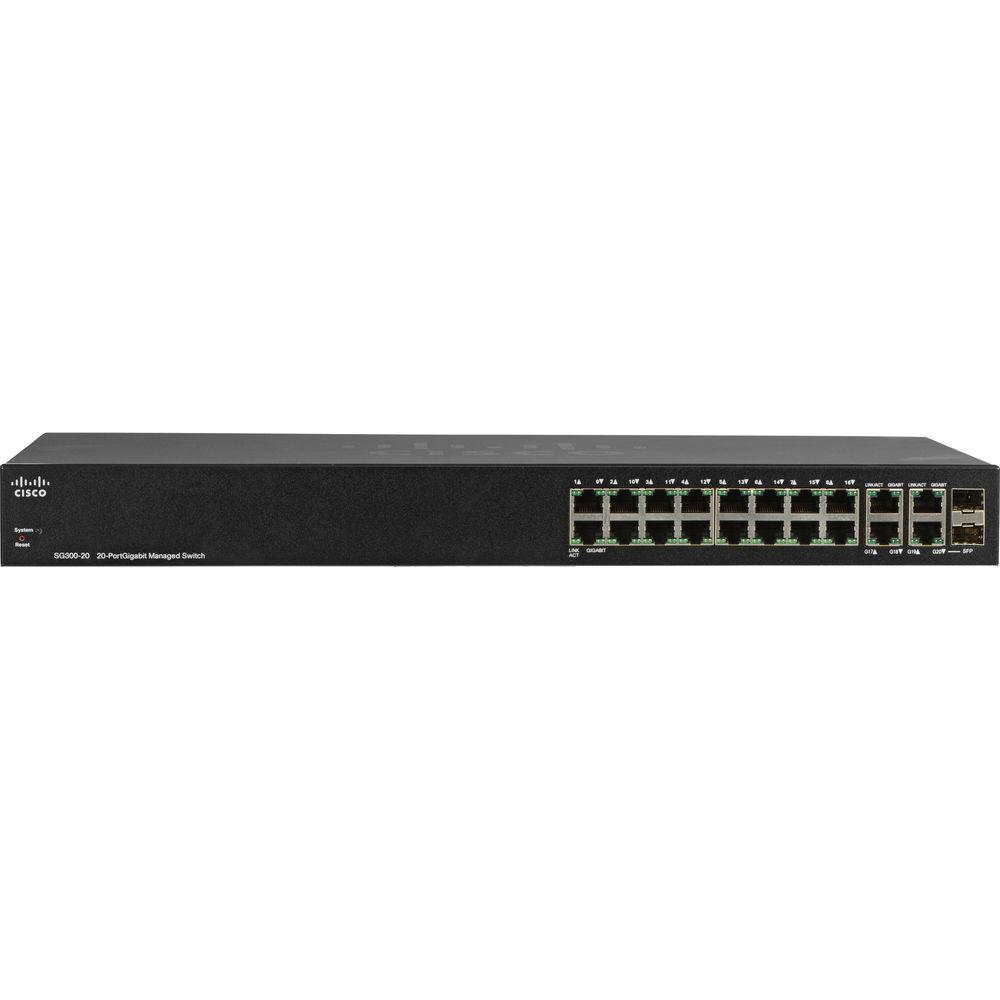
Technical parametersCisco SG300-20 Specs | | | Ports | 18 x 10/100/1000 Mb/s Gigabit Ethernet (RJ45)
2 x 10/100/1000 Mb/s Gigabit Combo (Ethernet/SFP) | | | | Layer Services Supported | Layer 2 Support, Layer 3 Support | | Supported Protocols | Head-of-Line (HOL) Blocking
IGMP Snooping
IPv6
Link Aggregation | | Queuing | Strict Priority, Weighted Round Robin (WRR) | | Jumbo Frames Support | 10,000 Bytes | | MAC Address Table Size | 8K | | VLAN Groups | 256 | | VLAN IDs | 4096 | | | | Security Features | DoS Attack Prevention
RADIUS Authentication
Storm Control | | IP Interfaces | 32 | | Static Routes | 32 | | | | RFC | RFC 2463
RFC 3513
RFC 4291
RFC 2460
RFC 2461
RFC 2462
RFC 1981
RFC 4007
RFC 3484
RFC 4214
RFC 4293
RFC 3595 | | Supported IEEE Standards | 802.1d, 802.1q/p, 802.1s, 802.1w, 802.1x, 802.3, 802.3ab, 802.3ad, 802.3af, 802.3at, 802.3u, 802.3x, 802.3z | | | | Forwarding Rate | 29.76 Mpps | | Switching Bandwidth | 40 Gb/s | | Priority Queues | 4 | | Packet Buffer | 4 MB | | | | Flash Memory | 16 MB | | Memory | 128 MB | | | | Power Draw | 22.6 W (Active) | | AC Input Power | 100 to 240 VAC, 50 / 60 Hz | | Power Supply Type | Internal | | | | Operating Temperature | 32 to 104°F / 0 to 40°C | | Operating Humidity | 10 to 90% | | Storage Temperature | -4 to 158°F / -20 to 70°C | | Storage Humidity | 10 to 90% | | | | Mean Time Between Failures (MTBF) | 144,237 Hours | | Indicator Lights | Link/Activity, Speed, System | | Dimensions | 17.3 x 8 x 1.5" / 44 x 20.3 x 3.7 cm | | Weight | 5 lb / 2 kg | | | | Package Weight | 7.5 lb | | Box Dimensions (LxWxH) | 21.5 x 11.9 x 3.9" |
Rating100% users recommend this product to others. And what about you?

This product has already been rated by 80 owners. Add your rating and experience with the product.
Discussion
 Ask our technicians if you have a problem with your settings,
or if anything is unclear in the user manual you have downloaded.
You can make use of our moderated discussion.
The discussion is public and helps other users of our website who may be encountering similar problems.
Ask our technicians if you have a problem with your settings,
or if anything is unclear in the user manual you have downloaded.
You can make use of our moderated discussion.
The discussion is public and helps other users of our website who may be encountering similar problems.
The discussion is empty - enter the first post
Post a new topic / query / comment:
|
|
|
| Request for user manual |
You can’t find the operation manual you are looking for? Let us know and we will try to add the missing manual:
I’m looking for a manual / Request for manual
Current requests for instruction manuals:
Call Of Duty World War Two For Xbox...
controller stratus XL...
stratus XL...
smart whatch serie S11 42mm...
Allen & Heath SQ-6 manual...
|
| Discussion |
Latest contributions to the discussion:
AEW R 4100
Name: MAURICIO ANGARITA
Audio-Technica AEW-R4100 UHF Diversity Receiver for
AEW R 4100 has the mute function blocked and does not allow audio to pass. I tried several times to turn off the mute from the transmitter but it does nothing, the mute stays on. Solution?
Thank you...
Instructions for assembling the 2015 Forecast Image Master Consoles GC3-A
Name: mike elam
Forecast Consoles GC3-A ImageMaster Editing Console
Looking for instructions for assembling this console. ...
EMPTY TONER ERROR MESSAGE AFTER REPLACING TONER
Name: LINDA BAD YELLOW EYES
Brother TN223BK Standard-Yield Toner
I HAD TO CHANGE OUT ALL THREE TONERS DUE TO LEAKS IN THE YELLOW AND CYAN. AFTER I REPLACED THEM, THE MACHINE KEEPS GIVING ME AN EMPTY TONER ERROR MESSAGE. HELP!!...
PS480D 20/24 pin Switching 480W Power Supply
Name: swkargo
Logisys 480W Power Supply
This item states in can run -5vdc .It is NOT listed on the board or I beleive is r4 is missing the resitior. Any body have thid issue. Shawn
...
Help needed
Name: Ann Carter
SanDisk 1TB Extreme Portable USB 3.1
When I click the link to download the user manual for my Sandisk Extreme external hard drive, it gives me the manual for the LG Cricket. Can you please change the link so I can download the Sandisk manual and begin using this drive? Thank you....
|
|



