|
User Manual for Cisco SPA302D Multi-Line DECT Handset Click to enlarge the picture
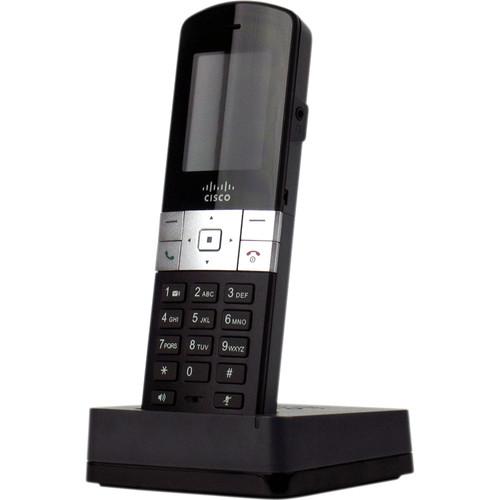 Contents of the user manual for the Cisco SPA302D Multi-Line DECT Handset
- Product category: Telephones Cisco
- Brand: Cisco
- Description and content of package
- Technical information and basic settings
- Frequently asked questions – FAQ
- Troubleshooting (does not switch on, does not respond, error message, what do I do if...)
- Authorized service for Cisco Telephones
|
User manual for the Cisco SPA302D Multi-Line DECT Handset contain basic instructions
that need to be followed during installation and operation.
Before starting your appliance, the user manual should be read through carefully.
Follow all the safety instructions and warnings, and be guided by the given recommendations.
User manual is an integral part of any Cisco product,
and if it is sold or transferred, they should be handed over jointly with the product.
Following the instructions for use is an essential prerequisite for protecting
health and property during use, as well as recognition of liability on the part of the manufacturer
for possible defects should you make a warranty claim. Download an official Cisco user manual in which you will find instructions on how to install, use, maintain and service your product.
And do not forget – unsuitable use of a Cisco product will considerably shorten its lifespan!
|
Product description Designed to be used exclusively with the Cisco SPA232D Multi-Line DECT ATA base station, the SPA302D Multi-Line DECT Handset from Cisco is a cordless solution to VoIP calling that is capable of handling multiple numbers or lines. This handset features DECT (Digital Enhanced Cordless Telecommunications Technology) which uses the power of TDMA cellular technology to transmit a stronger signal to a larger number of users. Along with DECT technology, you benefit from wideband audio support for high-definition voice quality.
With a variety of calling features including multi-call operation, call transfer, conferencing, hold, new call, mute, speakerphone, voicemail, intercom, one touch dial, and one touch dial out from call-history logs you can manage your calls with ease. Additionally, the 176 x 220 pixel, 2-inch display located above the keypad allows you to utilize the various functions such as date and time, speed dials, call history, phone book entries, and more. Whether using just one SPA302D or managing of multiple handsets, the software for each unit can be upgraded over-the-air saving both time and money. - High-Quality Voice and Business Grade Features
- The Cisco SPA302D Multi-Line DECT Handset together with the Cisco SPA232D Multi-Line DECT ATA offers an on-premises mobility solution that delivers clear, high-quality voice communication in diverse network conditions. Excellent voice quality in a demanding IP network is consistently achieved with our advanced implementation of standard voice-coding algorithms.
- Large Scale Deployment and Management
- The Cisco SPA302D can be remotely provisioned and is software-upgradable. A secure profile upload saves providers the time, expense, and hassle of managing and preconfiguring or reconfiguring subscriber equipment for deployment. Service providers can remotely provision the SPA302D handset enabling subscribers to incrementally add SPA302D handsets at any time without the need to configure on-site.
- Security
- The Cisco SPA302D supports highly secure, encryption-based methods for communication, provisioning, and servicing.
- Enhanced Mobility
- The integrated DECT base station of the SPA232D with exclusive support for Cisco SPA302D Multi-Line DECT Handsets provides a simple and reliable mobility solution for users that tend to frequently move about their location but must always be reachable around the premises.
- Easy Installation
- The Cisco SPA302D menu display enables quick deployment and easy changes.
- Handset Features
- • 2.0-in. TFT (176 x 220 pixels), 65,000 colors, backlit with scratch-resistant lens
• Software upgradable over the air (SUOTA)
• Outgoing default line (when configured with multiple lines)
• Line status
• White illuminated keypad backlight
• Status icons (do not disturb [DND], call forward, mute, off-hook, speakerphone, signal status, and battery strength)
• Date and time display
• Handset name display
• Dial key lock
• Speed dial: Eight programmable
• Private phone book (50 records)
• Shared phone book (50 records)
• Call history (50 records filtered by Outgoing, Incoming, and Missed)
• One-touch dial from call history
• Missed call(s)
• Message-Waiting Indicator (MWI) tones
• Visual MWI (VMWI)
• Five ringtones
• Keypad and handset parking tones
• Distinctive ring support
• Administrative personal identification number (PIN) code support
• Factory reset
• Hearing Aid Compatibility (HAC) - Call Control Features
- • Caller ID
• Call mute
• Call hold/resume
• New call (support for two active call segments)
• Call forward (conditional, unconditional, busy, or no answer)
• Call transfer (attended or blind)
• Call waiting and indication (CWI)
• Call blocking
• Redial
• DND
• Three-way conferencing with local mixing
• Call parking and unparking
• Secure calls (Secure Real-Time Transport Protocol [SRTP])
• Intercom (handset to handset)
Please note some features may require support by the call-control server In the Box Cisco SPA302D Multi-Line DECT Handset 2 x Ni-MH 800-mAh (1.2V) AAA Batteries Charging Cradle 5 V / 1 A Power Adapter Belt Clip CD with Documentation Including License and Warranty Limited 1-Year Manufacturer Warranty Manual PDF 2.5mb Table of Contents
|
Upload User Manual
Have you got an user manual for the Cisco SPA302D Multi-Line DECT Handset in electronic form? Please send it to us and help us expand our library of instruction manuals.
Thank you, too, on behalf of other users.
To upload the product manual, we first need to check and make sure you are not a robot. After that, your "Submit Link" or "Upload File" will appear.
Technical parametersCisco SPA302D-G1 Specs | Physical Specifications | Off-hook button
On-hook/Power off button
Two soft-key buttons
Dedicated speakerphone and mute buttons
Four-way navigation keypad
Headset jack: 2.5 mm
Removable belt clip
Charging cradle stand | | Registrations | Five handset registrations on a Cisco SPA232D (DECT Base Station)
Four simultaneous active calls
11 individual SIP accounts (10 DECT and 1 FXS)
Page/Registration button
Interfaces: FXS, FXO, LAN, and WAN (10/100BASE-T)
T.38 Fax
Codecs: G.722, G.711a-law and mu-law, G.729b and ab, and G.726 SIPv2 (RFCs 3261, 3262, 3263, and 3264)
Dual-Tone Multi Frequency (DTMF): In-band and out-of-band (RFC 2833) (SIP INFO)
Caller ID generation (name and number): Bellcore, DTMF, and ETSI | | Localization | Handset display language support for English, French, German, Italian, Spanish, and Portuguese | | Regulatory Compliance | FCC (Part 15 Class B), CE, ICES-003, A-Tick certification, Restriction of Hazardous Substances (RoHS), and UL | | Power Supply | DC input voltage: 5 DC at 1.0 A maximum
Power consumption: 5 W
Switching type (100-240 V) automatic
Power adapter: 100-240 V, 50-60 Hz (26-34 VA) AC input, 5.9 ft / 1.8 m cord | | Battery | 2 Ni-MH 800-mAh (1.2 V) AAA batteries (rechargeable)
10 hours of talk time
120 hours of standby time | | Indicator Lights | Charging cradle power and charge | | Operating Temperature | 32 to 113°F / 0 to 45°C | | Storage Temperature | -77 to 158°F / -25 to 70°C | | Operating Humidity | 10 to 90% non-condensing | | Storage Humidity | 10 to 90% non-condensing | | Dimensions | 2.0 x 5.8 x 1.0" / 5.0 x 15.0 x 2.5 cm | | Weight | 5 oz / 142 g |
Rating90% users recommend this product to others. And what about you?

This product has already been rated by 33 owners. Add your rating and experience with the product.
Discussion
 Ask our technicians if you have a problem with your settings,
or if anything is unclear in the user manual you have downloaded.
You can make use of our moderated discussion.
The discussion is public and helps other users of our website who may be encountering similar problems.
Ask our technicians if you have a problem with your settings,
or if anything is unclear in the user manual you have downloaded.
You can make use of our moderated discussion.
The discussion is public and helps other users of our website who may be encountering similar problems.
The discussion is empty - enter the first post
Post a new topic / query / comment:
|
|
|
| Request for user manual |
You can’t find the operation manual you are looking for? Let us know and we will try to add the missing manual:
I’m looking for a manual / Request for manual
Current requests for instruction manuals:
Call Of Duty World War Two For Xbox...
controller stratus XL...
stratus XL...
smart whatch serie S11 42mm...
Allen & Heath SQ-6 manual...
|
| Discussion |
Latest contributions to the discussion:
AEW R 4100
Name: MAURICIO ANGARITA
Audio-Technica AEW-R4100 UHF Diversity Receiver for
AEW R 4100 has the mute function blocked and does not allow audio to pass. I tried several times to turn off the mute from the transmitter but it does nothing, the mute stays on. Solution?
Thank you...
Instructions for assembling the 2015 Forecast Image Master Consoles GC3-A
Name: mike elam
Forecast Consoles GC3-A ImageMaster Editing Console
Looking for instructions for assembling this console. ...
EMPTY TONER ERROR MESSAGE AFTER REPLACING TONER
Name: LINDA BAD YELLOW EYES
Brother TN223BK Standard-Yield Toner
I HAD TO CHANGE OUT ALL THREE TONERS DUE TO LEAKS IN THE YELLOW AND CYAN. AFTER I REPLACED THEM, THE MACHINE KEEPS GIVING ME AN EMPTY TONER ERROR MESSAGE. HELP!!...
PS480D 20/24 pin Switching 480W Power Supply
Name: swkargo
Logisys 480W Power Supply
This item states in can run -5vdc .It is NOT listed on the board or I beleive is r4 is missing the resitior. Any body have thid issue. Shawn
...
Help needed
Name: Ann Carter
SanDisk 1TB Extreme Portable USB 3.1
When I click the link to download the user manual for my Sandisk Extreme external hard drive, it gives me the manual for the LG Cricket. Can you please change the link so I can download the Sandisk manual and begin using this drive? Thank you....
|
|


