|
User Manual for Cisco SPA508G 8-Line IP Phone with 2-Port Switch PoE and LCD Display Click to enlarge the picture
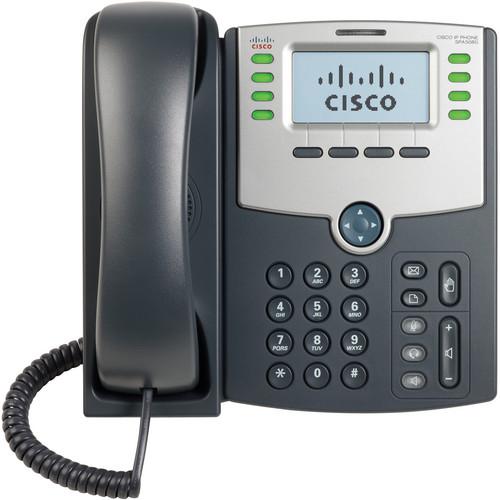 Contents of the user manual for the Cisco SPA508G 8-Line IP Phone with
- Product category: Telephones Cisco
- Brand: Cisco
- Description and content of package
- Technical information and basic settings
- Frequently asked questions – FAQ
- Troubleshooting (does not switch on, does not respond, error message, what do I do if...)
- Authorized service for Cisco Telephones
|
User manual for the Cisco SPA508G 8-Line IP Phone with contain basic instructions
that need to be followed during installation and operation.
Before starting your appliance, the user manual should be read through carefully.
Follow all the safety instructions and warnings, and be guided by the given recommendations.
User manual is an integral part of any Cisco product,
and if it is sold or transferred, they should be handed over jointly with the product.
Following the instructions for use is an essential prerequisite for protecting
health and property during use, as well as recognition of liability on the part of the manufacturer
for possible defects should you make a warranty claim. Download an official Cisco user manual in which you will find instructions on how to install, use, maintain and service your product.
And do not forget – unsuitable use of a Cisco product will considerably shorten its lifespan!
|
Product description The SPA508G 8-Line IP Phone with 2-Port Switch PoE and LCD Display, which is part of the Cisco Small Business Pro Series, is a dependable and affordable IP phone for business or home office use. The Cisco IP Phone has been tested to ensure comprehensive interoperability with equipment from voice over IP (VoIP) infrastructure leaders, enabling service providers to quickly roll out services to their customers.With hundreds of features and configurable service parameters, the Cisco IP Phone caters to the needs of traditional business users with features such as easy station moves and shared line appearances (across local and geographically dispersed locations).The Cisco IP Phone uses standard encryption protocols to perform highly secure remote provisioning and unobtrusive in-service software upgrades. Remote provisioning tools include detailed performance measurement and troubleshooting features, enabling network providers to deliver high-quality support to their subscribers. Remote provisioning also saves service providers the time and expense of managing, preloading and reconfiguring the customer's premises for equipment. - Telephony Features
- • 8 voice lines• 8 Independent SIP registrations• Line status: active line indication, with name and number• Menu-driven user interface• Shared line appearance• Speakerphone• Call hold• Music on hold• Call waiting• Caller ID name and number• Outbound caller ID blocking• Call transfer: attended and blind• Three-way call conferencing with local mixing• Multiparty conferencing via external conference bridge• Automatic redial of last calling and last called numbers• On-hook dialing• Call pickup: selective and group• Call park and unpark• Call swap• Call back on busy• Call blocking: anonymous and selective• Call forwarding: unconditional, no answer, on busy• Hot line and warm line automatic calling• Call logs (60 entries each): made, answered and missed calls• Redial from call logs• Personal directory with auto-dial (100 entries)• Do not disturb• Digits dialed with number auto-completion• Anonymous caller blocking• Uniform Resource Identifier (URI) (IP) dialing support (vanity numbers)• On-hook default audio configuration (speakerphone and headset)• Multiple ring tones• Called number with directory name matching• Ability to call number using name: directory matching or via caller ID• Subsequent incoming calls show calling name and number• Date and time with support for intelligent daylight savings• Call start time stored in call logs• Call timer• Name and identity (text) displayed at startup• Distinctive ringing based on calling and called number• 10 user-downloadable ring tones• Speed dialing, eight entries• Configurable dial/numbering plan support• Intercom• Group paging• Network Address Translation (NAT) Traversal, including Simple Traversal of UDP Through NATs (STUN) support• DNS SRV and multiple A records for proxy lookup and proxy redundancy• Syslog, debug, report generation, and event logging• Highly secure call encrypted voice communications support• Built-in web server for administration and configuration with multiple security levels• Automated remote provisioning, multiple methods; up to 256-bit encryption (HTTP, HTTPS, Trivial File Transfer Protocol [TFTP])• Option to require administrator password to reset unit to factory defaults
- Hardware Features
- • Pixel-based display: 128 x 64 monochrome LCD graphical display with backlight
• Dedicated illuminated buttons for:
- Audio mute on/off
- Headset on/off
- Speakerphone on/off
• 4-way rocking directional knob for menu navigation
• Voicemail message waiting indicator (VMWI) light
• Voicemail message retrieval button
• Dedicated hold button
• Settings button for access to feature, setup, and configuration menus
• Volume control rocking up/down knob controls handset, headset, speaker, ringer
• Standard 12-button dialing pad
• High-quality handset and cradle
• Built-in high-quality microphone and speaker
• Headset jack: 2.5 mm
• LED test function
• Two Ethernet ports with integrated Ethernet switch: 10/100BASE-T RJ-45
• 802.3af-compliant PoE
• Optional 5 VDC universal (100-240V) switching; power supply is ordered separately (Cisco PA100) - Security Features
- • Password-protected system, preset to factory default
• Password-protected access to administrator and user-level features
• HTTPS with factory-installed client certificate
• HTTP digest: encrypted authentication via MD5 (RFC 1321)
• Up to 256-bit Advanced Encryption Standard (AES) encryption
• SIP over Transport Layer Security (TLS)
• Secure Real-Time Transport Protocol (SRTP) UPC: 882658270017 In the Box Cisco SPA508G 8-Line IP Phone with 2-Port Switch PoE and LCD Display Stand Handset Cord RJ-45 Ethernet Cable Quick-Start Guide CD 1 Year Limited Hardware Warranty Table of Contents
|
Upload User Manual
Have you got an user manual for the Cisco SPA508G 8-Line IP Phone with 2-Port Switch PoE and LCD Display in electronic form? Please send it to us and help us expand our library of instruction manuals.
Thank you, too, on behalf of other users.
To upload the product manual, we first need to check and make sure you are not a robot. After that, your "Submit Link" or "Upload File" will appear.
Technical parametersCisco SPA508G Specs | Data Networking | MAC address (IEEE 802.3)
IPv4 (RFC 791)
Address Resolution Protocol (ARP)
DNS: A record (RFC 1706), SRV record (RFC 2782)
Dynamic Host Configuration Protocol (DHCP) client (RFC 2131)
Internet Control Message Protocol (ICMP) (RFC 792)
TCP (RFC 793)
User Datagram Protocol (UDP) (RFC 768)
Real-Time Transport Protocol (RTP) (RFC 1889, 1890)
Real-Time Control Protocol (RTCP) (RFC 1889)
Differentiated Services (DiffServ) (RFC 2475)
Type of service (ToS) (RFC 791, 1349)
VLAN tagging 802.1p/Q: Layer 2 quality of service (QoS)
Simple Network Time Protocol (SNTP) (RFC 2030) | | Voice Gateway | SIP version 2 (RFC 3261, 3262, 3263, 3264)
SPCP with the Cisco Unified Communications 500 Series
SIP proxy redundancy: dynamic via DNS SRV, A records
Reregistration with primary SIP proxy server
SIP support in NAT networks (including STUN)
SIPFrag (RFC 3420)
Secure (encrypted) calling via SRTP
Codec name assignment
Voice algorithms:
G.711 (A-law and -law)
G.726 (16/24/32/40 kbps)
G.729 A
G.722
Dynamic payload support
Adjustable audio frames per packet
Dual-tone multifrequency (DTMF), in-band and out-of-band (RFC 2833) (SIP INFO)
Flexible dial plan support with interdigit timers
IP address/URI dialing support
Call progress tone generation
Jitter buffer: adaptive
Frame loss concealment
Comfort Noise Generation (CNG)
Voice activity detection (VAD) with silence suppression
Attenuation/gain adjustments
VMWI - Voicemail waiting indicator, via NOTIFY, UBSCRIBE
Third-party call control (RFC 3725) | | Administration and Maintenance | Integrated web server provides web-based administration and configuration
Telephone keypad configuration via display menu/navigation
Automated provisioning and upgrade via HTTPS, HTTP, TFTP
Asynchronous notification of upgrade availability via NOTIFY
Nonintrusive in-service upgrades
Report generation and event logging
Statistics transmitted in BYE message
Syslog and debug server records: configurable per line | | Physical Interfaces | Two 10/100BASE-T RJ-45 Ethernet ports (IEEE 802.3)
Handset: RJ-9 connector
Built-in speakerphone and microphone
Headset 2.5 mm jack | | Power Supply | Power supply is optional and is purchased separately
DC output voltage: +5 VDC at 2.0A maximum
Switching power adapter: 100-240V 50-60 Hz AC input | | Indicators | Speakerphone on/off button with LED
Headset on/off button with LED
Mute button with LED
Message waiting LED | | Operating Temperature | 32 to 104ºF (0 to 40ºC) | | Storage Temperature | -4 to 158ºF (-20 to 70ºC) | | Operating Humidity | 5 to 95% non condensing | | Storage Humidity | 5 to 95% non condensing | | Dimension (DxWxH) | 1.73 x 8.42 x 8.35" (4.4 x 21.4 x 21.2 cm) | | Weight | 2.0 lb (0.9 kg) | | | | Package Weight | 2.72 lb | | Box Dimensions (LxWxH) | 15.0 x 12.0 x 2.5" |
Rating80% users recommend this product to others. And what about you?

This product has already been rated by 94 owners. Add your rating and experience with the product.
Discussion
 Ask our technicians if you have a problem with your settings,
or if anything is unclear in the user manual you have downloaded.
You can make use of our moderated discussion.
The discussion is public and helps other users of our website who may be encountering similar problems.
Ask our technicians if you have a problem with your settings,
or if anything is unclear in the user manual you have downloaded.
You can make use of our moderated discussion.
The discussion is public and helps other users of our website who may be encountering similar problems.
The discussion is empty - enter the first post
Post a new topic / query / comment:
|
|
|
| Request for user manual |
You can’t find the operation manual you are looking for? Let us know and we will try to add the missing manual:
I’m looking for a manual / Request for manual
Current requests for instruction manuals:
Call Of Duty World War Two For Xbox...
controller stratus XL...
stratus XL...
smart whatch serie S11 42mm...
Allen & Heath SQ-6 manual...
|
| Discussion |
Latest contributions to the discussion:
AEW R 4100
Name: MAURICIO ANGARITA
Audio-Technica AEW-R4100 UHF Diversity Receiver for
AEW R 4100 has the mute function blocked and does not allow audio to pass. I tried several times to turn off the mute from the transmitter but it does nothing, the mute stays on. Solution?
Thank you...
Instructions for assembling the 2015 Forecast Image Master Consoles GC3-A
Name: mike elam
Forecast Consoles GC3-A ImageMaster Editing Console
Looking for instructions for assembling this console. ...
EMPTY TONER ERROR MESSAGE AFTER REPLACING TONER
Name: LINDA BAD YELLOW EYES
Brother TN223BK Standard-Yield Toner
I HAD TO CHANGE OUT ALL THREE TONERS DUE TO LEAKS IN THE YELLOW AND CYAN. AFTER I REPLACED THEM, THE MACHINE KEEPS GIVING ME AN EMPTY TONER ERROR MESSAGE. HELP!!...
PS480D 20/24 pin Switching 480W Power Supply
Name: swkargo
Logisys 480W Power Supply
This item states in can run -5vdc .It is NOT listed on the board or I beleive is r4 is missing the resitior. Any body have thid issue. Shawn
...
Help needed
Name: Ann Carter
SanDisk 1TB Extreme Portable USB 3.1
When I click the link to download the user manual for my Sandisk Extreme external hard drive, it gives me the manual for the LG Cricket. Can you please change the link so I can download the Sandisk manual and begin using this drive? Thank you....
|
|


