User Manual for Colorfront Express Dailies Click to enlarge the picture
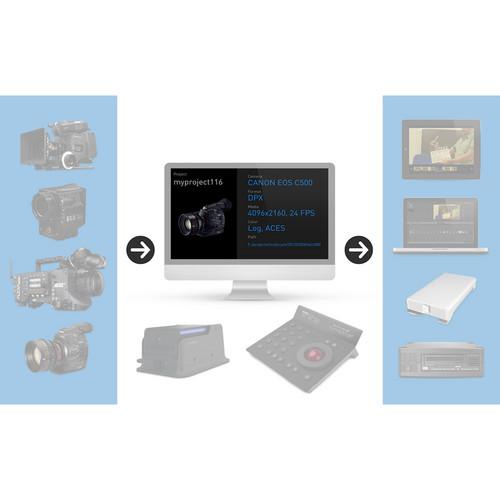 Contents of the user manual for the Colorfront Express Dailies
- Product category: Video Editing Colorfront
- Brand: Colorfront
- Description and content of package
- Technical information and basic settings
- Frequently asked questions – FAQ
- Troubleshooting (does not switch on, does not respond, error message, what do I do if...)
- Authorized service for Colorfront Video Editing
|
User manual for the Colorfront Express Dailies contain basic instructions
that need to be followed during installation and operation.
Before starting your appliance, the user manual should be read through carefully.
Follow all the safety instructions and warnings, and be guided by the given recommendations.
User manual is an integral part of any Colorfront product,
and if it is sold or transferred, they should be handed over jointly with the product.
Following the instructions for use is an essential prerequisite for protecting
health and property during use, as well as recognition of liability on the part of the manufacturer
for possible defects should you make a warranty claim. Download an official Colorfront user manual in which you will find instructions on how to install, use, maintain and service your product.
And do not forget – unsuitable use of a Colorfront product will considerably shorten its lifespan!
|
Product description Colorfront's Express Dailies is a high-performance on-set or near-set file-based dailies system for commercials, film, and high-end TV productions. Express Dailies is based on the image science technology, high-performance processing engine, and color grading and management tools featured in Colorfront's Emmy Award winning On-Set Dailies system, used in big-budget Hollywood features and episodic TV shows.
Express Dailies combines production-proven tools for dailies work with sophisticated yet simple-to-use color science to deliver simultaneous, faster than real-time results in all common file formats.
Express Dailies is a complete solution for digital color management and processing, featuring a simple drag and drop workflow for high-resolution grading, transcoding, archiving, QC, and encoding. Note: Your download will provide you with the most recent version of Express Dailies. - Key Features
-
- Drag and drop user interface
- Multiple RAW / uncompressed source formats
- On-Set Live look creation
- Copy Central ingest and archive
- Color grading, CDL, ARRI Alexa.look file support
- Flexible 32-bits per channel image processing pipeline
- IIF / ACES workflow with OpenEXR file format support
- Ultra high performance rendering
- HD deliverables with different burn-ins, watermark
- Simultaneous creation of multiple delivery formats: DNxHD MXF, ProRes QT, H264, DPX, OpenEXR
- Sound syncing, multiple metadata burn-ins
- Built-in waveform and histogram analysis tools
- Checksum verified copy / manifest and LTO archival
- COPRA streaming iPad dailies
- High Performance
- Runs on Mac Pro tower and MacBook Pro with Retina Display using NVIDIA GPU. Provides RAW image de-bayering and support for AJA Kona3 and Io XT cards for real-time HD video playback.
- Native 64-bit application, fully multi-threaded for multi-core CPUs
- Real-time playback of RAW camera formats with highest quality
- 32 bits per channel, floating point image processing in GPU
- Source Media & Camera Formats
-
- Canon C500 4K RAW
- Sony F65 RAW, F55 RAW, F5 RAW
- Sony XAVC 4K, SRFile (SStP MP4), XDCam EX
- Alexa ARRIRAW, ProRes 4444 and 422, DNxHD
- Blackmagic Cinema Camera and Aaton Delta DNG
- RED REDCODE RAW (R3D) support, including RED One MX, Epic, Scarlet, and Epic Monochrome
- DNxHD MXF and QuickTime, including DNxHD 444
- Phantom Flex, Miro, HD Gold , 65 .cine RAW
- Silicon Imaging SI-2K, Cineform RAW
- Canon EOS 1D, 5D, 7D H264 QuickTime with timecode
- Canon EOS C100, C300, C500 MXF, EOS 1DC 4K JPG
- Panasonic P2, MXF AVC Intra
- Most QuickTime formats, with appropriate codecs
- OpenEXR 16-bit format support
- Uncompressed media (DPX, TIFF files from digital, tape, or scanned sources)
- Broadcast audio BWAV including header metadata
- Encoding Formats
-
- Avid DNxHD MXF, including latest DNxHD 444
- Final Cut Pro ProRes (444, 422 HQ,Proxy, LT)
- MPEG4 H.264 for Web delivery, iPhone, and iPad, etc.
- Specific web deliverables, such as: PIX and DAX
- Uncompressed HD DPX, TIFF, OpenEXR, QuickTime
- Still frame formats such as: TIF, JPG, DPX, etc.
- WAV broadcast wave audio, stereo and multi channel
- Export various metadata, including FLX, ALE, FCP XML, CDL, CCC
- Automatic PDF QC report generation
- COPRA iPad Streaming Dailies in full HD
- On-Set Live Look Creation
- Create looks and export and manage CDLs and 3DLuts on external LUT boxes, with multiple cameras, full color science, Academy ACES support, stills, split screens, and camera metadata views.
- Grade live on camera HD monitor feeds
- Multi camera support, with color grading offset for cameras
- Still store, split screen, waveform and histogram analysis tools
- Camera metadata views with data extracted from HD-SDI signal
- Export and manage CDLs and 3D LUT files for external LUT boxes
- Supports Colorfront's open EMD metadata files to dailies systems
- Full color science for all professional camera formats supported
- Includes full support for Academy ACES color workflows
- Sound Syncing
-
- Automatically sync audio, based on timecode in BWF
- Analyze audio to detect clap sound and sync audio
- Manual sound syncing with sync slip and audition
- Scene/slate/take/cam/select info from BWF file header
- Audio waveform helps sync sound quickly and accurately
- Color Correction & Image Processing
-
- Full IIF-ACES workflow support: IDT, LMT, RRT, ODT
- ASC-CDL import / export in CMX EDL, ASC CCC CDL color grading, in HD video, Log, or ACES color
- Import / export reference images in TIF or DPX format
- Primary color grading -- master RGB color processor with saturation, contrast, high, mid and low corrections
- High quality HD resizing with high quality filtering
- Zoom: reposition, resize, aspect, flip and flop
- Text burn-in of multiple metadata including TC, file name, user text, watermark, logo burn, and letterbox
- Extensive Metadata Support and Open Architecture
-
- Broadcast audio BWAV including header metadata
- ScriptE, QTake XML, ARRI Alexa XML, Codex XML, and 5th Kind
- Lens metadata support, including LDS and Cooke /i lens
- LUT import and export in a variety of formats
- Color metadata import and export, CDL, CCC, and ALE
- Support for EMD, Colorfront's open Express Meta Data sidecar XML file format with all metadata info
- Copy Central
- Fast checksum verified copies (with manifest reports) to multiple destinations, including archival to single or dual LTO5 and 6 tapes via LTFS. Archive database, bar codes, and transfer reports.
Table of Contents
|
Upload User Manual
Have you got an user manual for the Colorfront Express Dailies in electronic form? Please send it to us and help us expand our library of instruction manuals.
Thank you, too, on behalf of other users.
To upload the product manual, we first need to check and make sure you are not a robot. After that, your "Submit Link" or "Upload File" will appear.
Technical parametersColorfront EXPRESS DAILIES Specs | Minimum System Requirements | Mac OS X 10.8 Mountain Lion
Mac Pro Tower
Dual 4 or 6 core processors
24 GB RAM
NVIDIA GeForce GTX 680, 690, Quadro 4000 and K5000
Local (SSD) or external FC/Thunderbolt storage
15" Retina MacBook Pro (38 cm)
Optional peripherals support:
AJA Kona 3G or AJA Io XT (MacBook Pro)
Archival on LTO 5 and LTO 6 LTFS
Control Panel Support:
Tangent Devices Element, Wave, CP200
AVID Artist Color and Transport panels |
Rating50% users recommend this product to others. And what about you?

This product has already been rated by 50 owners. Add your rating and experience with the product.
Discussion
 Ask our technicians if you have a problem with your settings,
or if anything is unclear in the user manual you have downloaded.
You can make use of our moderated discussion.
The discussion is public and helps other users of our website who may be encountering similar problems.
Ask our technicians if you have a problem with your settings,
or if anything is unclear in the user manual you have downloaded.
You can make use of our moderated discussion.
The discussion is public and helps other users of our website who may be encountering similar problems.
The discussion is empty - enter the first post
Post a new topic / query / comment:
|
|


