User Manual for CyberLink PowerDirector 17 Ultra Click to enlarge the picture
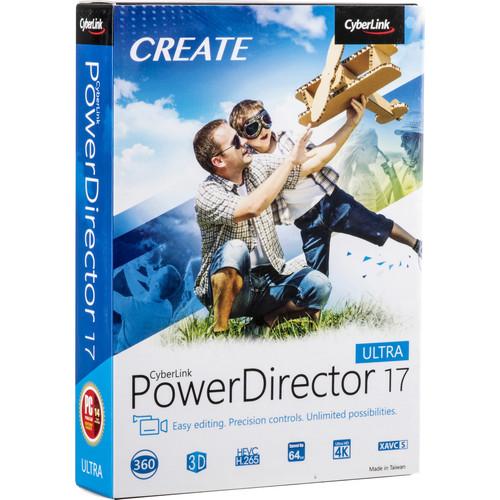 Contents of the user manual for the CyberLink PowerDirector 17 Ultra
- Product category: Video Editing CyberLink
- Brand: CyberLink
- Description and content of package
- Technical information and basic settings
- Frequently asked questions – FAQ
- Troubleshooting (does not switch on, does not respond, error message, what do I do if...)
- Authorized service for CyberLink Video Editing
|
User manual for the CyberLink PowerDirector 17 Ultra contain basic instructions
that need to be followed during installation and operation.
Before starting your appliance, the user manual should be read through carefully.
Follow all the safety instructions and warnings, and be guided by the given recommendations.
User manual is an integral part of any CyberLink product,
and if it is sold or transferred, they should be handed over jointly with the product.
Following the instructions for use is an essential prerequisite for protecting
health and property during use, as well as recognition of liability on the part of the manufacturer
for possible defects should you make a warranty claim. Download an official CyberLink user manual in which you will find instructions on how to install, use, maintain and service your product.
And do not forget – unsuitable use of a CyberLink product will considerably shorten its lifespan!
|
Product description CyberLink PowerDirector 17 Ultra is a consumer-level editing system with a comprehensive feature set, including many pro-level features. PowerDirector allows you to cut and trim your videos, apply effects and music, add titles and transitions, and fix and color-correct footage. There are also special features such as screen recording for creative web demos and tutorials. The workflow is designed to operate quicker and easier with one-click presets, a drag-and-drop, and an intuitive interface. The application is Windows-compatible and supports up to 4K resolution videos and many popular formats.
The Ultra version has the full feature set of PowerDirector 17 and also comes with CyberLink Content Packs Premium 1, 2, 3, and 4, 50 background music tracks, and 100 sound clips, as well as ProDAD Adorage 13 Lite and NewBlue Essentials 1 3rd-party plug-ins. All these allow you to highly enhance your projects. Additionally, the Ultra version includes 25GB of CyberLink Cloud Service for one year.
For times when you want a completed project very quickly, PowerDirector 17 features its Express Projects section, which offers a wide range of templates that you simply need to drop your clips into. The templates are complete with effects, transitions, animations, and music. These projects can then be shared directly to social media from PowerDirector at the press of a few buttons.
For action camera enthusiasts, PowerDirector 17 has an Action Camera Center that provides everything you need to edit, correct, and enhance your action cam footage. For 360 spherical VR enthusiasts, PowerDirector 17 supports importing equirectangular footage, editing it with a full range of tools—including 360 video stabilization—and then exporting in 360 format.
Among the advanced features, you'll find motion tracking, multicam editing, audio ducking, look-up table support, split toning and HDR effect, chroma key, and much more. - Cloud Storage
- Access projects anywhere with 25GB of cloud storage included for 1 year.
- New Features
- MultiCam Designer & Collage Designer Interoperability
Sync multiple clips using MultiCam Designer, then finish editing and producing in Video Collage Designer.
Updated Video Collage Designer
More border color and size controls. Also, make interclip border adjustments and save/download customized templates.
Improved Title Designer
Amazing animated title text effects, and quicker editing directly inside the preview window with background object support.
Nested Project Editing
Add and edit multiple projects in your timeline for effortless creativity.
Video Pre-Cut
Pre-cut clips to save in your library and reuse throughout your projects.
Create Brush Mask in Mask Designer
Use the brush tool to create custom, irregular shaped masks to apply to video clips.
Improved Motion Tracking Accuracy
Track objects through your video with frame-by-frame control and title backgrounds.
Advanced Chroma Key
Significant improvements to our Chroma Key engine and advanced multi-key sampling.
Keyframe Opacity Editing
Use keyframes to edit video opacity directly on the timeline.
Redesigned Paint Designer
A much-improved workflow allows animated painted effects to be overlayed on videos.
Enhanced 360° Video Stabilization
Improved stabilization engine, plus the ability to adjust temporal and spatial ranges and axis rotation.
Expanded Format Support
Import WebM (VP9 video and Opus audio), import HEIC, export JPG and PNG image sequences, produce MKV with DTS/AAC audio.
Improved Subtitle Room
Import and export SRTs with customized fonts, colors, and styles.
Capture Webcam while Recording
Capture webcam footage as a PiP to screen recordings.
Updated Capture Module
Capture H.264 codec with preset or customized profiles.
Integrated and Expanded Audio Editing
Audio Editor integrated directly into the PowerDirector editing workflow allows for seamless audio editing, plus vcal transformer and echo effects.
Best Matched Profile
Selects the production profile that best suits your video based on the source clips.
Improved Performance
Improved architecture enables more hardware decoding instances and Intel 8th Generation Core i CPU optimizations with TrueVelocity 8.
Point-of-Use Tutorials and Hotkeys
Learn more and edit faster with point-of-use tutorials and hotkey support. All Features - Creative Editing Tools
-
- (New) Screen capture with Screen Recorder 2
- (New) Built-in audio editor
- (New) Point-of-use video tutorial
- (Enhanced) Keyframe opacity adjustments
- Vertical video import, editing, and export
- Produce 120/240 fps high frame rate video
- Color presets and Look-Up Table (LUT) support
- Audio ducking
- TrueTheater color and stabilizer
- Action camera editing tools
- Apply titles and images to motion path
- Precision Design Tools
-
- (New) Frame-by-frame motion tracking
- (Enhanced) MultiCam designer
- (Enhanced) Video collage designer
- (Enhanced) PiP designer
- (Enhanced) Theme designer
- (Enhanced) Mask designer
- (Enhanced) Title designer
- (Enhanced) Paint designer
- (Enhanced) Subtitle room
- Menu designer
- True360 view designer
- Transition designer
- Professional Editing Features
-
- (New) Nested project editing
- (New) Video pre-cut
- (New) Multi-sample chroma key
- (New) Produce image sequence
- (Enhanced) Advanced 360-degree Video Stabilizer
- Color match
- Split toning and HDR effect
- Video blending modes
- 360-degree video editing
- Convert titles and PiP to 360° objects
- Correct distortions (lens, color)
- Performance & Formats
-
- (New) TrueVelocity 8
- (New) Best matched profile
- (New) WebM/VP9 support
- (Enhanced) 8th Generation Intel Core processor (Coffee Lake) optimization
- (Enhanced) Dolby and DTS 5.1 import/export
- Native 64-bit support
- Multi-GPGPU acceleration with OpenCL support
- NVIDIA and Intel H.265 (HEVC) hardware encoding
- NVIDIA, Intel, and AMD H.265 (HEVC) hardware decoding
- AVCHD 3D/progressive and XAVC-S camcorder support
- Import, edit, and produce 120/240 fps video
- DVD and Blu-ray authoring
- CyberLink Premium Content Packs
-
- (New) Content Pack Premium 4
- (New) 50 background music tracks and 100 sound clips
- Content Pack Premium 1
- Content Pack Premium 2
- Content Pack Premium 3
- 3rd-Party Plug-Ins & Effects
-
- ProDAD Adorage 13 Lite
- NewBlue Essentials 1
UPC: 884799003998 In the Box CyberLink PowerDirector 17 Ultra (DVD) Installation DVD Table of Contents
|
Upload User Manual
Have you got an user manual for the CyberLink PowerDirector 17 Ultra in electronic form? Please send it to us and help us expand our library of instruction manuals.
Thank you, too, on behalf of other users.
To upload the product manual, we first need to check and make sure you are not a robot. After that, your "Submit Link" or "Upload File" will appear.
Technical parametersCyberLink PowerDirector 17 Ultra Specs | | | Operating System | Microsoft Windows 10, 8/8.1, 7 Service Pack 1 (64-bit OS recommended) | | CPU | Intel Core i-series or AMD Phenom II and above | | GPU | For Standard Video: 128 MB VGA VRAM or higher
For 360 Video: DirectX 11 compatible
For AI Plug-In: 2 GB VGA VRAM or higher | | RAM | 2 GB required (6 GB or above recommended) | | Hard Disk Space | 10 GB | | Sound Card | Windows compatible sound card is required | | Screen Resolution | 1024 x 768, 16-bit color or above | | Menu/Operation Languages | English, Chinese Simplified, Chinese Traditional, Dutch, French, German, Italian, Japanese, Korean, Spanish (European) | | | | Video File Import | H.265/HEVC, MOD, MVC (MTS), MOV (H.264/alpha PNG), Side-by-Side Video, MPEG-1, Top-under Video, MPEG-2, Dual-Stream AVI, MPEG-4 AVC (H.264), FLV (H.264), MP4 (XAVC S), MKV (multiple audio streams), TOD, 3GPP2, VOB, AVCHD (M2T, MTS), VRO, AVI, WMV, DAT, WMV-HD, DivX (codec downloadable online for 32-bit Windows only)), WTV in H.264/MPEG2 (multiple video and audio streams), DV-AVI, DSLR video clip in H.264 format with LPCM/AAC/ Dolby Digital audio, DVR-MS, WebM (VP9)
360 Video: Equirectangular format MP4 (H.264). Supports up to 4K resolution in 2:1 aspect ratio. | | Audio File Import | WAV, MP3, WMA, M4A, OGG, FLAC, AAC, AMR-NB, Opus | | Audio Format Import | AAC, Dolby Digital, Dolby Digital Plus, DTS, WAVE, MPEG-1 Layer III, FLAC, ALAC | | Photo File Import | MPO, JPS, RAW, GIF, BMP, JPG, TIF, PNG, Animated GIF, HEIC
360 Photo: Equirectangular format JPG/TIF in 2:1 aspect ratio. | | Look-Up Table Import | 3DL, MGA, M3D, CUBE, CSP, CMS, RV3DLUT, VF | | Video File Exporting | 3D Video: MVC, Side-by-Side, Anaglyph
HD: AVCHD, AVCHD 2.0 (3D/ Progressive), MPEG-2 HD, WMV-HD
2K/4K: H.264 AVC, WMV, H.265 HEVC, XAVC S
MKV with Dolby Digital/LPCM audio
MPEG-2 (.MPG) with Dolby Digital audio
MPEG-2 TS (.M2TS) with Dolby Digital/LPCM audio
360 Video: Equirectangular format MP4 (H.264, H.265)
MPEG-4 AVC (.MP4) with AAC/Dolby Digital audio
Windows Media Video (.WMV) with WMA audio
DV-AVI (.AVI) with PCM audio
AVCHD 2.0 for SD/SDHC/SDXC/MS memory card or flash memory
TPD for HDD camcorder | | Audio File Exporting | AAC (.M4A), WMA, LPCM (.WAV) | | Formats Supported for Disc Creation | 3D Disc Burning: DVD/AVCHD/BD
DVD
BD Burning: BDMV
AVCHD disc burning
DVD and BD disc burning with DTS/Dolby/LPCM audio | | | | Package Weight | 0.295 lb | | Box Dimensions (LxWxH) | 7.6 x 5.3 x 1.6" |
Rating100% users recommend this product to others. And what about you?

This product has already been rated by 14 owners. Add your rating and experience with the product.
Discussion
 Ask our technicians if you have a problem with your settings,
or if anything is unclear in the user manual you have downloaded.
You can make use of our moderated discussion.
The discussion is public and helps other users of our website who may be encountering similar problems.
Ask our technicians if you have a problem with your settings,
or if anything is unclear in the user manual you have downloaded.
You can make use of our moderated discussion.
The discussion is public and helps other users of our website who may be encountering similar problems.
The discussion is empty - enter the first post
Post a new topic / query / comment:
|
|


