|
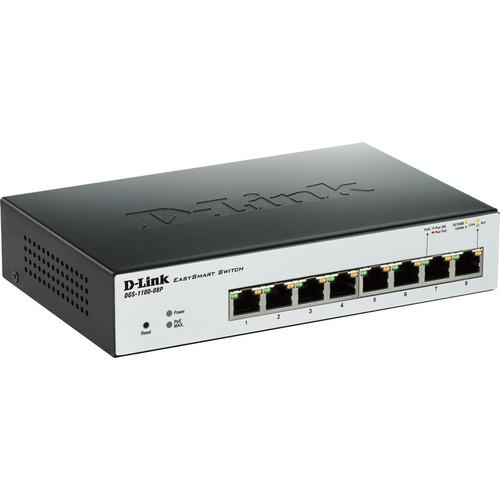
User Manual for D-Link DGS-1100 Series EasySmart 8-Port Gigabit PoE Switch Click to enlarge the picture
 Contents of the user manual for the D-Link DGS-1100 Series EasySmart 8-Port Gigabit
- Product category: Network Switches, Bridges & Hubs D-Link
- Brand: D-Link
- Description and content of package
- Technical information and basic settings
- Frequently asked questions – FAQ
- Troubleshooting (does not switch on, does not respond, error message, what do I do if...)
- Authorized service for D-Link Network Switches, Bridges & Hubs
 |
User manual for the D-Link DGS-1100 Series EasySmart 8-Port Gigabit contain basic instructions
that need to be followed during installation and operation.
Before starting your appliance, the user manual should be read through carefully.
Follow all the safety instructions and warnings, and be guided by the given recommendations.
User manual is an integral part of any D-Link product,
and if it is sold or transferred, they should be handed over jointly with the product.
Following the instructions for use is an essential prerequisite for protecting
health and property during use, as well as recognition of liability on the part of the manufacturer
for possible defects should you make a warranty claim. Download an official D-Link user manual in which you will find instructions on how to install, use, maintain and service your product.
And do not forget – unsuitable use of a D-Link product will considerably shorten its lifespan!
|
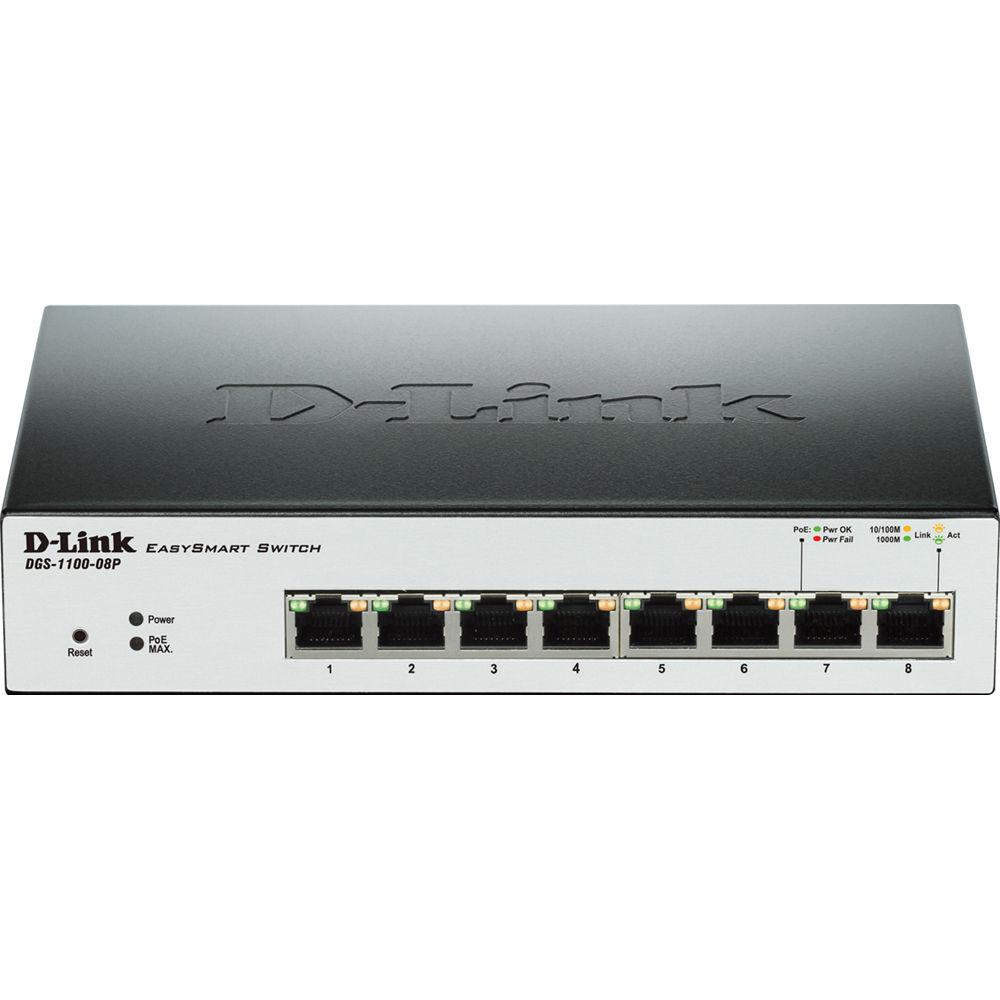
Product description The D-Link DGS-1100 Series EasySmart 8-Port Gigabit PoE Switch is a suitable solution for SOHOs, small/medium-sized businesses, as well as enterprise deployments, such as in branch offices that require simple network management. The 8-port switch with PoE (Power-over-Ethernet) support comes in a compact desktop enclosure. Compliant with IEEE802.3az Energy Efficient Ethernet, this switch consumes less power during idle periods. It also implements the D-Link Green Technology that helps in automatically saving energy. The switch automatically detects the length of the connected cables and can adjust power usage for shorter cable connections of up to 65.6’ (20m). In addition, the switch monitors link status of every port and drastically reduces power consumption when a port is without a link. The switch supports Layer 2 features such as IGMP Snooping to optimize performance for multicast applications. A fanless design allows for quieter operation and provides a longer product life. - D-Link Green / Power Saving Performance
- Compliant with IEEE 802.3az Energy Efficient Ethernet (EEE), this switch consumes less energy by cutting down on power consumption when port utilization is low. By deploying EEE devices, users can cut operating costs and even cut down on necessary cooling equipment, helping small and medium-sized businesses stay within their budgets. The DGS-1100 Series switch also features D-Link Green Technology that helps save energy automatically. The switches monitor the link status of every port and will drastically reduce power consumption when a port link is down.
- Easy Deployment
- This DGS-1100 Series switch supports an intuitive Client-based utility (SmartConsole Utility or D-Link Network Assistant Utility) and a web-based management interface. The Client based Utility allows customers to discover all switches in the D-Link Smart Switch family within the same L2 network segment. With this utility, users do not need to change the IP address of their PC, and this also makes initial setup of the Smart Switches quick and easy. Switches within the same L2 network segment that are connected to the user's PC are displayed on-screen for instant access. This allows for extensive switch configuration and basic setup of discovered devices, including password changes and firmware upgrades. The graphic web-based management interface provides a user-friendly interface that enables network administrators to remotely control their network down to the port level.
- Surveillance VLAN and Bandwidth Control
- The DGS-1100 Series switch supports Surveillance VLAN for video surveillance deployment. Surveillance VLAN gives video traffic high priority and an individual VLAN, guaranteeing the quality of surveillance traffic through a single DGS-1100 switch, thus sparing businesses the added expenses required for dedicated hardware and facilities. Bandwidth Control can reserve bandwidth on a per port basis for important functions that require larger bandwidth or might have high priority.
- PoE Support
- The DGS-1100-08P switch delivers Power over Ethernet capabilities, simplifying deployments with IP cameras, VoIP phones, wireless access points, and other standards-compliant powered devices. The DGS-1100-08P complies with the 802.3af PoE standard (up to 15.4 W supported on all 8 ports) and has a 64 W power budget. Using the switch's management interface, an administrator can control various PoE functions, such as remotely rebooting cameras or access points, from anywhere on the network, including over the Internet.
- Advanced Features
- The DGS-1100 Series switch is equipped with advanced security features such as Static MAC, Storm Control, and IGMP Snooping. Static MAC allows users to create a MAC whitelist for specific ports, helping administrators limit network access to authorized devices only. Storm Control monitors broadcast, multicast, or unknown unicast traffic and will start blocking or discarding packets which could flood the network when the defined threshold is exceeded. IGMP Snooping is able to reduce the loading of L3 multicast routers and save bandwidth in network throughput.
- Easy Troubleshooting
- The DGS-1100 Series features Loopback Detection and Cable Diagnostics to help network administrators find and solve network problems quickly and easily. Loopback Detection is used to detect loops created by a specific port and automatically shuts down the affected port. Cable Diagnostics helps network administrators quickly examine the quality of the copper cables, recognize the cable type, and detect cable errors.
- VLAN Features
- • Port-based VLAN
• 802.1Q Tagged VLAN
• Surveillance VLAN
• Voice VLAN
• Management VLAN
• VLAN Group
- Supports 32 static VLAN groups (DGS-1100-05/-08/-08P)
- Max. 4094 VIDs - L2 Features
- • Flow Control
- 802.3x Flow Control
- HOL Blocking Prevention
• Jumbo Frames up to 9216 Bytes
• IGMP Snooping
- IGMP v1/v2 Snooping
- Supports 32 Groups (DGS-1100-05/08/08P)
• Link Aggregation
- 2 groups, 2-4 ports per group (DGS-1100-08/08P)
• Loopback Detection
• Cable Diagnostics
• LLDP
• Port Mirroring
- One-to-One
- Many-to-One
• Statistics
- Tx Ok
- Tx Error
- Rx Ok
- Rx Error - QoS
- • 802.1p Quality of Service
• 4 queues per port
• Queue Handling
- Strict
- Weighted Round Robin (WRR)
• Bandwidth Control
- DGS-1100-05/08/08P
- Port Based
- Ingress: minimum granularity 8 Kbps
- Egress: minimum granularity 8 Kbps - Security
- • Static MAC Address
- Max. 32 entries (DGS-1100-05/08/08P)
• Broadcast/Multicast/Unknown Unicast Storm Control - Management
- • Web-Based GUI (Supports IPv4)
• SmartConsole Utility(DGS-1100-05/08/08P) - D-Link Green
- • Power Saving by:
- Link Status
- Cable Length (DGS-1100-05/-08/-08P)
• Energy Efficient Ethernet (IEEE 802.3az)
• RoHS Compliant - RFC Standard List
- • RFC 768 UDP
• RFC 791 IP
• RFC 792 ICMP
• RFC 793 TCP
• RFC 826 ARP
• RFC 1213 MIB II
• RFC1493 Bridge MIB
• RFC1907 SNMPv2 MIB
• RFC1215 MIB Traps Convention
• RFC2233 Interface Group MIB
• RFC2665 Ether-like MIB
• 802.1p MIB RFC4363
• ZoneDefense MIB
• Private MIB
• RFC 951 BootP Client
• RFC 1542 BootP/DHCP client
• RFC 4363 802.1p
• RFC 2236 IGMP Snooping UPC: 790069387272 In the Box D-Link DGS-1100 Series EasySmart 8-Port Gigabit PoE Switch Limited Lifetime Warranty More info from D-Link wwsecuzzufbzdf Table of Contents
|
Upload User Manual
Have you got an user manual for the D-Link DGS-1100 Series EasySmart 8-Port Gigabit PoE Switch in electronic form? Please send it to us and help us expand our library of instruction manuals.
Thank you, too, on behalf of other users.
To upload the product manual, we first need to check and make sure you are not a robot. After that, your "Submit Link" or "Upload File" will appear.
Technical parametersD-Link DGS-1100 Specs | | | Ports | 8 x 10/100/1000 Mb/s Gigabit Ethernet (RJ45) PoE (Type 1) | | | | Transmission Method | Store-and-Forward | | MAC Address Table Size | 8K | | | | Supported IEEE Standards | 802.3af | | | | Forwarding Rate | 11.9 Mpps | | Switching Bandwidth | 16 Gb/s | | Packet Buffer | 2 Mb | | | | Power Draw | 5.2 W (Active)
2.0 W (Idle) | | AC Input Power | 100 to 240 VAC, 50 / 60 Hz | | PoE Power Budget | 64 W | | | | Operating Temperature | 32 to 104°F / 0 to 40°C | | Operating Humidity | 10 to 95% | | Storage Temperature | 14 to 158°F / -10 to 70°C | | Storage Humidity | 5 to 95% | | Noise Level | 0.0 dB | | | | Cooling System | Passive | | Mean Time Between Failures (MTBF) | 708,219 Hours | | Dimensions | 7.4 x 4.7 x 1.5" / 19 x 12 x 3.8 cm | | Weight | 2 lb / 1 kg | | | | Package Weight | 2.45 lb | | Box Dimensions (LxWxH) | 13.4 x 8.9 x 3.5" |
Rating100% users recommend this product to others. And what about you?

This product has already been rated by 29 owners. Add your rating and experience with the product.
Discussion
 Ask our technicians if you have a problem with your settings,
or if anything is unclear in the user manual you have downloaded.
You can make use of our moderated discussion.
The discussion is public and helps other users of our website who may be encountering similar problems.
Ask our technicians if you have a problem with your settings,
or if anything is unclear in the user manual you have downloaded.
You can make use of our moderated discussion.
The discussion is public and helps other users of our website who may be encountering similar problems.
The discussion is empty - enter the first post
Post a new topic / query / comment:
|
|
|
| Request for user manual |
You can’t find the operation manual you are looking for? Let us know and we will try to add the missing manual:
I’m looking for a manual / Request for manual
Current requests for instruction manuals:
Call Of Duty World War Two For Xbox...
controller stratus XL...
stratus XL...
smart whatch serie S11 42mm...
Allen & Heath SQ-6 manual...
|
| Discussion |
Latest contributions to the discussion:
AEW R 4100
Name: MAURICIO ANGARITA
Audio-Technica AEW-R4100 UHF Diversity Receiver for
AEW R 4100 has the mute function blocked and does not allow audio to pass. I tried several times to turn off the mute from the transmitter but it does nothing, the mute stays on. Solution?
Thank you...
Instructions for assembling the 2015 Forecast Image Master Consoles GC3-A
Name: mike elam
Forecast Consoles GC3-A ImageMaster Editing Console
Looking for instructions for assembling this console. ...
EMPTY TONER ERROR MESSAGE AFTER REPLACING TONER
Name: LINDA BAD YELLOW EYES
Brother TN223BK Standard-Yield Toner
I HAD TO CHANGE OUT ALL THREE TONERS DUE TO LEAKS IN THE YELLOW AND CYAN. AFTER I REPLACED THEM, THE MACHINE KEEPS GIVING ME AN EMPTY TONER ERROR MESSAGE. HELP!!...
PS480D 20/24 pin Switching 480W Power Supply
Name: swkargo
Logisys 480W Power Supply
This item states in can run -5vdc .It is NOT listed on the board or I beleive is r4 is missing the resitior. Any body have thid issue. Shawn
...
Help needed
Name: Ann Carter
SanDisk 1TB Extreme Portable USB 3.1
When I click the link to download the user manual for my Sandisk Extreme external hard drive, it gives me the manual for the LG Cricket. Can you please change the link so I can download the Sandisk manual and begin using this drive? Thank you....
|
|


