User Manual for Dahua Technology 6AE530UNI Pro Series 5MP Outdoor Network PTZ Dome Camera with Night Vision Click to enlarge the picture
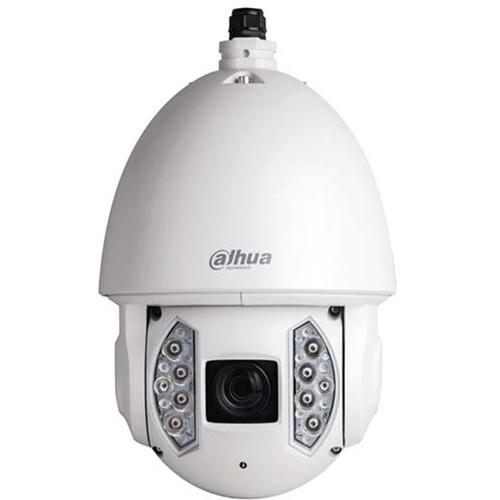 Contents of the user manual for the Dahua Technology 6AE530UNI Pro Series 5MP
- Product category: Wired IP Cameras Dahua Technology
- Brand: Dahua Technology
- Description and content of package
- Technical information and basic settings
- Frequently asked questions – FAQ
- Troubleshooting (does not switch on, does not respond, error message, what do I do if...)
- Authorized service for Dahua Technology Wired IP Cameras
|
User manual for the Dahua Technology 6AE530UNI Pro Series 5MP contain basic instructions
that need to be followed during installation and operation.
Before starting your appliance, the user manual should be read through carefully.
Follow all the safety instructions and warnings, and be guided by the given recommendations.
User manual is an integral part of any Dahua Technology product,
and if it is sold or transferred, they should be handed over jointly with the product.
Following the instructions for use is an essential prerequisite for protecting
health and property during use, as well as recognition of liability on the part of the manufacturer
for possible defects should you make a warranty claim. Download an official Dahua Technology user manual in which you will find instructions on how to install, use, maintain and service your product.
And do not forget – unsuitable use of a Dahua Technology product will considerably shorten its lifespan!
|
Product description The 6AE530UNI Pro Series 5MP Outdoor Network PTZ Dome Camera from Dahua Technology features a 1/1.9" Exmor R CMOS imager with a 30x optical zoom lens. The camera uses the H.265 video compression standard to improve encoding efficiency while preserving video quality. This PTZ camera is equipped with quick and accurate pan/tilt/zoom control and True WDR for applications in direct sunlight or glare. - Intelligent Video System (IVS)
- The camera comes with IVS analytics algorithms that deliver intelligent functions to monitor a scene for tripwire violations, intrusion, and abandoned or missing objects. This algorithm lets the camera respond to events in a specific area. In addition to scene analytics, the camera supports face detection to quickly capture a face and upload the image to a server. The camera also offers tamper detection by recognizing a dramatic scene change and generating a warning message to inspect the camera.
- Auto-Tracking
- Auto-tracking controls the pan/tilt/zoom actions of the camera to automatically track an object in motion and to keep it in the scene. The tracking action can be triggered manually or automatically by defined rules. Once a rule is triggered, the camera can zoom in and track the defined target automatically.
- Defog
- Utilizing Dahua's algorithm technology, the Defog feature dynamically adjusts the camera's contrast settings to provide improved image quality in scenes affected by fog, smog, mist, smoke, or other low-contrast interference.
- Environmental
- With a temperature range of -40 to 158°F, the camera is designed for extreme temperature environments. The camera complies with the IK10 impact rating. Subjected to rigorous dust and water immersion tests, the IP67 rating indicates it is suitable for outdoor applications.
- Interoperability
- The camera conforms to the ONVIF (Open Network Video Interface Forum) and PSIA (Physical Security Interoperability Alliance) specifications, ensuring interoperability between network video products regardless of manufacturer.
- Other Features
-
- Facial detection to detect and capture a snapshot of a human face in a defined area within a scene
- Heat map for generating a visual representation of data
- Auto-tracking to control pan/tilt/zoom actions of the camera to automatically track an object in motion and to keep it in the scene
UPC: 816116023020 In the Box Dahua Technology 6AE530UNI Pro Series 5MP Outdoor Network PTZ Dome Camera with Night Vision Limited 3-Year Warranty Table of Contents
|
Upload User Manual
Have you got an user manual for the Dahua Technology 6AE530UNI Pro Series 5MP Outdoor Network PTZ Dome Camera with Night Vision in electronic form? Please send it to us and help us expand our library of instruction manuals.
Thank you, too, on behalf of other users.
To upload the product manual, we first need to check and make sure you are not a robot. After that, your "Submit Link" or "Upload File" will appear.
Technical parametersDahua Technology Pro Series Specs | | | Image Sensor | 1/1.9" Exmor R CMOS | | Effective Pixels | H x V: 2560 x 1920, 5 MP | | RAM | 1024 MB | | ROM | 128 MB | | Scanning System | Progressive | | Minimum Illumination | Color: 0.01 lux at f/1.5
0 lux at f/1.5 (IR on) | | S/N Ratio | More than 55 dB | | IR Distance | 656.17' / 200 m | | IR Control | On/Off: Auto, Manual | | IR LEDs | 10 | | | | Focal Length | 6-180mm | | Aperture | f/1.5 to 4.3 | | Angle of View | Horizontal: 61.2 to 2.1° | | Optical Zoom | 30x | | Focus Control | Auto, Manual | | Close Focus Distance | 100 to 1000mm | | | | Range | Pan: 360° endless
Tilt: -20 to 90°, auto-flip 180° | | Manual Control Speed | Pan: 0.1 to 200° per sec
Tilt: 0.1 to 120° per sec | | Preset Speeds | Pan: 240° per sec
Tilt: 200° per sec | | Presets | 300 | | PTZ Mode | 5 pattern, 8 tour, auto pan, auto scan | | Setup | Speed: Human-oriented focal length, speed adaptation | | Power-Up Action | Auto restore to previous PTZ and lens status after power failure | | Idle Motion | Activate preset, scan, tour, or pattern if there is no command in the specified period | | Protocol | DH-SD, Pelco P/D (auto recognition) | | | | Compression | H.265/H.264/MJPEG | | Streaming Capability | 3 | | Resolution | 5 MP (2560 x 1920), 3 MP (2048 x 1536), 1080p (1920 x 1080), 1.3 MP (1280 x 960), 720p (1280 x 720), D1 (704 x 480), CIF (352 x 240) | | Frame Rate | Main Stream: 5 MP, 3 MP, 1.3 MP, 720p at 30 fps, or 1080p at 60 fps
Sub Stream 1: D1, CIF at 30 fps
Sub Stream 2: 5 MP at 20 fps or 1080p, 1.3 MP, 720p at 30 fps | | Bit Rate Control | CBR, VBR | | Bit Rate | H.265/H.264: 448 to 8192 kb/s
MJPEG: 5120 to 10,240 kb/s | | Day/Night | Auto (ICR), Color, B&W | | Backlight Compensation | BLC, HLC, Digital WDR | | White Balance | Auto, ATW, Indoor, Outdoor, Manual | | Gain Control | Auto, Manual | | Noise Reduction | Ultra-DNR (2D/3D) | | Advanced Features | Motion detection, region of interest, electronic image stabilization (EIS), defog | | Digital Zoom | 16x | | Flip / Mirror | 180° | | Privacy Masking | Up to 24 areas | | | | Compression | G.711a, G.711Mu, AAC, G.722, G.726, MPEG2-L2 | | | | Video | 1 x BNC | | Audio | In: 1
Out: 1 | | RS485 | 1 | | Alarm | In: 7
Out: 2 | | | | Ethernet | RJ45 (10/100Base-T) | | Protocol | IPv4/IPv6, HTTP, HTTPS, SSL, TCP/IP, UDP, UPnP, ICMP, IGMP, SNMP, RTSP, RTP, SMTP, NTP, DHCP, DNS, PPPOE, DDNS, FTP, IP Filter, QoS, Bonjour, 802.1x | | Interoperability | ONVIF, PSIA, CGI | | Streaming Method | Unicast/Multicast | | Maximum User Access | 20 users | | Edge Storage | NAS (Network Attached Storage)
Local PC for instant recording
microSD card, maximum 128 GB | | Web Viewer | IE 10, Firefox, Safari | | Management Software | Smart PSS, DSS | | Operating System | Supports iPhone, iPad, Android, Windows Phone | | | | CE | EN 55032
EN 55024
EN 50130-4 | | UL | UL60950-1 + CAN/CSA C22.2, No.60950-1 | | Electromagnetic Compatibility | FCC Part 15 Subpart B
ANSI C63.4-2014 | | | | Power Supply | 24 VAC, 3 A (±25%), Hi-PoE | | Power Consumption | 24 W
38 W with IR on | | | | Operating Conditions | Temperature: -40 to 158°F / -40 to 70°C
Humidity: Less than 95% RH | | Ingress Protection | IP67 | | Vandal Resistance | IK10 | | | | Casing | Metal | | Dimensions | 9.45 x 15.04" / 24 x 38.2 cm | | Weight | 14.99 lb / 6.80 kg |
Rating70% users recommend this product to others. And what about you?

This product has already been rated by 98 owners. Add your rating and experience with the product.
Discussion
 Ask our technicians if you have a problem with your settings,
or if anything is unclear in the user manual you have downloaded.
You can make use of our moderated discussion.
The discussion is public and helps other users of our website who may be encountering similar problems.
Ask our technicians if you have a problem with your settings,
or if anything is unclear in the user manual you have downloaded.
You can make use of our moderated discussion.
The discussion is public and helps other users of our website who may be encountering similar problems.
The discussion is empty - enter the first post
Post a new topic / query / comment:
|
|


