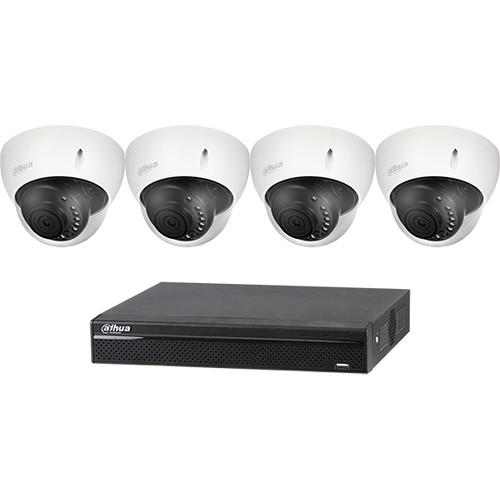
User Manual for Dahua Technology BC541E42 4-Channel HD-CVI Penta-Brid NVR & 4 Outdoor Dome Cameras Kit Click to enlarge the picture
 Contents of the user manual for the Dahua Technology BC541E42 4-Channel HD-CVI Penta-Brid
- Product category: Surveillance Systems Dahua Technology
- Brand: Dahua Technology
- Description and content of package
- Technical information and basic settings
- Frequently asked questions – FAQ
- Troubleshooting (does not switch on, does not respond, error message, what do I do if...)
- Authorized service for Dahua Technology Surveillance Systems
|
User manual for the Dahua Technology BC541E42 4-Channel HD-CVI Penta-Brid contain basic instructions
that need to be followed during installation and operation.
Before starting your appliance, the user manual should be read through carefully.
Follow all the safety instructions and warnings, and be guided by the given recommendations.
User manual is an integral part of any Dahua Technology product,
and if it is sold or transferred, they should be handed over jointly with the product.
Following the instructions for use is an essential prerequisite for protecting
health and property during use, as well as recognition of liability on the part of the manufacturer
for possible defects should you make a warranty claim. Download an official Dahua Technology user manual in which you will find instructions on how to install, use, maintain and service your product.
And do not forget – unsuitable use of a Dahua Technology product will considerably shorten its lifespan!
|
Product description The 4-Channel HD-CVI Penta-Brid NVR & 4 Outdoor Dome Cameras Kit from Dahua Technology includes one Pro series 4-channel penta-brid 1080p mini DVR and four Lite series 2MP outdoor analog HD dome cameras. - Pro Series 4-Channel Penta-brid 1080p Mini DVR with 2TB HDD The Pro Series 4-Channel Penta-brid 1080p Mini DVR with 2TB HDD from Dahua Technology lets you upgrade existing video surveillance systems while leveraging existing networks, cabling, and cameras. This XVR utilizes Penta-brid access technology to seamlessly record video from HDCVI, AHD, TVI, CVBS, and IP sources simultaneously. The XVR offers advanced options such as built-in motion detection algorithms, alarm triggers, and customized recording modes. XVR technology is a suitable solution for actively monitoring and recording video feeds in a wide range of environments including public venues, retail stores, transportation hubs and access ways, personal property and homes, and educational institutions. The Smart H.264+ video compression standard can reduce bit rate and storage requirements by up to 70% without having to invest in new cameras. The XVR automatically recognizes the incoming signals of each attached camera without any setup. The XVR supports 5MP resolution (2560 x 1920) on IP camera inputs for recording and live viewing. The XVR offers a variety of configurable scheduling options that save HDD space and active monitoring time. Smart Search allows an operator to specify a region in the playback video to search for a motion detection event, saving time and manpower.
-
- Embedded processor
- Smart H.264+ / H.264 dual-stream video compression
- Offers 720p (real-time) and 1080p (15 fps) resolutions
- 4 HDCVI/AHD/TVI/CVBS channels and up to additional 2 channels of IP inputs
- Maximum 24 Mb/s incoming bandwidth
- Built-in smart search
UPC: 816116025314 - Lite Series 2MP Outdoor HD-CVI Dome Camera with 2.8mm Lens & Night Vision Keep an eye on a medium-sized outdoor area with the Lite Series 2MP Outdoor Analog HD Dome Camera from Dahua Technology. Its 2.8mm lens has a 106° horizontal field of view and features a 2MP 1/2.9" CMOS sensor to capture 1920 x 1080 resolution video at up to 30 fps. The IR cut filter and built-in IR LEDs allow it to produce clear images of objects in complete darkness from up to 98' away. Wide dynamic range and automatic gain control help the camera produce accurate images in varying lighting conditions. The camera is housed in an IP67- and IK10-rated enclosure for protection against dust, water, and impact, making it suitable for use outdoors and in high-risk environments.
- 2MP 1/2.9" CMOS sensor captures 1080p video at up to 30 fps
- Night vision up to 98' in complete darkness
- 2.8mm lens has a 106° field of view to monitor a medium-sized outdoor area
- WDR and AGC for clear images
- IP67- and IK10-rated enclosure for dust, water, and impact protection
UPC: 816116025086 In the Box Bundle Items Pro Series 4-Channel Penta-brid 1080p Mini DVR with 2TB HDD tvwxaueffudaesr 4 x Lite Series 2MP Outdoor HD-CVI Dome Camera with 2.8mm Lens & Night Vision Table of Contents
|
Upload User Manual
Have you got an user manual for the Dahua Technology BC541E42 4-Channel HD-CVI Penta-Brid NVR & 4 Outdoor Dome Cameras Kit in electronic form? Please send it to us and help us expand our library of instruction manuals.
Thank you, too, on behalf of other users.
To upload the product manual, we first need to check and make sure you are not a robot. After that, your "Submit Link" or "Upload File" will appear.
Technical parameters - Pro Series 4-Channel Penta-brid 1080p Mini DVR with 2TB HDD
| | | Main Processor | Embedded processor | | Operating System | Embedded Linux | | Internal HDD | 2 TB | | | | Interface | 1 x HDMI
1 x VGA | | Resolution | 1920 x 1080, 1280 x 1024, 1280 x 720, 1024 x 768 | | Multi-Screen Display | 1/4/6 | | On-Screen Display | Camera title, time, video loss, camera lock, motion detection, and recording | | | | Triggering | Recording, PTZ, tour, alarm out, video push, email, FTP, snapshot, buzzer, and screen tips | | Video Detection | Motion detection
MD Zones: 396 (22 x 18)
Video loss
Tampering
Diagnosis | | Alarm Input | 8 | | Relay Output | 3 | | | | Playback | 1/4 | | Search Modes | Time / date, alarm, motion detection, and exact search (accurate to 1 second) | | Playback Function | Play, pause, stop, rewind, fast play, slow play, next file, previous file, next camera, previous camera, full screen, repeat, shuffle, backup selection, and digital zoom | | Backup Modes | USB device, network | | | | Internal HDD | 1 x SATA port, up to 6 TB capacity | | HDD Mode | Single | | | | USB | 2 x USB 2.0 Ports | | RS-485 | 1 x Port, for PTZ Control | | | | Third Party Software | Dahua, Arecont Vision, Axis, Bosch, Brickcom, Canon, CP Plus, Dynacolor, Honeywell, Panasonic, Pelco, Samsung, Sanyo, Sony, Videotec, Vivotek, and others | | | | Camera Inputs | Analog:
4; 1080p resolution support at 15 fps per channel
IP:
4+2; up to 5 MP resolution support per channel | | Audio Connections | Audio In: 4
Audio Out: 1 | | Two-way Audio | Reuse audioiIn (channel 1) / out, RCA | | | | Compression | Smart H.264+/H.264 | | Resolution | 1080p, 720p, 960H, D1, HD1, BCIF, CIF, QCIF | | Recording Rate | Main Stream:
1080p at 1 to 15 fps or 1080N, 720p, 960H, D1, HD1, BCIF, CIF, QCIF at 1 to 30 fps
Sub Stream:
D1, CIF, QCIF at 1 to 30 fps | | Bit Rate | 1 to 6144 kb/s per channel | | Recording Modes | Manual, schedule (regular, continuous), motion detection (Video Detection: motion detection, video loss, tampering), alarm, and stop | | Record Length | 1 to 60 minutes (Default: 60 minutes)
Pre-Record: 1 to 30 sec
Post-Record: 10 to 300 sec | | | | Interface | 1 x RJ45 port (100M) | | Network Function | HTTP, TCP/IP, IPv4/IPv6, UPnP, RTSP, UDP, SMTP, NTP, DHCP, DNS, IP filter, PPPoE, DDNS, FTP, Alarm Server, IP Search (supports Dahua IP cameras, DVRs, NVS) | | Maximum User Access | 128 users | | Operating System | iOS and Android | | Interoperability | ONVIF 2.4.1, CGI conformant | | | | Power Supply | 12 VDC, 2 A | | Power Consumption | <10 W (without HDD) | | | | Operating Conditions | 14 to 131°F (-10 to 55°C), 86 to 106 kpa | | Storage Conditions | 32 to 122°F (0 to 50°C), | | Humidity | 0 to 90% RH | | | | Installation | Desktop installation | | Dimensions | Mini 1U, 12.8 x 10 x 2.2" (32.5 x 26 x 5.5 cm) | | Weight | 3.3 lb (1.5 kg), without HDD | - Lite Series 2MP Outdoor HD-CVI Dome Camera with 2.8mm Lens & Night Vision
| | | Image Sensor | 2 MP 1/2.9" CMOS sensor | | Effective Pixels (H x V) | 1920 x 1280 | | Electronic Shutter | 1/30 to 1/100,000 sec | | Synchronization | Internal | | Minimum Illumination | Color: 0.02 lux at f/2.0
IR LEDs On: 0 lux | | Number of IR LEDs and Range | 12 x smart IR LEDs, up to 98' / 30 m | | IR Control | Auto, manual | | Day/Night | Auto (ICR), color, B&W | | | | Type | Fixed lens, fixed iris | | Lens Mount Type | Board-in | | Lens | 2.8mm | | Aperture | f/2.0 | | Field of View | Horizontal: 106° | | Close Focus Distance | 19.7" / 50 cm | | Adjustments | Pan: 0 to 355°
Tilt: 0 to 65°
Rotation: 0 to 355° | | | | Resolution | 1080p (1920 x 1080) | | Frame Rate | 30 fps at 1080p, 30/60 fps at 720p | | Video Output | 1 x BNC HD-CVI output
1 x BNC CVBS, AHD, or HD-TVI output (switchable) | | Maximum Video Transmission Range | RG-59/U Coax:
720p: 2625' / 800 m
1080p: 1640' / 500 m
RG-6/U Coax:
720p: 3937' / 1200 m
1080p: 2625' / 800 m
Cat 6 UTP (Balun Required and Available Separately):
720p: 1476' / 450 m
1080p: 984' / 300 m | | OSD Menu | Multi-language | | Backlight Compensation | BLC, HLC, DWDR | | Wide Dynamic Range | Digital wide dynamic range | | Gain Control | AGC | | Digital Noise Reduction | 2D-DNR | | White Balance | Auto, manual | | Smart IR | Auto, manual | | | | Certifications | EN55032, EN55024, EN50130-4, UL60950-1+CAN/CSA C22.2 No.60950-1, FCC CFR 47, FCC Part 15 Subpart B, ANSI C63.4-2014 | | Power Supply | 12 VDC ±25% | | Maximum Power Consumption | 2.6 W (12 VDC with IR LEDs on) | | Operating Temperature | -40 to 140°F / -40 to 60°C | | Operating Humidity | <95% RH | | Storage Temperature | -40 to 140°F / -40 to 60°C | | Storage Humidity | <95% RH | | IP Rating | IP67 | | IK Rating | IK10 | | Material | Aluminum | | Dimensions | 4.3 x 3.2" / 110 x 81 mm | | Weight | 0.7 lb / 0.3 kg | | | | Box Dimensions (LxWxH) | 5.5 x 5.4 x 4.5" |
Rating100% users recommend this product to others. And what about you?

This product has already been rated by 75 owners. Add your rating and experience with the product.
Discussion
 Ask our technicians if you have a problem with your settings,
or if anything is unclear in the user manual you have downloaded.
You can make use of our moderated discussion.
The discussion is public and helps other users of our website who may be encountering similar problems.
Ask our technicians if you have a problem with your settings,
or if anything is unclear in the user manual you have downloaded.
You can make use of our moderated discussion.
The discussion is public and helps other users of our website who may be encountering similar problems.
The discussion is empty - enter the first post
Post a new topic / query / comment:
|
|


