User Manual for Dahua Technology DHI-IVSS7016DR-4T 256-Channel Intelligent Video Surveillance Server Click to enlarge the picture
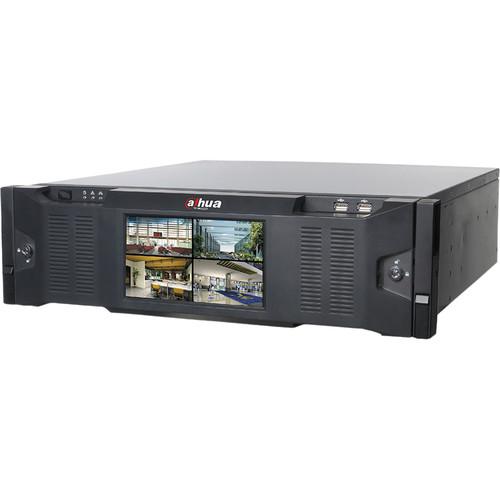 Contents of the user manual for the Dahua Technology DHI-IVSS7016DR-4T 256-Channel Intelligent Video
- Product category: Network Video Recorders (NVRs) Dahua Technology
- Brand: Dahua Technology
- Description and content of package
- Technical information and basic settings
- Frequently asked questions – FAQ
- Troubleshooting (does not switch on, does not respond, error message, what do I do if...)
- Authorized service for Dahua Technology Network Video Recorders (NVRs)
|
User manual for the Dahua Technology DHI-IVSS7016DR-4T 256-Channel Intelligent Video contain basic instructions
that need to be followed during installation and operation.
Before starting your appliance, the user manual should be read through carefully.
Follow all the safety instructions and warnings, and be guided by the given recommendations.
User manual is an integral part of any Dahua Technology product,
and if it is sold or transferred, they should be handed over jointly with the product.
Following the instructions for use is an essential prerequisite for protecting
health and property during use, as well as recognition of liability on the part of the manufacturer
for possible defects should you make a warranty claim. Download an official Dahua Technology user manual in which you will find instructions on how to install, use, maintain and service your product.
And do not forget – unsuitable use of a Dahua Technology product will considerably shorten its lifespan!
|
Product description The DHI-IVSS7016DR-4T 256-Channel Intelligent Video Surveillance Server from Dahua Technology is an AI server with deep learning algorithms, an integrated GPU, and an NVR that enables users to record from and manage up to 256 cameras. This server supports IP cameras up to 32MP and has 16 HDD ports that support up to 10TB HDD capacity per disk, for a maximum of 160TB (HDDs available separately). H.265, H.264, and MJPEG compressions offer the best possible recording and playback quality, while optimizing network bandwidth use.
This server provides facial database management that stores up to 100,000 facial images, along with the name, gender, birthday, nationality, address, and ID info for each. It also offers real-time facial recognition for up to 16 channels. Two-way audio is possible thanks to an audio I/O. One VGA and three HDMI ports enable video output to an external monitor (available separately). ONVIF compliance for version 2.4 offers interoperability with ONVIF IP cameras. - AI server with deep learning algorithms, a GPU, and an advanced NVR
- Intel Quad-Core processor
- 512 Mb/s maximum incoming bandwidth
- All HDMI connectors output video at up to 4K UHD resolution
- 16 alarm inputs and 8 relay outputs
- 4 x 1000M RJ45 Ethernet ports
- 2 USB 2.0 and 2 USB 3.0 ports
- RS-232 port for PC communication
- RS-485 port for PTZ control
- Backup via USB device or network
- Artificial Intelligence Features
-
- Face recognition for up to 16 channels
- Structured data for gender, age, expression, glasses, mustache, and mask
- Stranger mode detects a face not stored in the IVSS database & incorporates a similarity threshold that can be set manually
- Trigger events include buzzer, snapshot, and recording
- Supports up to 10 target face image searches simultaneously
- Supports similarity threshold for each target face image
- 20 face databases
- 100,000 total images of faces
- Stores name, gender, birthday, nationality, address, and ID information for each face
- Each database can be applied to video channels independently
In the Box Dahua Technology DHI-IVSS7016DR-4T 256-Channel Intelligent Video Surveillance Server Limited 3-Year Warranty Table of Contents
|
Upload User Manual
Have you got an user manual for the Dahua Technology DHI-IVSS7016DR-4T 256-Channel Intelligent Video Surveillance Server in electronic form? Please send it to us and help us expand our library of instruction manuals.
Thank you, too, on behalf of other users.
To upload the product manual, we first need to check and make sure you are not a robot. After that, your "Submit Link" or "Upload File" will appear.
Technical parametersDahua Technology DHI-IVSS7008 Specs | | | Main Processor | Intel Quad-Core Processor | | Memory | 16 GB (Up to 64 GB) | | Operating System | Embedded Linux | | | | IP Camera Input | 256 | | Audio | 1 x Input (3.5 mm Jack)
1 x Output (3.5 mm Jack) | | | | Interface | 3 x HDMI Outputs
1 x VGA Output | | Output Native Resolutions | HDMI: 3840 x 2160, 1920 x 1080, 1280 x 1024, 1280 x 720
VGA: 1920 x 1080, 1280 x 1024, 1280 x 720 | | Maximum Decoding | 24 Channels of 1080p at 30 fps | | Multi-Screen Display | Up to 36 Splits for Each Screen | | OSD | Camera Title, Time, Camera Lock, Motion Detection, Recording | | | | Compression | H.265, H.264, MJPEG, MPEG-4 | | Supported IP Camera Resolution | 32 MP, 12 MP, 8 MP, 6 MP, 5 MP, 4 MP, 3 MP, 1080p | | Bandwidth | Maximum Incoming Bandwidth: 512 Mb/s
Maximum Recording Bandwidth: 450 Mb/s | | Record Mode | Schedule (Regular, Motion Detection, Alarm) | | | | Trigger Events | Recording, Snapshot, Buzzer | | Video Detection | Motion Detection, MD Zones: 396 (22 x 18), and Tampering | | Alarm Inputs | 16 | | Relay Outputs | 8 | | | | Synchronous Playback | Up to 16 Channels
128 Mb/s Playback Bandwidth | | Search Modes | Time and Date, Video Detection, Face and Exact Search (Accurate to One Second) | | Backup Modes | USB Device, Network | | | | Third-Party Support | Axis Communications, Panasonic, and Sony Cameras that Support CGI | | | | Interface | 4 x RJ45 (10/100/1000M) | | Network Port Mode | Independent Ethernet Ports, Load Balance, Fault Tolerance, Link Aggregation | | Network Function | HTTP, HTTPS, TCP/IP, UDP, RTSP, IPv4, NTP, DHCP, DNS, IP Filter, IP Search (Support for Dahua IP Cameras, DVRs, NVRs), P2P | | Interoperability | ONVIF 2.4, SDK, CGI | | | | Internal HDD | 16 x SAS/SATA Ports (Independent HDD Bracket, Hot Swappable) | | HDD Capacity | Up to 10 TB for Each HDD, 160 TB Maximum (Available Separately) | | HDD Mode | Single, RAID 0/1/5/10 (Enterprise Level HDDs Recommended), Supports Global HDD Hot Spare | | eSATA | 1 x eSATA Port | | SAS | 2 x SAS 3.0 Ports | | | | Front Cover | 7" / 17.8 cm HD LCD (1920 x 1080 or 1280 x 1024), Hot Swappable | | USB | 2 x USB 3.0
2 x USB 2.0 | | RS-232 | 1 x RS-232 Port for PC Communication | | RS-485 | 1 x RS-485 Port for PTZ Control | | | | Power Supply | 100 to 240 VAC, 50/60 Hz
Hot Swappable, Redundant | | Power Consumption | <120 W without HDDs | | Fan | 12 Dual Ball Bearing Fans, Hot Swappable | | | | Operating Temperature | 32 to 122°F / 0 to 50°C | | Storage Temperature | -4 to 158°F / -20 to 70°C | | Storage Humidity | 0 to 90% RH | | Certifications | Safety: UL 60950-1, EN60950-1
Electromagnetic Compatibility (EMC): FCC Part 15 Subpart B, ANSI C63.4-2014, EN55032, EN55024, EN50130-4 | | Rack Units | 3 RU | | Installation | Standard 19" / 482.6 mm Rack Mount | | Dimensions | 19.1 x 21.24 x 5.2" / 485 x 539.4 x 133.2 mm | | Weight | 38.47 lb / 17.45 kg (without HDDs) |
Rating70% users recommend this product to others. And what about you?

This product has already been rated by 08 owners. Add your rating and experience with the product.
Discussion
 Ask our technicians if you have a problem with your settings,
or if anything is unclear in the user manual you have downloaded.
You can make use of our moderated discussion.
The discussion is public and helps other users of our website who may be encountering similar problems.
Ask our technicians if you have a problem with your settings,
or if anything is unclear in the user manual you have downloaded.
You can make use of our moderated discussion.
The discussion is public and helps other users of our website who may be encountering similar problems.
The discussion is empty - enter the first post
Post a new topic / query / comment:
|
|


