User Manual for Dahua Technology Pro Series 4MP Network Box Camera with WDR Technology Click to enlarge the picture
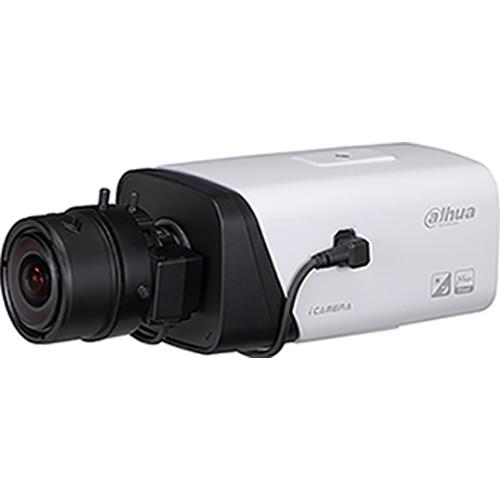 Contents of the user manual for the Dahua Technology Pro Series 4MP Network
- Product category: Wired IP Cameras Dahua Technology
- Brand: Dahua Technology
- Description and content of package
- Technical information and basic settings
- Frequently asked questions – FAQ
- Troubleshooting (does not switch on, does not respond, error message, what do I do if...)
- Authorized service for Dahua Technology Wired IP Cameras
|
User manual for the Dahua Technology Pro Series 4MP Network contain basic instructions
that need to be followed during installation and operation.
Before starting your appliance, the user manual should be read through carefully.
Follow all the safety instructions and warnings, and be guided by the given recommendations.
User manual is an integral part of any Dahua Technology product,
and if it is sold or transferred, they should be handed over jointly with the product.
Following the instructions for use is an essential prerequisite for protecting
health and property during use, as well as recognition of liability on the part of the manufacturer
for possible defects should you make a warranty claim. Download an official Dahua Technology user manual in which you will find instructions on how to install, use, maintain and service your product.
And do not forget – unsuitable use of a Dahua Technology product will considerably shorten its lifespan!
|
Product description The Pro Series 4MP Outdoor Network Box Camera from Dahua Technology features a 1/3" progressive scan Exmor CMOS sensor for capturing videos at a maximum resolution of 2688 x 1520. For applications with both bright and low light conditions that change quickly, true WDR (120 dB) optimizes both the bright and dark areas of a scene at the same time to provide a usable video. The IVS (Intelligent Video System) is a built-in video analytics algorithm that delivers intelligent functions to monitor a scene for tripwire violations, intrusion detection, and abandoned or missing objects. A camera with IVS quickly and accurately responds to monitoring events in a specific area. In addition to scene analytics, the camera supports face detection to capture a face and upload the image to a server. The camera also offers tamper detection to generate a warning message that prompts you to inspect the camera. The camera delivers clear images even when shooting under sodium-vapor lamps that add a yellowish-ti nt to the scene hampering identification. It provides a built-in white-balance mode that compensates for the tint to restore the scene to its original color. The H.265 video compression standard offers improved compression by expanding pattern comparison and difference-coding, improving motion vector prediction and motion region merging, and incorporating an additional filtering step called sample-adaptive offset filtering. The Smart H.265+ is the optimized implementation of the H.265 codec that uses a scene-adaptive encoding strategy, dynamic GOP, dynamic ROI, flexible multi-frame reference structure, and intelligent noise reduction to deliver high-quality video without straining the network. With a temperature range of -22 to +140°F, the camera is designed for use in harsh temperature environments. With support for ±30% input voltage tolerance, the camera can be used for outdoor applications with voltage fluctuations. The 6kV lightning rating indicates the camera and its structure are protected from the effects of lightning. Performance - 1/3" 4MP progressive scan Exmor CMOS sensor
- Triple-stream encoding with Smart H.265+ compression
- 2688 x 1520 video at 60 fps
- True Wide Dynamic Range (120 dB) and day / night IR cut filter
- Intelligent video system with Facial Detection
- Alarm and audio inputs/outputs
Intelligent Video System - Standard Features
Tampering with the camera
Error writing to an onboard microSD card
Error sending or receiving data over the network
Unauthorized access to the camera
Premium Features
Motion: An object moves through any part of the scene
Tripwire: A target crosses a user-defined line
Intrusion: A target enters or exits a defined perimeter
Scene Change: A person or object moves the camera to change the scene or covers the camera to obscure the scene
Abandoned/Missing Object: A target leaves an object in designated area, or a target removes an object from the same designated area
Advanced Features
Facial Detection: Detects and captures a snapshot of human face in a defined area within a scene UPC: 816116026137 In the Box Dahua Technology Pro Series 4MP Network Box Camera with WDR Technology (No Lens) Limited 5-Year Warranty Table of Contents
|
Upload User Manual
Have you got an user manual for the Dahua Technology Pro Series 4MP Network Box Camera with WDR Technology in electronic form? Please send it to us and help us expand our library of instruction manuals.
Thank you, too, on behalf of other users.
To upload the product manual, we first need to check and make sure you are not a robot. After that, your "Submit Link" or "Upload File" will appear.
Technical parametersDahua Technology Pro Series Specs | | | Image Sensor | 1/3" 4 MP progressive scan Exmor CMOS sensor | | Effective Pixels | 2688 x 1520 | | Memory | 512 MB / 32 MB | | Scanning System | Progressive | | Minimum Illumination | Color: 0. 01 lux at f/1.2
0.001 lux at f/1.2 with IR on | | S/N Ratio | More than 50 dB | | Lens Mount Type | C/CS | | | | Compression | Smart H.265+, H.265, Smart H.264+, H.264, MJPEG | | Streaming Capability | 3 streams | | Resolution | 4 MP (2688 x 1520), 3 MP (2304 x 1296), 1080p (1920 x 1080), 1.3 MP (1280 x 960), 720p (1280 x 720), D1 (704 x 480), VGA (640 x 480), CIF (352 x 240) | | Frame Rate | Main Stream: 4 MP at 30 fps
Sub Stream 1: D1 at 60 fps
Sub Stream 2: 720p at 30 fps | | Bit Rate Control | CBR, VBR | | Bit Rate | H.264: 24 to 10,240 Kbps
H.265: 14 to 9984 Kbps | | Day/Night | Auto (ICR), Color, B&W | | BLC | BLC, HLC, True WDR (120 dB) | | White Balance | Auto, Natural, Street Lamp, Outdoor, Manual | | Gain Control | Auto, Manual | | Noise Reduction | 3D DNR | | Motion Detection | Off, On (4 zone, rectangle) | | Region of Interest | Off, On (4 zone) | | Digital Zoom | 16x | | Image Flip | 0°, 90°, 180°, 270° | | Mirror | Off, On | | Privacy Masking | Off, On (4 areas, rectangle) | | | | Compression | G.711a, G.711Mu, AAC, G.726 | | | | Ethernet | RJ45 (10/100 Base-T) | | Protocol | HTTP, HTTPs, TCP, ARP, RTSP, RTP, UDP, SMTP, FTP, DHCP, DNS, DDNS, PPPOE, IPv4/v6, QoS, UPnP, NTP, Bonjour, 802.1x, Multicast, ICMP, IGMP, SNMP | | Interoperability | ONVIF, PSIA, CGI | | Streaming Method | Unicast, Multicast | | Max. User Access | 10 Users / 20 Users | | Edge Storage | NAS
Local PC for instant recording
microSD Card, maximum 128 GB | | Web Viewer | IE, Firefox, Safari | | Management Software | Smart PSS, DSS | | Mobile Operating Systems | iOS, Android | | | | Safety | UL60950-1 | | Electromagnetic Compatibility | FCC Part 15 Subpart B | | | | Video Interface | 1 x port | | Audio Interface | Input: 1 x channel, with 1 x built-in microphone
Output: 1 x channel | | RS485 | 1 | | Alarm | Input: 2 x channel
Output: 1 x channel | | | | Power Supply | 12 VDC, PoE (802.3af, Class 0) | | Power Consumption | < 5 W | | | | Operating Conditions | -22 to +140° F (-30 to +60° C), less than 95% RH | | Storage Conditions | -22 to +140° F (-30 to +60° C), less than 95% RH | | | | Casing | Metal | | Dimensions | 5.33 x 2.93 x 2.58" (135.40 x 74.40 x 65.50 mm) | | Weight | 1.46 lb (0.66 kg) | | | | Package Weight | 1.5 lb | | Box Dimensions (LxWxH) | 8.1 x 4.3 x 3.8" |
Rating50% users recommend this product to others. And what about you?

This product has already been rated by 80 owners. Add your rating and experience with the product.
Discussion
 Ask our technicians if you have a problem with your settings,
or if anything is unclear in the user manual you have downloaded.
You can make use of our moderated discussion.
The discussion is public and helps other users of our website who may be encountering similar problems.
Ask our technicians if you have a problem with your settings,
or if anything is unclear in the user manual you have downloaded.
You can make use of our moderated discussion.
The discussion is public and helps other users of our website who may be encountering similar problems.
The discussion is empty - enter the first post
Post a new topic / query / comment:
|
|


