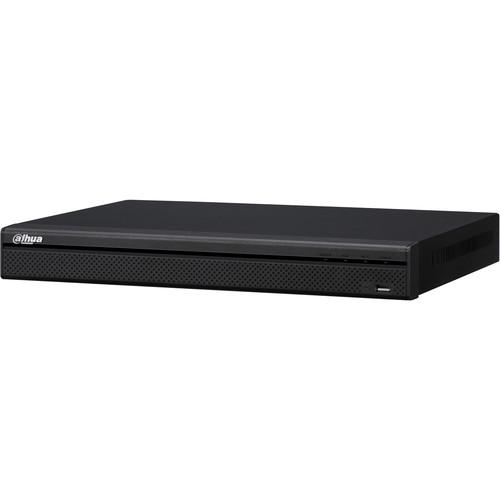
User Manual for Dahua Technology Pro Series 8-Channel 12MP PoE NVR with 3TB HDD Click to enlarge the picture
 Contents of the user manual for the Dahua Technology Pro Series 8-Channel 12MP
- Product category: Network Video Recorders (NVRs) Dahua Technology
- Brand: Dahua Technology
- Description and content of package
- Technical information and basic settings
- Frequently asked questions – FAQ
- Troubleshooting (does not switch on, does not respond, error message, what do I do if...)
- Authorized service for Dahua Technology Network Video Recorders (NVRs)
|
User manual for the Dahua Technology Pro Series 8-Channel 12MP contain basic instructions
that need to be followed during installation and operation.
Before starting your appliance, the user manual should be read through carefully.
Follow all the safety instructions and warnings, and be guided by the given recommendations.
User manual is an integral part of any Dahua Technology product,
and if it is sold or transferred, they should be handed over jointly with the product.
Following the instructions for use is an essential prerequisite for protecting
health and property during use, as well as recognition of liability on the part of the manufacturer
for possible defects should you make a warranty claim. Download an official Dahua Technology user manual in which you will find instructions on how to install, use, maintain and service your product.
And do not forget – unsuitable use of a Dahua Technology product will considerably shorten its lifespan!
|
Product description Stream and record up to 8 channels of video with the Pro Series 8-Channel 12MP PoE NVR from Dahua Technology, at resolutions of up to 4K at 12MP. Pre-installed with 3TB of HDD storage, the recorder can be expanded to host two HDDs up to 6TB each for a maximum internal capacity of 12TB. External storage options include PCs via Internet connection, network servers, and USB storage devices. Eight PoE ports provide simultaneous power and video to network cameras. H.265, H.264, MJPEG, and MPEG-4 compression are supported, enabling you to choose the format that works best for your application.
The NVR enables simultaneous live view and playback of up to 8 channels at resolutions up to 3840 x 2160 via its HDMI and VGA ports. Up to 8 channels can be recorded at full-frame-rate 1080p, with a maximum combined transfer speed of 320 Mbps. The NVR is equipped with RCA connectors for bi-directional audio and an RS-232 serial port for PC and keyboard communication. Internet connectivity enables remote monitoring via PCs as well as from Android and iOS devices. - Simultaneous HDMI and VGA video output
- Supports network cameras of multiple brands, including Dahua, Arecont Vision, Axis Communications, Bosch, Brickcom, Canon, CP Plus, DynaColor, Honeywell, Panasonic, Pelco, Samsung, Sanyo, Sony, Videotec, and Vivotek
- 3D intelligent positioning with Dahua PTZ cameras
- Multiple network monitoring web viewer, CMS (DSS/PSS), and mobile (DMSS)
UPC: 856920006994 In the Box Dahua Technology Pro Series 8-Channel 12MP PoE NVR with 3TB HDD Limited 3-Year Warranty Table of Contents
|
Upload User Manual
Have you got an user manual for the Dahua Technology Pro Series 8-Channel 12MP PoE NVR with 3TB HDD in electronic form? Please send it to us and help us expand our library of instruction manuals.
Thank you, too, on behalf of other users.
To upload the product manual, we first need to check and make sure you are not a robot. After that, your "Submit Link" or "Upload File" will appear.
Technical parametersDahua Technology DHI-NVR52A08-8P-4KS2 3TB Specs | | | Main Processor | Quad-core embedded processor | | Operating System | Embedded Linux | | | | IP Camera Inputs | 8 channels | | Audio | 1 x RCA, 1-channel input
1 x RCA, 1-channel output | | | | Interface | 1 x HDMI
1 x VGA | | Resolution | 3840 x 2160
1920 x 1080
1280 x 1024
1280 x 720
1024 x 768 | | OSD | Camera title, time, video loss, camera lock, motion detection, and recording | | | | Compression | H.265, H.264, MJPEG, MPEG-4 | | Resolution | 12 MP
8 MP
6 MP
5 MP
4 MP
3 MP
1080p
720p
D1 | | Recording Bit Rate | 320 Mbps | | Bit Rate | 16 kbps to 20 Mbps | | Recording Mode | Manual, schedule, & stop | | Recording Intervals | 1-120 minutes (Default: 60 minutes)
Pre-recording: 1-30 seconds
Post-recording: 10-300 seconds | | | | Triggers | Recording, PTZ, tour, alarm, video push, email, FTP, snapshot, buzzer, and screen tips | | Video Detection | Motion detection, motion detection zones (x396, at 22 x 18), video loss, and camera blank | | Alarm Input | 4 channels | | Relay Output | 2 channels | | | | Playback | 1/4/8 | | Search Modes | Time/date, alarm, motion detection & exact search, and smart search | | Playback Functions | Play, pause, stop, rewind, fast play, slow play, next file, previous file, next camera, previous camera, full screen, repeat, shuffle, backup selection, and digital zoom | | Backup Modes | USB device, network, and internal SATA burner | | | | Ethernet | 1 x RJ45 port (10/100/1000 Mbps) | | PoE | 8 x ports | | Network Function | HTTP, TCP/IP, IPv4/IPv6, UPnP, RTSP, UDP, SMTP, NTP, DHCP, DNS, IP filter, PPPoE, DDNS, FTP, alarm server, IP search, and P2P | | User Limit | 128 users | | Smart Phone | iOS and Android | | | | Internal HDD | 2 SATA ports, capacity up to 12 TB
3 TB pre-installed | | | | USB | 1 x USB 3.0 on rear panel
1 x USB 2.0 on front panel | | RS-232 | 1 x port for PC communication & keyboard | | RS-485 | 1 x port for PTZ | | | | Power Supply | Single
100-240 VAC
50/60 Hz | | Power Consumption | NVR: 15.2 W (without HDD)
PoE: 130 W (max 25.5 W for single port) | | Working Environment | 14 to 131°F (-10 to 55°C)
10-90% RH
86-106 kPa | | Rack Mount | 1U | | Dimension | 14.7 x 13 x 2.1" (37.5 x 33.1 x 5.3 cm) | | Weight | 5.7 lb (2.6 kg) |
Rating80% users recommend this product to others. And what about you?

This product has already been rated by 52 owners. Add your rating and experience with the product.
Discussion
 Ask our technicians if you have a problem with your settings,
or if anything is unclear in the user manual you have downloaded.
You can make use of our moderated discussion.
The discussion is public and helps other users of our website who may be encountering similar problems.
Ask our technicians if you have a problem with your settings,
or if anything is unclear in the user manual you have downloaded.
You can make use of our moderated discussion.
The discussion is public and helps other users of our website who may be encountering similar problems.
The discussion is empty - enter the first post
Post a new topic / query / comment:
|
|


