User Manual for Dahua Technology Pro Series X28A5S 32-Channel Pentabrid HD-CVI DVR Click to enlarge the picture
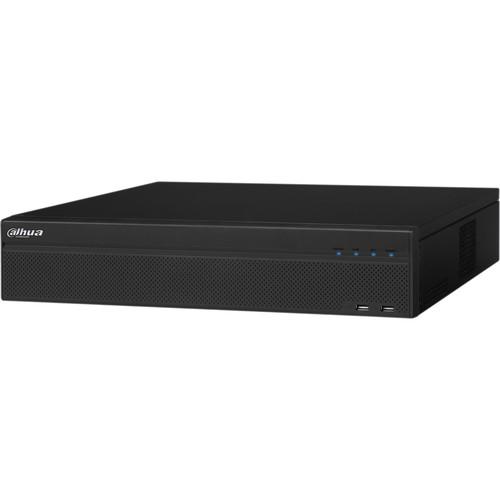 Contents of the user manual for the Dahua Technology Pro Series X28A5S 32-Channel
- Product category: Digital Video Recorders (DVRs) Dahua Technology
- Brand: Dahua Technology
- Description and content of package
- Technical information and basic settings
- Frequently asked questions – FAQ
- Troubleshooting (does not switch on, does not respond, error message, what do I do if...)
- Authorized service for Dahua Technology Digital Video Recorders (DVRs)
|
User manual for the Dahua Technology Pro Series X28A5S 32-Channel contain basic instructions
that need to be followed during installation and operation.
Before starting your appliance, the user manual should be read through carefully.
Follow all the safety instructions and warnings, and be guided by the given recommendations.
User manual is an integral part of any Dahua Technology product,
and if it is sold or transferred, they should be handed over jointly with the product.
Following the instructions for use is an essential prerequisite for protecting
health and property during use, as well as recognition of liability on the part of the manufacturer
for possible defects should you make a warranty claim. Download an official Dahua Technology user manual in which you will find instructions on how to install, use, maintain and service your product.
And do not forget – unsuitable use of a Dahua Technology product will considerably shorten its lifespan!
|
Product description Record video from any combination of HD-CVI, AHD, TVI, CVBS, or IP cameras with the Pro Series X28A5S 32-Channel Pentabrid HD-CVI DVR (No HDD) from Dahua Technology. This DVR supports up to 32 cameras at 1080p resolution from analog sources and 5MP resolution from IP sources. It comes equipped with eight SATA ports that support up to 8TB HDD capacity per disk, for a maximum of 64TB (HDDs available separately). Smart H.264+ H.264, and MJPEG video compressions ensure high-quality recording and playback.
This DVR has two RJ45 ports and supports up to 128 users. An audio I/O makes two-way talk possible. A VGA, TV, and two HDMI video outputs enable users to connect a monitor (available separately) to view a live feed locally. ONVIF compliance for version 2.4.1 offers interoperability with ONVIF IP cameras. - Embedded processor and Linux OS
- Pentabrid technology enables simultaneous recording from HD-CVI, AHD, TVI, CVBS, and IP sources
- 32 auto-detect camera inputs
- Auto-configuration of HD-CVI, AHD, TVI, CVBS, and IP cameras
- Up to 5MP camera recording per IP channel
- 128 Mb/s maximum incoming bandwidth
- Smart H.264+, H.264, and MJPEG video compression
- Configurable recording options and schedules that save HDD space and active monitoring time
- VGA, TV, and 2 HDMI ports
- Spot output enables an operator to view a secondary monitor (available separately) assigned to selected cameras or video inputs
- 16 alarm inputs and 6 relay outputs
- RS-232 port for PC communication and keyboard control
- RS-422/RS-485 ports for PTZ Control
- 2 USB 2.0 and 2 USB 3.0 ports
- Compatible with iOS and Android
- Intelligent Video System (IVS) Analytics
-
- Tampering with the camera
- Memory card error
- Network error
- Unauthorized access
- Motion
- Tripwire
- Intrusion
- Scene change
- Abandoned/missing object
- Facial detection
In the Box Dahua Technology Pro Series X28A5S 32-Channel Pentabrid HD-CVI DVR (No HDD) Limited 3-Year Warranty Table of Contents
|
Upload User Manual
Have you got an user manual for the Dahua Technology Pro Series X28A5S 32-Channel Pentabrid HD-CVI DVR in electronic form? Please send it to us and help us expand our library of instruction manuals.
Thank you, too, on behalf of other users.
To upload the product manual, we first need to check and make sure you are not a robot. After that, your "Submit Link" or "Upload File" will appear.
Technical parametersDahua Technology X28A5S Specs | | | Main Processor | Embedded Processor | | Operating System | Embedded Linux | | | | Interface | 2 x HDMI Ports
1 x VGA Port
1 x TV Port | | Spot Output | HDMI 2 Interface | | Resolution | 1920 x 1080, 1280 x 1024, 1280 x 720, 1024 x 768 | | Multi-Screen Display | 1/4/8/9/16/25/36 | | On-Screen Display | Camera Title, Time, Video Loss, Camera Lock, Motion Detection, Recording | | | | Trigger Events | Recording, PTZ, Tour, Alarm Out, Video Push, Email, FTP, Snapshot, Buzzer, and Screen Tips | | Video Detection | Motion Detection, MD Zones: 396 (22 x 18), Video Loss, Tampering, and Diagnosis | | Alarm Inputs | 16 | | Relay Outputs | 6 | | | | Playback | 1/4/9/16 | | Search Modes | Time/Date, Alarm, MD and Exact Search (Accurate to 1 Second), Smart Search | | Playback Functions | Play, Pause, Stop, Rewind, Fast Play, Slow Play, Next File, Previous File, Next Camera, Previous Camera, Full Screen, Repeat, Shuffle, Backup Selection, Digital Zoom | | Backup Modes | USB Device and Network | | | | HDD Support | 8 x SATA Ports, 8 TB Capacity for Each Disk | | Installed HDD | No HDD | | HDD Mode | Single | | eSATA Ports | 1 | | | | USB | 2 x USB 2.0
2 x USB 3.0 | | RS-232 | 1 x RS-232 for PC Communication and Keyboard Control | | RS-422/RS-485 | 1 x RS-422 and 1 x RS-485 for PTZ Control | | | | Compatible Brands | Dahua, Arecont Vision, Axis Communications, Bosch, Brickcom, Canon, CP Plus, Dynacolor, Honeywell, Panasonic, Pelco, Samsung, Sanyo, Sony, Videotec, Vivotek, and Others | | | | Camera Inputs | 32 Channels Total
Any Combination of HD-CVI, AHD, TVI, CVBS, or IP Sources | | IP Camera Input | Each Channel up to 5 MP | | Audio I/O | 16/1 | | Two-Way Audio | 1 x BNC Microphone Input
1 x BNC Microphone Output | | | | Compression | Smart H.264+, H.264, MJPEG | | Resolution | Main Stream:
1920 x 1080 at 15 fps
960 x 1080, 1280 x 720, 960H, D1, HD1, BCIF, CIF, and QCIF at 30 fps
Sub Stream:
D1, CIF, QCIF at 15 fps | | Maximum Incoming Bandwidth | 128 Mb/s | | Bit Rate | 1 to 6144 kb/s per Channel | | Record Mode | Manual, Schedule (Regular, Continuous), MD (Video Detection: Motion Detection, Video Loss, Tampering), Alarm, Stop | | Record Time | 1 to 60 Minutes (Default 60 Minutes)
Pre-Record: 1 to 30 Seconds
Post-Record: 10 to 300 Seconds | | | | Interface | 2 x 1000M RJ45 Ports | | Network Function | HTTP, TCP/IP, IPv4/IPv6, UPnP, RTSP, UDP, SMTP, NTP, DHCP, DNS, IP Filter, PPPoE. DDNS, FTP, Alarm Server, P2P, IP Search (Supports Dahua IP Cameras, DVRs, and NVSes) | | Maximum User Access | 128 Users | | Mobile OS Support | iOS and Android | | Interoperability | ONVIF 2.4.1, CGI Conformant | | | | Power Supply | 100 to 240 VAC, 50/60 Hz | | Power Consumption | <35 W, Without HDD | | Operating Temperature | 14 to 131°F / -10 to 55°C | | Storage Temperature | -4 to 158°F / -20 to 70°C | | Storage Humidity | 0 to 90% RH | | Installation | Desktop or Rackmount Installation | | Rack Units | 2 RU | | Certifications | Safety: EN 60950-1:2006+A1:2010+A11:2009+A12:2011 +A2:2013
Electromagnetic Compatibility (EMC):
FCC Part 15, Subpart B: 2015
EN 55032:2015 (Class B)
EN 50130-4:2011+A1:2014
EN 61000-3-2:2014
EN 61000-3-3:2013
Immunity: EN 55024:2010+A1:2015 | | Dimensions | 17.3 x 17.9 x 3.7" / 440 x 455.1 x 94.9 mm | | Weight | 14.32 lb / 6.5 kg without HDDs |
Rating60% users recommend this product to others. And what about you?

This product has already been rated by 69 owners. Add your rating and experience with the product.
Discussion
 Ask our technicians if you have a problem with your settings,
or if anything is unclear in the user manual you have downloaded.
You can make use of our moderated discussion.
The discussion is public and helps other users of our website who may be encountering similar problems.
Ask our technicians if you have a problem with your settings,
or if anything is unclear in the user manual you have downloaded.
You can make use of our moderated discussion.
The discussion is public and helps other users of our website who may be encountering similar problems.
The discussion is empty - enter the first post
Post a new topic / query / comment:
|
|


