User Manual for Dahua Technology Wi-Fi Series 4-Channel 5MP 1U NVR Click to enlarge the picture
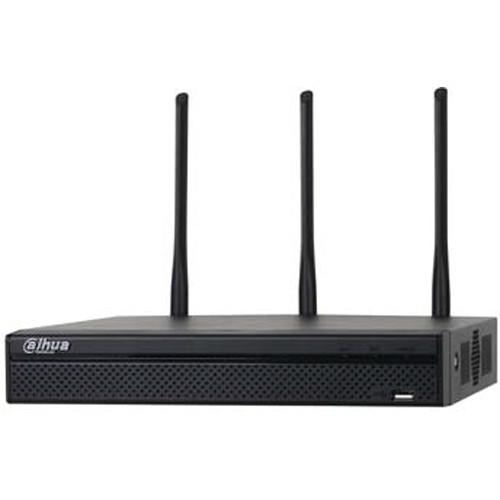 Contents of the user manual for the Dahua Technology Wi-Fi Series 4-Channel 5MP
- Product category: Network Video Recorders (NVRs) Dahua Technology
- Brand: Dahua Technology
- Description and content of package
- Technical information and basic settings
- Frequently asked questions – FAQ
- Troubleshooting (does not switch on, does not respond, error message, what do I do if...)
- Authorized service for Dahua Technology Network Video Recorders (NVRs)
|
User manual for the Dahua Technology Wi-Fi Series 4-Channel 5MP contain basic instructions
that need to be followed during installation and operation.
Before starting your appliance, the user manual should be read through carefully.
Follow all the safety instructions and warnings, and be guided by the given recommendations.
User manual is an integral part of any Dahua Technology product,
and if it is sold or transferred, they should be handed over jointly with the product.
Following the instructions for use is an essential prerequisite for protecting
health and property during use, as well as recognition of liability on the part of the manufacturer
for possible defects should you make a warranty claim. Download an official Dahua Technology user manual in which you will find instructions on how to install, use, maintain and service your product.
And do not forget – unsuitable use of a Dahua Technology product will considerably shorten its lifespan!
|
Product description Connect up to four cameras to the Wi-Fi Series 4-Channel 5MP 1U NVR from Dahua Technology for wireless video storage and security monitoring. This NVR features three external antennas to provide long signal range to connected cameras. It operates on the 2.4 or 5 GHz frequency and has the Smart Add feature, which allows the NVR to automatically scan the Wi-Fi network for available cameras and connect to them. Able to record up to 5MP video, this NVR compresses video using H.264 and MJPEG codecs for high-quality recording and playback while optimizing bandwidth. Additionally, connect up to two monitors (available separately) to the back of the NVR for simultaneous HDMI and VGA video output. - Up to 5MP recording resolution for high-quality playback
- Wi-Fi connectivity for quick setup and easy maintenance
- Smart Add functionality automatically finds available Wi-Fi cameras on your network and connects them to the NVR
- Dual-core processor for up to 80 Mbps incoming bandwidth
- Simultaneous HDMI and VGA video output
- Three antennas for increased Wi-Fi range
- Automatic Network Replenishment (ANR) technology ensures no video transmission data is lost by storing temporary video data to a camera's memory card
- Watermarks can be placed on recorded video
- Wireless Access Point (WAP) functionality to expand your home Wi-Fi network
UPC: 816116025840 In the Box Dahua Technology Wi-Fi Series 4-Channel 5MP 1U NVR (No HDD) Power Cable USB Mouse IR Remote HDMI Cable Cat5 Network Cable SATA Cable Limited 3-Year Warranty Table of Contents
|
Upload User Manual
Have you got an user manual for the Dahua Technology Wi-Fi Series 4-Channel 5MP 1U NVR in electronic form? Please send it to us and help us expand our library of instruction manuals.
Thank you, too, on behalf of other users.
To upload the product manual, we first need to check and make sure you are not a robot. After that, your "Submit Link" or "Upload File" will appear.
Technical parametersDahua Technology DHI-NVR41A04HS-W-S2 Specs | | | Processor | Dual-core embedded processor | | Operating System | Embedded Linux | | | | Interface | HDMI and VGA | | Resolution | 1920 x 1080, 1280 x 1024, 1280 x 720, 1024 x 768 | | Screen Display | 1, 4 | | On-Screen Display | Camera title, time, video loss, camera lock, motion detection, recording | | | | Event Trigger | Recording, PTZ, tour, video push, email, FTP, snapshot, buzzer, and screen tips | | Video Detection | Motion detection, MD zones (396 at 22 × 18), video loss, and camera blank | | | | Playback | 1, 4 | | Search Modes | Time/date, MD, and exact search (accurate to one second), Smart Search | | Playback Function | Play, pause, stop, rewind, fast play, slow play, next file, previous file, next camera, previous camera, full screen, repeat, shuffle, backup selection, digital zoom | | Backup | Via USB device or network | | | | Interface | 1 x SATA III port | | Capacity | Supports up to 6 TB | | | | Video | 4 x channels | | Auxiliary | 2 x USB 2.0 ports | | | | Support | Dahua, Arecont Vision, Axis, Bosch, Brickcom, Canon, CP Plus, Dynacolor, Honeywell, Panasonic, Pelco, Samsung, Sanyo, Sony, Videotec, Vivotek, and others | | | | Compression | H.264 and MJPEG | | Resolution | 5 MP, 4 MP, 3 MP, 1080p, 1.3 MP, 720p | | Maximum Bandwidth | 80 Mbps | | Bit Rate | 16 kbps to 20 Mbps per channel | | Recording Mode | Manual, schedule (regular, continuous), MD (Video Detection: motion detection, camera blank, video loss), stop | | Record Time | 1 to 120 min (Default: 60 min)
Pre-Record: 1 to 30 sec
Post-Record: 10 to 300 sec | | | | Connectivity | Wi-Fi, dual-band 2.4 and 5 GHz | | Interface | 1 x RJ45 10/100 Mbps Ethernet port | | Protocols | HTTP, TCP/IP, IPv4/IPv6, UPnP, RTSP, UDP, SMTP, NTP, DHCP, DNS, IP filter, PPPoE, DDNS, FTP, IP search (supports Dahua IP cameras, DVRs, NVS) | | Users | 128 users | | Mobile OS Support | iOS and Android | | Interoperability | ONVIF 2.4, CGI | | | | Power Supply | 12 VDC, 2 A | | Power Consumption | <10 W without HDD | | Operating Temperature | 14 to 131°F (-10 to 55°C) | | Pressure Level | 86 to 106 kPa | | Storage Temperature | -4 to 158°F (-20 to 70°C) | | Storage Humidity | 0 to 90% RH | | Dimensions | 10.2 x 9.7 x 1.9" (260 x 246.4 x 47.6 mm) | | Weight | 1.1 lb (0.5 kg) | | | | Package Weight | 3.695 lb | | Box Dimensions (LxWxH) | 14.8 x 12.2 x 4.6" |
Rating80% users recommend this product to others. And what about you?

This product has already been rated by 32 owners. Add your rating and experience with the product.
Discussion
 Ask our technicians if you have a problem with your settings,
or if anything is unclear in the user manual you have downloaded.
You can make use of our moderated discussion.
The discussion is public and helps other users of our website who may be encountering similar problems.
Ask our technicians if you have a problem with your settings,
or if anything is unclear in the user manual you have downloaded.
You can make use of our moderated discussion.
The discussion is public and helps other users of our website who may be encountering similar problems.
The discussion is empty - enter the first post
Post a new topic / query / comment:
|
|


