User Manual for DATAPATH VisionSD4 1S RGB DVI HD and SD Video Capture Card Click to enlarge the picture
 Contents of the user manual for the DATAPATH VisionSD4 1S RGB DVI HD
- Product category: Multiviewer Accessories DATAPATH
- Brand: DATAPATH
- Description and content of package
- Technical information and basic settings
- Frequently asked questions – FAQ
- Troubleshooting (does not switch on, does not respond, error message, what do I do if...)
- Authorized service for DATAPATH Multiviewer Accessories
|
User manual for the DATAPATH VisionSD4 1S RGB DVI HD contain basic instructions
that need to be followed during installation and operation.
Before starting your appliance, the user manual should be read through carefully.
Follow all the safety instructions and warnings, and be guided by the given recommendations.
User manual is an integral part of any DATAPATH product,
and if it is sold or transferred, they should be handed over jointly with the product.
Following the instructions for use is an essential prerequisite for protecting
health and property during use, as well as recognition of liability on the part of the manufacturer
for possible defects should you make a warranty claim. Download an official DATAPATH user manual in which you will find instructions on how to install, use, maintain and service your product.
And do not forget – unsuitable use of a DATAPATH product will considerably shorten its lifespan!
|
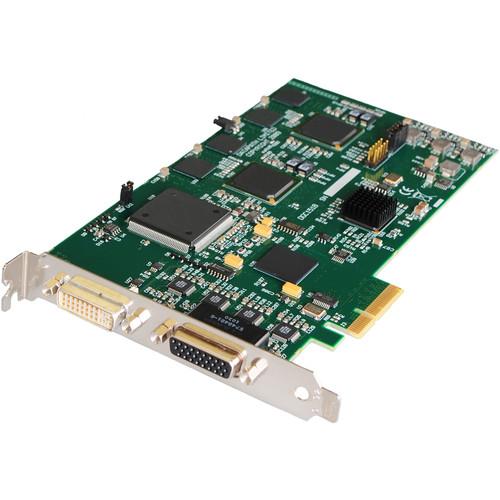
Product description The VisionSD4+1S RGB/DVI/HD and SD Video Capture Card from DATAPATH is a video capture card with five complete video capture channels supporting a single channel for up to 1920x1080 DVI or 2048x1536 Analog resolution, plus four SD Analog capture channels, and provides a maximum data rate of 650 MB/s. The card captures the Analog/DVI data and triple buffers it into on-board storage. This data is then copied using DMA to the host system for display, storage or streaming. When a Datapath graphics card is used, the VisionSD4+1S transfers the data directly to the graphics card thereby increasing performance.
When the RGB/DVI data is displayed on a non-Datapath graphics card, the VisionSD4+1S sends the data to system memory or direct to the graphics card, dependent on the software used for display.
The VisionSD4+1S video capture card is supplied with a software application for configuring the timing and format of the input sources and displaying the data. Simply connect your external DVI, Analog, or video source into the card, run the VisionSD4+1S application to automatically detect the video source format and display the captured video in a window on your desktop.
The VisionSD4+1S is a suitable solution for applications that require the capture of an RGB/DVI source simultaneously with up to four SD video sources, such as viewing Analog or DVI sources from PCs, MACs, industrial/medical equipment, cameras and other video equipment, streaming video applications, and video wall controllers. For streaming applications, the VisionSD4+1s can be used with Windows Media Encoder to compress and stream captured video. To replay the video, use Windows Media Player. Any application compatible with Windows DirectShow technology can use the VisionSD4+1s due to its built-in WDM support. - Direct WDM streaming driver supports the following applications, to encode, record and stream video over networks or the internet:
- Dataton WatchOut
- Microsoft Expression Encoder
- Windows Media Encoder
- VideoLAN VLC
- NorPix StreamPix
- VitualDub
- Adobe Flash Encoder
- VidBlaster
- AMCap and other DirectShow compatible software
- Four channel SD Video and one channel RGB/DVI/HD video capture card
- Four-lane PCI Express interface with a maximum data rate of 650MB/s
- Maximum RGB analog capture resolution of 2048 x 1536 x 24-bit, and maximum DVI capture resolution of 1920 x 1200 x 24-bit
- HD modes using the supplied DVI/Component adapter or DVI/HDMI adapter
- Four SD capture channels for PAL/NTSC, SECAM for composite or S-Video inputs
- On-card processor for real-time mode and sync detection
- Support for multiple cards allowing up to 128 SD capture channels and 32 DVI-I capture channels
- Direct DMA driver software and streaming driver
- High quality down scaling
- Support for YUV 4:2:2 and RGB 5:5:5, 5:6:5, and 8:8:8 video formats
- High performance DMA to system memory or direct to graphics memory with scatter gather
- Support for separate H/V sync, Composite sync, or Sync on Green
- Support for Windows XP, Vista, Server 2003, Server 2008, Windows 7, Windows 8, and Linux
- Includes WDM streaming drivers and Datapath Vision application software, and is fully integrated with the Datapath Wall Control-red video wall software
- Datapath SDK included for software developers
In the Box DATAPATH VisionSD4+1S RGB/DVI/HD and SD Video Capture Card (PCI Express) SD4 Splitter Cable DVI/VGA Adapter DVI/Component Adapter DVI/HDMI Adapter Limited 3-Year Warranty Table of Contents
|
Upload User Manual
Have you got an user manual for the DATAPATH VisionSD4 1S RGB DVI HD and SD Video Capture Card in electronic form? Please send it to us and help us expand our library of instruction manuals.
Thank you, too, on behalf of other users.
To upload the product manual, we first need to check and make sure you are not a robot. After that, your "Submit Link" or "Upload File" will appear.
Technical parametersDATAPATH VISIONSD4+1S Specs | Card Format | PCI Express x4 plug-in card
PCI Express bus master with scatter gather DMA | | Connectors | 1 x DVI-I, video input
1 x Sub-D, SD video input | | Data Rate | 650 MB/s, maximum | | Sample Rate | 170 MHz RGB analogue or 165 MHz DVI
Analog modes up to 340 MHz pixel clock can be captured using dual-pass sampling | | Video Sampling | RGB: 24 bits per pixel, 8-8-8 format
Video: 16 bits per pixel, YUV format | | Capture Resolution | SD: 720 x 576 x 16-bit, maximum
RGB Analog: 2048 x 1536 x 24-bit, maximum
DVI: 1920 x 1200 x 24-bit, maximum | | Maximum Cards Supported | 32 (128 SD and 32 DVI-I capture channels) | | Video Capture | Memory: 64 MB, triple buffered | | Modes | RGB Analog: 640 x 480, 800 x 600, 1024 x 768, 1280 x 1024, 1600 x 1200, 1920 x 1080, 2048 x 1536, custom modes
DVI Single-Link: 640 x 480, 800 x 600, 1024 x 768, 1280 x 1024, 1600 x 1200, 1920 x 1080, 1920 x 1200, custom modes
HD: 1080p, 1080i, 720p, 576p, 576i, 480p and 480i using DVI/component or DVI/HDMI adapters | | Input Detection | Automatic detection of input modes in hardware, enabling the tracking of mode changes in the source signal | | Pixel Format | RGB: 5-5-5, 5-6-5, or 8-8-8 (24-bit, 32-bit) | | Update Rate | User defined, captured frame rate will match the source providing maximum data rate (650 MB/s) is not exceeded | | Video Formats | Analog RGB, plus HSync and VSync (5 wire) | | Operating System Support | Windows XP, Windows Vista, Windows Server 2003, Windows Server 2008, Windows 7, Windows 8, and Linux | | Power Requirements | Maximum current at 3.3 V - 0.25 A
Maximum current at 12 V - 1.2 A
Maximum power 15 W | | Temperature | Operating: 32 to 96°F (0 to 35°C)
Storage: -4 to 158°F (-20 to 70°C) | | Relative Humidity | 5 - 90%, non-condensing | | Dimensions | 4.3 x 8.0" (110 x 204 mm) |
Rating50% users recommend this product to others. And what about you?

This product has already been rated by 40 owners. Add your rating and experience with the product.
Discussion
 Ask our technicians if you have a problem with your settings,
or if anything is unclear in the user manual you have downloaded.
You can make use of our moderated discussion.
The discussion is public and helps other users of our website who may be encountering similar problems.
Ask our technicians if you have a problem with your settings,
or if anything is unclear in the user manual you have downloaded.
You can make use of our moderated discussion.
The discussion is public and helps other users of our website who may be encountering similar problems.
The discussion is empty - enter the first post
Post a new topic / query / comment:
|
|


