User Manual for Denon DNP-800NE Network Audio Player Click to enlarge the picture
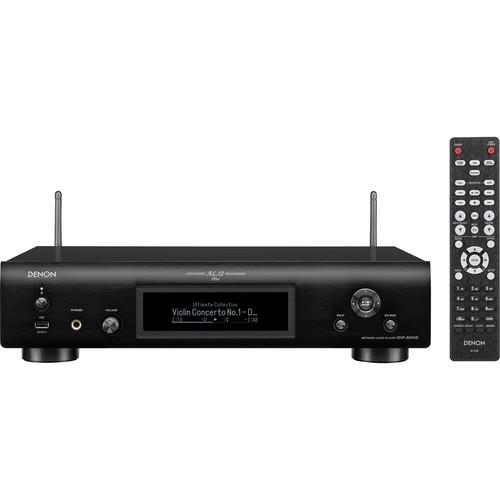 Contents of the user manual for the Denon DNP-800NE Network Audio Player
- Product category: Digital Music Players Denon
- Brand: Denon
- Description and content of package
- Technical information and basic settings
- Frequently asked questions – FAQ
- Troubleshooting (does not switch on, does not respond, error message, what do I do if...)
- Authorized service for Denon Digital Music Players

 |
User manual for the Denon DNP-800NE Network Audio Player contain basic instructions
that need to be followed during installation and operation.
Before starting your appliance, the user manual should be read through carefully.
Follow all the safety instructions and warnings, and be guided by the given recommendations.
User manual is an integral part of any Denon product,
and if it is sold or transferred, they should be handed over jointly with the product.
Following the instructions for use is an essential prerequisite for protecting
health and property during use, as well as recognition of liability on the part of the manufacturer
for possible defects should you make a warranty claim. Download an official Denon user manual in which you will find instructions on how to install, use, maintain and service your product.
And do not forget – unsuitable use of a Denon product will considerably shorten its lifespan!
|
Product description Stream music from your favorite networked audio sources with the Denon DNP-800NE Network Audio Player. It has Bluetooth, Wi-Fi & Ethernet connectivity built-in and supports playback over HEOS, DLNA, and Apple AirPlay 2. It also supports voice control via Amazon Alexa, the Google Assistant, Siri, or Josh.ai for virtually seamless integration into your smart home. A front-mounted USB port enables playback from your compatible HDDs and flash drives.
To connect to nearly any home audio system, the DNP-800NE has one fixed and one variable stereo RCA audio output, as well as an optical output for digital connectivity and a 1/4" headphone connection for private listening. The three-line OLED display helps simplify setup and clearly display information. Note: Content acquired via certain apps may require subscription to a service. - Built-In Bluetooth, Wi-Fi, and AirPlay 2 Capability
- Thanks to built-in Wi-Fi, the DNP-800NE connects to the Internet through your home network to provide near-limitless streaming options. Listen to online music services over AirPlay 2 and Bluetooth with your compatible smart devices and connect to your computer for additional streaming capabilities.
- Digital Music File Playback
- Play nearly any digital audio format vrom your USB drive or through your network connection. The DNP-800NE supports files such as MP3, WMA, AAC, ALAC, WAV, FLAC HD (up to 24-bit, 192 kHz), and DSD (2.8 / 5.6 MHz resolution) over streaming, and gapless playback of DSD, WAV, FLAC, and ALAC files.
- Advanced AL32 Processing Plus
- This analog waveform technology uses data interpolation algorithms, which support high-resolution audio sources, to smooth out the waveform and restore data that was lost during the digital recording, to help produce detailed playback free of interference and faithful to the original sound. The Ultra Precision 192 kHz / 32-bit D/A converter helps further enhance playback accuracy.
- Music Streaming
- The DNP-800NE supports popular music services like Pandora, Spotify, Amazon Music, Napster, SoundCloud, Deezer, Tidal, and more.
- HEOS Wireless Whole-Home Audio
- As part of the HEOS ecosystem, the DNP-800NE connects with additional HEOS wireless speakers to play music throughout your entire home. You can play the same song on each speaker, or different audio in different rooms. Control the whole experience through the free HEOS app.
- Amazon Alexa Voice Control
- Control the DNP-800NE hands-free with Amazon Alexa and your voice. Adjust the volume, skip to the next track, and more by simply asking. Download the HEOS Home Entertainment Skill to enable Amazon Alexa voice commands for your DNP-800NE, HEOS devices, and other select Denon products.
- Google Assistant Voice Control
- Ask your Google Assistant-enabled device to control content across your listening environment. Start music in the HEOS app, then ask your Google Assistant to control volume, playback, and more.
- AirPlay 2 with Siri Compatibility
- Stream audio from your favorite music services like Apple Music and Spotify, or watch videos from services like YouTube and Netflix from any compatible iPhone, iPad, Mac, or Apple TV device, and hear the audio synced to your sources. AirPlay 2 also supports multi-room audio, enabling you to wirelessly stream content to multiple AirPlay 2-compatible devices simultaneously with smooth playback. AirPlay 2 provides control and grouping of compatible devices within the Apple Music or Home apps. Use AirPlay 2 in-app or with your voice via Siri.
- Josh.ai Smart Home Voice Automation
- Josh.ai is designed to offer flexible voice control for nearly any aspect of your day-to-day experience and entertainment environment. Use voice commands to control your thermostat, lights, appliances, speakers, receiver, and more. Josh.ai is installed by custom integrators and accessed through an app on your compatible iOS or Android phone or tablet.
- Connect to Your Network
- Expand your existing Hi-Fi system with network connectivity via the DNP-800NE. Sync it with your amplifier and CD player, or connect to your network to enjoy online music services and Internet radio with augmented accuracy.
- iPod & iPhone Audio Playback
-
- iPod classic
- iPod nano 3G/4G/5G/6G
- iPod touch 1G/2G/3G/4G
- iPhone 1G/3G/3GS/4G
- Additional Features
-
- Three-line OLED shows all related functions bright and accurately from nearly any viewing angle
- Headphone amplifier with Amplifier Gain setting for a personal listening experience
- Denon Remote app for iOS & Android
- Firmware updates via Ethernet
- Symmetrical circuit layout
- iPod control interface from remote
- Windows Play to
- DLNA 1.5, WMP11, & TwonkyVision music servers
- iPod charging
- vTuner & Spotify Connect
- Enables app control of select other Denon devices
- Wi-Fi sharing / WPS
- WMM-certified
- USB playback for memory stick, HDD, and iOS devices
- USB control via menu
- iPod, iPhone, iPad Direct connectivity
- Dimmable display, can also be disabled
- Jitter Reducer
- Aluminum front panel
UPC: 883795004558 In the Box Denon DNP-800NE Network Audio Player Remote Control 2 x AAA Batteries Audio Cable IR Control Cable 2 x Bluetooth / Wi-Fi Antennas Power Cord Limited 2-Year Warranty Table of Contents
|
Upload User Manual
Have you got an user manual for the Denon DNP-800NE Network Audio Player in electronic form? Please send it to us and help us expand our library of instruction manuals.
Thank you, too, on behalf of other users.
To upload the product manual, we first need to check and make sure you are not a robot. After that, your "Submit Link" or "Upload File" will appear.
Technical parametersDenon DNP-800NE Specs | | | Frequency Response (-3 dB) | 2 Hz to 50 kHz (192 kHz PCM sampling frequency) | | Frequency Range | Playable, DSD: 2 Hz to 100 kHz
Playable, 192 kHz: 2 Hz to 96 kHz
Playable, 44.1 kHz: 2 Hz to 20 kHz | | Signal-to-Noise Ratio | 115 dB | | Total Harmonic Distortion | DSD: 0.0015%
24-Bit PCM: 0.002%
16-Bit PCM: 0.0025% | | Dynamic Range | DSD, 24-Bit PCM: 108 dB
16-Bit PCM: 101 dB | | Digital-to-Analog Converter (DAC) | Burr Brown PCM1795 32-bit, 192 kHz | | Menu Languages | English (default), German, French, Italian, Spanish, Dutch, Swedish, Russian, Polish | | | | Bluetooth Specification | Version: 3.0 + EDR (Enhanced Data Rate)
Profile Support: A2DP 1.2, AVRCP 1.5
Corresponding Codec: SBC
Transmission Frequency Range (A2DP): 20 Hz to 20 kHz
Range: Up to 98.4' / 30 m with line of sight
Frequency: 2.4 GHz
Modulation Scheme: FHSS (Frequency-Hopping Spread Spectrum)
Transmission Power: Bluetooth Specification Power Class 1 | | Wi-Fi | Dual-band (2.4/5 GHz) IEEE 802.11a/b/g/n | | Wi-Fi Security | WEP: 64-bit, 128-bit
WPA/WPA2-PSK (AES)
WPA/WPA2-PSK (TKIP) | | DLNA | Version 1.5 | | AirPlay | Yes, AirPlay 2 | | Inputs | 1 x USB 2.0 Type-A (front) | | Outputs | 1 x fixed stereo RCA
1 x variable stereo RCA
1 x optical TOSLINK
1 x 1/4" / 6.35 mm headphone (front) | | Other Connectors | 1 x Ethernet LAN
2 x Bluetooth/Wi-Fi antennas
1 x 1/8" / 3.5 mm IR control out | | Optical Output | -21 to -15 dBm | | USB Formats | WMA: 32, 44.1, 48 kHz, 48 to 192 kbps
MP3: 32, 44.1, 48 kHz, 32 to 320 kbps
WAV: 32, 44.1, 48, 88.2, 96, 176.4, 192 kHz
MPEG-4 AAC, M4A: 32, 44.1, 48 kHz, 16 to 320 kbps
FLAC: 32, 44.1, 48, 88.2, 96, 176.4, 192 kHz
Apple Lossless M4A: 32, 44.1, 48, 88.2, 96, 192 kHz
DSD, DSF, DFF: 2.8, 5.6 MHz | | Unbalanced Output Level | Fixed: 2.2 V RMS
Variable, Maximum: 4.5 V RMS | | Headphone Output | 30 mW, 32 ohms | | | | Operating Temperature | 41 to 95°F / 5 to 35°C | | Power Requirements | 120 VAC, 60 Hz | | Power Consumption | Operational: 18 W
Standby: 0.3 W
Network Standby: 4 W | | Dimensions (W x H x D) | Including Protrusions: 17.09 x 6.69 x 12.28" / 434 x 170 x 312 mm | | Weight | 8.6 lb / 3.9 kg | | | | Package Weight | 11.5 lb | | Box Dimensions (LxWxH) | 20.4 x 15.1 x 7.9" |
Rating90% users recommend this product to others. And what about you?

This product has already been rated by 86 owners. Add your rating and experience with the product.
Discussion
 Ask our technicians if you have a problem with your settings,
or if anything is unclear in the user manual you have downloaded.
You can make use of our moderated discussion.
The discussion is public and helps other users of our website who may be encountering similar problems.
Ask our technicians if you have a problem with your settings,
or if anything is unclear in the user manual you have downloaded.
You can make use of our moderated discussion.
The discussion is public and helps other users of our website who may be encountering similar problems.
The discussion is empty - enter the first post
Post a new topic / query / comment:
|
|


