User Manual for Digital Watchdog Compressor DW-CP04 4-Channel Analog to IP Video Encoder Click to enlarge the picture
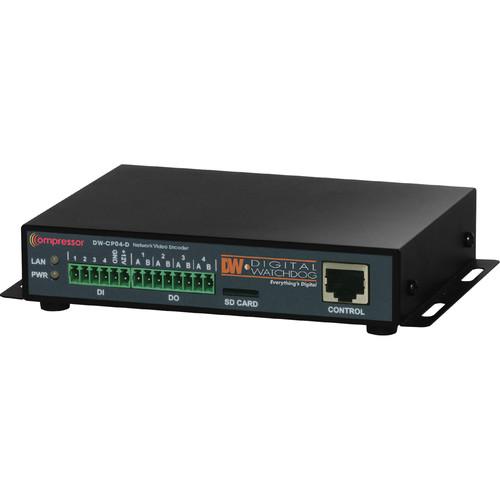 Contents of the user manual for the Digital Watchdog Compressor DW-CP04 4-Channel Analog
- Product category: Video Encoders & Decoders Digital Watchdog
- Brand: Digital Watchdog
- Description and content of package
- Technical information and basic settings
- Frequently asked questions – FAQ
- Troubleshooting (does not switch on, does not respond, error message, what do I do if...)
- Authorized service for Digital Watchdog Video Encoders & Decoders
|
User manual for the Digital Watchdog Compressor DW-CP04 4-Channel Analog contain basic instructions
that need to be followed during installation and operation.
Before starting your appliance, the user manual should be read through carefully.
Follow all the safety instructions and warnings, and be guided by the given recommendations.
User manual is an integral part of any Digital Watchdog product,
and if it is sold or transferred, they should be handed over jointly with the product.
Following the instructions for use is an essential prerequisite for protecting
health and property during use, as well as recognition of liability on the part of the manufacturer
for possible defects should you make a warranty claim. Download an official Digital Watchdog user manual in which you will find instructions on how to install, use, maintain and service your product.
And do not forget – unsuitable use of a Digital Watchdog product will considerably shorten its lifespan!
|
Product description The Compressor DW-CP04 4-Channel Analog to IP Video Encoder from Digital Watchdog can convert signals from up to 4 analog cameras into an IP signal at a maximum of 120 fps at D1 resolution. When connected to network, you can monitor video of the encoder through a Web browser (for example, MS Internet Explorer). It supports simultaneous MJPEG and H.264 video compression; this allows you to select the appropriate video compression for the required application. For both MJPEG and H.264, DW-CP04 provides 6 levels of video quality. The Compressor encoder offers important features such as two-way audio, PTZ control, microSD card slot for local backup, and intelligent motion detection. It is suitable for applications that have both analog and network surveillance solutions when you and are looking to get the most out of both platforms. -
- ONVIF Profile S compliant
- 4-channel BNC input
- Streaming at 120 fps @ D1 resolution
- Dual codec (H.264/ MJPEG) with single stream
- Motion detection
- Two-way audio support
- microSD card interface
- RS-232/RS-485 PTZ control
- PSIA (v1.0) conformant
- Search and playback from the software interface
- Frame rate & bandwidth control
- 4 alarm inputs and outputs
- Event notifications via email with image
- Fully compatible with Digital Watchdog’s DW spectrum IPVMS
- Configuration and control through Web browser
UPC: 813379012822 In the Box Digital Watchdog Compressor DW-CP04 4-Channel Analog to IP Video Encoder Power Supply Software CD Limited 2-Year Warranty Table of Contents
|
Upload User Manual
Have you got an user manual for the Digital Watchdog Compressor DW-CP04 4-Channel Analog to IP Video Encoder in electronic form? Please send it to us and help us expand our library of instruction manuals.
Thank you, too, on behalf of other users.
To upload the product manual, we first need to check and make sure you are not a robot. After that, your "Submit Link" or "Upload File" will appear.
Technical parametersDigital Watchdog DW-CP04 Specs | | | Input | 4 channels, analog | | Encoding | Dual codec (H.264 or MJPEG) with single stream setup | | Resolution | D1 (704 x 480), CIF (352 x 288), and 160 x 112 | | Webcasting | Live Casting: Streaming at 120 fps @ D1 resolution | | Audio | I/O: 1 channel input; 1 channel output
Codec: 8-bit G.711, 8 kHz, 8 KB/sec | | System | Memory: 32-bit RISC CPU, 128 MB flash
OS: Embedded Linux
RAM: 128 MB SDRAM | | | | Recording | Compression: H.264 or MJPEG
Recording Mode: Scheduled, Motion, Event
Recording Rate: 120 fps @ D1 resolution | | Playback | Playback Rate: 120fps @ D1 resolution
Fast Forward Functions: Fast forward, fast rewind, frame-by-frame forward, frame-by-frame rewind
Search Modes: Date, time, event preview | | Storage | Supports micro SDHC for onboard storage (up to 32 GB) Card not included | | Interface | 4 x alarm inputs, 4 x alarm outputs, 1 x RS-232 for UART device control, 1 x RS-485
Baud Rate: 115.2 kb/s maximum | | Support | PTZ Support:
Digital Watchdog's PTZ Series, Pelco P, Pelco D, Samsung, and Honeywell PTZ | | | | Alarm Management | Video loss, video recovered, motion detection, alarm activation, reboot complete, serial input, and schedule alarm report | | Alarm Notifications | E-mail & FTP notifications with image attached (including pre & post alarm buffering) | | Security | Channel-based user password protection for live video, PTZ, alarm output, and audio options | | Motion Detection | Accuracy: 12 x 12 = 144 blocks
Motion Sensitivity: -100 to 100 (100 is hypersensitive) | | Others | Time stamp on video, transmit external data (example POS) transfer with video, IP notification by e-mail | | Management | Configurable by serial, web or telnet, remote system update via telnet, FTP, or web browser | | Support | Developer Support: Provides HTTP CGI API, ActiveX control development kit | | | | Connection | Ethernet (1 x Megabyte 10/100 Base-T) | | Streaming | Transmission Speed Live: 120/100 fps @ D1 (NTSC/PAL)
Protocol: HTTP, RTP/RTSP, TCP/IP, FTP, Telnet, ARP, PPPoE, SNMP, PAP, CHAP, DHCP, NTP, SMTP client, uPNP | | Software | Work with Smart NVR (CMS software)
Dynamic IP support through IPCCTVDNS server | | Users | 128 simultaneous users | | Installation & Management | Configuration: Installation wizard, HTTP, telnet, and console upgrade
Firmware: HTTP, telnet & FTP | | Access | Web Viewer: Live, PTZ control, playback up to 16 channels
Video Card: 256 MB RAM, 1024 x 768
Client Software: DW spectrum | | Minimum System Requirements | Pentium 4, 2 GHz, 2 GB(RAM) or higher
Video Card: 256 MB RAM, 1024 x 768 resolution or higher
100 Mb/s network adapter or faster
OS: Windows XP Pro or later
Internet Explorer 6.x or later | | | | Approvals | KC, FCC Class A, CE Class A, RoHS | | Compliance | OnVIF profile S, PSIA (v1.0) | | Operating Temperature | 14 to 122°F (-10 to 50°C) | | Operating Humidity | Less than 90% (non-condensing) | | Power Requirement | 12 VDC, 1 A (100 to 240 VAC, 50/60 Hz, 300 mA) | | Power Consumption | 12 VDC: 600 mA | | Dimensions (W x H x D) | 5.82 x 4.64 x 0.98" (14.78 x 11.78 x 2.48 cm) | | Weight | 0.55 lb (0.25 kg) | | | | Package Weight | 1.6 lb | | Box Dimensions (LxWxH) | 9.3 x 6.9 x 3.0" |
Rating100% users recommend this product to others. And what about you?

This product has already been rated by 15 owners. Add your rating and experience with the product.
Discussion
 Ask our technicians if you have a problem with your settings,
or if anything is unclear in the user manual you have downloaded.
You can make use of our moderated discussion.
The discussion is public and helps other users of our website who may be encountering similar problems.
Ask our technicians if you have a problem with your settings,
or if anything is unclear in the user manual you have downloaded.
You can make use of our moderated discussion.
The discussion is public and helps other users of our website who may be encountering similar problems.
The discussion is empty - enter the first post
Post a new topic / query / comment:
|
|


