|
User Manual for Digital Watchdog DW-BJCUBE Windows-Based Blackjack Cube NVR with DW Spectrum Software Click to enlarge the picture
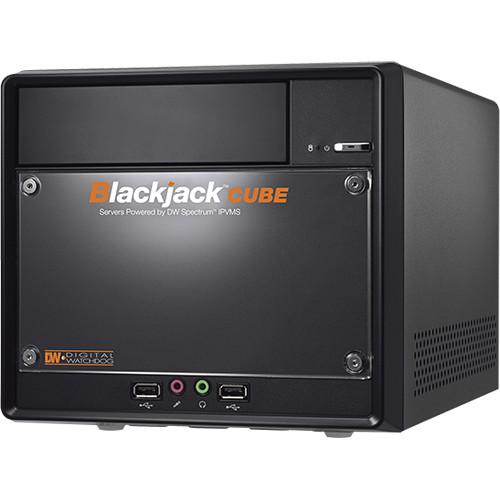 Contents of the user manual for the Digital Watchdog DW-BJCUBE Windows-Based Blackjack Cube
- Product category: Network Video Recorders (NVRs) Digital Watchdog
- Brand: Digital Watchdog
- Description and content of package
- Technical information and basic settings
- Frequently asked questions – FAQ
- Troubleshooting (does not switch on, does not respond, error message, what do I do if...)
- Authorized service for Digital Watchdog Network Video Recorders (NVRs)

 |
User manual for the Digital Watchdog DW-BJCUBE Windows-Based Blackjack Cube contain basic instructions
that need to be followed during installation and operation.
Before starting your appliance, the user manual should be read through carefully.
Follow all the safety instructions and warnings, and be guided by the given recommendations.
User manual is an integral part of any Digital Watchdog product,
and if it is sold or transferred, they should be handed over jointly with the product.
Following the instructions for use is an essential prerequisite for protecting
health and property during use, as well as recognition of liability on the part of the manufacturer
for possible defects should you make a warranty claim. Download an official Digital Watchdog user manual in which you will find instructions on how to install, use, maintain and service your product.
And do not forget – unsuitable use of a Digital Watchdog product will considerably shorten its lifespan!
|
Product description The DW-BJCUBE Windows-Based Blackjack Cube NVR with DW Spectrum Software from Digital Watchdog is a user-friendly video management solution that is optimized to provide scalability, bandwidth savings, and simplified system setup and management. The NVR supports recording from 4 2.1MP IP cameras. The capacity can be expanded to support up to 64 cameras at 30 fps, with 360 Mb/s throughput with additional licenses (available separately). It features 9TB of storage space.The DW spectrum software automatically discovers, populates, and configures cameras on the network. It also allows you to easily drag and drop cameras across servers. The Spyglass feature lets you zoom into any area within a camera’s field-of-view and watch the selected region as a separate display, allowing you to monitor smaller regions of interest separately from the overall camera's image. Fisheye screen de-warping capability allows the NVR to record and display images from a camera with hemispheric lenses. It translates the camera’s feed into multiple viewing formats, including panoramic view.This NVR can be configured to send popup notifications, voice alerts, or an email with the event link for events such as network and storage failure, motion detection, or sensor activation on a camera. The software enables you to track any event through a logging system, which features detailed filtering methods to help you identify a specific problem and exporting options for your personal records. It also allows you to quickly and accurately search for a specific video with calendar and panoramic search options. - NVR with DW Spectrum Software
-
- 1080p screen recording
- Supports audio input / output from server to cameras
- Features the DW Spectrum central management software
- Supports H.264, MJPEG, and MPEG4 codecs and streams
- Linux, Windows, and MAC cross platform support
- Dual stream recording
- Automatic firmware upgrade via FTP server and manual
- Import / export configurations between multiple NVRs
- Network bandwidth control
- ONVIF conformant
- S.M.A.R.T health check with email notifications
- Email notification with playback link and JPEG image
- Panic recording
- Features go to, multi-date and time, panoramic, smart search, smart motion search, thumbnail search, preview search, single channel playback during live, and frame-by-frame search options
- Web-based client with multi-user access for live and playback video feeds
- Remote backup using DW Spectrum IPVMS software
- Can be configured to record only when motion is detected
- Features continuous, motion recording, motion recording + low resolution recording modes
- Automatic device discovery and display
- Network troubleshooting notification
- Storage failure and camera disconnection alerts
- Mobile applications available for iPad, iPad mini, iPhone, iPod Touch, and Android smartphones and tablets
- Digital watermark authentication
- Software
-
- Features digital zooming capabilities in live and playback viewing modes
- Fully customizable layouts
- Help menu on major functions
- Multiple recording schedules per camera
- Simple enterprise scalability
- Advanced thumbnail search and calendar search
- Seamless transition from live to search
- Instant motion-based smart search
- Motion / smart search allows you to easily pinpoint and identify general motion, missing and foreign objects
- Automatic device discovery and display
- PTZ control allows a radial controller (sold separately) to alter camera’s direction in all 3 axes, or simply draw a box within any region to immediately focus and zoom in the area
- Region of interest with forensic Spyglass
- Easy drag-n-drop camera management
- Dual stream recording
- Graphical system health monitoring through informative, easy-to-understand graphical format
- Thumbnail search allows you to chronologically narrow down your search to frame-by-frame display
- Quickly and continuously watch video on user-selected areas (marked in red)
- Mark your selection and export as an AVI, MKV, and executable file in a quick, simple, and intuitive timeline interface
- Enables you to easily switch between live and review mode by simply scrolling back in time
- Fisheye screen de-warping capability allows viewing images from cameras with a panoramic lens
- Dual stream recording allows camera to record at high resolution when motion is detected and at a lower resolution at all other times
- E-mapping
- Hybrid capable via software integration
- Pop-up notification
UPC: 813379012310 In the Box Digital Watchdog DW-BJCUBE Windows-Based Blackjack Cube NVR with DW Spectrum Software (9TB) Limited 5-Year Warranty Table of Contents
|
Upload User Manual
Have you got an user manual for the Digital Watchdog DW-BJCUBE Windows-Based Blackjack Cube NVR with DW Spectrum Software in electronic form? Please send it to us and help us expand our library of instruction manuals.
Thank you, too, on behalf of other users.
To upload the product manual, we first need to check and make sure you are not a robot. After that, your "Submit Link" or "Upload File" will appear.
Technical parametersDigital Watchdog DW-BJCUBE9T Specs | | | Supported Cameras | Licenses for 4 cameras included. The unit is capable of supporting up to 64 cameras. Additional licenses need to be purchased separately. | | Recording Performance | Maximum 360 Mb/s | | CPU | Intel i5 Processor | | Memory | 8 GB | | Video | On Board (Intel) | | Video Connections | DVI-I (analog) and DVI-D (digital) | | OS | Windows 7 64-Bit | | Client Computer Requirements | Processor: Intel Core i5 or greater
Graphics: 1920 x 1080
Ram: 4 GB
NIC: 10/100/1000 Base-T Ethernet
OS: Windows 7, Server 2008, Vista, Linux Ubuntu 10.0 | | | | Display Modes | Fully customizable layouts | | Screen Resolution | 1080P (DVI-I, DVI-D outputs) | | Display Resolution | 1080P (DVI-I, DVI-D outputs), NTSC/PAL | | Audio Input | RCA from the camera to the server | | Audio Output | Microphone from the server to the camera | | | | Image Controls | Brightness, contrast, saturation, Hue, 3D-DNR, WDR, camera firmware upgrade, and reboot | | Firmware Upgrade | USB drive, network upgrade, FTP remote upgrade | | Playback Functions | Fast forward, fast rewind, frame-by-frame forward, frame-by-frame rewind, jump to first, jump to last | | Playback Rate | Depending on recording parameter | | Recording | Rate: Depending on camera's resolutions
Mode: Continuous, motion recording, motion recording + low resolution always
Quality: Depends on camera's resolutions
Pre-alarm recording | | Compression Type | H.264, MJPEG, MPEG4 | | Export | Via DVD-RW, 8 x USB flash drive, USB HDD | | | | Client Monitoring | DW Spectrum (Synergy S/W) | | Protocol | Static, DHCP, and wireless IP protocols | | Network Connection | 2 x 1000 Mb/s Dual NIC card | | Mobile Connectivity | Web Browsers: Windows Internet Explorer, Firefox, Safari, Opera, and Chrome
Applications: Apple iPad, iPad mini, iPhone, iPod Touch, and all Android smartphones and tablets | | Web Viewer | Operations: Live, playback, remote configuration, up to 10 simultaneous connections (in live) | | | | HDD Interface | Up to 3 internal HDDs (3.5" SATA) | | Storage | 9 TB | | Power Consumption | 250 W, 100 VAC, 2.5 A | | Operating Temperature | 50 to 95°F (10 to 35°C) | | Operating Humidity | Less than 80% (non-condensing) | | Certification | CE & FCC, RoHS | | Dimensions (L x W x H) | 12.8 x 8.5 x 7.5" (32.5 x 21.6 x 19.1 cm) | | Weight | 9.6 lb (4.3 kg) without HDD |
Rating80% users recommend this product to others. And what about you?

This product has already been rated by 67 owners. Add your rating and experience with the product.
Discussion
 Ask our technicians if you have a problem with your settings,
or if anything is unclear in the user manual you have downloaded.
You can make use of our moderated discussion.
The discussion is public and helps other users of our website who may be encountering similar problems.
Ask our technicians if you have a problem with your settings,
or if anything is unclear in the user manual you have downloaded.
You can make use of our moderated discussion.
The discussion is public and helps other users of our website who may be encountering similar problems.
The discussion is empty - enter the first post
Post a new topic / query / comment:
|
|
|
| Request for user manual |
You can’t find the operation manual you are looking for? Let us know and we will try to add the missing manual:
I’m looking for a manual / Request for manual
Current requests for instruction manuals:
Call Of Duty World War Two For Xbox...
controller stratus XL...
stratus XL...
smart whatch serie S11 42mm...
Allen & Heath SQ-6 manual...
|
| Discussion |
Latest contributions to the discussion:
AEW R 4100
Name: MAURICIO ANGARITA
Audio-Technica AEW-R4100 UHF Diversity Receiver for
AEW R 4100 has the mute function blocked and does not allow audio to pass. I tried several times to turn off the mute from the transmitter but it does nothing, the mute stays on. Solution?
Thank you...
Instructions for assembling the 2015 Forecast Image Master Consoles GC3-A
Name: mike elam
Forecast Consoles GC3-A ImageMaster Editing Console
Looking for instructions for assembling this console. ...
EMPTY TONER ERROR MESSAGE AFTER REPLACING TONER
Name: LINDA BAD YELLOW EYES
Brother TN223BK Standard-Yield Toner
I HAD TO CHANGE OUT ALL THREE TONERS DUE TO LEAKS IN THE YELLOW AND CYAN. AFTER I REPLACED THEM, THE MACHINE KEEPS GIVING ME AN EMPTY TONER ERROR MESSAGE. HELP!!...
PS480D 20/24 pin Switching 480W Power Supply
Name: swkargo
Logisys 480W Power Supply
This item states in can run -5vdc .It is NOT listed on the board or I beleive is r4 is missing the resitior. Any body have thid issue. Shawn
...
Help needed
Name: Ann Carter
SanDisk 1TB Extreme Portable USB 3.1
When I click the link to download the user manual for my Sandisk Extreme external hard drive, it gives me the manual for the LG Cricket. Can you please change the link so I can download the Sandisk manual and begin using this drive? Thank you....
|
|


