User Manual for DJI Master Wheels 3-Axis and Ronin 2 Stabilizer Kit Click to enlarge the picture
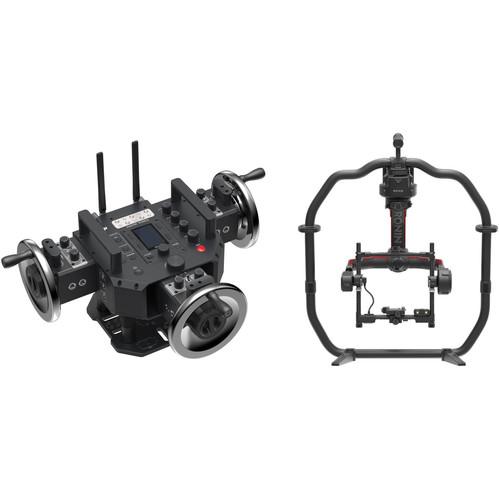 Contents of the user manual for the DJI Master Wheels 3-Axis and Ronin
- Product category: See All Gimbal Stabilizers DJI
- Brand: DJI
- Description and content of package
- Technical information and basic settings
- Frequently asked questions – FAQ
- Troubleshooting (does not switch on, does not respond, error message, what do I do if...)
- Authorized service for DJI See All Gimbal Stabilizers
|
User manual for the DJI Master Wheels 3-Axis and Ronin contain basic instructions
that need to be followed during installation and operation.
Before starting your appliance, the user manual should be read through carefully.
Follow all the safety instructions and warnings, and be guided by the given recommendations.
User manual is an integral part of any DJI product,
and if it is sold or transferred, they should be handed over jointly with the product.
Following the instructions for use is an essential prerequisite for protecting
health and property during use, as well as recognition of liability on the part of the manufacturer
for possible defects should you make a warranty claim. Download an official DJI user manual in which you will find instructions on how to install, use, maintain and service your product.
And do not forget – unsuitable use of a DJI product will considerably shorten its lifespan!
|
Product description Combining the DJI Master Wheels 3-Axis with the Ronin 2 Stabilizer, this B&H Kit allows you to remotely operate the Ronin 2 from up to 1.8 miles away wirelessly, or 98' over an optional cable. The Ronin 2 is a 3-axis stabilizer that supports up to 30 lb and can be set down on a flat surface. The Master Wheels 3-Axis features three control wheels that each control a separate axis of the gimbal with a latency of only 10 ms. - DJI Master Wheels 3-Axis The DJI Master Wheels 3-Axis is a wireless long-range gimbal controller featuring three wheel control modules, each providing individual control over one of the gimbal's axes. The Master Wheels controller is compatible with the DJI Ronin 2 and Ronin-S, and with select third-party gimbals via an SBUS connection. It offers high-precision and low-latency wireless control over 1.8 miles of distance and wired control up to 98' (using an optional cable).
Performed movements can be saved and repeated later, allowing you to build up a library of gimbal movements. The Master Wheels 3-Axis is capable of operating in temperatures as low as -4°F and it runs for up to 18 hours using the included batteries.
The wheel controllers use high-precision sensors and advanced control algorithms to achieve accurate and smooth camera movement. The high-resolution optical encoders are capable of detecting and communicating subtle movements, making the Master Wheels system suitable for professional film, TV, and video productions.
The wheels are made of stainless steel, providing for a classic feel and reliable operation, and the center wheel module can be adjusted to the left or right into a position closer to one of the other modules as that might be helpful in some scenarios. The wheel modules can be used attached to the Master Wheels base or detached and connected via cables, providing for more freedom in tight spaces.
Each wheel module has a three-stop toggle switch that controls gimbal direction and dials that control speed, smoothness, and damping. Additionally, various buttons (including three assignable ones), menus, and a display screen on the Master Wheels base allow you to monitor equipment status and adjust settings quickly. - Key Features
-
- Wireless long-range gimbal controller for professional productions
- Three wheel control modules, one for each gimbal axis
- Compatible with the Ronin 2, Ronin-S, and select third-party gimbals (SBUS connection)
- 1.8 mile wireless transmission distance
- 98' wired transmission distance over optional cable
- 10 ms latency
- High-precision sensors and advanced control algorithms achieve accurate and smooth camera movement
- Savable, repeatable moves
- Three-stop toggle switches control gimbal direction; dials control speed, smoothness, and damping
- 2.4 and 5.8 GHz dual frequency
- Self-heating batteries feature up to 18-hour battery life and allow operation in as low as -4°F
- Adjustable center wheel control module (positions closer to left or right module)
- Wheel modules can be used attached or detached and connected via cables
- Detachable control wheels
- Standard Mitchell mount
- 1/4"-20 and 3/8"-16 mounting threads
- Built-in display screen
UPC: 190021313378 - DJI Ronin 2 3-Axis Handheld/Aerial Stabilizer The versatile Ronin 2 gimbal from DJI is suitable for use either handheld or mounted in a variety of ways including onto a drone, Steadicam, vehicle mount, and more. An update from the original Ronin, this motorized stabilization system is suitable for a range of camera and lens configurations, boasting a payload capacity of 30 pounds. This means it can be used for everything from DSLRs up to cinema cameras such as the ARRI ALEXA Mini or Sony FS7.
Like its predecessor, the Ronin 2 features support for underslung, upright, and briefcase operation modes to help you achieve the best angle. However, it has been redesigned to enable easy transition between upright and underslung modes without changing the position of the camera. It also offers several other improvements, such as enhancements to the control software and physical design to simplify taking complex shots without sacrificing performance, all while making important functions more readily accessible. Performance - Upgraded high-torque motors allow the gimbal to support a wider range of cameras, resist high winds and G-forces caused when mounted onto a car, and keep it moving smoothly in flight.
- Boosted Torque
- With up to eight times more powerful motors than previous iterations, Ronin 2 can withstand sustained speeds of over 75 mph with camera builds as heavy as 30 pounds. Thanks to encoded motors and enhanced precision, the Ronin maintains the same 0.02° of accuracy of its predecessors.
Versatility - Detachable Grip
- A detachable grip allows the Ronin 2 to stand up on its own, and is easily separated when the lower part of the handgrip is not needed. In addition to handheld work, the Ronin 2 supports mounting on cable cams, drones, Steadicams, vehicle mounts, and more.
Simplified Operation - Easier Setup
- Making fine adjustments, which is essential for proper camera balancing, is now simplified with integrated adjustment knobs and a redesigned camera mounting base.
- Integrated Screen
- A dedicated high-brightness touchscreen for settings and adjustments has been integrated into Ronin 2, streamlining and accelerating gimbal setup. Tactile buttons including motor pause are placed easily within reach.
- Assistant App
- The extensively refined, redesigned, and expanded Gimbal Assistant app helps create content with minimum effort via new features such as CamAnchor, Time-Lapse, and Panorama, providing a more intuitive and easier-to-use full control system for Ronin 2.
- Intelligent
- Enhanced intelligence means filmmakers can get shots with Ronin 2 that would once have needed specialist expertise or additional equipment, from total smoothness control to studio-oriented smart features. Intelligent features include Panorama, Time-Lapse, and CamAnchor modes.
Powering - Hot-Swap Batteries
- Two batteries on Ronin 2, and the ability to run with only one, allows for batteries to be charged and swapped without interrupting a shoot.
- Accessory Support
- The Ronin power hub enables essential accessories such as DJI Focus and wireless video transmission systems to be powered by the Ronin 2 battery, as well as communicate with the gimbal controller.
Design - Integrated GPS
- The built-in GPS provides Ronin 2 with essential information for gimbal acceleration and speed, which is crucial for maintaining the camera's position and the horizon level when moving at high speeds while mounted onto a vehicle or drone.
- Robust Batteries
- Robust and resilient in extreme weather conditions, Ronin 2's self-heating batteries ensure stable power output for high-performance in temperatures as low as -4°F and high-heat environments. Dual batteries capable of operating simultaneously and independently provide complete redundancy, keeping the shoot going.
Compatible Cameras - The Ronin 2 supports a range of cameras from DSLRs to cinema cameras, even with high-grade lenses and other accessories mounted. Compatible camera/lens configurations include:
- RED DRAGON
-
- Angenieux Optimo Anamorphic 6-152 A-2S
- ARRI Master Prime lenses up to 150mm
- ARRI Master Anamorphic lens
- Canon CN7x17 KAS S 17-120mm T2.95
- ARRI ALEXA Mini
-
- Angenieux Optimo Anamorphic 56-152 A-2S
- ARRI Master Prime lenses up to 150mm
- ARRI Master Anamorphic lens
- Canon CN7x17 KAS S 17-120mm T2.95
- Blackmagic URSA Mini
-
- Angenieux Optimo Anamorphic 56-152 A-2S
- ARRI Master Prime lenses up to 150mm
- Fujinon ZK19-90mm T2.9
- Canon CN7x17 KAS S 17-120mm T2.95
- Canon C300
-
- Canon CN7x17 KAS S 17-120mm T2.95
- Canon CN-E Prime lenses
- Canon EF lenses up to 400mm
- Zeiss Compact Zoom lenses
- Sony FS7
-
- Sony CineAlta 4K lens series
- E-Mount lenses
- ARRI Ultra Prime lenses
- A-Mount lenses up to 300mm f/2.8G II
UPC: 190021296893 In the Box - Master Wheels 3-Axis ttqcxfzswqwxaf
- Monitor Power Cable
- USB-C Cable
- Mitchell Mount Adapter
- 2 x TB50 Batteries
- Battery Charging Hub
- 2 x Allen Wrenches
- 4 x Antennas
- Video Link Power Cable
- RF Power Cable (16')
- 3 x Communication Cables (6.5')
- Power Adapter
- Power Cable
- Wireless Receiver
- Wireless Receiver Antenna
- Wireless Receiver to D-Bus Cable
- Limited 1-Year Warranty
- Ronin 2 3-Axis Handheld/Aerial Stabilizer
Table of Contents
|
Upload User Manual
Have you got an user manual for the DJI Master Wheels 3-Axis and Ronin 2 Stabilizer Kit in electronic form? Please send it to us and help us expand our library of instruction manuals.
Thank you, too, on behalf of other users.
To upload the product manual, we first need to check and make sure you are not a robot. After that, your "Submit Link" or "Upload File" will appear.
Technical parameters - DJI Master Wheels 3-Axis
| Compatibility | DJI Ronin 2 and Ronin-S, third-party gimbals with SBUS connection | | Transmission | 1.8 miles / 3 Km wireless, 98' / 30 m wired | | Latency | 10 ms | | Frequency | 2.4 and 5.8 GHz dual frequency | | Mount Type | Mitchell mount, 1/4"-20 and 3/8"-16 mounting threads for accessories | | Voltage | 22.8 V | | Battery | 2 x TB50 batteries, 4280 mAh / 97.58 Wh each, 18-hour battery life, 1.5-hour charge time | | DC In | 12-27 V | | DC Out | 14.4 V / 8 A (max) | | Operating Temperature | -4 to 104°F / -20 to 40° | | Charging Temperature | 41 to 113°F / 5 to 45° | | | | Box Dimensions (LxWxH) | 26.18 x 25.78 x 20.18" | - DJI Ronin 2 3-Axis Handheld/Aerial Stabilizer
| | | Number of Axes | 3-Axis (Pitch, Roll, Yaw) | | Rotation Range | Yaw (Pan): 360
Rating50% users recommend this product to others. And what about you?

This product has already been rated by 70 owners. Add your rating and experience with the product.
Discussion
 Ask our technicians if you have a problem with your settings,
or if anything is unclear in the user manual you have downloaded.
You can make use of our moderated discussion.
The discussion is public and helps other users of our website who may be encountering similar problems.
Ask our technicians if you have a problem with your settings,
or if anything is unclear in the user manual you have downloaded.
You can make use of our moderated discussion.
The discussion is public and helps other users of our website who may be encountering similar problems.
The discussion is empty - enter the first post
Post a new topic / query / comment:
|
|
|
| Request for user manual |
You can’t find the operation manual you are looking for? Let us know and we will try to add the missing manual:
I’m looking for a manual / Request for manual
Current requests for instruction manuals:
Call Of Duty World War Two For Xbox...
controller stratus XL...
stratus XL...
smart whatch serie S11 42mm...
Allen & Heath SQ-6 manual...
|
| Discussion |
Latest contributions to the discussion:
AEW R 4100
Name: MAURICIO ANGARITA
Audio-Technica AEW-R4100 UHF Diversity Receiver for
AEW R 4100 has the mute function blocked and does not allow audio to pass. I tried several times to turn off the mute from the transmitter but it does nothing, the mute stays on. Solution?
Thank you...
Instructions for assembling the 2015 Forecast Image Master Consoles GC3-A
Name: mike elam
Forecast Consoles GC3-A ImageMaster Editing Console
Looking for instructions for assembling this console. ...
EMPTY TONER ERROR MESSAGE AFTER REPLACING TONER
Name: LINDA BAD YELLOW EYES
Brother TN223BK Standard-Yield Toner
I HAD TO CHANGE OUT ALL THREE TONERS DUE TO LEAKS IN THE YELLOW AND CYAN. AFTER I REPLACED THEM, THE MACHINE KEEPS GIVING ME AN EMPTY TONER ERROR MESSAGE. HELP!!...
PS480D 20/24 pin Switching 480W Power Supply
Name: swkargo
Logisys 480W Power Supply
This item states in can run -5vdc .It is NOT listed on the board or I beleive is r4 is missing the resitior. Any body have thid issue. Shawn
...
Help needed
Name: Ann Carter
SanDisk 1TB Extreme Portable USB 3.1
When I click the link to download the user manual for my Sandisk Extreme external hard drive, it gives me the manual for the LG Cricket. Can you please change the link so I can download the Sandisk manual and begin using this drive? Thank you....
|
|


