|
User Manual for DJI Mavic 2 Zoom with Hard-Shell Case Kit Click to enlarge the picture
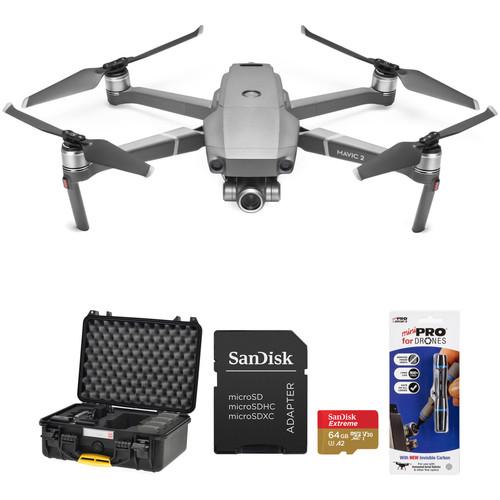 Contents of the user manual for the DJI Mavic 2 Zoom with Hard-Shell
- Product category: See All Drones DJI
- Brand: DJI
- Description and content of package
- Technical information and basic settings
- Frequently asked questions – FAQ
- Troubleshooting (does not switch on, does not respond, error message, what do I do if...)
- Authorized service for DJI See All Drones
|
User manual for the DJI Mavic 2 Zoom with Hard-Shell contain basic instructions
that need to be followed during installation and operation.
Before starting your appliance, the user manual should be read through carefully.
Follow all the safety instructions and warnings, and be guided by the given recommendations.
User manual is an integral part of any DJI product,
and if it is sold or transferred, they should be handed over jointly with the product.
Following the instructions for use is an essential prerequisite for protecting
health and property during use, as well as recognition of liability on the part of the manufacturer
for possible defects should you make a warranty claim. Download an official DJI user manual in which you will find instructions on how to install, use, maintain and service your product.
And do not forget – unsuitable use of a DJI product will considerably shorten its lifespan!
|
Product description The DJI Mavic 2 is the Best Consumer Drone Yet Read More This B&H Kit includes the DJI Mavic 2 Zoom and Hard-Shell Carrying Case. It's designed to give Mavic 2 Zoom pilots a convenient and safe option to transport the drone and essential accessories. Use the Mavic 2 Zoom's camera to capture cinematic video and 48MP super-resolution photos in almost any locale. The rugged Nanuk hard-shell case's custom foam insert lets you pack up the Mavic 2 Zoom, a controller, up to three batteries, and more. The case is capable of being taken onto planes as carry-on luggage, and being both dustproof and water-resistant, can withstand the elements when you land. - DJI Mavic 2 Zoom
- Introducing the DJI Mavic 2
The Mavic 2 Zoom from DJI is a professional quality filmmaking drone that gives you the ability to get closer to the action, thanks to its 2x 24-48mm optical zoom camera with a 1/2.3" 12MP sensor. With 4x lossless zoom (including 2x optical zoom) you can capture sensitive subjects from an even greater distance. There's even a single-tap aerial mode called Dolly Zoom that gives a Hitchcockian effect to your footage.
The Mavic 2 Zoom utilizes a low-drag aerodynamic body design for achieving speeds up to 44.7 mph, a four-cell LiPo battery for up to 31 minutes of flight time, and low-noise propellers for filming without being distracting. This power and performance are coupled with a variety of shooting modes and capabilities for cinematic results.
To help keep the Mavic 2 Zoom safe and in control, DJI has provided OcuSync 2.0 video transmission technology that can transmit a video feed to the included controller from up to five miles away in Full HD 1080p quality. There's also omnidirectional obstacle sensing that provides object avoidance with sensors on all sides of the Mavic 2 Zoom. - Additional Gimbal Camera Features
-
- Mid-range shots: Capture epic midrange shots with the 48mm telephoto lens, designed to compress your perspective and enhance the parallax effect.
- Hybrid autofocus: Combines phase and contrast detection for higher focus speed and accuracy, helping to keep subjects in focus while zooming in and out.
- Super-Resolution Photos
- Take your aerial landscape photography to another level with Super Resolution. By utilizing the 24mm field of view on the Mavic 2 Zoom, you can take a 48MP super-resolution photo where a series of nine different photos are captured and automatically patched together. Unlike a regular panorama, super-resolution photos are designed to retain the original look of the shooting targets with a more accurate composition.
- Hyperlapse Time-Lapse Shots
- With a single tap, you can use your Mavic 2 Zoom to capture stunning time-lapse shots in Hyperlapse mode, processing everything automatically and saving you time in post-processing. You can even simultaneously save photos in JPEG and raw on a microSD card (not included). Hyperlapse shots can be captured with four distinct modes:
- Free: Move the Mavic 2 where you want with total freedom.
- Circle: Select a subject for the Mavic 2 to automatically circle around.
- CourseLock: This flies the Mavic 2 on a locked course in a straight line, forward and backwards or right to left, allowing you to adjust the gimbal along the way for dramatic results.
- WayPoint: Set a specific savable flight path in 3D space for a single time-lapse, or for multiple shots at different times to edit together later.
- Enhanced HDR Photos
- With a 13 EV the Mavic 2 Zoom is designed to capture clear, ghost-free images by blending together a sequence of individual photos taken at varying exposures.
- HyperLight Noise Reduction
- With HyperLight mode switched on, the Mavic 2 Zoom can capture low-light images with reduced noise.
- H.265/HEVC Support
- By utilizing the H.265/HEVC codec in your 4K videos, you can benefit from advanced compression that includes 50% more information than H.264/AVC, resulting in higher-quality results and videos with more detail.
- OcuSync 2.0 Video Transmission
- The OcuSync 2.0 system is designed to provide you with a stable, high-quality video feed. DJI has engineered OcuSync 2.0 to deliver 1080p feeds to your controller from up to five miles away. From that distance, DJI helps keep things streaming smoothly with dual-band, real-time autoswitching between 2.4 and 5.8 GHz bands. Footage is downloaded at up to 40 Mb/s, and latency can be as low as 120 ms.
OcuSync 2.0 also lets you share and save your footage and images without having to download content from the drone itself. Footage can be edited and uploaded to social media from the cache, and images can be automatically saved to your mobile device. - Omnidirectional Obstacle Sensing
- To keep your Mavic 2 Zoom safe and your footage pristine, DJI has covered all sides of the Mavic 2 with obstacle sensors:
- Forward sensor: Dual vision sensors with a measurement range up to 65', and a detectable range of 65 to 131'. The Mavic 2 is designed to safely stop when obstacles are detected while flying at up to 31.3 mph.
- Downward sensor: Dual vision sensors with a measurement range up to 36', and a detectable range of 36 to 72'. It also has an infrared sensor that can measure up to 26' away. The sensors also allow for accurate hovering at up to 164' and can detect land to land safely. A bottom auxiliary light helps the sensor in low-light conditions.
- Left and right sensors: Detects obstacles at speeds of up to 18 mph in both ActiveTrack and Tripod modes.
- Backward sensor: Dual vision sensors with a measurement range up to 52', and a detectable range of 52 to 104.9'. The Mavic 2 is designed to safely stop when obstacles are detected while flying at up to 27 mph.
- Upward sensor: Infrared sensor that can precisely measure at ranges up to 26'.
- ActiveTrack 2.0 Sensing and Tracking
-
- Precise recognition: Maps a 3D view of the surrounding environment through the camera and forward dual sensors for greater recognition and accuracy.
- Trajectory prediction: Algorithms help maintain tracking when the subject is temporarily blocked by an obstruction.
- High-speed tracking: In open environments, the Mavic 2 Zoom can track subjects moving at up to 44.7 mph.
- Obstacle sensing: Plan a flight path on the 3D map and shoot your target without interruption. Obstacles are sensed, recognized, and avoided with forward and backward sensors.
- Aerial Shooting Modes
-
- Dolly zoom: Providing a Hitchcock-like effect, the Mavic 2 Zoom adjusts focus while flying to deliver a warped effect. With proper focus speed values, you can get more creative when flying manually.
- Point of interest (POI) 2.0: Thanks to vision and GPS distance measurement technologies, you can circle around and shoot a specific subject.
- Waypoint 2.0: By tapping the desired waypoints and point of interest in the app, you can plan a flight path quickly and save it for your next flight.
- Asteroid: The Mavic 2 quickly flies down from a height while spinning in on a subject.
- Boomerang: Centering on a subject, the Mavic 2 will fly around it in an elliptical pattern until reaching its starting location.
- Additional Features
-
- Low-drag body design helps provide a top speed of up to 44.7 mph.
- Four-cell LiPo battery can provide up to 31 minutes of flight time.
- A combination of an FOC sinusoidal drive ESCs and low-noise propellers keeps flights quiet.
- Panorama image mode with support for Sphere, 180°, Horizontal, and Vertical modes.
UPC: 190021320604 - HPRC Watertight/Waterproof Hard-Shell Case for DJI Mavic 2 Pro/Zoom (Black)
- Introducing the DJI Mavic 2
Protect your DJI Mavic 2 Pro/Zoom drone with the Watertight/Waterproof Hard-Shell Case from HPRC. This hard-shell case features black, high-density, interior cubed foam that has been precision cut, providing the Mavic 2 drone and accessories with their own customized storage compartments. An additional layer of foam on the lid interior provides increased protection when traveling. Speaking of traveling, this case is approved for transport on airlines as carry-on luggage, helping to prevent your expensive gear from getting lost. - Mother Nature Approved
-
- Rugged engineering to withstand the elements when traveling to remote locations
- Designed to withstand temperatures from -40°F to 176°F
- Watertight and waterproof
- Resistant to damage from drops, impacts, and UV rays
- Interior Foam Compartments
- The interior foam compartments have been precision cut to store the following items:
- DJI Mavic 2 Pro or Zoom (folded with propellers, flight battery, and gimbal protector installed)
- Additional propellers
- USB adapter
- Remote controller
- 4 x Intelligent flight batteries
- Battery charger
- Battery charging hub
- Battery to power bank adapter
- Cables
- Additional small accessories and parts
- Additional Features
-
- Dual heavy-duty clasps
- Dual padlock holes for (optional) locks
- Built-in ergonomic handle
UPC: 810145019559 - SanDisk 64GB Extreme UHS-I microSDXC Memory Card with SD Adapter
- Introducing the DJI Mavic 2
Designed for microSD devices such as smartphones, interchangeable-lens cameras, drones, or GoPro action cameras that can capture Full HD, 3D, and 4K video, as well as raw and burst photography, the 64GB Extreme UHS-I microSDXC Memory Card from SanDisk has a capacity of 64GB, is compatible with the UHS-I bus, and features a speed class rating of V30, which guarantees minimum write speeds of 30 MB/s. If your device does not support the V30 standard, this card also supports the U3 standard, which also guarantees minimum write speeds of 30 MB/s. Read speeds are supported up to 160 MB/s and write speeds max out at 60 MB/s.
While this card has been designed for cameras that are UHS-I / V30 / U3 compatible, it may be used in devices that do not support UHS-I / V30 / U3. However, bear in mind that this card will then default to your device's speed class and bus rating, such as UHS-I and U1, which supports minimum write speeds of 10 MB/s, or Class 10, which also supports minimum write speeds of 10 MB/s.
Aside from support for UHS-I, V30, and U3, SanDisk also built this card with support for the Application Performance Class 2 (A2) spec, which includes optimizations to give Android users an improved mobile experience, delivering faster mobile app performance. The A2 spec allows the card to manage random read input-output access per second (IOPS) operations so it can quickly open apps and process accompanying tasks, such as audio, graphics, saved profiles, and in-app permissions.
As with most SanDisk media, this memory card is shockproof, X-ray proof, and waterproof, while also being able to withstand temperatures, allowing you to take this card with you into extreme environments. Should the card's data become compromised, you also benefit from the option to download RescuePRO Deluxe software, and SanDisk's Memory Zone app offers users a simple way to organize, browse, and back up files on their Android mobile device. Additionally, included is a microSD to SD adapter with a write protect switch, allowing this card to be used in SD-compatible devices. General Features - Read speeds up to 160 MB/s, write speeds up to 60 MB/s, and minimum write speeds of 30 MB/s
- Class 10, App Performance Class 2 (A2), Video Speed Class 30 (V30), and UHS Speed Class 3 (U3)
- Water / temperature / shock / x-ray proof
- SanDisk Memory Zone included
- RescuePRO Deluxe one-year file recovery software (download offer)
UPC: 619659169770 - Lensless LensPen MiniPro for Drones
- Introducing the DJI Mavic 2
This LensPen MiniPro from Lensless is designed to let you quickly and safely clean off your drone's lens or filter. This pocket-sized pen features a retractable design that extends a flexible natural goat hair brush that's coated in a carbon cleaning compound.
As you clean, the brush contours to your drone's optics to removes dust, dirt, and oily fingerprints. The compound dries clear and is designed to not dry out while inside the pen, so it's always ready when you need it most. - Additional Features
- Up to 500 uses
Safe on drone and other camera optics
Dry clear carbon compound that's designed to not dry out
Temperature resistant UPC: 776293051875 In the Box - Mavic 2 Zoom tfuqavzfscydfbfua
- Remote Controller
- Intelligent Flight Battery for Mavic 2 Pro/Zoom
- Battery Charger for Mavic 2
- Power Cable
- 3 x Low-Noise Propellers for Mavic 2 Pro/Zoom/Enterprise (One Pair)
- RC Cable with Lightning Connector
- RC Cable with Micro-USB Connector
- RC Cable with USB Type-C Connector
- Gimbal Protector
- Communication Cable with USB 3.0 Type-C Connector
- USB Adapter
- Large RC Cable Slider
- 2 x Small RC Cable Slider
- Pair of Spare Control Sticks
- Limited 1-Year Warranty for MC, Remote Controller, Charger
- Limited 6-Month Warranty for Gimbal Camera, Vision Positioning System, Propulsion System (Excluding Propellers) & Battery (< 200 Charge Cycles)
- HPRC - Watertight/Waterproof Hard-Shell Case for DJI Mavic 2 Pro/Zoom (Black)
Includes Free - SanDisk - 64GB Extreme UHS-I microSDXC Memory Card with SD Adapter tfuqavzfscydfbfua
- Lensless - LensPen MiniPro for Drones
Aerial Photography and Drone Glossary David Adler 09/04/2018 Camera in the Sky: Using Drones in Wedding Photography and Videos Peter Ward_1 02/29/2016 Some Good News for Photographers and Filmmakers Who Use Drones Peter Ward_1 02/23/2015 Table of Contents
|
Upload User Manual
Have you got an user manual for the DJI Mavic 2 Zoom with Hard-Shell Case Kit in electronic form? Please send it to us and help us expand our library of instruction manuals.
Thank you, too, on behalf of other users.
To upload the product manual, we first need to check and make sure you are not a robot. After that, your "Submit Link" or "Upload File" will appear.
Technical parameters - DJI Mavic 2 Zoom
| | | Maximum Takeoff Weight | 1.99 lb / 905 g | | Maximum Horizontal Speed | 44.7 mph / 72 km/h (S-Mode) | | Maximum Ascent Speed | 16.4 ft/s / 5 m/s | | Maximum Descent Speed | 9.8 ft/s / 3 m/s | | Maximum Wind Resistance | 23.6 mph / 38 km/h | | Flight Ceiling | 3 mi / 6000 m | | Maximum Flight Time | 31 Minutes | | Maximum Hover Time | 29 Minutes | | Maximum Tilt Angle | 35° | | Hovering Accuracy | ±0.33' / 0.1 m Vertical with Vision Positioning
±1.64' / 0.5 m Vertical with GPS
±0.98' / 0.3 m Horizontal with Vision Positioning
±4.92' / 1.5 m Horizontal with GPS | | | | GNSS Support | GPS, GLONASS | | | | Operating Range | 36.1 to 131.2' / 11.0 to 40.0 m | | Required Object Reflectivity | >20% | | | | Vision System | Downward, Forward, Backward, Left, Right | | Operating Range | 1.6 to 131.2' / 0.5 to 40.0 m | | Obstacle Sensory Range | 36.1 to 131.2' / 11.0 to 40.0 m | | Forward Field of View | 40° (Horizontal)
70° (Vertical) | | Backward Field of View | 60° (Horizontal)
77° (Vertical) | | Operating Environment | Surface with Clear Patterns at >15 lux | | | | Operating Frequency | 2.4 GHz (2.400 - 2.483)
5.8 GHz (5.725 - 5.850) | | Maximum Operating Distance | 4.97 mi / 8000 m at 2.4 G
4.97 mi / 8000 m at 5.8 G | | Transmitter Power | 26 dBm (2.4 G)
26 dBm (5.8 G) | | Connectivity | 1 x Lightning
1 x Micro-USB
1 x USB Type-C | | Battery Type | 1 x Built-In | | Battery Chemistry | Lithium-Ion | | Battery Capacity | 3950 mAh | | Battery Configuration | 1 S / 3.83 V | | Mobile Device Compatibility | Devices up to 6.30" / 160 mm Wide and 0.3" / 7.62 mm Thick | | Operating Temperature | 32 to 104°F / 0 to 40°C | | | | Sensor | 1/2.3" CMOS | | Effective Pixels | 12 MP | | Lens Field of View | Horizontal: 83° | | Aperture | f/2.8 - 3.8 | | Minimum Focusing Distance | 1.6' / 0.5 m | | Photo ISO Range | 100 - 1600 (Auto)
100 - 3200 (Manual) | | Video ISO Range | 100 - 3200 (Auto) | | Electronic Shutter Speed | 8 - 1/8000 Second | | Photo Resolution | 4:3: 4000 x 3000 | | Photo Format | JPEG, DNG | | Video Format | 3840 x 2160p at 24/25/30 fps
2688 x 1512p at 24/25/30/48/50/60 fps
1920 x 1080p at 24/25/30/48/50/60/120 fps | | Recording Media | microSD (Up to 128 GB) | | Photo Modes | Auto-Exposure Bracketing (AEB), Burst Shooting, Interval, Single Shot | | | | Number of Axes | 3 (Pitch, Roll, Yaw) | | Control Range | Pitch: -90 to 30°
Yaw: -75 to 75° | | Angular Speed | Pitch: 120°/s | | | | Battery Chemistry | Lithium-Ion Polymer (LiPo) | | Capacity | 3850 mAh / 59.29 Wh | | Battery Configuration | 4 S / 15.4 V | | Maximum Charging Power | 80 W | | Charging Temperature | 41 to 104°F / 5 to 40°C | | Weight | 10.48 oz / 297 g | | | | AC Input Power | 100 to 240 VAC, 50 / 60 Hz at 1.8 A | | Output Voltage | 17.6 V, 3.41 A
17 V, 3.53 A
5 V, 2 A | | Power Rating | 60 W | | | | Number of Rotors | 4 | | Operating Temperature | 14 to 104°F / -10 to 40°C | | Overall Dimensions | 3.6 x 3.3 x 8.4" / 91.0 x 84.0 x 214.0 mm (Folded)
9.5 x 3.3 x 12.7" / 242.0 x 84.0 x 322.0 mm (Unfolded) | | | | Box Dimensions (LxWxH) | 11.3 x 11.0 x 4.4" | - HPRC Watertight/Waterproof Hard-Shell Case for DJI Mavic 2 Pro/Zoom (Black)
| Interior Dimensions | 15.0 x 10.5 x 6.0" / 38.0 x 26.6 x 15.2 cm | | Exterior Dimensions | 15.9 x 13.0 x 6.7" / 40.5 x 33.0 x 17.0 cm | | Weight | 5.3 lb / 2.4 kg | | Operating temperature | -40 to 176°F / -40 to 80°C | | Approvals | ATA 300
IP67
STANAG 4280
DS 81-41 | | | | Box Dimensions (LxWxH) | 16.0 x 13.5 x 7.0" | - SanDisk 64GB Extreme UHS-I microSDXC Memory Card with SD Adapter
| Card Type | microSDXC | | Storage Capacity | 64 GB | | Bus Type | UHS-I | | Speed Class | 10 | | UHS Speed Class | U3 | | Video Speed Class | V30 | | Application Performance Class | A2 | | Data Transfer | Read Speed: 160 MB/s Maximum (Burst)
Write Speed: 60 MB/s Maximum (Burst)
Write Speed: 30 MB/s Minimum | | Durability | Shockproof, Temperature Extremes, Waterproof, X-Ray Proof | | Operating Temperature | -13 to 185°F/ -25 to 85°C | | Storage Temperature | -40 to 185°F/ -40 to 85°C | | Wireless Capability | None | | | | Box Dimensions (LxWxH) | 6.5 x 4.3 x 3.7" | - Lensless LensPen MiniPro for Drones
| Length | 3.7" / 9.5 cm | | Weight | 1.7 oz / 48.2 g | | | | Box Dimensions (LxWxH) | 19.3 x 5.7 x 2.1" |
Rating88% users recommend this product to others. And what about you?

This product has already been rated by 29 owners. Add your rating and experience with the product.
Discussion
 Ask our technicians if you have a problem with your settings,
or if anything is unclear in the user manual you have downloaded.
You can make use of our moderated discussion.
The discussion is public and helps other users of our website who may be encountering similar problems.
Ask our technicians if you have a problem with your settings,
or if anything is unclear in the user manual you have downloaded.
You can make use of our moderated discussion.
The discussion is public and helps other users of our website who may be encountering similar problems.
The discussion is empty - enter the first post
Post a new topic / query / comment:
|
|
|
| Request for user manual |
You can’t find the operation manual you are looking for? Let us know and we will try to add the missing manual:
I’m looking for a manual / Request for manual
Current requests for instruction manuals:
Call Of Duty World War Two For Xbox...
controller stratus XL...
stratus XL...
smart whatch serie S11 42mm...
Allen & Heath SQ-6 manual...
|
| Discussion |
Latest contributions to the discussion:
AEW R 4100
Name: MAURICIO ANGARITA
Audio-Technica AEW-R4100 UHF Diversity Receiver for
AEW R 4100 has the mute function blocked and does not allow audio to pass. I tried several times to turn off the mute from the transmitter but it does nothing, the mute stays on. Solution?
Thank you...
Instructions for assembling the 2015 Forecast Image Master Consoles GC3-A
Name: mike elam
Forecast Consoles GC3-A ImageMaster Editing Console
Looking for instructions for assembling this console. ...
EMPTY TONER ERROR MESSAGE AFTER REPLACING TONER
Name: LINDA BAD YELLOW EYES
Brother TN223BK Standard-Yield Toner
I HAD TO CHANGE OUT ALL THREE TONERS DUE TO LEAKS IN THE YELLOW AND CYAN. AFTER I REPLACED THEM, THE MACHINE KEEPS GIVING ME AN EMPTY TONER ERROR MESSAGE. HELP!!...
PS480D 20/24 pin Switching 480W Power Supply
Name: swkargo
Logisys 480W Power Supply
This item states in can run -5vdc .It is NOT listed on the board or I beleive is r4 is missing the resitior. Any body have thid issue. Shawn
...
Help needed
Name: Ann Carter
SanDisk 1TB Extreme Portable USB 3.1
When I click the link to download the user manual for my Sandisk Extreme external hard drive, it gives me the manual for the LG Cricket. Can you please change the link so I can download the Sandisk manual and begin using this drive? Thank you....
|
|


