|
User Manual for DJI Mavic Air Drone with 64GB Card & Landing Pad Kit Click to enlarge the picture
 Contents of the user manual for the DJI Mavic Air Drone with 64GB
- Product category: See All Drones DJI
- Brand: DJI
- Description and content of package
- Technical information and basic settings
- Frequently asked questions – FAQ
- Troubleshooting (does not switch on, does not respond, error message, what do I do if...)
- Authorized service for DJI See All Drones
|
User manual for the DJI Mavic Air Drone with 64GB contain basic instructions
that need to be followed during installation and operation.
Before starting your appliance, the user manual should be read through carefully.
Follow all the safety instructions and warnings, and be guided by the given recommendations.
User manual is an integral part of any DJI product,
and if it is sold or transferred, they should be handed over jointly with the product.
Following the instructions for use is an essential prerequisite for protecting
health and property during use, as well as recognition of liability on the part of the manufacturer
for possible defects should you make a warranty claim. Download an official DJI user manual in which you will find instructions on how to install, use, maintain and service your product.
And do not forget – unsuitable use of a DJI product will considerably shorten its lifespan!
|
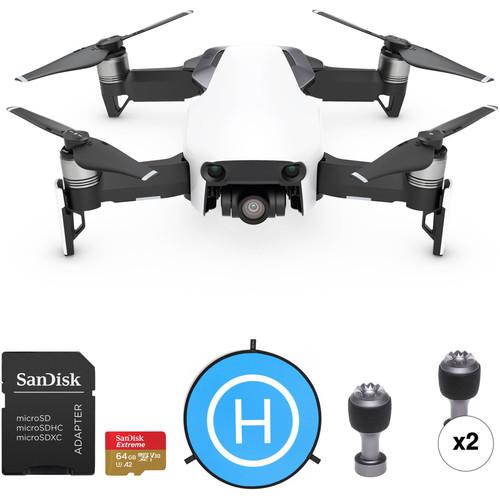
Product description Aerial Photography and Drone Glossary Read More This B&H Kit consists of a DJI Mavic Air Drone with an additional 64GB microSD card and 43.3" drone landing pad, providing you with a more capable and well-rounded UAV experience right out of the box. The additional 64GB of storage gives your DJI Mavic Air the ability to take better advantage of its 3-axis gimbal camera. Store more 12MP photos and longer 4K videos per flight.
With the 43.3" landing pad you can achieve better drone functionality while protecting the drone's camera. The design gives your drone a unique indicator to memorize, which can result in more accurate landings when using the Return-to-Home function. It also helps keep dust and debris from kicking up during takeoffs and landings, which could possibly damage or otherwise negatively affect the performance of the camera lens. - DJI Mavic Air (Arctic White)
- Hands-On Review | DJI Mavic Air
- DJI MAVIC Air Intro
Capture all your adventures in stunning detail with the Mavic Air Fly More Combo from DJI. This foldable, pocket-portable drone was designed with travelers and outdoor enthusiasts in mind. It features a 3-axis gimbal-stabilized camera with a 1.2/3" CMOS sensor that shoots 12MP stills and is capable of capturing 4K video at 30 fps that it can transfer at speeds up to 100 Mb/s or store on its 8GB of internal storage.
In terms of performance, the Mavic Air offers multiple flight modes, can reach a top speed of up to 43 mph, and offers a max flight time of up to 21 minutes. For safety and security, the Mavic Air uses an advanced flight control system that draws on several sophisticated technologies, including Visual Inertial Odometry (VIO) and Advanced Pilot Assistance Systems (APAS), to locate itself in 3D space, detect objects, and avoid collisions.
The Mavic Air works in tandem with DJI's GO 4 mobile app for accessing settings, getting a telemetry readout, viewing a low-latency video feed, as well as more advanced features, such as accessing QuickShots, ActiveTrack, and more. In addition to traditional joystick style controls, you can fly the Mavic with simple tap-based commands or using specific hand gestures. - 3-Axis Gimbal Camera
- The portable Mavic Air houses a 3-axis mechanical gimbal with an angular vibration range reduced to 0.005° and is equipped with dampeners that help ensure steady shooting
- 4K Video at 100 Mb/s
- The Mavic Air can shoot 4K video at 30 fps and record footage at 100 Mb/s
- Advanced Onboard Camera
- The Mavic Air's onboard camera integrates a 1/2.3" 12MP CMOS sensor and an f/2.8 lens with a 35mm-equivalent focal length of 24mm to shoot high-quality photos and videos
- 32 MP Sphere Panoramas
- In addition to horizontal, vertical, and 180° panoramas, the Mavic Air can stitch 25 photos together in eight seconds to create clear 32MP spherical panoramas
- Slow-Motion Video
- With support for recording 1080p 120 fps slow-motion video, the Mavic Air can capture even your most high-speed adventure
- Improved HDR Photos
- New HDR algorithms help you obtain the right exposure settings intelligently, based on lighting conditions
- 8GB Internal Storage
- In addition to an integrated microSD card slot, the Mavic Air comes with 8GB of internal storage so you can save photos and videos directly to the aircraft
UPC: 190021305632 - SanDisk 64GB Extreme UHS-I microSDXC Memory Card with SD Adapter
- Hands-On Review | DJI Mavic Air
- DJI MAVIC Air Intro
Designed for microSD devices such as smartphones, interchangeable-lens cameras, drones, or GoPro action cameras that can capture Full HD, 3D, and 4K video, as well as raw and burst photography, the 64GB Extreme UHS-I microSDXC Memory Card from SanDisk has a capacity of 64GB, is compatible with the UHS-I bus, and features a speed class rating of V30, which guarantees minimum write speeds of 30 MB/s. If your device does not support the V30 standard, this card also supports the U3 standard, which also guarantees minimum write speeds of 30 MB/s. Read speeds are supported up to 160 MB/s and write speeds max out at 60 MB/s.
While this card has been designed for cameras that are UHS-I / V30 / U3 compatible, it may be used in devices that do not support UHS-I / V30 / U3. However, bear in mind that this card will then default to your device's speed class and bus rating, such as UHS-I and U1, which supports minimum write speeds of 10 MB/s, or Class 10, which also supports minimum write speeds of 10 MB/s.
Aside from support for UHS-I, V30, and U3, SanDisk also built this card with support for the Application Performance Class 2 (A2) spec, which includes optimizations to give Android users an improved mobile experience, delivering faster mobile app performance. The A2 spec allows the card to manage random read input-output access per second (IOPS) operations so it can quickly open apps and process accompanying tasks, such as audio, graphics, saved profiles, and in-app permissions.
As with most SanDisk media, this memory card is shockproof, X-ray proof, and waterproof, while also being able to withstand temperatures, allowing you to take this card with you into extreme environments. Should the card's data become compromised, you also benefit from the option to download RescuePRO Deluxe software, and SanDisk's Memory Zone app offers users a simple way to organize, browse, and back up files on their Android mobile device. Additionally, included is a microSD to SD adapter with a write protect switch, allowing this card to be used in SD-compatible devices. General Features - Read speeds up to 160 MB/s, write speeds up to 60 MB/s, and minimum write speeds of 30 MB/s
- Class 10, App Performance Class 2 (A2), Video Speed Class 30 (V30), and UHS Speed Class 3 (U3)
- Water / temperature / shock / x-ray proof
- SanDisk Memory Zone included
- RescuePRO Deluxe one-year file recovery software (download offer)
UPC: 619659169770 - PGYTECH Landing Pad for Drones (43.3")
- Hands-On Review | DJI Mavic Air
- DJI MAVIC Air Intro
Treat your beloved drones to a 43.3" Landing Pad from PGYTECH. Portable and easy to fold, this double-sided pad protects your drone's gimbal and camera during takeoff and landing. The landing pad comes with three pegs for securing it to the ground so it doesn't get blown away by the wind while you're up in the sky. Also included are eight reflective stripes to make landing easier in low-light situations. At the end of the day, just twist-fold the pad, slip it into the included zippered nylon pouch, and you're good to go. - High-precision printing—waterproof and UV-protected
- Springs automatically into shape
UPC: 843225101905 - 2 x DJI Control Sticks for Mavic Air Controller
- Hands-On Review | DJI Mavic Air
- DJI MAVIC Air Intro
The DJI Control Sticks for Mavic Air Controller quickly screw into the controller for easy replacement should one of the included control sticks breaks or gets lost. UPC: 190021308510 In the Box - Mavic Air (Arctic White) cqaytfduvrfrd
- Remote Controller
- Intelligent Flight Battery
- Charger
- Power Cable
- 3 x Pairs of Props
- Set of Prop Guards
- RC Cable (Lightning)
- RC Cable (Micro-USB)
- RC Cable (USB Type-C)
- Gimbal Protector
- Communication Cable
- USB Adapter
- RC Cable Slider (Large)
- 2 x RC Cable Slider (Small)
- Carrying Case
- Limited 6-Month Warranty on Gimbal Camera
- Limited 6-Month Warranty on Vision Positioning System
- Limited 6-Month Warranty on Propulsion System (Excluding Propellers)
- Limited 12-Month Warranty on Remote Controller
- Limited 6-Month / 200-Cycle Warranty on Battery (Whichever Comes First)
- Limited 6-Month Warranty on Battery Charger
- SanDisk - 64GB Extreme UHS-I microSDXC Memory Card with SD Adapter cqaytfduvrfrd
- PGYTECH - Landing Pad for Drones (43.3")
Includes Free - 2 x Control Sticks for Mavic Air Controller
Camera in the Sky: Using Drones in Wedding Photography and Videos Peter Ward_1 02/29/2016 Some Good News for Photographers and Filmmakers Who Use Drones Peter Ward_1 02/23/2015 Table of Contents
|
Upload User Manual
Have you got an user manual for the DJI Mavic Air Drone with 64GB Card & Landing Pad Kit in electronic form? Please send it to us and help us expand our library of instruction manuals.
Thank you, too, on behalf of other users.
To upload the product manual, we first need to check and make sure you are not a robot. After that, your "Submit Link" or "Upload File" will appear.
Technical parameters - DJI Mavic Air (Arctic White)
| | | Maximum Horizontal Speed | 42.5 mph / 68.4 km/h (S Mode)
17.9 mph / 28.8 km/h (P Mode)
17.9 mph / 28.8 km/h (Wi-Fi Mode) | | Maximum Ascent Speed | 9.84 ft/s / 3 m/s | | Maximum Descent Speed | 6.56 ft/s / 2 m/s | | Maximum Wind Resistance | 23.61 mph / 38 km/h | | Flight Ceiling | 16,404' / 5000 m | | Maximum Flight Time | 21 Minutes | | Maximum Hover Time | 20 Minutes | | Maximum Tilt Angle | 35° | | Hovering Accuracy | ±1.64' / 0.5 m Vertical with GPS
±0.33' / 0.1 m Vertical with Vision Positioning
±4.92' / 1.5 m Horizontal with GPS
±0.33' / 0.1 m Horizontal with Vision Positioning | | | | GNSS Support | GPS, GLONASS | | | | Vision System | Downward, Forward, Backward | | Velocity Range | 26.2 ft/s / 8 m/s at 1.6' / 0.5 m | | Maximum Altitude | 26' / 8 m | | Operating Range | 1.6 to 98.4' / 0.5 to 30.0 m | | Obstacle Sensory Range | 1.6 to 78.7' / 0.5 to 24.0 m | | Forward Field of View | 50° (Horizontal)
±19° (Vertical) | | Backward Field of View | 50° (Horizontal)
±19° (Vertical) | | Operating Environment | Surface with Clear Patterns at >15 lux | | | | Operating Frequency | 2.4 GHz (2.4 - 2.483)
5.8 GHz (5.725 - 5.850) | | Maximum Operating Distance | 13,123.36' / 4000 m at 2.4 G
13,123.36' / 4000 m at 5.8 G | | Transmitter Power | 26 dBm (2.4 G)
30 dBm (5.8 G) | | Connectivity | 1 x USB Type-C
1 x USB Type-A | | Battery Type | 1 x Built-In | | Battery Chemistry | Lithium-Ion Polymer (LiPo) | | Battery Capacity | 2970 mAh | | Mobile Device Compatibility | Devices up to 6.30" / 160 mm Wide and 0.334" / 8.48 mm Thick | | App Operating System Requirements | iOS 9.0 and later
Android 4.4 and later | | Operating Temperature | 32 to 104°F / 0 to 40°C | | | | Sensor | 1/2.3" CMOS | | Effective Pixels | 12 MP | | Focal Length | 24mm / 35mm (35mm Equivalent) | | Lens Field of View | Diagonal: 85° | | Aperture | f/2.8 | | Minimum Focusing Distance | 19.7" / 50.0 cm | | Photo ISO Range | 100 - 1600 (Auto)
100 - 3200 (Manual) | | Video ISO Range | 100 - 1600 (Auto)
100 - 1600 (Manual) | | Electronic Shutter Speed | 8 - 1/8000 Second | | Photo Resolution | 4:3: 4056 x 3040
16:9: 4056 x 2280 | | Photo Format | JPEG, DNG | | Video Format | 3840 x 2160p at 24/25/30 fps (100 Mb/s MP4 via H.264)
2720 x 1530p at 24/25/30/48/50/60 fps (100 Mb/s MP4 via H.264)
1920 x 1080p at 24/25/30/48/50/60/120 fps (100 Mb/s MP4 via H.264)
1280 x 720p at 24/25/30/48/50/60/120 fps (100 Mb/s MP4 via H.264) | | Recording Media | microSD (Up to 128 GB) | | Photo Modes | Auto-Exposure Bracketing (AEB), Burst Shooting, Interval, Single Shot | | | | Number of Axes | 3 (Pitch, Roll, Yaw) | | Control Range | Pitch: -90 to 17° | | Angular Speed | Pitch: 120°/s | | | | Battery Chemistry | Lithium-Ion Polymer (LiPo) | | Capacity | 2375 mAh / 27.43 Wh | | Battery Configuration | 3 S / 11.55 V | | Maximum Charging Power | 60 W | | Charging Temperature | 41 to 104°F / 5 to 40°C | | Weight | 4.94 oz / 140 g | | | | AC Input Power | 100 to 240 VAC, 50 / 60 Hz | | Output Voltage | 13 V, 4 A | | Power Rating | 50 W | | | | Number of Rotors | 4 | | Operating Temperature | 32 to 104°F / 0 to 40°C | | Diagonal Size | 8.4" / 213 mm (Without Propellers) | | Overall Dimensions | 6.6 x 7.2 x 2.5" / 168.0 x 184.0 x 64.0 mm (Folded) | | Weight | 0.95 lb / 430 g | | | | Box Dimensions (LxWxH) | 9.5 x 7.5 x 4.75" | - SanDisk 64GB Extreme UHS-I microSDXC Memory Card with SD Adapter
| Card Type | microSDXC | | Storage Capacity | 64 GB | | Bus Type | UHS-I | | Speed Class | 10 | | UHS Speed Class | U3 | | Video Speed Class | V30 | | Application Performance Class | A2 | | Data Transfer | Read Speed: 160 MB/s Maximum (Burst)
Write Speed: 60 MB/s Maximum (Burst)
Write Speed: 30 MB/s Minimum | | Durability | Shockproof, Temperature Extremes, Waterproof, X-Ray Proof | | Operating Temperature | -13 to 185°F/ -25 to 85°C | | Storage Temperature | -40 to 185°F/ -40 to 85°C | | Wireless Capability | None | | | | Box Dimensions (LxWxH) | 6.5 x 4.3 x 3.7" | - PGYTECH Landing Pad for Drones (43.3")
| Material | Nylon | | Diameter | Folded: 16.5" / 42 cm
Open: 43.3" / 110 cm | | Weight | 18.9 oz / 535 g | | | | Box Dimensions (LxWxH) | 15.1 x 15.0 x 1.3" | - 2 x DJI Control Sticks for Mavic Air Controller
| | | Box Dimensions (LxWxH) | 6.5 x 3.5 x 0.2" |
Rating70% users recommend this product to others. And what about you?

This product has already been rated by 88 owners. Add your rating and experience with the product.
Discussion
 Ask our technicians if you have a problem with your settings,
or if anything is unclear in the user manual you have downloaded.
You can make use of our moderated discussion.
The discussion is public and helps other users of our website who may be encountering similar problems.
Ask our technicians if you have a problem with your settings,
or if anything is unclear in the user manual you have downloaded.
You can make use of our moderated discussion.
The discussion is public and helps other users of our website who may be encountering similar problems.
The discussion is empty - enter the first post
Post a new topic / query / comment:
|
|
|
| Request for user manual |
You can’t find the operation manual you are looking for? Let us know and we will try to add the missing manual:
I’m looking for a manual / Request for manual
Current requests for instruction manuals:
Call Of Duty World War Two For Xbox...
controller stratus XL...
stratus XL...
smart whatch serie S11 42mm...
Allen & Heath SQ-6 manual...
|
| Discussion |
Latest contributions to the discussion:
AEW R 4100
Name: MAURICIO ANGARITA
Audio-Technica AEW-R4100 UHF Diversity Receiver for
AEW R 4100 has the mute function blocked and does not allow audio to pass. I tried several times to turn off the mute from the transmitter but it does nothing, the mute stays on. Solution?
Thank you...
Instructions for assembling the 2015 Forecast Image Master Consoles GC3-A
Name: mike elam
Forecast Consoles GC3-A ImageMaster Editing Console
Looking for instructions for assembling this console. ...
EMPTY TONER ERROR MESSAGE AFTER REPLACING TONER
Name: LINDA BAD YELLOW EYES
Brother TN223BK Standard-Yield Toner
I HAD TO CHANGE OUT ALL THREE TONERS DUE TO LEAKS IN THE YELLOW AND CYAN. AFTER I REPLACED THEM, THE MACHINE KEEPS GIVING ME AN EMPTY TONER ERROR MESSAGE. HELP!!...
PS480D 20/24 pin Switching 480W Power Supply
Name: swkargo
Logisys 480W Power Supply
This item states in can run -5vdc .It is NOT listed on the board or I beleive is r4 is missing the resitior. Any body have thid issue. Shawn
...
Help needed
Name: Ann Carter
SanDisk 1TB Extreme Portable USB 3.1
When I click the link to download the user manual for my Sandisk Extreme external hard drive, it gives me the manual for the LG Cricket. Can you please change the link so I can download the Sandisk manual and begin using this drive? Thank you....
|
|


