|
User Manual for DJI Mavic Pro Bundle with Shoulder Bag and Accessories Click to enlarge the picture
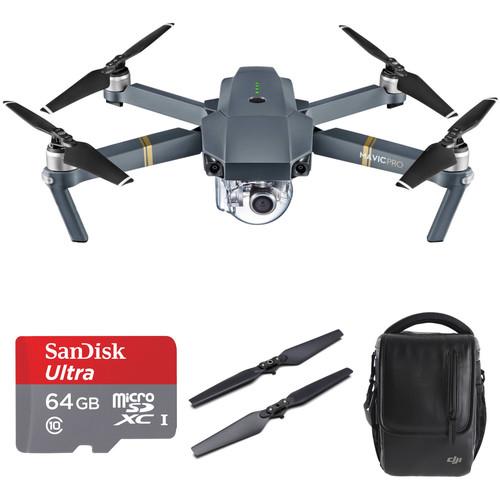 Contents of the user manual for the DJI Mavic Pro Bundle with Shoulder
- Product category: See All Drones DJI
- Brand: DJI
- Description and content of package
- Technical information and basic settings
- Frequently asked questions – FAQ
- Troubleshooting (does not switch on, does not respond, error message, what do I do if...)
- Authorized service for DJI See All Drones
|
User manual for the DJI Mavic Pro Bundle with Shoulder contain basic instructions
that need to be followed during installation and operation.
Before starting your appliance, the user manual should be read through carefully.
Follow all the safety instructions and warnings, and be guided by the given recommendations.
User manual is an integral part of any DJI product,
and if it is sold or transferred, they should be handed over jointly with the product.
Following the instructions for use is an essential prerequisite for protecting
health and property during use, as well as recognition of liability on the part of the manufacturer
for possible defects should you make a warranty claim. Download an official DJI user manual in which you will find instructions on how to install, use, maintain and service your product.
And do not forget – unsuitable use of a DJI product will considerably shorten its lifespan!
|
Product description Aerial Photography and Drone Glossary Read More This Mavic Pro Bundle from includes everything you need for high-flying aerial adventures and photography. This bundle comes with a Mavic Pro quadcopter, 64GB microSD card, propellers, and a shoulder bag for transporting your gear.
The Mavic Pro is an agile, high-speed flyer capable of capturing high-res images and video. It features an advanced flight control system, gimbal-stabilized camera setup, 4.3-mile operational range, top speed up to 40 mph, and much more. It can be used for multiple applications, including aerial cinematography and hobbyist flying. The included 64GB microSD card will allow you to store all your aerial adventures, and the extra propellers will help keep you flying in case there's an accident. - DJI Mavic Pro (Standard Bundle)
- First Look: DJI Mavic Pro
- DJI - Introducing the DJI Mavic
The Mavic from DJI packs features you once thought possible only on much larger platforms into a compact quadcopter that is snappy, agile, and captures high-resolution images. The drone features an advanced flight control system that draws on a host of sensors — including a ground-facing camera, ultrasound, GPS, dual redundant IMUs, and more — to keep track of where it is flying in 3D space and even avoid collisions. The Mavic works in tandem with DJI's GO mobile app for accessing settings, getting a telemetry readout, viewing a low-latency video feed, and even editing and sharing your footage. In addition to traditional joystick style controls, you can fly with simple tap-based commands, and the Mavic can even recognize gestures for the perfect selfie.
Long Range Flying - OcuSync Transmission Technology
- OcuSync long-range-transmission technology is capable of relaying a signal up to 4.3 miles line-of-sight while supporting 720p HD video (1080p HD transmission in short-range mode). Every time you fly, OcuSync scans a range of available frequencies to find and use the one with the least interference to give you more reliability and control. Tightly integrated with the DJI GO app, OcuSync transfers vital statistics of the Mavic to you in real time, and can also be used to download photos and videos at up to 40 Mbps while flying.
- Efficient Design
- Custom-designed, high-energy-density batteries; an optimized propulsion system; and advanced power management give the Mavic a much longer flight time than many compatible platforms in its size class. This results in flight times of up to 27 minutes under ideal conditions and up to 21 minutes for average flights.
Integrated Camera and Gimbal - 3-Axis Gimbal Stabilizer
- Using three specially miniaturized brushless motors and advanced algorithms, the camera moves in the opposite direction to the Mavic, cancelling out unwanted movement for the smoothest possible video.
- DCI & UHD 4K and Full HD Video
- The Mavic Pro camera shoots 4K video (up to 4096 x 2160) at 30 frames per second and Full HD 1080p at 96 frames per second, so you can create incredible slow motion. Its minimum focusing distance is just 19", making it perfect for everything from the ultimate aerial selfies to landscape shots.
- ActiveTrack Subject Tracking Modes
- With ActiveTrack, just tell the Mavic who to track and it handles the rest. No GPS bracelets or transmitters are required. The Mavic has been trained to detect and recognize a number of common subjects including people, bike riders, vehicles, and even animals. Once you have marked your subject, you can fly around them to create a huge variety of shots, depending on the mode you are in. As the Mavic is tracking, you can even select exactly where you want the subject in the frame.
Three modes are available:
Trace - Follow behind or in front of your subject, or circle it as it moves
Profile - Fly alongside your subject
Spotlight - Keep the camera trained on your subject while you fly almost anywhere - 12MP Raw/JPEG Still Photos
- Every photo you take with the Mavic can be as big as 12 megapixels, with the ability to save in DNG raw or JPEG. You can even flip the camera 90-degrees for portrait oriented shots, just like you do with your phone.
- Selfie Mode with Gestures
- Put away your controller and phone to get that perfect, natural selfie. All you need to do is put the Mavic in Gesture Mode and walk in front of it. The Mavic will automatically detect you. Raise your arms or wave to it to make it follow you, and when you're ready for your photo, make a box shape with your fingers. The lights under the Mavic's front arms will start to flash, and you will have three seconds to strike your pose before it takes a photo.
- Tripod Mode
- Tripod Mode caps the Mavic's maximum speed at just 2.2 mph, while the control stick sensitivity of the remote controller is dulled to give you the precision you need for accurate framing. It is also great for flying indoors or other small spaces where the Mavic's normal speed may make it more challenging to fly.
Flight Control System - FlightAutonomy
- FlightAutonomy is the Mavic's brain and nervous system: a complex network of hardware and software that includes five cameras, GPS/GLONASS, a pair of ultrasonic range finders, redundant sensors, and a group of 24 CPUs to process and fuse all of this information.
- Navigation System
- The Mavic is able to position itself accurately in a range of environments, beyond what is possible using basic "optical flow" technology, which depends on a single downward-facing camera and assumes that the ground below is always flat. Mavic is able to sense its environment in 3-dimensions and react to it, ensuring it hovers steadily, whether it is high up on the side of a cliff where downward sensors have no target, or under a forest canopy where satellite positioning is blocked and the ground is covered in uneven markings and obstacles.
- Precision Landing
- Precision Landing technology means the Mavic is able to automatically land almost exactly where you took off. Every time you take off, the two downward-facing vision sensors record a burst of video of the ground pair it with satellite coordinates. When you tell the Mavic to fly home, it will return to that coordinate, match the video, and land back at your feet.
- Collision Avoidance
- As the Mavic flies, it scans the world around it, creating a 3D map that tells it exactly where it can fly and what it needs to avoid. Because it uses vision processing, it can see up to 98' in front and can accurately measure distance up to 49' in front, making it significantly more accurate than sonar based avoidance technologies. When the Mavic detects an obstacle and sees a way around it, it will simply adjust its route to fly around it. If it can't see a way around, it will slow to a stop gently and hover until you tell it what to do next.
This obstacle avoidance system is activated in every Intelligent Flight Mode, including all ActiveTrack modes, TapFly, and Terrain Follow. If you use Automatic Return to Home, it switches on too, so that as the Mavic makes its way back to you, it won't bump into anything in its path. Avoidance is effective when flying at speeds up to 22 mph. - Sport Mode
- Sport Mode was designed for fun, giving the Mavic a top speed of 40 mph, all the while ramping up agility and responsiveness, to give you a taste of drone racing. You can also use it to film something fast, or zip out to catch a shot before the moment passes. Even in Sport Mode, the Mavic will stop immediately if you let go of the controls.
- Dual-Sensor Redundancy
- In flight, the Mavic uses its compass to tell it where it is heading and the Inertial Measurement Unit (IMU) to tell it how it is flying. An interruption in the data flow from either of these may cause it to fly less reliably, which is why the Mavic has not one, but two of each. Whenever the system detects an inconsistency in one, it switches to the other, keeping your flight steady and reliable.
- Terrain Follow
- When you are flying over changing terrain, like following bikers riding uphill, the Mavic's Terrain Follow function uses height information gathered by the on-board ultrasonic system, and its downward-facing cameras to keep you flying at the same height above the ground even as the ground moves. Just set the height from the ground you want — from 9 to 33' — and focus on getting the right shot.
DJI GO Mobile App - DJI GO is your Mavic's control center. When your phone or device is connected to the Mavic, it shows you everything the camera sees in near real-time, so you can set up and frame every shot as if you are actually there. It also gives you full manual camera controls for photos and videos, including ISO, shutter, and file format. It even lets you fine-tune your Mavic so that it flies exactly how you want it to.
- Fly-by-Phone
- Sometimes a phone is all you need to fly. Not only does the Mavic support flying on your phone with virtual joysticks, but you also have full access to all of its Intelligent Flight Modes: TapFly, Trace, Spotlight, Profile, and Circle.
- Tap Flying
- When you tap on your phone's screen, software translates your touch into a heading, including whether you want it to climb or descend. When you want to change direction, just tap somewhere else on your screen and the Mavic will smoothly turn to the new destination.
- Shoot. Edit. Share.
- Automatic video editing templates, simple video editing functions, and easy photo and video management bring together the tools you need to make epic videos right in your phone. All you need to do is choose the shots you think will amaze, which you can then share straight to Facebook, YouTube, Twitter, Instagram, and more, as well as SkyPixel, DJI's own community dedicated to aerial imaging.
DJI Goggle Compatibility - The separately available DJI Goggle are FPV goggles designed to make flying totally immersive. The feature two 1080p LTPS displays with a wide 85° angle of view to give you a bird's eye view of the world around you. Built-in OcuSync connectivity means that it links directly to the Mavic and not through a cable or a Wi-Fi link to the controller. This seamless connection yields a delay of only 120 milliseconds.
Intelligent Flight Batteries - The Intelligent Flight Battery has its own integrated battery-management system that takes into account everything from remaining voltage, amount of power being used, temperature, and more to calculate remaining flight times, so you always know when to head home. It also has a host of protection mechanisms in place to prevent overcharging and over draining, both of which can damage a LiPo battery permanently. When placed in longer term storage, LiPo batteries should only be kept at 50% charge. Any more or less could cause permanent damage. If left unused, DJI Intelligent Flight Batteries will discharge power until 50% to maintain good health.
- If you live in a cold place or plan to fly on a winter break, low-temperature protection will activate. This controls available propulsion power based on the temperature of the battery, so that only a fully-warmed-up battery can offer full power.
UPC: 190021279605 - SanDisk 64GB Ultra UHS-I microSDXC Memory Card (Class 10)
- First Look: DJI Mavic Pro
- DJI - Introducing the DJI Mavic
Designed for use in Android smartphones and tablets, the class 10 64GB Ultra UHS-I microSDXC Memory Card is a micro-size Secure Digital Extended Capacity memory card. With 64GB of data storage capacity, the card provides ample space for photos and videos captured with your camera or smartphone. Download the Memory Zone app from the Google Play store and easily manage your media right from your phone.
This microSDXC memory offers an SD Class 10 rating along with an Ultra High Speed Class 1 rating, for read speeds up to 100 MB/s and lower write speeds that should at least be able to exceed the Class 10 minimum of 10 MB/s. These speeds make the card ideal for capture and transfer of full HD 1080p video. A built-in write-protect switch found on the SD adapter prevents accidental data loss.
You can insert the card into any microSDXC-compatible device, such as a mobile phone. Plus, the included microSD adapter enables you to insert the card into any full-sized SD slot, making it compatible with SDXC-compatible devices like digital cameras and card readers. As far as durability, this compact memory solution is waterproof, shockproof, and protected against X-rays. It's also backed by a ten-year limited warranty in the USA. - Micro-size Secure Digital High Capacity card
- With 64GB of data storage capacity, this card provides ample space for photos, videos, apps, and more
- With SD Class 10 and Ultra High Speed Class 1 ratings, you benefit from data transfer rates of up to 100 MB/s and lower write speeds.
- Built-in write-protect switch, found on the SD adapter, prevents accidental data loss
- You can insert the card into any microSDXC micro-compatible device. Plus, the included microSD adapter enables you to insert the card into any full-sized SD slot, making it compatible with SDXC-compatible devices like digital cameras and card readers
- As far as durability, this compact memory solution is waterproof, shockproof, and protected against X-rays
- Backed by a ten-year limited warranty in the USA
UPC: 619659134792 - DJI 7728 Quick Release Folding Propellers for Mavic Pro Quadcopter
- First Look: DJI Mavic Pro
- DJI - Introducing the DJI Mavic
The 7728 Quick Release Folding Propellers for Mavic Pro Quadcopter from DJI are designed to be used in combination with the Mavic Propeller Cage. The propellers feature a folding design that reduces the drone's footprint when not in use. Quick release attachment enables them to be installed or removed easily, without special tools.
Note: These propellers should only be used together with the Propeller Cage. Please do not use these propellers without the propeller cage, or else the flight time and maximum thrust will be reduced. UPC: 190021282599 - DJI Shoulder Bag for Mavic Pro
- First Look: DJI Mavic Pro
- DJI - Introducing the DJI Mavic
The Shoulder Bag for Mavic Pro from DJI provides a convenient way to transport and store your drone and accessories. It will accommodate the drone, four flight batteries, remote, a smartphone, and other miscellaneous items. The Shoulder Bag Accommodates: - Various smaller accessories, such as cables
UPC: 190021282711 In the Box - Mavic Pro (Standard Bundle) etrvtedsufcsrtarzquyyqtfrxce
- Remote Controller
- Intelligent Flight Battery for Mavic Quadcopter
- 3 x 8330 Quick Release Folding Propellers for Mavic Drone
- Gimbal Clamp
- Charger
- AC Power Cable for Charger
- 16GB microSD Card
- Micro-USB Cable
- RC Cable for Mavic Controller (Lightning)
- RC Cable for Mavic Controller (Reverse Micro-USB)
- 2 x RC Cable Slider
- Limited 12-Month Warranty on MC
- Limited 6-Month Warranty on Gimbal Camera
- Limited 6-Month Warranty on Vision Positioning System
- Limited 6-Month Warranty on Propulsion System (Excluding Propellers)
- Limited 12-Month Warranty on Remote Controller
- Limited 6-Month / 200-Cycle Warranty on Battery (Whichever Comes First)
- Limited 6-Month Warranty on Battery Charger
- SanDisk - 64GB Ultra UHS-I microSDXC Memory Card (Class 10) etrvtedsufcsrtarzquyyqtfrxce
Includes Free - 7728 Quick Release Folding Propellers for Mavic Pro Quadcopter
- Shoulder Bag for Mavic Pro
Camera in the Sky: Using Drones in Wedding Photography and Videos Peter Ward_1 02/29/2016 Some Good News for Photographers and Filmmakers Who Use Drones Peter Ward_1 02/23/2015 More info from DJI Table of Contents
|
Upload User Manual
Have you got an user manual for the DJI Mavic Pro Bundle with Shoulder Bag and Accessories in electronic form? Please send it to us and help us expand our library of instruction manuals.
Thank you, too, on behalf of other users.
To upload the product manual, we first need to check and make sure you are not a robot. After that, your "Submit Link" or "Upload File" will appear.
Technical parameters - DJI Mavic Pro (Standard Bundle)
| | | Maximum Speed | Sport Mode: 40 mph / 65 km/h (no wind) | | Maximum Ascent Speed | Sport Mode: 16.4 ft/second (5 m/second) | | Maximum Descent Speed | Sport Mode: 9.8 ft/second (3 m/second) | | Flight Ceiling | 16,404' / 5000 m above sea level | | Flight Time | Up to 27 minutes (no wind at a consistent 15.5 mph / 25 km/h) | | Hover Time | Up to 24 minutes (no wind) | | Flight Distance | Up to 8' / 13 km (no wind) | | | | Sensor Range | Precision Measurement Range: 2 to 49' / 0.7 to 15 m
Detectable Range: 49 to 98' / 15 to 30 m | | | | Velocity Range | Up to 22.4 mph (36 km/h) at 6.6' (2 m) above ground level | | Altitude Range | 1 to 43' / 0.3 to 13 m | | Operating Environment | Surface with clear pattern and adequate lighting (> 15 lux) | | | | Frequency | 2.4 to 2.483 GHz | | Communication Distance | 4.3 miles / 7 km (line-of-sight) | | Transmit Power | Up to 26 dBm | | Operating Current | 950 mA at 3.7 V | | Battery | Chemistry: Lithium-ion polymer (LiPo)
Capacity: 2970 mAh | | Mobile Device Holder | Thickness Supported: 0.24 to 0.33" / 6.5 to 8.5 mm
Max Length: 6.3" / 160 mm
Supported USB Port Types: Lightning, micro-USB, USB Type-C | | | | Sensor | Type: 1/2.3" CMOS
Effective Pixels: 12.35 million
Total Pixels: 12.71 million | | Lens | FOV: 78.8°
Focal Length: 28 mm (35 mm format equivalent) Aperture: f/2.2
Distortion: < 1.5%
Focus Range: 1.6' (0.5 m) to ∞ | | ISO Range | Video: 100 to 3200
Photo: 100 to 1600 | | Electronic Shutter Speed | 8 second to 1/8000 second | | Photo Resolution | Up to 4000 x 3000 (12 MP) | | Photo Modes | Single shot
Burst shooting: 3/5/7 frames
Auto Exposure Bracketing (AEB): 3/5 bracketed frames at 0.7 EV bias
Interval | | Video Resolutions | DCI 4K (4096 x 2160): 24p
UHD 4K (3840 x 2160): 24/25/30p
2.7K (2704 x 1520): 24/25/30p
FHD (1920 x 1080): 24/25/30/48/50/60/96p
HD (1280 x 720): 24/25/30/48/50/60/120/180p | | File Formats | Video: MPEG-4 AVC/H.264 in MOV wrapper
Photo: JPEG, DNG RAW | | Recording Media | 60 Mbps | | Recording Media | Type: microSDHC/SDXC card up to 64 GB
Format: FAT32 / exFAT
Note: Class 10/U1/V10 or faster card required (64 GB maximum size) | | Operating Temperature | 32 to 104°F / 0 to 40°C | | | | Number of Axes | 3-axis (pitch, roll, yaw) | | Control Range | Pitch: -90° to +30°
Roll: 0° / 90° (horizontally / vertically) | | | | Chemistry | Lithium-ion polymer (LiPo) | | Capacity | 3830 mAh / 43.6 Wh | | Configuration | 3 S | | Voltage | 11.4 V | | Maximum Charging Power | 100 W | | Operating Temperature | 41 to 104°F / 5 to 40°C | | Weight | 0.5 lb / 240 g | | | | Output Voltage | 13.05 V | | Rated Power | 50 W | | | | Operating Temperature | 32 to 104°F / 0 to 40°C | | Weight | Including Battery and Propellers:
1.62 lb / 734 g (excluding gimbal cover) 1.64 lb / 743 g (including gimbal cover) | | | | Box Dimensions (LxWxH) | 9.8 x 9.7 x 4.5" | - SanDisk 64GB Ultra UHS-I microSDXC Memory Card (Class 10)
| Card Type | microSDXC | | Storage Capacity | 64 GB | | Speed Class | 10 | | Bus Interface Speed | UHS Class I | | Data Transfer | Read Speed: 100 MB/s Maximum (Burst) | | Durability | Shockproof, Waterproof, X-Ray Proof | | Operating Temperature | -13 to 185°F/ -25 to 85°C | | Storage Temperature | -40 to 185°F/ -40 to 85°C | | | | Box Dimensions (LxWxH) | 6.0 x 4.0 x 0.5" | - DJI 7728 Quick Release Folding Propellers for Mavic Pro Quadcopter
| Dimensions | Diameter x Thread: 7.7 x 2.8" / 19.6 × 7.1 cm | | Weight | 0.2 oz / 6.5 g | | | | Box Dimensions (LxWxH) | 4.0 x 2.3 x 1.0" | - DJI Shoulder Bag for Mavic Pro
| Exterior Dimensions | 6.9 x 4.9 x 8.3" / 17.5 x 12.5 x 21 cm | | Weight | 6.6 lb / 3 kg | | | | Box Dimensions (LxWxH) | 10.0 x 6.8 x 5.4" |
Rating40% users recommend this product to others. And what about you?

This product has already been rated by 97 owners. Add your rating and experience with the product.
Discussion
 Ask our technicians if you have a problem with your settings,
or if anything is unclear in the user manual you have downloaded.
You can make use of our moderated discussion.
The discussion is public and helps other users of our website who may be encountering similar problems.
Ask our technicians if you have a problem with your settings,
or if anything is unclear in the user manual you have downloaded.
You can make use of our moderated discussion.
The discussion is public and helps other users of our website who may be encountering similar problems.
The discussion is empty - enter the first post
Post a new topic / query / comment:
|
|
|
| Request for user manual |
You can’t find the operation manual you are looking for? Let us know and we will try to add the missing manual:
I’m looking for a manual / Request for manual
Current requests for instruction manuals:
Call Of Duty World War Two For Xbox...
controller stratus XL...
stratus XL...
smart whatch serie S11 42mm...
Allen & Heath SQ-6 manual...
|
| Discussion |
Latest contributions to the discussion:
AEW R 4100
Name: MAURICIO ANGARITA
Audio-Technica AEW-R4100 UHF Diversity Receiver for
AEW R 4100 has the mute function blocked and does not allow audio to pass. I tried several times to turn off the mute from the transmitter but it does nothing, the mute stays on. Solution?
Thank you...
Instructions for assembling the 2015 Forecast Image Master Consoles GC3-A
Name: mike elam
Forecast Consoles GC3-A ImageMaster Editing Console
Looking for instructions for assembling this console. ...
EMPTY TONER ERROR MESSAGE AFTER REPLACING TONER
Name: LINDA BAD YELLOW EYES
Brother TN223BK Standard-Yield Toner
I HAD TO CHANGE OUT ALL THREE TONERS DUE TO LEAKS IN THE YELLOW AND CYAN. AFTER I REPLACED THEM, THE MACHINE KEEPS GIVING ME AN EMPTY TONER ERROR MESSAGE. HELP!!...
PS480D 20/24 pin Switching 480W Power Supply
Name: swkargo
Logisys 480W Power Supply
This item states in can run -5vdc .It is NOT listed on the board or I beleive is r4 is missing the resitior. Any body have thid issue. Shawn
...
Help needed
Name: Ann Carter
SanDisk 1TB Extreme Portable USB 3.1
When I click the link to download the user manual for my Sandisk Extreme external hard drive, it gives me the manual for the LG Cricket. Can you please change the link so I can download the Sandisk manual and begin using this drive? Thank you....
|
|


