User Manual for DJI Ronin-S Kit with Easyrig Minimax, Kong Quick Release, and Umbrella Click to enlarge the picture
 Contents of the user manual for the DJI Ronin-S Kit with Easyrig Minimax,
- Product category: See All Gimbal Stabilizers DJI
- Brand: DJI
- Description and content of package
- Technical information and basic settings
- Frequently asked questions – FAQ
- Troubleshooting (does not switch on, does not respond, error message, what do I do if...)
- Authorized service for DJI See All Gimbal Stabilizers
|
User manual for the DJI Ronin-S Kit with Easyrig Minimax, contain basic instructions
that need to be followed during installation and operation.
Before starting your appliance, the user manual should be read through carefully.
Follow all the safety instructions and warnings, and be guided by the given recommendations.
User manual is an integral part of any DJI product,
and if it is sold or transferred, they should be handed over jointly with the product.
Following the instructions for use is an essential prerequisite for protecting
health and property during use, as well as recognition of liability on the part of the manufacturer
for possible defects should you make a warranty claim. Download an official DJI user manual in which you will find instructions on how to install, use, maintain and service your product.
And do not forget – unsuitable use of a DJI product will considerably shorten its lifespan!
|
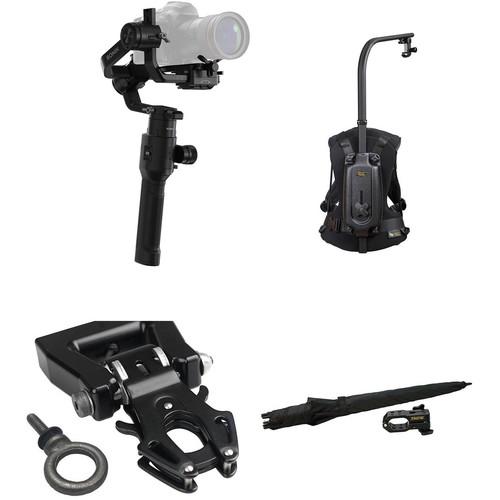
Product description Relieve your arms and keep your equipment dry with this DJI Ronin-S Kit put together by B&H. The Ronin-S stabilizer gimbal for DSLR or mirrorless cameras comes with a variety of accessories such as cables, a battery, a power supply, mounts and supports, and a focus wheel. The Easyrig Minimax support vest redistributes the weight from the Ronin-S and relieves the strain on your arms. The 16x9 Kong Quick Release Adapter with 1/4"-20 Eyebolt replaces the original hook on the Minimax upper arm to quickly mount and unmount your Ronin-S and camera using an eyebolt. The included Minimax Umbrella with Holder mounts onto the upper arm of the Minimax and protects you and your camera from sun or rain. - DJI Ronin-S
- Hands-on Review - DJI Ronin S
- DJI Introducing Ronin S
The DJI Ronin-S is more than just a miniaturized version of the larger Ronin gimbal stabilizers; it represents a scalable ecosystem for integrating DSLR and mirrorless cameras into professional-grade workflows. The single-handed form factor of the Ronin-S lends itself to lighter camera payloads, up to eight pounds. But don't let its size fool you; the Ronin-S has a lot going on under the hood. Separate modules are available for the handle and accessory docks, allowing you to customize the gimbal based on how you wish to operate it. While using the conventional battery grip, the Ronin-S will last up to 12 hours on a single charge.Between the front trigger, the rear mode button, and the joystick, precise gimbal control lets you obtain the shots you require. The front trigger can lock the gimbal when held, re-center the gimbal when tapped twice, and engage the Selfie mode by turning 180° when tapped three times. Press the mode button to engage three customizable operation profiles, each with tuneable speed and response for different shooting scenarios. If fast-moving subjects are your forte, the Sport mode delivers extra-quick response times and fast gimbal movements, up to a maximum speed of 45 mph. With this operation flexibility, the Ronin-S will fit into documentary, event, and feature film workflows.Everything you need to get started shooting with the Ronin-S comes with the gimbal. A sliding camera mounting plate for attaching your camera and balancing works with the included lens support and riser to secure your mirrorless or DSLR camera of choice. USB Type-C and Type-B cables are included for camera control functions like start/stop and focus pulling (depending on camera compatibility). A 24W USB charger is included for quick-charging the gimbal. The gimbal and all included accessories can be stored inside the included case, which helps protect your equipment during storage and transport. Automated Creative Features - Panorama
- Use the Ronin-S to capture panoramic photos using precise gimbal movements.
- Time-Lapse and Motion-Lapse
- Using the DJI Ronin app for Android and iOS you can control your camera to take photos at specific intervals which, when combined and sequenced in post, can yield creative time-lapse movies. You can also pre-set a path for the gimbal to follow during time-lapse photography inside the app as well. Gimbal movement adds dynamic motion to your finished product without using post-production tools that can decrease resolution.
- Tracking
- With the Track function, you can program a repeatable gimbal movement. Having this functionality is great for when you need to block out scenes precisely and require complex camera moves to be executed without active operator input.
General Features - Included Focus Wheel
- A Focus Wheel is included for pulling focus with select camera systems with compatible lenses, or with a separately available focus motor. It attaches right to the side of the unit for seamless integration and a unified appearance.
- Offset Roll Motor
- By offsetting the roll motor, the Ronin-S holds the camera above the roll axis, leaving the camera's LCD screen unblocked. This design also minimizes the camera shake that occurs when transitioning from upright to underslung modes and vice versa.
- SmoothTrack
- Customize the response of the Ronin-S to fit your shooting style. Two response types can be saved and instantly recalled with a single click of the mode button. Go from smooth camera movement to rapid response with the flick of a switch to be ready for any kind of shooting situation.
- Modular Design
- The Ronin-S was built to be modular. Direct-connected and wireless accessories are supported. For example, separately available DJI control devices, such as the Master Wheels and Master Force, enhance the usability of the Ronin-S in professional scenarios. The S-Bus connection supports third-party controls compatible with that standard protocol.
- Versatility
- The Ronin-S can mount to an RC buggy for low angle shots or even act as a stabilized remote head when mounted to a jib. The DJI Focus Command Unit can be mounted to the accessory dock, enabling creators to pull focus when operating with the standard handle. You can also attach the Ronin-S to a dual-handheld bar without compromising control of the gimbal, focus, or the camera shutter.
- Multitasker
- Multiple accessory mounts are allocated on the Ronin-S, providing full support for add-ons such as a microphone, LED light, or a wireless video transmitter. Compatibility with DJI control devices such as Master Force provides intuitive controls. The Master Wheels are also able to provide remote operators precise gimbal movements.
- Additional Features
- Advanced 32-bit ARM processor
DJI specialized gimbal drive motors with encoders
Support for 2.4/5.8 GHz receivers
Support for D-Bus receiver
Support for extended GPS
360° continuous rotation through slip ring
Three profile settings, including SmoothTrack and joystick parameters
Support for virtual joystick operation
Support for time-lapse, track, and panorama
Sport mode support
Roll 360° rotation support
Quick record function UPC: 190021317420 - Easyrig Minimax
- Hands-on Review - DJI Ronin S
- DJI Introducing Ronin S
Useful for documentaries, news, events, and more, the Easyrig Minimax is great for situations which require extensive handheld camera work with cameras weighing from 4.4 to 15.4 pounds. Rather than uncomfortably handholding your camera, supporting the weight with your arms, the Minimax redistributes the weight of your camera setup through the body harness. Taking the weight off your arms lets you hold the camera steady for longer periods of time without fatigue. An added bonus of the Minimax is increased stability in your shots. The support rope, while transferring the weight to the harness, also adds a point of contact, reducing vibrations.The Minimax model features a redesigned spring system which results in smoother support rope movement with reduced friction. A conical wheel unrolls the rope with increasing force as the rope is unraveled. Additionally, an overload protection system will trip if the maximum weight capacity is exceeded. Another improvement included in the Minimax model is the pivoting upper arm brought down from the Easyrig 3 Cinema model. The pivot allows you to swing the camera to the side, or even have it sit on your shoulder. - 16x9 Kong Quick Release Adapter for Easyrig with 1/4"-20 Eyebolt
- Hands-on Review - DJI Ronin S
- DJI Introducing Ronin S
Replace the original camera hook that comes with your Easyrig gimbal with this heavy-duty Kong Quick Release Adapter from 16x9. Simply untie the original hook from the top line and tie it to the top of the Kong adapter. The quick release aluminum clamp makes it easy to attach and detach your camera from the gimbal with a pinch. The adapter comes with a 1/4"-20 eyebolt that screws into the top of your camera, cage, or handle to provide a secure connection to the clamp. - Easyrig Umbrella with Holder for Minimax
- Hands-on Review - DJI Ronin S
- DJI Introducing Ronin S
Use the Easyrig Umbrella with Holder for Minimax to keep rain off your camera operator and your Minimax-mounted camera. This 51.2" wide, 32.7" long umbrella can also be used as a sun shield on daylight exterior shoots.The Umbrella mounts on the upper arm of your Minimax and its holder sports 1/4"-20 and 3/8"-16 threads for attaching accessories. The holder also incorporates a hole for mounting a lighting stud, enabling you to add an Obie light or a work light to the rig. - Compatibility
- Easyrig Minimax
In the Box - Ronin-S xveyyrtacewrutaq
- BG37 Grip with Built-In Battery
- Camera Mounting Plate
- Focus Wheel
- RSS IR Control Cable
- USB-C Camera Control Cable
- USB Micro-B Camera Control Cable
- USB Type-C Cable
- Lens Support
- Camera Riser
- Extended Grip/Tripod
- 24W USB Power Supply
- Accessory Box
- Hex Key
- Touch Fastener Strap for Cable
- Touch Fastener Strap for Gimbal
- Storage Case
- Limited 1-Year Warranty on Gimbal
- Limited 6-Month Warranty on Motors
- 16x9 - Kong Quick Release Adapter for Easyrig with 1/4"-20 Eyebolt xveyyrtacewrutaq
- Easyrig - Umbrella with Holder for Minimax
Table of Contents
|
Upload User Manual
Have you got an user manual for the DJI Ronin-S Kit with Easyrig Minimax, Kong Quick Release, and Umbrella in electronic form? Please send it to us and help us expand our library of instruction manuals.
Thank you, too, on behalf of other users.
To upload the product manual, we first need to check and make sure you are not a robot. After that, your "Submit Link" or "Upload File" will appear.
Technical parameters - DJI Ronin-S
| | | Number of Axes | 3-Axis (Pitch, Roll, Yaw) | | Rotation Range | Yaw (Pan): 360
Rating84% users recommend this product to others. And what about you?

This product has already been rated by 83 owners. Add your rating and experience with the product.
Discussion
 Ask our technicians if you have a problem with your settings,
or if anything is unclear in the user manual you have downloaded.
You can make use of our moderated discussion.
The discussion is public and helps other users of our website who may be encountering similar problems.
Ask our technicians if you have a problem with your settings,
or if anything is unclear in the user manual you have downloaded.
You can make use of our moderated discussion.
The discussion is public and helps other users of our website who may be encountering similar problems.
The discussion is empty - enter the first post
Post a new topic / query / comment:
|
|
|
| Request for user manual |
You can’t find the operation manual you are looking for? Let us know and we will try to add the missing manual:
I’m looking for a manual / Request for manual
Current requests for instruction manuals:
Call Of Duty World War Two For Xbox...
controller stratus XL...
stratus XL...
smart whatch serie S11 42mm...
Allen & Heath SQ-6 manual...
|
| Discussion |
Latest contributions to the discussion:
AEW R 4100
Name: MAURICIO ANGARITA
Audio-Technica AEW-R4100 UHF Diversity Receiver for
AEW R 4100 has the mute function blocked and does not allow audio to pass. I tried several times to turn off the mute from the transmitter but it does nothing, the mute stays on. Solution?
Thank you...
Instructions for assembling the 2015 Forecast Image Master Consoles GC3-A
Name: mike elam
Forecast Consoles GC3-A ImageMaster Editing Console
Looking for instructions for assembling this console. ...
EMPTY TONER ERROR MESSAGE AFTER REPLACING TONER
Name: LINDA BAD YELLOW EYES
Brother TN223BK Standard-Yield Toner
I HAD TO CHANGE OUT ALL THREE TONERS DUE TO LEAKS IN THE YELLOW AND CYAN. AFTER I REPLACED THEM, THE MACHINE KEEPS GIVING ME AN EMPTY TONER ERROR MESSAGE. HELP!!...
PS480D 20/24 pin Switching 480W Power Supply
Name: swkargo
Logisys 480W Power Supply
This item states in can run -5vdc .It is NOT listed on the board or I beleive is r4 is missing the resitior. Any body have thid issue. Shawn
...
Help needed
Name: Ann Carter
SanDisk 1TB Extreme Portable USB 3.1
When I click the link to download the user manual for my Sandisk Extreme external hard drive, it gives me the manual for the LG Cricket. Can you please change the link so I can download the Sandisk manual and begin using this drive? Thank you....
|
|


