|
User Manual for Drobo 5C 5-Bay USB 3.0 Type-C Enclosure & 12TB IronWolf 3.5" HDD Kit Click to enlarge the picture
 Contents of the user manual for the Drobo 5C 5-Bay USB 3.0 Type-C
- Product category: Hard Drive Arrays Drobo
- Brand: Drobo
- Description and content of package
- Technical information and basic settings
- Frequently asked questions – FAQ
- Troubleshooting (does not switch on, does not respond, error message, what do I do if...)
- Authorized service for Drobo Hard Drive Arrays
|
User manual for the Drobo 5C 5-Bay USB 3.0 Type-C contain basic instructions
that need to be followed during installation and operation.
Before starting your appliance, the user manual should be read through carefully.
Follow all the safety instructions and warnings, and be guided by the given recommendations.
User manual is an integral part of any Drobo product,
and if it is sold or transferred, they should be handed over jointly with the product.
Following the instructions for use is an essential prerequisite for protecting
health and property during use, as well as recognition of liability on the part of the manufacturer
for possible defects should you make a warranty claim. Download an official Drobo user manual in which you will find instructions on how to install, use, maintain and service your product.
And do not forget – unsuitable use of a Drobo product will considerably shorten its lifespan!
|
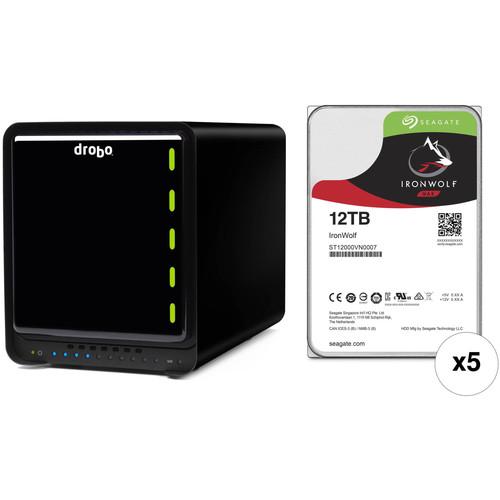
Product description RAID Arrays for Photography and Pro Video Read More Set up your own NAS server with the 5C 5-Bay USB 3.0 Type-C Enclosure & 12TB IronWolf 3.5" HDD Kit from . This kit includes a Drobo 5C 5-bay enclosure and five 3.5" 12TB 7200 rpm SATA III NAS drives for a total raw capacity of 60TB. Moreover, the enclosure supports multiple RAID configurations for performance and data redundancy. - Drobo 5C 5-Bay USB 3.0 Type-C Enclosure Designed from the ground up to be an affordable and secure storage array, the 5C 5-Bay USB 3.0 Type-C Enclosure from Drobo is equipped with five 3.5" SATA drive bays that support SATA III 6 Gb/s and SATA II 3 Gb/s drives. Using separately sold drive carriers, the 5C will also support 2.5" hard drives and SSDs. The Drobo 5C distinguishes itself from the other members of the Drobo "5" series through its single USB 3.0 Type-C port, which operates with data transfer speeds of up to 5 Gb/s.
To facilitate data protection, Drobo's BeyondRAID technology enables single or dual-drive redundancy. If there are any empty drive bays, BeyondRAID allows additional drives to be inserted into the array, where they would be automatically configured. If all drive bays are occupied, simply replace the smallest capacity drive with a larger one and BeyondRAID will handle the rest. BeyondRAID is also what allows drives of varying capacities to work in the same unit, which helps enable future expansion as larger drives become available.
Additional data protection is provided by the included rechargeable battery, which helps protect data stored in the 5C's memory or cache. If there were to be a sudden power loss, the battery allows the Drobo to stay powered long enough for the cached data to be written to an included internal SSD. Cooling is provided by a 120mm variable-speed fan and once installed, the hard drives can be configured to spin down when they're not in use, helping to further reduce noise and energy. Also, the LEDs can be dimmed to reduce light pollution when working in sensitive environments. The Drobo 5C is compatible with both Windows and Mac, including APFS/macOS High Sierra, and also includes a 5.9' USB 3.0 Type-C to Type-A cable, a 100-240 VAC power supply that runs at 50-60 Hz, and a 9.2' power cord. Protection is provided by a limited 1-year warranty within the US or outside the EU, or a limited 2-year warranty within the EU, as well as 90 days of business hour tech support. Using the 1 or 3-year DroboCare warranty renewals, your Drobo 5C is eligible for up to 5 years of coverage. General Features - Protection From Drive Failure
- The Drobo 5C protects your data from a single or dual hard drive failures. In the case of a drive failure, Drobo will immediately rebuild data using the remaining available space. In the background, Drobo performs "data scrubbing and self-healing," which means it validates your data and repairs any inconsistencies.
- Power Protecting Your Critical Data
- Drobo doesn't just protect against drive failures, but also from potential data loss after a power outage. The Drobo 5C includes advanced battery backup technology that helps protects data in memory or cache. During a sudden power loss, Drobo protects in-progress operations by saving them to an internal SSD. The operations are resumed and written to the disks once power is restored. This helps ensure important information is safe and sound. The battery recharges itself and is designed to last for the life of your Drobo.
- Economical Capacity Expansion
- The Drobo 5C supports volume sizes up to 64TB and allows for expansion into this size. You can grow in to this, and provide only the capacity you need today. When more storage space is needed, simply add another drive, or replace a drive with a larger one. Drobo allows you to mix and match hard drives of virtually any size or brand. This empowers you to buy suitable drives when you need more space, instead of paying today for capacity you will not need until the future.
- Second Volume for Backups or Full Disk Encryption
- The Drobo 5C allows for a second, fixed volume size and limits the amount of storage space you specify for the second volume. The rest of the capacity is available for storing other files.
Two Ways to Use a Second Volume:
1. Apple's Time Machine: Specify the maximum size Time Machine can use for its versioned backups. This solves the problem of Time Machine slowly consuming all space on a drive.
2. Encrypted Hard Drive: Some information requires additional protection. A second volume can create an encrypted disk using Windows and OS X / macOS tools. Sensitive data is protected with a password. Access to sensitive data is password protected. - Simple Setup - No Tools Needed
- With the Drobo 5C, 3.5" hard drives slide right into the drive bays. No metal drive carriers or assembly screws are necessary, unless 2.5" drives are being used. The Drobo chassis is constructed of metal and the magnetic front cover is easy to install or remove.
- As Easy as Reading a Traffic Light
- Lights on the front show alerts of what's happening, making monitoring your Drobo 5C as easy as reading a traffic light. Green, yellow, or red lights show the drive status, and each blue LED light along the bottom represents 10% utilization, showing how much capacity is consumed. Unsure of what the lights mean? Simply take off the magnetic cover and all the information can be found on the back:
"Actions Required" Indicators
- Green: No action needed, system is healthy
- Solid Yellow: Add or upsize a drive here soon, the Drobo is over 85% full
- Blinking Green and Yellow: Don't remove any drives, operate normally. Drobo is optimizing the data layout. You can still perform read and write operations during optimization
- Solid Red: Add or upsize a drive here now
- Blinking Red: Replace this drive immediately, as it has failed. Depending on the capacity of your Drobo 5C, your data could be at risk until you replace this drive UPC: 816604020005 - 5 x Seagate 12TB IronWolf 7200 rpm SATA III 3.5" Internal NAS HDD Store your critical data on the 12TB IronWolf 7200 rpm SATA III 3.5" Internal NAS HDD from Seagate. The IronWolf is designed for corporate environments that utilize multi-drive systems and servers. The NAS hard drive provides an ample storage capacity of 12TB and is built to withstand 24 x 7 operations. It is outfitted with a SATA III interface and mounted in an available 3.5" drive bay. Other notable features include a 7200 rpm spin rate and 256MB of cache to deliver a maximum sustained data transfer rate of 210 MB/s.
- AgileArray is built for dual-plane balancing and RAID optimization in multi-bay environments with advanced power management
- IronWolf performance provides limited lag times or downtime for users during high traffic time for the NAS
- Drive balance with Rotational Vibration (RV) sensors manage multi-bay vibration for long-term consistent performance and reliability
- IronWolf provides 256MB of cache memory allowing your NAS to serve data faster
- Enables user workload rate of 180TB/year
- Designed for always-on, always-accessible 24×7 performance
UPC: 763649123386 In the Box - 5C 5-Bay USB 3.0 Type-C Enclosure dxszysxtazrdeuszfadebtzuxstvusayw
- 5.9' / 1.8m USB 3.0 Type-C to Type-A Cable
- 9.2' / 2.8m Power Cord
- 90 Days of Business Hour Tech Support
- Limited 1-Year Warranty
- Limited 2-Year Warranty
- 5 x Seagate - 12TB IronWolf 7200 rpm SATA III 3.5" Internal NAS HDD
Table of Contents
|
Upload User Manual
Have you got an user manual for the Drobo 5C 5-Bay USB 3.0 Type-C Enclosure & 12TB IronWolf 3.5" HDD Kit in electronic form? Please send it to us and help us expand our library of instruction manuals.
Thank you, too, on behalf of other users.
To upload the product manual, we first need to check and make sure you are not a robot. After that, your "Submit Link" or "Upload File" will appear.
Technical parameters - Drobo 5C 5-Bay USB 3.0 Type-C Enclosure
| Number of Bays | 5 x 3.5" | | Connections | 1 x USB Type-C (USB 3.1 Gen 1 (5 Gb/s)) | | Compatible Drive Interface | SATA III | | Form Factor | Desktop | | Operating System Support | Windows, macOS/OS X | | | | Power Source | AC Adapter | | AC Input Power | 100 to 240 VAC, 50 / 60 Hz at 2 A | | DC Input Power | 12 VDC at 10 A | | Power Consumption | 120 W | | | | Security Features | Kensington Security Slot | | | | Dimensions (W x H x D) | 10.3 x 5.9 x 7.3" / 26.2 x 15.0 x 18.5 cm | | Weight | 8.5 lb / 3.9 kg | | | | Box Dimensions (LxWxH) | 13.9 x 12.9 x 10.4" | - 5 x Seagate 12TB IronWolf 7200 rpm SATA III 3.5" Internal NAS HDD
| | | Drive Capacity | 12.00 TB | | Cache Memory | 256 MB | | | | Interface | SATA III (6 Gb/s) | | Maximum Read Speed | 210 MB/s | | | | Drive Type | HDD | | Form Factor | 3.5" | | | | Spindle Speed (RPM) | 7200 RPM | | | | Mean Time Between Failures (MTBF) | 1000000.00 Million Hours | | Non-Recoverable Read Errors per Bits Read | 1 in 1015 | | | | Power Draw | 0.8 W (Standby)
0.8 W (Idle) | | Supported Voltage | 5 VDC, 12 VDC | | Current | 1.8 A at 12 VDC | | | | Operating Shock | 70 G / 2.0 ms | | Storage Shock | 250 G / 2.0 ms | | Operating Temperature | 41 to 158°F / 5 to 70°C | | Storage Temperature | -40 to 158°F / -40 to 70°C | | | | Dimensions (W x H x D) | 4.0 x 1.0 x 5.8" / 101.6 x 25.4 x 147.3 mm | | Weight | 1.6 lb / 0.7 kg | | | | Box Dimensions (LxWxH) | 7.8 x 6.0 x 2.4" |
Rating80% users recommend this product to others. And what about you?

This product has already been rated by 27 owners. Add your rating and experience with the product.
Discussion
 Ask our technicians if you have a problem with your settings,
or if anything is unclear in the user manual you have downloaded.
You can make use of our moderated discussion.
The discussion is public and helps other users of our website who may be encountering similar problems.
Ask our technicians if you have a problem with your settings,
or if anything is unclear in the user manual you have downloaded.
You can make use of our moderated discussion.
The discussion is public and helps other users of our website who may be encountering similar problems.
The discussion is empty - enter the first post
Post a new topic / query / comment:
|
|
|
| Request for user manual |
You can’t find the operation manual you are looking for? Let us know and we will try to add the missing manual:
I’m looking for a manual / Request for manual
Current requests for instruction manuals:
Call Of Duty World War Two For Xbox...
controller stratus XL...
stratus XL...
smart whatch serie S11 42mm...
Allen & Heath SQ-6 manual...
|
| Discussion |
Latest contributions to the discussion:
AEW R 4100
Name: MAURICIO ANGARITA
Audio-Technica AEW-R4100 UHF Diversity Receiver for
AEW R 4100 has the mute function blocked and does not allow audio to pass. I tried several times to turn off the mute from the transmitter but it does nothing, the mute stays on. Solution?
Thank you...
Instructions for assembling the 2015 Forecast Image Master Consoles GC3-A
Name: mike elam
Forecast Consoles GC3-A ImageMaster Editing Console
Looking for instructions for assembling this console. ...
EMPTY TONER ERROR MESSAGE AFTER REPLACING TONER
Name: LINDA BAD YELLOW EYES
Brother TN223BK Standard-Yield Toner
I HAD TO CHANGE OUT ALL THREE TONERS DUE TO LEAKS IN THE YELLOW AND CYAN. AFTER I REPLACED THEM, THE MACHINE KEEPS GIVING ME AN EMPTY TONER ERROR MESSAGE. HELP!!...
PS480D 20/24 pin Switching 480W Power Supply
Name: swkargo
Logisys 480W Power Supply
This item states in can run -5vdc .It is NOT listed on the board or I beleive is r4 is missing the resitior. Any body have thid issue. Shawn
...
Help needed
Name: Ann Carter
SanDisk 1TB Extreme Portable USB 3.1
When I click the link to download the user manual for my Sandisk Extreme external hard drive, it gives me the manual for the LG Cricket. Can you please change the link so I can download the Sandisk manual and begin using this drive? Thank you....
|
|


