|
User Manual for Eizo ColorEdge CG277 27" Hardware Calibration IPS LCD Monitor Click to enlarge the picture
 Contents of the user manual for the Eizo ColorEdge CG277 27" Hardware Calibration
- Product category: Computer Monitors Eizo
- Brand: Eizo
- Description and content of package
- Technical information and basic settings
- Frequently asked questions – FAQ
- Troubleshooting (does not switch on, does not respond, error message, what do I do if...)
- Authorized service for Eizo Computer Monitors
|
User manual for the Eizo ColorEdge CG277 27" Hardware Calibration contain basic instructions
that need to be followed during installation and operation.
Before starting your appliance, the user manual should be read through carefully.
Follow all the safety instructions and warnings, and be guided by the given recommendations.
User manual is an integral part of any Eizo product,
and if it is sold or transferred, they should be handed over jointly with the product.
Following the instructions for use is an essential prerequisite for protecting
health and property during use, as well as recognition of liability on the part of the manufacturer
for possible defects should you make a warranty claim. Download an official Eizo user manual in which you will find instructions on how to install, use, maintain and service your product.
And do not forget – unsuitable use of a Eizo product will considerably shorten its lifespan!
|
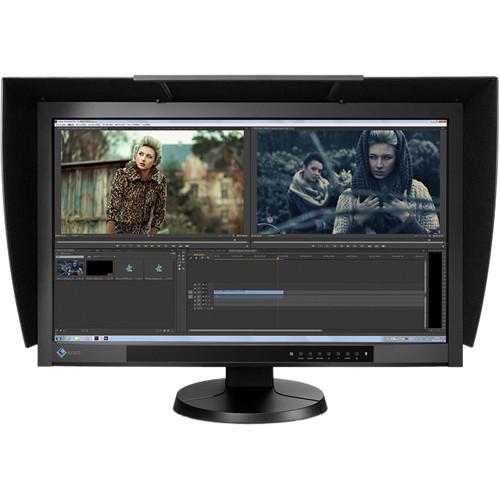
Product description 10 Factors to Consider When Selecting A Monitor for Video Editing Read More ssseeutuqexrqvyzbtvyxbycuysuyswqwstu The ColorEdge CG277 27" Hardware Calibration IPS LCD Monitor from EIZO features a maximum resolution of 2560 x 1440, an enhanced 1000:1 contrast ratio and 300 cd/m2 brightness. It also features DisplayPort, HDMI and DVI-D inputs that enable connectivity to various types of graphics boards. The ColorEdge CG277 Monitor has a built-in SelfCalibration sensor which allows you to automate calibration. It also incorporates EIZO's patented Digital Uniformity Equalizer (DUE) technology to ensure a Delta-E difference of 3 or less across the screen. Using the DisplayPort input, the monitor offers 10-bit simultaneous color display from a 16-bit LUT, which means it can present more than one billion colors simultaneously. Designed for both soft proofing and digital device emulation, the bundled ColorNavigator software allows you to know how your clients will see color. The monitor also comes with a versatile stand that offers height, tilt and swivel adjustments as well as a portrait mode display.
Please Note: A graphics board and software supporting 10-bit output are also necessary for a 10-bit display. Built-In Sensor for Simplified Maintenance - Built-In SelfCalibration Sensor
- Automate your calibration with the built-in SelfCalibration sensor that is housed within the monitor's bottom bezel and swings up onto the screen only when calibrating. This sensor eliminates the need for a third-party calibration device and even operates in portrait mode. Using either the On-Screen Display menu or the bundled ColorNavigator software, you can schedule the monitor to self-calibrate at specific times. Even if the monitor is switched off or not connected to a computer, it will stick to its preset schedule and self-calibrate.
- Correlation with External Sensors
- The ColorEdge CG277 Monitor can be correlated to the measurement results of an external calibration sensor. After correlating, the built-in sensor will automatically recalibrate to the settings. This is convenient if the monitor is used in a work environment with other monitors and one measurement device must be used as a standard for all calibration.
Enhanced Color Accuracy - Reproduces 99% of the Adobe RGB Color Space
- An IPS panel with a wide color gamut reproduces 99% of the Adobe RGB color space so images shot in RAW can be converted to Adobe RGB or images shot in Adobe RGB will be displayed correctly. The wide color gamut also ensures that the monitor reproduces almost the entire ISO-coated and US web-coated CMYK color spaces used in printing as well as 93% of the DCI used in post production.
- Excellent Tone Display in the Dark
- When viewing the screen from an angle in a dimly lit room, dark tones typically appear washed out due to the display characteristics of LCD backlights. The monitor maintains a high contrast ratio even from an angle which allows the dark tones to retain their depth.
- Non-Glare IPS Panel
- The IPS (in-plane switching) panel exhibits no glare and allows several people to view the monitor with minimal color shift.
- LED Backlight Cuts Power by 40%
- The LED backlight reduces energy consumption by 40% compared to a conventional backlight. It is also mercury-free for less impact on the environment when it is disposed of.
- Brightness Modulation Minimizes Flicker
- To counteract the flicker that is noticeable by some users at low brightness settings, EIZO uses PWM (pulse width modulation) technology to help reduce eye fatigue.
Features for Creative Work - Uniformity from Corner to Corner
- Fluctuations in brightness and chromaticity on different parts of the screen are a common trait of LCD monitors. To counteract this, the monitor incorporates EIZO's patented digital uniformity equalizer (DUE) technology to ensure a Delta-E difference of 3 or less across the screen when the monitor leaves the factory. DUE also counterbalances the influences that a fluctuating ambient temperature may have on color temperatures and brightness to ensure stable image display.
- Individually Adjusted at the Factory
- The gamma level for each ColorEdge monitor is adjusted at the factory. This is accomplished by measuring the R, G, and B gamma values from 0 to 255, then using the monitor's 16-bit look-up table (LUT) to select the 256 most appropriate tones to achieve the desired value.
- Stable Display within Seven Minutes of Startup
- From the time it is turned on it typically takes 30 minutes or longer for a monitor's brightness, chromaticity, and tone characteristics to stabilize. EIZO has shortened this warm-up time by more than 75% to 7 minutes.
- 10-Bit Simultaneous Display
- Using the DisplayPort input, the monitor offers 10-bit simultaneous color display from a 16-bit look-up table which means it can show more than one billion colors simultaneously. This is 64 times as many colors as you get with an 8-bit display which results in even smoother color gradations and reduced Delta-E between two adjacent colors.
A graphics board and software which supports 10-bit output are also necessary for 10-bit displays Simple and Precise Calibration with ColorNavigator - ColorNavigator Software
- The bundled ColorNavigator software makes calibration both simple and quick. Just input target values for brightness, white point and gamma. The built-in sensor directly utilizes the monitor's LUT and creates an ICC profile within minutes.
- Predictable Color with Any Media
- With content published on so many types of printed and digital media, it's critical to know how your clients will see color. Designed for both soft proofing and digital device emulation, the bundled ColorNavigator software allows you to do just that. So now you can "predict" how color will appear to your clients, whether you produce content for printed media like books and magazines or for digital media devices like tablets, smart phones and notebook computers.
Comfort and Convenience - Multiple Inputs
- DisplayPort, HDMI, and DVI-D inputs are included and support resolutions up to 2560 x 1440. The HDMI input also offers direct connection with digital cameras. Two USB upstream ports allow two computers to be connected at once so it's not necessary to reconnect the USB cable when using the ColorNavigator software and switching between the two computers.
- Smooth Display of Video
- For video editing or post-production work, an overdrive circuit is included to reduce the gray-to-gray response time to 6 ms and ensure that moving images look clean and sharp with minimum ghosting.
- Adjustable Stand
- Adjust the screen to the most comfortable angle and reposition it to show your work to a colleague or client. The monitor comes with a versatile stand that offers height, tilt and swivel adjustments as well as portrait mode display.
- Shading Hood for Portrait and Landscape Modes
- The monitor comes bundled with a unique hood that is designed for portrait mode as well. Now you can keep the glare off your screen no matter which mode you work in.
Ideal for Video Editing and Post Production - Preset Color Modes
- A button on the front of the monitor provides quick access to several broadcast-standard color modes reset color modes: Rec. 709, EBU, SMPTE-C, and DCI. In addition, sRGB and Adobe RGB modes are also available.
- Input Support for 4K x 2K
- This EIZO monitor accepts 4K x 2K resolutions of 4096 x 2160 and 3840 x 2160 at up to 30 frames/second via the DisplayPort input then downscales them to its native resolution of 2560 x 1440. This added functionality makes the ColorEdge CG277 a practical choice for editing when working with 4K x 2K resolutions used in digital television and digital cinematography.
- 1080/24p Playback
- Film is usually shot at 24 frames/second and looks unnatural when played back on a typical monitor that displays 60 frames/second. The HDMI input supports a video signal display rate of 1080/24p frames-per-second so you can edit the film as it was meant to be viewed.
- 3D LUT for Accurate Color Display
- A 3D LUT is included which adjusts colors individually on an RGB cubic table. With the bundled ColorNavigator software's emulation function, the 3D LUT applies a film look to the image so creators can check how it will be viewed by their audience. The 3D LUT also improves the monitor's additive color mixture (combination of RGB), which is a key factor in its ability to display neutral gray tones.
- LED Buttons and On-Screen Button Guide
- For dimly lit work environments like post production studios, the monitor comes with backlit control buttons an on-screen button guide to indicate what each button is for.
- Safe Area Marker
- A safe area marker designates the area of the screen that will be displayed when the monitor is connected to a particular device. This allows you to check that subtitles and other text will be visible. The color of the marker is changeable to ensure it remains with any imagery.
Environment - FograCert Softproof Monitor
- The ColorEdge CG277 is recognized by Fogra as a Class A FograCert Softproof Monitor. Using the CG277 in a FograCert Softproofing System ensures designers, print specifiers, and print producers can rely on the soft proof for predictable and consistent results.
- No Power Consumption When Turned Off
- When the monitor is turned off via the power button on its front bezel, it consumes no electricity.
UPC: 690592037388 In the Box Eizo ColorEdge CG277 27" Hardware Calibration IPS LCD Monitor AC Power Cord DVI-D - DVI-D (Dual Link Supported) Signal Cable Mini DisplayPort - DisplayPort Signal Cable USB Cable EIZO LCD Utility Disk Adjustment Certificate ScreenCleaner Monitor Hood Quick Reference Limited 5-Year Warranty User Manual PDF 5mbssseeutuqexrqvyzbtvyxbycuysuyswqwstu Table of Contents
|
Upload User Manual
Have you got an user manual for the Eizo ColorEdge CG277 27" Hardware Calibration IPS LCD Monitor in electronic form? Please send it to us and help us expand our library of instruction manuals.
Thank you, too, on behalf of other users.
To upload the product manual, we first need to check and make sure you are not a robot. After that, your "Submit Link" or "Upload File" will appear.
Technical parametersEizo CG277 Specs | | | Size | 27" | | Screen Area | 23.5 x 13.2" / 59.7 x 33.6 cm | | Panel Type | IPS-Type LCD | | Touchscreen | No | | Resolution | 2560 x 1440 | | Aspect Ratio | 16:9 | | Maximum Brightness | 300 cd/m2 | | Contrast Ratio | 1000:1 | | Adaptive Sync Technology | None | | Horizontal Frequency | 26 to 89 kHz (DisplayPort)
26 to 89 kHz (DVI)
15 to 78 kHz (HDMI) | | Vertical Frequency | 23.8 to 61 Hz (HDMI)
23.8 to 63 Hz (DisplayPort)
23.8 to 63 Hz (DVI) | | Bit Depth / Color Support | 8-Bit+FRC (1.07 Billion Colors) | | Color Gamut | 99% Adobe RGB | | Response Time | 6 ms (GtG) | | Viewing Angle | Horizontal: 178°
Vertical: 178° | | Dot Pitch | 0.2331 x 0.2331 mm | | | | Connectivity | 2 x USB Input
2 x USB Type-A Output
1 x DVI-D
1 x DisplayPort Input
1 x HDMI | | HDCP Support | Yes | | | | Power Consumption | 0.5 W (Standby)
99 W (Maximum)
43 W (Typical) | | AC Input Power | 100 to 240 VAC, 50 / 60 Hz | | | | Operating Temperature | 32 to 95°F / 0 to 35°C | | Operating Humidity | 20 to 80% | | Certifications | RoHS, WEEE, as per Manufacturer | | | | Height Adjustment | 6" / 15.2 cm | | Rotation Adjustment | 90° | | Swivel Adjustment | 344° | | Tilt Adjustment | 0 to 25° | | Mounting-Hole Pattern | 100 x 100 mm | | Dimensions (W x H x D) | 25.4 x 16.7 x 11.1" / 64.6 x 42.5 x 28.1 cm
25.4 x 15.8 x 3.6" / 64.6 x 40.2 x 9.2 mm (Without Stand) | | Weight | 30.4 lb / 13.8 kg
19.4 lb / 8.8 kg (Without Stand) | | | | Package Weight | 39.0 lb | | Box Dimensions (LxWxH) | 29.0 x 24.2 x 14.4" |
Rating92% users recommend this product to others. And what about you?

This product has already been rated by 55 owners. Add your rating and experience with the product.
Discussion
 Ask our technicians if you have a problem with your settings,
or if anything is unclear in the user manual you have downloaded.
You can make use of our moderated discussion.
The discussion is public and helps other users of our website who may be encountering similar problems.
Ask our technicians if you have a problem with your settings,
or if anything is unclear in the user manual you have downloaded.
You can make use of our moderated discussion.
The discussion is public and helps other users of our website who may be encountering similar problems.
The discussion is empty - enter the first post
Post a new topic / query / comment:
|
|
|
| Request for user manual |
You can’t find the operation manual you are looking for? Let us know and we will try to add the missing manual:
I’m looking for a manual / Request for manual
Current requests for instruction manuals:
Call Of Duty World War Two For Xbox...
controller stratus XL...
stratus XL...
smart whatch serie S11 42mm...
Allen & Heath SQ-6 manual...
|
| Discussion |
Latest contributions to the discussion:
AEW R 4100
Name: MAURICIO ANGARITA
Audio-Technica AEW-R4100 UHF Diversity Receiver for
AEW R 4100 has the mute function blocked and does not allow audio to pass. I tried several times to turn off the mute from the transmitter but it does nothing, the mute stays on. Solution?
Thank you...
Instructions for assembling the 2015 Forecast Image Master Consoles GC3-A
Name: mike elam
Forecast Consoles GC3-A ImageMaster Editing Console
Looking for instructions for assembling this console. ...
EMPTY TONER ERROR MESSAGE AFTER REPLACING TONER
Name: LINDA BAD YELLOW EYES
Brother TN223BK Standard-Yield Toner
I HAD TO CHANGE OUT ALL THREE TONERS DUE TO LEAKS IN THE YELLOW AND CYAN. AFTER I REPLACED THEM, THE MACHINE KEEPS GIVING ME AN EMPTY TONER ERROR MESSAGE. HELP!!...
PS480D 20/24 pin Switching 480W Power Supply
Name: swkargo
Logisys 480W Power Supply
This item states in can run -5vdc .It is NOT listed on the board or I beleive is r4 is missing the resitior. Any body have thid issue. Shawn
...
Help needed
Name: Ann Carter
SanDisk 1TB Extreme Portable USB 3.1
When I click the link to download the user manual for my Sandisk Extreme external hard drive, it gives me the manual for the LG Cricket. Can you please change the link so I can download the Sandisk manual and begin using this drive? Thank you....
|
|


