|
User Manual for EnGenius EnStationAC Outdoor Long-Range 11ac Wireless Bridge Click to enlarge the picture
 Contents of the user manual for the EnGenius EnStationAC Outdoor Long-Range 11ac Wireless
- Product category: Wireless Access Points EnGenius
- Brand: EnGenius
- Description and content of package
- Technical information and basic settings
- Frequently asked questions – FAQ
- Troubleshooting (does not switch on, does not respond, error message, what do I do if...)
- Authorized service for EnGenius Wireless Access Points

 |
User manual for the EnGenius EnStationAC Outdoor Long-Range 11ac Wireless contain basic instructions
that need to be followed during installation and operation.
Before starting your appliance, the user manual should be read through carefully.
Follow all the safety instructions and warnings, and be guided by the given recommendations.
User manual is an integral part of any EnGenius product,
and if it is sold or transferred, they should be handed over jointly with the product.
Following the instructions for use is an essential prerequisite for protecting
health and property during use, as well as recognition of liability on the part of the manufacturer
for possible defects should you make a warranty claim. Download an official EnGenius user manual in which you will find instructions on how to install, use, maintain and service your product.
And do not forget – unsuitable use of a EnGenius product will considerably shorten its lifespan!
|
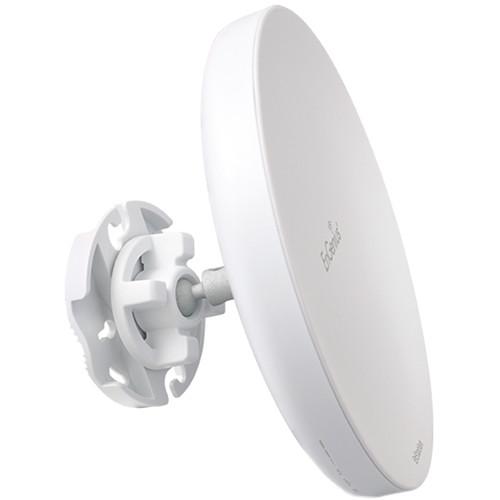
Product description EnGenius EnStationAC Outdoor Long-Range 11ac Wireless Bridge Connects Networks Up to 5 Miles Apart Read More rburazdqdqdvsbtbvffqyudv Greatly extend the reach of your current network with the EnStationAC Outdoor Long-Range 11ac Wireless Bridge from EnGenius. With a transmit power of up to 26 dBm this wireless bridge emits a signal capable of extending the network up to 5 miles in a point-to-point configured setup. Additionally, the IP55-rated housing ensures it will hold up against the elements including prolonged exposure to sunlight, extreme cold, snow, sleet, rain, heat, and humidity.
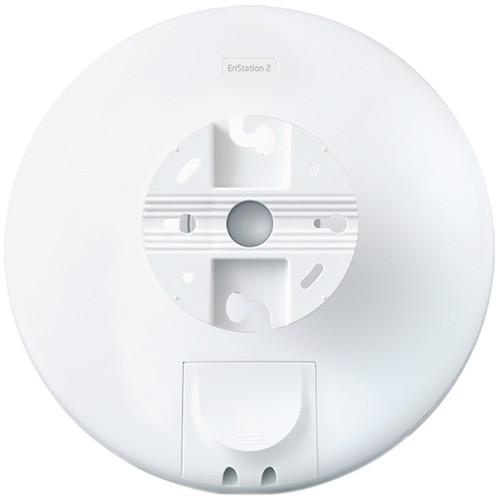
The EnStationAC can be configured as an access point, client bridge, or as a wireless distribution system (WDS bridge) to suit the needs of a variety of network configurations. To support bandwidth intensive applications this wireless bridge operates on the 5 GHz frequency and supports the 802.11a/n/ac networking standards with a maximum data transfer rate of up to 867 Mbps. Complementing the enhanced wireless network capabilities, you will find a single PoE compatible Gigabit Ethernet input and a single PoE compatible Gigabit Ethernet output perfect for powering an additional PoE compatible device. Once installed the EnGenius EnStationAC features a 360° 3-axis pivoting arm to ensure a proper line of sight and strong connection. - Optimal Bandwidth, Wider Channel Range, Faster Smoother HD Streaming
- The EnStationAC supports fast 802.11ac wireless speeds to 867 Mbps on the 5 GHz band for accommodating 4k Ultra High Definition (UHD) video and heavy multi-application traffic services with extended bandwidth over a wider channel range (20 MHz, 40 MHz and/or 80 MHz) allowing network managers to fine tune channel usage based on the application.
- Connect and Power a Second Network Device for Greater Deployment Flexibility
- With its secondary 802.3af-compliant PoE pass-through Gigabit port, EnStationAC connects and powers an additional PoE-compatible device like a remote IP surveillance camera or AP for greater deployment flexibility and convenience. Easily position EnStationAC for maximum connectivity with its 360-degree, 3-axis pivoting arm that locks in place, ensuring precise alignment between other EnStationAC devices.
- Deliver Precise Short & Long Range Point-to-Point Connectivity
- The EnStationAC is ideal for Point-to-Point (PtP) applications over short or long distances where cabling is not possible or practical. Longer ranges can be achieved when paired with another EnStationAC in a PtP deployment by aligning the dish-shaped, 19 dBi dual-polarized, high-gain antennas to face each other, ensuring each gets the full impact of the narrow-focused, wireless beam, reducing frequency interference over long distances.
- Grounded PoE Extends Power to Unwired Areas
- Deploy the EnStationAC where power outlets are scarce or unavailable, such as under the eaves of roofs, high atop light poles or in other remote locations up to 328 feet away. Power the unit via the included passive 54 V Gigabit PoE adapter (EPA5006GP) while protecting valuable network equipment from power surges or short-circuits associated with lightning strikes and electrostatic discharge (ESD).
- Versatile Operation Modes
- The EnStationAC supports three operation modes - Access Point, Client Bridge, and WDS Bridge mode. This flexibility makes the Access Point/Client Bridge a versatile solution for IT managers who may need to update or reconfigure their deployments, as their network needs change.
- Enhanced Distances, Even in Extreme Weather
- Designed to perform in harsh environments, the EnStationAC features IP55-rated waterproof and dustproof casing that ensures it can withstand harsh outdoor climates and indoor industrial environments. This includes prolonged exposure outdoors to sunlight, extreme cold, frost, snow, rain, hail, heat and humidity, and indoors where temperature may be a factor.
UPC: 655216007758 In the Box EnGenius EnStationAC Outdoor Long-Range 11ac Wireless Bridge Power over Ethernet Adapter (Proprietary PoE) rburazdqdqdvsbtbvffqyudv Pole/Wall Mounting Kit Mounting Screw Set Limited 1-Year Warranty Guides & Manuals More from Manufacturer Table of Contents
|
Upload User Manual
Have you got an user manual for the EnGenius EnStationAC Outdoor Long-Range 11ac Wireless Bridge in electronic form? Please send it to us and help us expand our library of instruction manuals.
Thank you, too, on behalf of other users.
To upload the product manual, we first need to check and make sure you are not a robot. After that, your "Submit Link" or "Upload File" will appear.
Download User ManualThe user manual for the EnGenius EnStationAC Outdoor Long-Range 11ac Wireless Bridge can be downloaded in PDF format at the link stated below.
Technical parametersEnGenius ENSTATIONAC Specs | | | Wireless Frequency Bands | 5 GHz | | Number of Antennas | 1 | | WLAN Mode | 802.11ac | | Antenna Gain | 19 dBi | | Transmit Power | 26 dBm | | Supported Protocols | WMM
SNMPv1
SNMPv2c
SNMPv3 | | | | Ports | 2 x 10/100/1000 Mb/s Gigabit Ethernet (RJ45) PoE+ | | | | Wireless Security | WEP, WPA, AES, TKIP | | | | Operation Modes | Access Point, Bridge, Client | | Max SSIDs Supported | 8 | | Throughput | 2.4 GHz: 300 Mb/s
5 GHz: 866 Mb/s | | | | Supported IEEE Standards | 802.11i, 802.1x, 802.3af, 802.3at | | | | Operating Temperature | -4 to 140°F / -20 to 60°C | | Storage Temperature | -22 to 176°F / -30 to 80°C | | Operating Humidity | 90% | | Storage Humidity | 90% | | | | IP Rating | IP55 | | Dimensions | 7.5 x 1.5" / 19 x 3.8 cm | | Weight | 1.0 lb / 0.5 kg | | | | Package Weight | 2.75 lb | | Box Dimensions (LxWxH) | 12.6 x 9.8 x 3.3" |
Rating90% users recommend this product to others. And what about you?

This product has already been rated by 48 owners. Add your rating and experience with the product.
Discussion
 Ask our technicians if you have a problem with your settings,
or if anything is unclear in the user manual you have downloaded.
You can make use of our moderated discussion.
The discussion is public and helps other users of our website who may be encountering similar problems.
Ask our technicians if you have a problem with your settings,
or if anything is unclear in the user manual you have downloaded.
You can make use of our moderated discussion.
The discussion is public and helps other users of our website who may be encountering similar problems.
The discussion is empty - enter the first post
Post a new topic / query / comment:
|
|
|
| Request for user manual |
You can’t find the operation manual you are looking for? Let us know and we will try to add the missing manual:
I’m looking for a manual / Request for manual
Current requests for instruction manuals:
Call Of Duty World War Two For Xbox...
controller stratus XL...
stratus XL...
smart whatch serie S11 42mm...
Allen & Heath SQ-6 manual...
|
| Discussion |
Latest contributions to the discussion:
AEW R 4100
Name: MAURICIO ANGARITA
Audio-Technica AEW-R4100 UHF Diversity Receiver for
AEW R 4100 has the mute function blocked and does not allow audio to pass. I tried several times to turn off the mute from the transmitter but it does nothing, the mute stays on. Solution?
Thank you...
Instructions for assembling the 2015 Forecast Image Master Consoles GC3-A
Name: mike elam
Forecast Consoles GC3-A ImageMaster Editing Console
Looking for instructions for assembling this console. ...
EMPTY TONER ERROR MESSAGE AFTER REPLACING TONER
Name: LINDA BAD YELLOW EYES
Brother TN223BK Standard-Yield Toner
I HAD TO CHANGE OUT ALL THREE TONERS DUE TO LEAKS IN THE YELLOW AND CYAN. AFTER I REPLACED THEM, THE MACHINE KEEPS GIVING ME AN EMPTY TONER ERROR MESSAGE. HELP!!...
PS480D 20/24 pin Switching 480W Power Supply
Name: swkargo
Logisys 480W Power Supply
This item states in can run -5vdc .It is NOT listed on the board or I beleive is r4 is missing the resitior. Any body have thid issue. Shawn
...
Help needed
Name: Ann Carter
SanDisk 1TB Extreme Portable USB 3.1
When I click the link to download the user manual for my Sandisk Extreme external hard drive, it gives me the manual for the LG Cricket. Can you please change the link so I can download the Sandisk manual and begin using this drive? Thank you....
|
|



