|
User Manual for EnGenius EWS7952P 48-Port Gigabit PoE Managed Switch Click to enlarge the picture
 Contents of the user manual for the EnGenius EWS7952P 48-Port Gigabit PoE Managed
- Product category: Network Switches, Bridges & Hubs EnGenius
- Brand: EnGenius
- Description and content of package
- Technical information and basic settings
- Frequently asked questions – FAQ
- Troubleshooting (does not switch on, does not respond, error message, what do I do if...)
- Authorized service for EnGenius Network Switches, Bridges & Hubs
 |
User manual for the EnGenius EWS7952P 48-Port Gigabit PoE Managed contain basic instructions
that need to be followed during installation and operation.
Before starting your appliance, the user manual should be read through carefully.
Follow all the safety instructions and warnings, and be guided by the given recommendations.
User manual is an integral part of any EnGenius product,
and if it is sold or transferred, they should be handed over jointly with the product.
Following the instructions for use is an essential prerequisite for protecting
health and property during use, as well as recognition of liability on the part of the manufacturer
for possible defects should you make a warranty claim. Download an official EnGenius user manual in which you will find instructions on how to install, use, maintain and service your product.
And do not forget – unsuitable use of a EnGenius product will considerably shorten its lifespan!
|
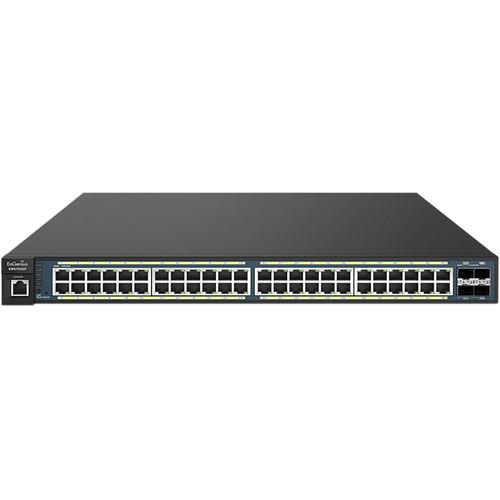
Product description Power your IP cameras, VoIP phones, APs and more with the EWS7952P 48-Port Gigabit PoE+ Managed Switch from EnGenius. This 802.3at/af PoE-compliant switch features 48 Gigabit Ethernet PoE+ network ports designed to offer enhanced network connectivity while drawing from the switche's 410W power budget. Along with the 48 Gigabit Ethernet ports you will find 4 SFP ports to connect fiber-optic enabled devices to the network and a single RJ45 console port.
Once installed, the EWS7952P Managed Switch offers enhanced performance with a 104 Gbps switching capacity and an 8,000 entry MAC address table. Backing up the enhanced performance of this EnGenius switch is a 1.5 MB packet memory buffer, 256 MB SDRAM, and 32 MB flash memory.
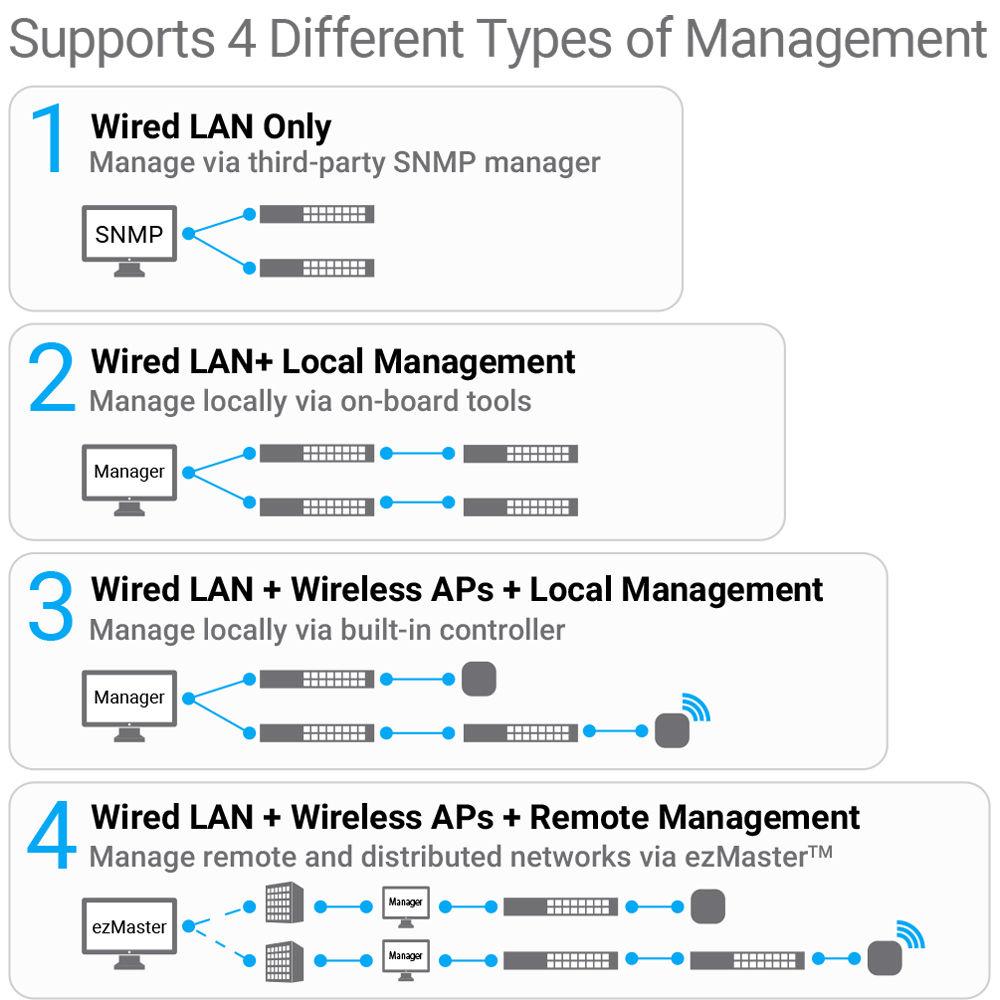
Managing this EnGenius switch is simple, thanks to the extensive list of Layer 2 features including IGMP Snooping, MLD Snooping, 802.3x Flow Control, enhanced VLAN support, QoS functionality, and more. You can also centrally manage your devices using the included ezMaster Network Management Software capable of supporting hundreds of EWS devices both locally and remotely. In Switch Management - Simplified Network Management, Visibility, & Troubleshooting
- Achieve network management, visibility, and troubleshooting locally through the switch's on-board Web interface tools. Establish event based email alerts for notification of predetermined activities.
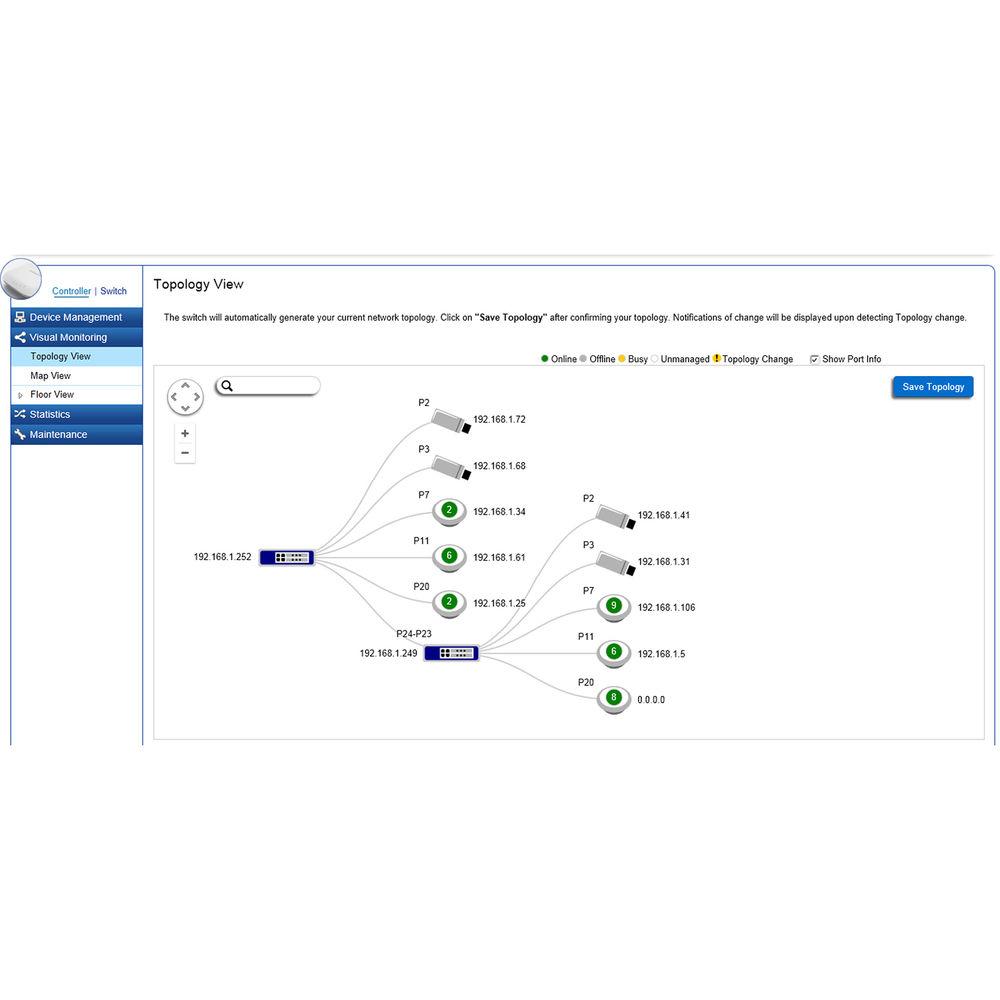
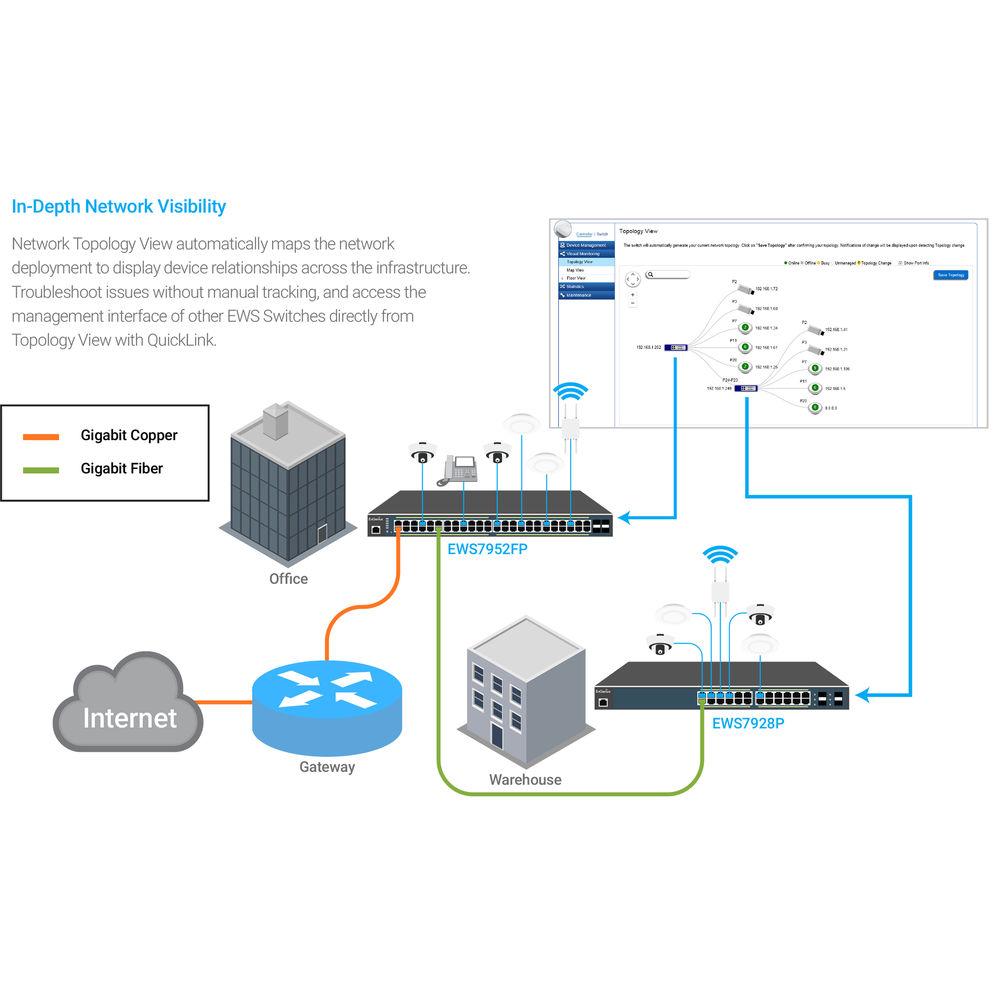
- In-Depth Network Visibility
- Network Topology View automatically maps the network deployment to display device relationships across the infrastructure. Troubleshoot issues without manual tracking, and access the management interface of other EWS Switches directly from Topology View with QuickLink.
Layer-2 Gigabit Switching - High-Speed Gigabit
- Provide reliable Gigabit access for networked devices and reduce delays that interrupt communications. The switch's SFP slots are suitable for connecting wired network segments throughout buildings that extend beyond the limitations of Ethernet cabling.
- Power & Connect Multiple Devices
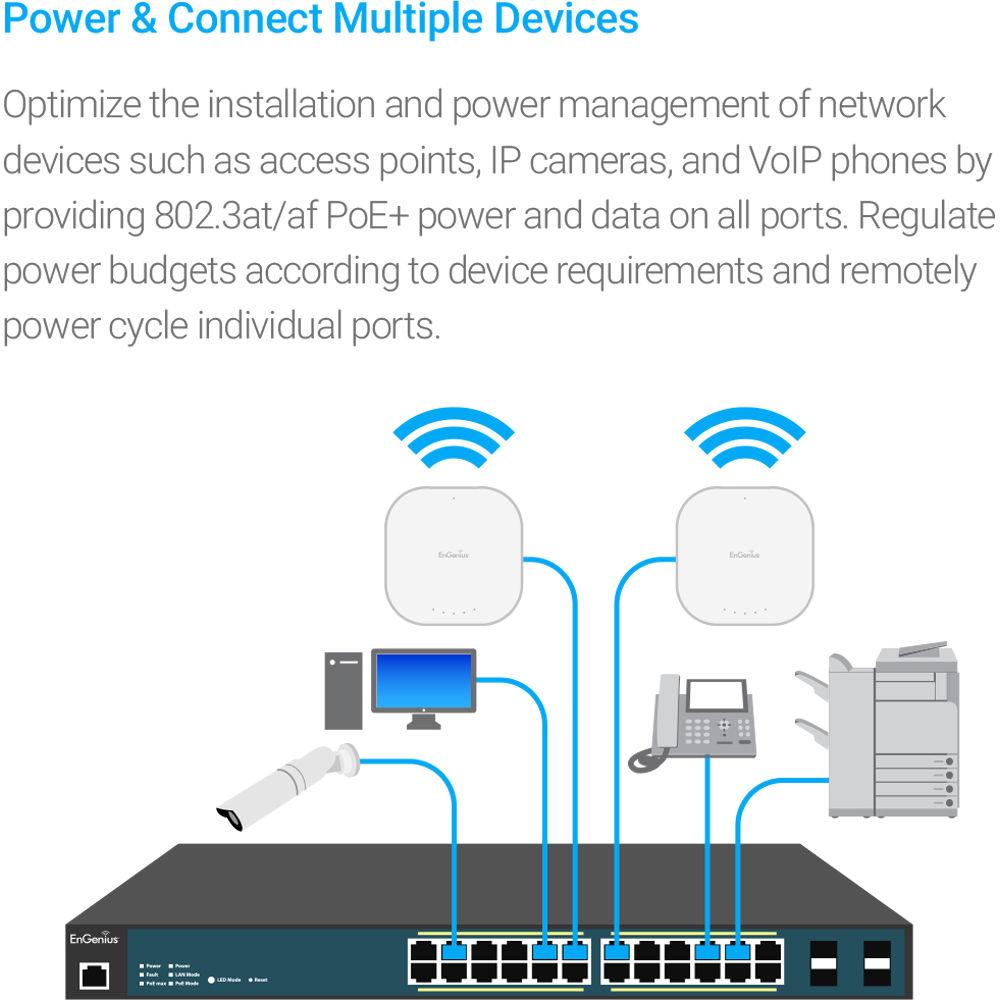
- Optimize the installation and power management of network devices such as access points, IP cameras, and VoIP phones by providing 802.3at/af PoE+ power and data on all ports. Regulate power budgets according to device requirements and remotely power cycle individual ports.
- Network Traffic Management
- Neutron full-featured Layer 2 Switches offer performance-enhancing features that reduce multicasting traffic, speed up port blocking and port forwarding, and increase bandwidth via load balancing. Control each port's available bandwidth speeds for connected devices like APs in areas where more or less speed is needed, such as in lobbies or conference rooms.
- VLAN / Voice & Quality of Service
- Segment the network by departments or traffic types for increased performance and security with 802.1Q VLAN. While 802.1p Class of Service prioritizes compliant VoIP and video traffic ensuring bandwidth intensive, time-sensitive data is forwarded immediately for clear, smooth voice and video delivery
- Access Control & Security
- Protect the network via 802.1X port-based client authentication and security through a RADIUS server. Utilizing Access Control Lists (ACLs), administrators can see who has access to network segments while screening traffic from unauthorized MAC or IP addresses. Establish a Guest VLAN to grant and limit Internet resources for visitors while keeping the network secure.
- Network Monitoring & Troubleshooting
- Enable 3rd party SNMP management and monitor the network's performance by viewing port statistics, system logs, and RMON data. Perform port diagnostics through Ping Tests, diagnose cable failure and trace the route data takes through the network to troubleshoot slowdowns or connection issues.
License-Free Access Point & Remote Management - Locally Manage Wireless Access Points with On-Board Tools
- Quickly discover, configure and monitor Neutron EWS Access Points and manage up to 50 APs within the local subnet, license-free, through the switch's suite of wireless management features.
- Centrally Manage Wired & Wireless Devices via ezMaster
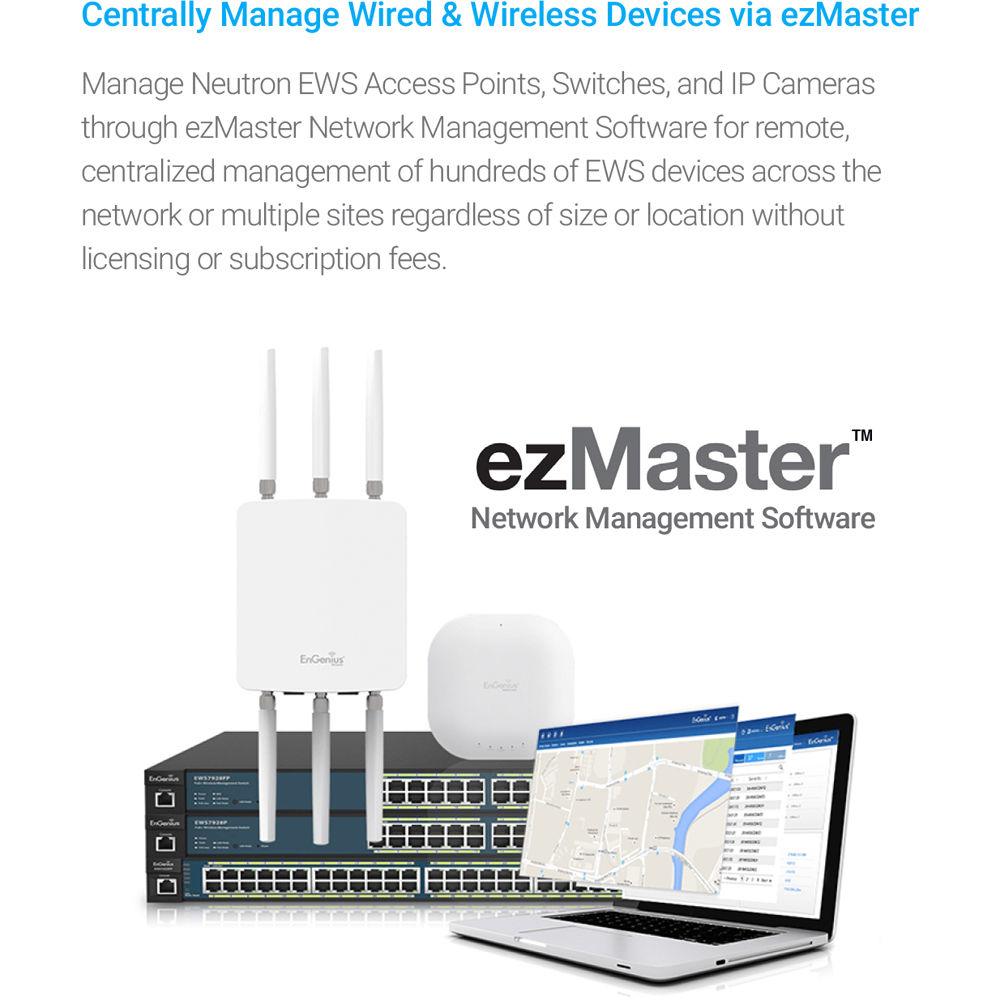
- Manage Neutron EWS Access Points, Switches, and IP Cameras through ezMaster Network Management Software for remote, centralized management of hundreds of EWS devices across the network or multiple sites regardless of size or location without licensing or subscription fees.
- Simplified Device Management
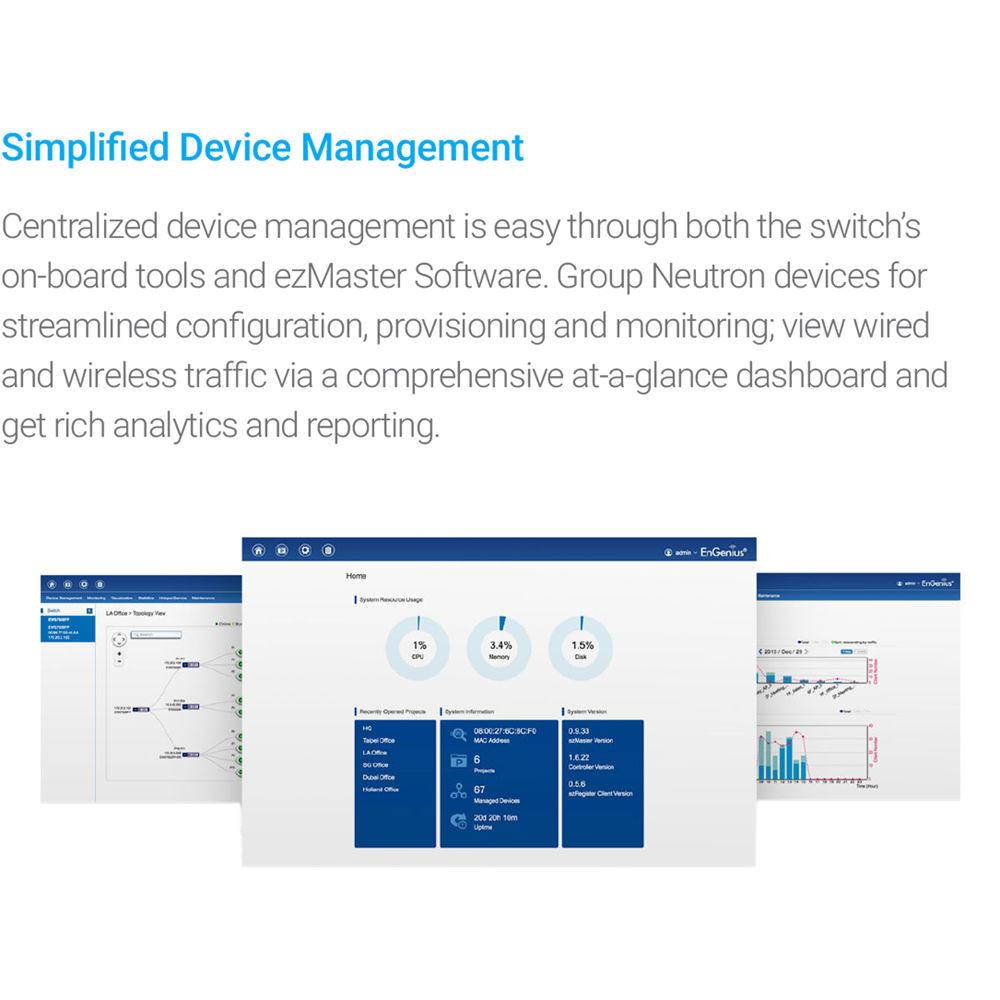
- Centralized device management is easy through both the switch's on-board tools and ezMaster Software. Group Neutron devices for streamlined configuration, provisioning and monitoring; view wired and wireless traffic via a comprehensive at-a-glance dashboard and get rich analytics and reporting.
UPC: 655216008588 In the Box EnGenius EWS7952P 48-Port Gigabit PoE+ Managed Switch Power Cord RJ45 Console Cable Rack Mount Kit Limited 1-Year Warranty More from Manufacturer xrzrbfdqvedv Table of Contents
|
Upload User Manual
Have you got an user manual for the EnGenius EWS7952P 48-Port Gigabit PoE Managed Switch in electronic form? Please send it to us and help us expand our library of instruction manuals.
Thank you, too, on behalf of other users.
To upload the product manual, we first need to check and make sure you are not a robot. After that, your "Submit Link" or "Upload File" will appear.
Technical parametersEnGenius EWS7952P Specs | Port Standards & Functions | 802.3 10Base-T Ethernet
802.3u 100Base-TX Ethernet
802.3ab 10000Base-T Ethernet
802.3x Full-Duplex Flow Control | | Network Ports | 48 x 10/100/1000 Mbps ports
4 x 10/100/1000 Mbps SFP ports
1 x RJ45 console port | | Performance | Switching Capacity: 104 Gbps
Forwarding Mode: Store-and-Forward
SDRAM: 256 MB
Flash Memory: 32 MB
Packet Buffer Memory: 1.5 MB
Address Database Size: 8,000 MAC addresses | | PoE Compatibility | PoE Standard: Ports 1~48 Support IEEE 802.3at/af
PoE Capable Ports: All Gigabit Ethernet ports/up to 30 W
PoE Budget: 410 W | | Power Source | 100 ~ 240 VAC, 50-60 Hz
12 A | | Physical Interfaces | LED Indicators
Reset Button
Desktop/Wall Mount
LED Indicators Device
Power LED
Fault LED
PoE Max LED
LAN Mode LED
PoE Mode LED
Ports
Link/Activity/Speed (per Ethernet port) | | Layer 2 Switching | 802.3ad Link Aggregation
- Maximum of 8 groups/8 ports per Group
Port Mirroring
- One-to-One
- Many-to-One
Spanning Tree Protocol
- 802.1D Spanning Tree Protocol (STP)
- 802.1w Rapid Spanning Tree Protocol (RSTP)
- 802.1s Multiple Spanning Tree Protocol (MSTP)
MAC Address Table
- 8K Entries
Static MAC Address
- 256 Entries
802.1ab Link Layer Discovery Protocol
IGMP Snooping
- IGMP v1/v2/v3 Snooping
- Supports 4094 IGMP Groups
- IGMP per VLAN
- IGMP Snooping Query
- IGMP Snooping Fast Leave
MLD Snooping
- MDL Snooping v1/v2
- Supports 4,094 MLD Groups
- IGMP per VLAN
Jumbo Frame
- Up to 9,216 bytes
802.3x Flow Control
802.3az Energy Efficient Ethernet
VLAN
- 802.1Q Support
VLAN Group
- Max 4,094 Static VLAN Groups
Voice VLAN
QoS
- 802.1p Quality of Service
- 8 Queues per Port
Queue Handling
- Strict
- Weighted Round Robin (WRR)
QoS Based on:
- 802.1p Priority
- DSCP
Bandwidth Control
- Port-Based (Ingress/Egress, 64 Kbps~1000 Mbps)
Broadcast/Unknown Multicast/Unknown Unicast Storm Control
Access Control List (ACL)
- Layer 2/3
- Supports Maximum 50 Entries (ACL)
- Supports Maximum 256 Entries (ACE)
ACL Based on:
- MAC Address
- VLAN ID
- 802.1p Priority
- Ethertype
- IP Address
- Protocol Type
- DSCP
Security
- 802.1X
- Guest VLAN
- Port-Based Access Control
Supports RADIUS Authentication
Port Security
- Up to 256 MAC Addresses per Port
Port Isolation
DoS Attack Prevention
BPDU Attack Prevention
Monitoring
- Port Statistics
- System Log
- RMON
Management
- Web Graphical User Interface (GUI)
- Command Line Interface (CLI)
- BootP/DHCP Client/DHCPv6 Client
- SSH Server
- Telnet Server
- TFTP Client
- HTTPS
SNMP
- Supports v1/v2c/v3
- SNMP Trap
- SNTP
- Configuration Restore/Backup
- Dual Images
Diagnostic
- Cable Diagnostic
- Ping Test
- Trace Route
MIB/RFC Standards
- RFC1213
- RFC1493
- RFC1757
- RFC2674
- RFC 2863 | | Wireless Management Features | AP Supported (up to 50 APs in controller mode)
Access Point Auto Discovery & Provisioning
Access Point Auto IP-Assignment
Access Point Group Management
Remote Access Point Rebooting
Access Point Device Name Editing
Access Point Radio Settings
Band Steering
Traffic Shaping
RSSI Threshold
Fast Roaming
Access Point Client Limiting
Client Fingerprinting
Wireless Security (WPA/WPA2 Enterprise, WPA/WPA2 PSK)
AP VLAN Management
VLANs for Access Point- Multiple SSIDs
Secured Guest Network
Capture Portal
Access Point Status Monitoring
Rogue AP Detection
Email Alert
Wireless Client Monitoring
Background Scanning
Wireless Traffic & Usage Statistics
Real-Time Throughput Monitoring
Visual Topology View
Floor Plan View
Wireless Coverage Display
Map View
Secure Control Messaging
SSL Certificate
Local MAC Address Database
Remote MAC Address Database (RADIUS)
Unified Configuration Import / Export
Intelligent Diagnostics
Bulk Firmware Upgrade Capability
One-Click Update
Kick/Ban Clients | | Temperature & Humidity | Operating Temperature
32 to 122°F / 0 to 50°C
Storage Temperature
-4 to 158°F / -20 to 70°C
Humidity (non-condensing)
5 to 95% | | Dimensions | 17.32 x 10.23 x 1.73" / 440 x 260 x 44 mm | | Weight | 12.3 lb / 5.6 kg | | | | Package Weight | 15.45 lb | | Box Dimensions (LxWxH) | 21.5 x 20.9 x 3.9" |
Rating80% users recommend this product to others. And what about you?

This product has already been rated by 22 owners. Add your rating and experience with the product.
Discussion
 Ask our technicians if you have a problem with your settings,
or if anything is unclear in the user manual you have downloaded.
You can make use of our moderated discussion.
The discussion is public and helps other users of our website who may be encountering similar problems.
Ask our technicians if you have a problem with your settings,
or if anything is unclear in the user manual you have downloaded.
You can make use of our moderated discussion.
The discussion is public and helps other users of our website who may be encountering similar problems.
The discussion is empty - enter the first post
Post a new topic / query / comment:
|
|
|
| Request for user manual |
You can’t find the operation manual you are looking for? Let us know and we will try to add the missing manual:
I’m looking for a manual / Request for manual
Current requests for instruction manuals:
Call Of Duty World War Two For Xbox...
controller stratus XL...
stratus XL...
smart whatch serie S11 42mm...
Allen & Heath SQ-6 manual...
|
| Discussion |
Latest contributions to the discussion:
AEW R 4100
Name: MAURICIO ANGARITA
Audio-Technica AEW-R4100 UHF Diversity Receiver for
AEW R 4100 has the mute function blocked and does not allow audio to pass. I tried several times to turn off the mute from the transmitter but it does nothing, the mute stays on. Solution?
Thank you...
Instructions for assembling the 2015 Forecast Image Master Consoles GC3-A
Name: mike elam
Forecast Consoles GC3-A ImageMaster Editing Console
Looking for instructions for assembling this console. ...
EMPTY TONER ERROR MESSAGE AFTER REPLACING TONER
Name: LINDA BAD YELLOW EYES
Brother TN223BK Standard-Yield Toner
I HAD TO CHANGE OUT ALL THREE TONERS DUE TO LEAKS IN THE YELLOW AND CYAN. AFTER I REPLACED THEM, THE MACHINE KEEPS GIVING ME AN EMPTY TONER ERROR MESSAGE. HELP!!...
PS480D 20/24 pin Switching 480W Power Supply
Name: swkargo
Logisys 480W Power Supply
This item states in can run -5vdc .It is NOT listed on the board or I beleive is r4 is missing the resitior. Any body have thid issue. Shawn
...
Help needed
Name: Ann Carter
SanDisk 1TB Extreme Portable USB 3.1
When I click the link to download the user manual for my Sandisk Extreme external hard drive, it gives me the manual for the LG Cricket. Can you please change the link so I can download the Sandisk manual and begin using this drive? Thank you....
|
|


