User Manual for Ensemble Designs NXT 430 Compact Video Routers with Clean Switched Outputs Click to enlarge the picture
 Contents of the user manual for the Ensemble Designs NXT 430 Compact Video
- Product category: Routers & Switchers Ensemble Designs
- Brand: Ensemble Designs
- Description and content of package
- Technical information and basic settings
- Frequently asked questions – FAQ
- Troubleshooting (does not switch on, does not respond, error message, what do I do if...)
- Authorized service for Ensemble Designs Routers & Switchers
|
User manual for the Ensemble Designs NXT 430 Compact Video contain basic instructions
that need to be followed during installation and operation.
Before starting your appliance, the user manual should be read through carefully.
Follow all the safety instructions and warnings, and be guided by the given recommendations.
User manual is an integral part of any Ensemble Designs product,
and if it is sold or transferred, they should be handed over jointly with the product.
Following the instructions for use is an essential prerequisite for protecting
health and property during use, as well as recognition of liability on the part of the manufacturer
for possible defects should you make a warranty claim. Download an official Ensemble Designs user manual in which you will find instructions on how to install, use, maintain and service your product.
And do not forget – unsuitable use of a Ensemble Designs product will considerably shorten its lifespan!
|
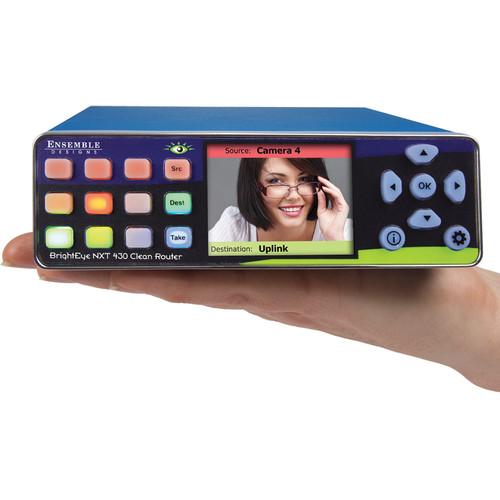
Product description The NXT 430 Compact Video Routers from Ensemble Designs allows clean, quiet switching, and mixing of video and audio sources. It gives you two clean switched outputs. The router's built-in clean switch provides full frame synchronization, which means you can switch or dissolve cleanly between asynchronous sources. There are 2 fixed input BNCs, 2 fixed output BNCs, and 7 assignable BNCs that you can configure either as inputs or outputs. It also has a web server and a built-in Ethernet connector, which allows full control and setup from virtually anywhere. This router can be controlled from third party devices using serial protocols via TCP/IP, RS-232, and SNMP. - New Routing Technology
-
- This router can be used for clean, quiet switching, and mixing of video and audio sources. The exclusive front panel LCD displays real-time full motion video of your router sources. It is ideal for fly packs, ENG and anywhere you need a small router, this new BrightEye has incredible power in a small 1RU high by 1/3 RU wide footprint which is about the size of a CD box set.
- Clean Switch - Use Asynchronous Sources
-
- This router gives you two clean switched outputs. The router’s built-in clean switch provides full frame synchronization, which means you can switch or dissolve cleanly between asynchronous sources. Wild feeds from cameras, helicopters, and microwaves can be fed to the BrightEye Compact Router for perfect switching. The features include variable duration mix transitions, independent audio level adjustments, channel assignment of all 16 audio channels on an input-by-input basis, and automatic audio cross fade with the video when mix mode is enabled, all without any glitch.
- Fully Featured
-
- This router has features frequently not found on more expensive routing solutions. Things like dissolves, audio breakaway mode, direct take for even faster switching in a live environment, programmable router salvo registers, RS-232 control, and transportable system settings.
- Web Browser Control
-
- It has a web server and Ethernet connector built right in. This allows full control and setup from virtually anywhere. An installation such as an ENG truck or flypack can be controlled from the field with any web browser enabled device such as an iPhone or iPad. Multiple users can be authorized to control the router, each with its own source and destination profile to ensure both security and on-air reliability. Operators can see updating video thumbnails of each source and each destination on their mobile device, providing complete confidence during routing operations.
- Assignable I/O and Flexible Architecture
-
- You get to configure the number of inputs and outputs on the fly. There are 2 fixed input BNCs, 2 fixed output BNCs, and 7 assignable BNCs that you configure either as inputs or outputs. The two SFP (small format pluggable) cages can be populated with dual SFPs (small format pluggable) that have fiber optic or other connectors, allowing you to determine the best connector for your installation. Adding SFPs gives you true flexibility in combining electrical BNC and fiber optic inputs and outputs.
- Control from Third Party Devices
-
- This router can be controlled from third party devices using serial protocols via TCP/IP, RS-232, and SNMP.
1 Please Note: If RS-232 control is desired, you need to specify at the time of purchase and your unit will come with the connector cable pre-installed. close - General Features
-
- Router for 3G, HD, and SD-SDI video
- Front panel and web-based control
- Safe driving mode
- Built-in test signal generators
- Compact and rugged
- Genlockable and timeable
- Automatic input cable equalization
In the Box Ensemble Designs NXT 430 Compact Video Routers with Clean Switched Outputs Power Adapter Limited 5-Year Warranty Table of Contents
|
Upload User Manual
Have you got an user manual for the Ensemble Designs NXT 430 Compact Video Routers with Clean Switched Outputs in electronic form? Please send it to us and help us expand our library of instruction manuals.
Thank you, too, on behalf of other users.
To upload the product manual, we first need to check and make sure you are not a robot. After that, your "Submit Link" or "Upload File" will appear.
Technical parametersEnsemble Designs BENXT-430 Specs | | | Number | 2 to 13, configurable, BNC, and SFP | | Signal Type | 270 Mb/s: SD-SDI, SMPTE 259M
1.485 Gb/s: HD SDI,SMPTE 274M, 292M, 296M
2.97 Gb/s: HD SDI, SMPTE 424M, 425M | | Impedance | 75 Ohms | | Return Loss | >15 dB | | Maximum Cable Length | 984.3' (300.0 m) for 270 Mb/s
328.1' (100.0 m) for 1.485 Gb/s | | | | Number | 1 | | Type | 1 V pp composite video, PAL or NTSC or tri-level sync | | Impedance | 75 Ohms | | Return Loss | >40 dB | | | | Number | 2 to 13, configurable, BNC, and SFP | | Type | 270 Mb/s: SD SDI, SMPTE 259M
1.485 Gb/s HD SDI, SMPTE 274M, 292M, 296M
2.97 Gb/s: HD SDI, SMPTE 424M, 425M | | Processing | 12 and 16-bit | | Impedance | 75 Ohms | | Return Loss | >15 dB | | Maximum Cable Length | 328.1' (100.0 m) for HD (Belden 1694A)
984.3' (300.0 m) for SD (Belden 1694A) | | | | Supported Standards | 1080i: 50, 59.94, or 60 Hz, SMPTE 274M: -4, 5, 6
720p: 50, 59.94, or 60 Hz, SMPTE 296M: -1, 2, 3
1080p: 23.98, 24, or 25 Hz, SMPTE 274M: -9, 10, 11
1080p: 50, 59.94, 60 Hz, SMPTE 424M, 425M, level A
1080sF: 23.98, 24, or 25 Hz, RP211: -14, 15, 16
625i: 50 Hz
525i: 59.94 Hz | | | | Power | 12 V, 20 W (100 to 230 VAC modular power supply) | | Temperature Range | 32 to 104°F (0 to 40° C) ambient | | Relative Humidity | 0 to 95% (non-condensing) | | Altitude | 0 to 10000' (0 to 3048 m) | | Dimensions (W × H × D) | 5.63 x 1.65 x 6.75" (14.30 x 4.19 x 17.14 cm) | | Weight | 12.0 oz (340.2 g) including connectors and flange |
Rating60% users recommend this product to others. And what about you?

This product has already been rated by 79 owners. Add your rating and experience with the product.
Discussion
 Ask our technicians if you have a problem with your settings,
or if anything is unclear in the user manual you have downloaded.
You can make use of our moderated discussion.
The discussion is public and helps other users of our website who may be encountering similar problems.
Ask our technicians if you have a problem with your settings,
or if anything is unclear in the user manual you have downloaded.
You can make use of our moderated discussion.
The discussion is public and helps other users of our website who may be encountering similar problems.
The discussion is empty - enter the first post
Post a new topic / query / comment:
|
|


