|
User Manual for EPIX PIXCI SV5L Analog Video Frame Grabber for PCI Bus Click to enlarge the picture
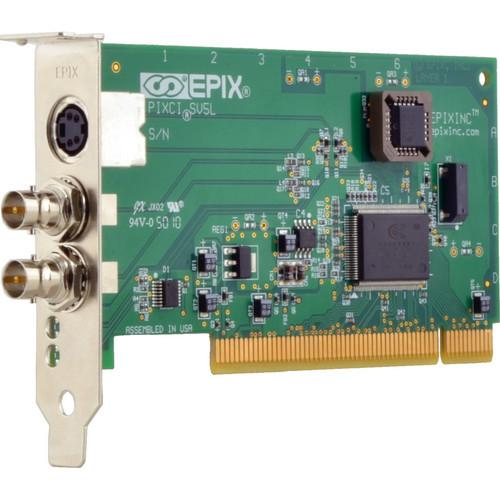 Contents of the user manual for the EPIX PIXCI SV5L Analog Video Frame
- Product category: Computer Hardware EPIX
- Brand: EPIX
- Description and content of package
- Technical information and basic settings
- Frequently asked questions – FAQ
- Troubleshooting (does not switch on, does not respond, error message, what do I do if...)
- Authorized service for EPIX Computer Hardware
|
User manual for the EPIX PIXCI SV5L Analog Video Frame contain basic instructions
that need to be followed during installation and operation.
Before starting your appliance, the user manual should be read through carefully.
Follow all the safety instructions and warnings, and be guided by the given recommendations.
User manual is an integral part of any EPIX product,
and if it is sold or transferred, they should be handed over jointly with the product.
Following the instructions for use is an essential prerequisite for protecting
health and property during use, as well as recognition of liability on the part of the manufacturer
for possible defects should you make a warranty claim. Download an official EPIX user manual in which you will find instructions on how to install, use, maintain and service your product.
And do not forget – unsuitable use of a EPIX product will considerably shorten its lifespan!
|
Product description The EPIX PIXCI SV5L Analog Video Frame Grabber offers low profile video capture for the PCI bus. It has two mini BNC inputs and one S-video multiplexed input. The trigger connector has been removed to allow for a low-profile PCI form factor. A full-height bracket is sold separately if required.
The PIXCI SV5L digitizes analog video and transfers the digitized video through the PCI bus at full video rate. Video sources that use standard formats (NTSC, RS-170, PAL, CCIR, and S-Video) are supported. As a PCI bus master, the PIXCI SV5L board transfers image data without using the host computer’s processor. Images may be transferred at full or reduced frame rates, to computer memory for processing and/or analysis by the host computer’s processor(s), to the S/VGA system for display, or to other targets on the PCI bus such as disk controllers (real time video to disk).
The PIXCI SV5L and XCAP software can capture video sequences and store them to the computer’s hard drive. Live images may be displayed on the computer’s monitor during image capture. Up to eight PIXCI SV5L boards can capture videos in one computer simultaneously from multiple video sources. - Acquisition
- The PIXCI SV5L provides 3-input video multiplexer signal selection from two mini-BNC inputs and one S-Video input. Programmable gain, hue, brightness, saturation, and contrast adjustments can condition the video signal.
A digital genlock circuit ensures precise synchronization of every image. The PIXCI SV5L imaging board genlock subsystem accepts video timing from a VCR. - Scaling and Cropping
- The captured image can be cropped in single pixel increments, and then scaled down to as few as 4 pixels by 1 line. Horizontal and vertical scaling is performed in real-time by interpolation, providing a high quality representation of the original image.
- Optimized Imaging Systems
- With data transfer directly into the host's memory at video rates, the imaging potential of the PIXCI SV5L is limited only by the host computer and peripherals. A high-quality computer, a graphics card, a camera, lighting, and lens are recommended for best results. Applications include automated inspection, motion analysis, microscopy, medical imaging, robotics, laser beam analysis, object tracking, multimedia, and print quality inspection.
- Epix Software
- The PIXCI SV5L frame grabber is bundled with an imaging program that allows camera operation and frame grabber control without the need to write software. Capture and save images after unpacking the board and loading the software. The XCAP-Lite imaging program provided with the PIXCI SV5 purchase provides video format / mode selection, triggering, live display, and image / sequence capture to computer memory. Individual images can be saved in several industry-standard formats including TIF, BMP, and JPEG.
The XCAP is a menu-driven, interactive program for the PIXCI imaging board, allowing capture, display, viewing, processing, printing, analysis, measurements, loading, and saving of imagery. It includes a script language for customization and automating tasks. XCAP is available for Windows. The XCAP-Ltd program (sold separately) adds the ability to capture sequences (uncompressed full-motion video movie clips at 25 or 30 fps) to memory up to a maximum size of approximately 3.5GB (computer configuration dependent), and includes the ability to save sequences. XCAP-Ltd also supports annotation, which is the ability to write text on an image.
For image processing and video to disk, purchase XCAP-Std (sold separately). In addition to all of the capabilities just described, the XCAP-Std program offers extensive processing, measurement and analysis capabilities including filters, mathematical operations, blob analysis, and particle tracking. The availability of scripts and the blackboard allow customization and automation of included operations. Sequence capture options include the ability to capture video sequences to a hard drive. The PIXCI SV5L Frame Grabber, with XCAP-Std, can capture full-resolution video for 10 hours with a 750GB hard drive.
EPIX developer libraries ease custom software development with hundreds of functions for image capture, processing, measurement, and analysis. Libraries are available for Linux, Windows, and 32-bit DOS.
The XCLIB (sold separately) "C" library allows accessing the PIXCI imaging board. It supports DOS, Windows, and most popular "C" compilers. The library provides command and control functions for capturing image data from a video source and implements transfer to computer memory, graphics cards, or hard drives. XCLIB-Lite (sold separately) is an economical and reduced capability version of XCLIB.
The PXIPL library (sold separately, includes XCLIB) simplifies the development of software for processing, measuring, or analyzing images after they have been transferred into the computer. XCLIB and PXIPL provide high-level services that allow the software developer to concentrate on the imaging application rather than focusing on board level controls. Please see the XCLIB and PXIPL descriptions on the Products Page for detailed descriptions. - MUX
- The multiplexer selects the video source for the Programmable Gain from either the S-Video input connector or from the composite video source on the BNC connector. The multiplexer may be switched during vertical blanking.
- Programmable Gain
- It compensates for reduced amplitude in the analog signal input. Gain can be programmed from 0% to more than 200%.
- Luminance A/D
- It provides analog to digital conversion of NTSC, RS-170, CCIR, PAL, and the luminance (Y) component of S-video sources.
- Chrominance (Color) A/D
- Provides analog to digital conversion of the color (C) component of S-Video.
- Decoder
- It separates the Y/C components and generates the U/V color difference signals.
- Digital Genlock
- It supports automatic synchronization circuitry for precise digitization and accommodates video sources which have variable periods, such as video tape recorders. It generates the pixel clock for transferring image data to the PCI bus interface.
- Scaling, Cropping
- Interpolation is used to scale images to 1/14 of their original size.
- Temporal Scaling
- Image sequences may be captured at full or reduced frame rates.
- Trigger Input / Output (sold separately)
- Four input and output TTL triggers can be used for synchronization with external events. The trigger signals are controlled by the host CPU.
In the Box EPIX PIXCI SV5L Analog Video Frame Grabber for PCI Bus Limited 1-Year Warranty Table of Contents
|
Upload User Manual
Have you got an user manual for the EPIX PIXCI SV5L Analog Video Frame Grabber for PCI Bus in electronic form? Please send it to us and help us expand our library of instruction manuals.
Thank you, too, on behalf of other users.
To upload the product manual, we first need to check and make sure you are not a robot. After that, your "Submit Link" or "Upload File" will appear.
Technical parametersEPIX PIXCI-SV5L Specs | Video Input | Color or Monochrome Video Acquisition: NTSC, RS-170, NTSC S-Video, PAL, CCIR, PAL S-Video | | Resolution (Pixel) | 752 x 480: NTSC, RS-170, NTSC S-Video
920 x 580: CCIR
768 x 580: PAL, PAL S-Video | | Resolution Formats | 8-bit Monochrome
24/32-bit RGB
YUYV / UYVY / YUV [4:2:2:] / YcrCb | | Capture Rate | 30 fps: NTSC, RS-170, NTSC S-Video
25 fps: PAL, CCIR, PAL S-Video | | Connections | 4-pin DIN Receptacle: S-Video input
2 mini-BNC-Jacks: Composite video input
Trigger I/0 connectors (sold separately)
Cables sold separately | | PCI Bus | 5 V signaling PCI bus slot
0.55 A @ 5 V
4.82 x 2.53" (122.5 x 64.4 mm) | | | | Package Weight | 0.55 lb | | Box Dimensions (LxWxH) | 9.1 x 8.5 x 2.1" |
Rating80% users recommend this product to others. And what about you?

This product has already been rated by 07 owners. Add your rating and experience with the product.
Discussion
 Ask our technicians if you have a problem with your settings,
or if anything is unclear in the user manual you have downloaded.
You can make use of our moderated discussion.
The discussion is public and helps other users of our website who may be encountering similar problems.
Ask our technicians if you have a problem with your settings,
or if anything is unclear in the user manual you have downloaded.
You can make use of our moderated discussion.
The discussion is public and helps other users of our website who may be encountering similar problems.
The discussion is empty - enter the first post
Post a new topic / query / comment:
|
|
|
| Request for user manual |
You can’t find the operation manual you are looking for? Let us know and we will try to add the missing manual:
I’m looking for a manual / Request for manual
Current requests for instruction manuals:
Call Of Duty World War Two For Xbox...
controller stratus XL...
stratus XL...
smart whatch serie S11 42mm...
Allen & Heath SQ-6 manual...
|
| Discussion |
Latest contributions to the discussion:
AEW R 4100
Name: MAURICIO ANGARITA
Audio-Technica AEW-R4100 UHF Diversity Receiver for
AEW R 4100 has the mute function blocked and does not allow audio to pass. I tried several times to turn off the mute from the transmitter but it does nothing, the mute stays on. Solution?
Thank you...
Instructions for assembling the 2015 Forecast Image Master Consoles GC3-A
Name: mike elam
Forecast Consoles GC3-A ImageMaster Editing Console
Looking for instructions for assembling this console. ...
EMPTY TONER ERROR MESSAGE AFTER REPLACING TONER
Name: LINDA BAD YELLOW EYES
Brother TN223BK Standard-Yield Toner
I HAD TO CHANGE OUT ALL THREE TONERS DUE TO LEAKS IN THE YELLOW AND CYAN. AFTER I REPLACED THEM, THE MACHINE KEEPS GIVING ME AN EMPTY TONER ERROR MESSAGE. HELP!!...
PS480D 20/24 pin Switching 480W Power Supply
Name: swkargo
Logisys 480W Power Supply
This item states in can run -5vdc .It is NOT listed on the board or I beleive is r4 is missing the resitior. Any body have thid issue. Shawn
...
Help needed
Name: Ann Carter
SanDisk 1TB Extreme Portable USB 3.1
When I click the link to download the user manual for my Sandisk Extreme external hard drive, it gives me the manual for the LG Cricket. Can you please change the link so I can download the Sandisk manual and begin using this drive? Thank you....
|
|


