|
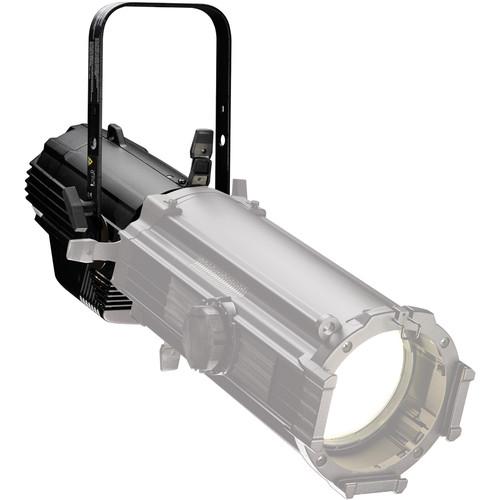
User Manual for ETC Source Four LED Studio HD Light Engine Body Click to enlarge the picture
 Contents of the user manual for the ETC Source Four LED Studio HD
- Product category: LED Lights ETC
- Brand: ETC
- Description and content of package
- Technical information and basic settings
- Frequently asked questions – FAQ
- Troubleshooting (does not switch on, does not respond, error message, what do I do if...)
- Authorized service for ETC LED Lights
|
User manual for the ETC Source Four LED Studio HD contain basic instructions
that need to be followed during installation and operation.
Before starting your appliance, the user manual should be read through carefully.
Follow all the safety instructions and warnings, and be guided by the given recommendations.
User manual is an integral part of any ETC product,
and if it is sold or transferred, they should be handed over jointly with the product.
Following the instructions for use is an essential prerequisite for protecting
health and property during use, as well as recognition of liability on the part of the manufacturer
for possible defects should you make a warranty claim. Download an official ETC user manual in which you will find instructions on how to install, use, maintain and service your product.
And do not forget – unsuitable use of a ETC product will considerably shorten its lifespan!
|
Product description The ETC Source Four LED Studio HD Light Engine Body is the heart of the Source Four LED Studio HD ellipsoidal. This listing is for the engine alone and requires separate purchase of a lens tube with your choice of 5, 10, 14, 19, 26, 36, 50, 70, or 90 degree lenses. Both 15-30° and 25-50° Zoom lenses are also available. The engine includes a 5' powerCON bare end cable, yoke mount, C-clamp, soft focus diffuser and an A-size pattern holder. Edison, Stage Pin, and Twist Lock connectors are available separately. The Source Four LED Studio HD Ellipsoidal from ETC is an advanced light source employing sixty 2.5mm emitters backed with the Selador x7 Color System which renders a larger color gamut than RGB resulting in more saturated and vibrant color mixes, particularly in soft pastels and skin tones. Color temperature is variable remotely via DMX from 2700-6500K as is dimming. The fixture has an impressive CRI of 94, CQS of 95 and a color fidelity rating of 93 at 3200K while the Duv rating of 0.000 indicates the absence of green or magenta tint. The light engine ships with a 100-240 VAC power supply and weighs 14.3 lb. - General
-
- 60 LED array
- ETL listed to UL1573, the standard for stage and studio lighting units
- IP20-rated for indoor use
- Power and DMX in/thru connections for easy setup
- User-friendly control interface with multiple modes and fixture settings
- Physical
-
- Rugged, die-cast, all-metal housing
- Available in black, white, silver or custom colors
- C-clamp
- Positive locking double-clutch fixture body
- Slot for glass or stainless steel patterns and soft focus diffuser
- Wide accessory slot with sliding cover for motorized pattern devices or optional iris
- Hanging yoke standard. Optional yoke/floor stand available
- Electrical
-
- 100-240 VAC, 50/60 Hz universal power input
- Neutrik power in and thru connections
- Up to 9 fixtures (15A max) may be linked via power thru connector
- Requires power from a non-dim source
- LED
-
- 50,000 hour LED life (to 70% intensity)
- 60 2.5W LED emitters
- Color
-
- Use the included soft-focus diffuser for creating washes or soft light
- Can use all ETC Source Four Interchangeable lens barrels: 5°, 10°, 14°, 19°, 26°, 36°, 50°, 70°, and 90° field angles as well as 19°, 26°, 36°, and 50° EDLT lenses
- Best performance with the LED 50° barrel
- Control
-
- DMX512 in and thru via five-pin XLR connectors
- Multiple control options including RGB, strobe, and console free Master/Slave mode
- Multiple dimming curve options
- 15-bit virtual dimming engine provides smooth, high quality theatrical fades and minimizes color shift during dimming
- Preset color temperatures and sequences
- White Point selection, ex. 3200 and 5600K
- Loss of data behavior options: instant off and "hold last look" for two minutes
- Output modes: three output options that offer the user a choice between maximum output and maximum consistency
- RDM functionality for address and setting changes
- Quick Setups
- 5 combinations of operational settings are available to get quickly started. These settings are specifically created for different applications and are easily accessible at the fixture display. Each setting can then be modified as required to take advantage of all of the possible control features.
- General: Direct: Factory default for general purpose use including interior architectural applications. Uses standard dimming curve and regulated output for color consistency
- Stage: HSI Plus 7 Enabled- Duplicates the color and dimming behavior of tungsten stage lighting fixtures. Features incandescent dimming curve, regulated color consistent output and 3200K white point setting
- XT Arch: HSI: Provides a high degree of color consistency in high ambient temperature environments for exterior architectural lighting. Features standard dimming curve, protected output and 3200K white point setting
- High Impact: RGB- Enables quickest response, simple RGB control and strobe channel for maximum effect usage in event lighting. Features quick dimming curve, boost mode for maximum intensity and 3200K white point setting
- Studio: Studio Factory Default enables three parameter control of white light (intensity, white point, and tint) via DMX from console or from fixture display, no console required. Features linear dimming curve and regulated output mode for color consistency
- Thermal
-
- Ambient operating temperature of -4° to 104°F (-20° to 40°C)
- Active electronic thermal management for droop-free operation
- Quiet fan cooling
- Fixture is designed for continuous operation up to 104°F (40°C) ambient temperature and requires free flow of air around fixture housing
In the Box ETC Source Four LED Studio HD Light Engine Body (Black) Pattern Holder Yoke C-Clamp Soft Focus Diffuser PowerCON Bare End Cable (5') Limited 2-Year Warranty User Manual PDF 991.3kb Table of Contents
|
Upload User Manual
Have you got an user manual for the ETC Source Four LED Studio HD Light Engine Body in electronic form? Please send it to us and help us expand our library of instruction manuals.
Thank you, too, on behalf of other users.
To upload the product manual, we first need to check and make sure you are not a robot. After that, your "Submit Link" or "Upload File" will appear.
Technical parametersETC Source Four Studio HD Specs | | | Color Temperature | 2700 to 6500K | | Color Accuracy Standard | CRI 94 at 3200K
CQS 95 at 3200K
CRI 91 at 5600K
CQS 87 at 5600K | | Cooling System | Fan | | Dimming | Yes | | Display | None | | Number of LEDs | 60 | | Fixture Dimensions | 10.8 x 7.9 x 17.1" / 27.4 x 20.0 x 43.4 cm (Including Yoke) | | Fixture Weight | 14.3 lb / 6.5 kg | | | | Yoke Mount | TVMP/ Hex Bolt | | Fixture Mount | None | | Accessory Mount | None | | | | AC Input Power | 100 to 240 VAC, 50 / 60 Hz | | Power Source | AC Adapter | | Consumption Per LED | 2.5 W | | | | Cable Length | 5' / 1.5 m | | Cable Type | powerCON to Bare Ends | | | | Package Weight | 17.6 lb | | Box Dimensions (LxWxH) | 21.0 x 12.4 x 12.4" |
Rating80% users recommend this product to others. And what about you?

This product has already been rated by 42 owners. Add your rating and experience with the product.
Discussion
 Ask our technicians if you have a problem with your settings,
or if anything is unclear in the user manual you have downloaded.
You can make use of our moderated discussion.
The discussion is public and helps other users of our website who may be encountering similar problems.
Ask our technicians if you have a problem with your settings,
or if anything is unclear in the user manual you have downloaded.
You can make use of our moderated discussion.
The discussion is public and helps other users of our website who may be encountering similar problems.
The discussion is empty - enter the first post
Post a new topic / query / comment:
|
|
|
| Request for user manual |
You can’t find the operation manual you are looking for? Let us know and we will try to add the missing manual:
I’m looking for a manual / Request for manual
Current requests for instruction manuals:
Call Of Duty World War Two For Xbox...
controller stratus XL...
stratus XL...
smart whatch serie S11 42mm...
Allen & Heath SQ-6 manual...
|
| Discussion |
Latest contributions to the discussion:
AEW R 4100
Name: MAURICIO ANGARITA
Audio-Technica AEW-R4100 UHF Diversity Receiver for
AEW R 4100 has the mute function blocked and does not allow audio to pass. I tried several times to turn off the mute from the transmitter but it does nothing, the mute stays on. Solution?
Thank you...
Instructions for assembling the 2015 Forecast Image Master Consoles GC3-A
Name: mike elam
Forecast Consoles GC3-A ImageMaster Editing Console
Looking for instructions for assembling this console. ...
EMPTY TONER ERROR MESSAGE AFTER REPLACING TONER
Name: LINDA BAD YELLOW EYES
Brother TN223BK Standard-Yield Toner
I HAD TO CHANGE OUT ALL THREE TONERS DUE TO LEAKS IN THE YELLOW AND CYAN. AFTER I REPLACED THEM, THE MACHINE KEEPS GIVING ME AN EMPTY TONER ERROR MESSAGE. HELP!!...
PS480D 20/24 pin Switching 480W Power Supply
Name: swkargo
Logisys 480W Power Supply
This item states in can run -5vdc .It is NOT listed on the board or I beleive is r4 is missing the resitior. Any body have thid issue. Shawn
...
Help needed
Name: Ann Carter
SanDisk 1TB Extreme Portable USB 3.1
When I click the link to download the user manual for my Sandisk Extreme external hard drive, it gives me the manual for the LG Cricket. Can you please change the link so I can download the Sandisk manual and begin using this drive? Thank you....
|
|


